
Font size
 Worksheets
Post-Production 1 Chapter 1
Total questions: 52
Worksheet time: 38mins
When setting up your project in your hard drive, it is a good practices to create a project folder with project title, then create 7 subfolders in them. What are the 7 folders to create in ur hard drive?
(a)
(b)
Media (Eg. other video elements such as archive videos)
(c)
Music & SFX
(d)
(e)
A Full HD video's aspect ratio is (a) and its pixel aspect ratio is (b)
What is the FIRST step in a Post-Production Workflow?
(a)
After Assembly Edit, the editor moved on to do a Rough Cut by tweaking the assemble edit until the flow is cleaner. This is the stage of the project’s development where majority of the excess footage has been
(a) and you are left with a presentation that is complete in its narrative flow but has got
many rough edges.
Which of the following is a simple way to achieve data redundancy?
Copying all your media onto a second hard drive
Deleting unused files from your computer
Compressing your video files
Changing the format of your audio tracks

Imagine you are a data wrangler. What steps would you take to safely manage digital footage after filming?
Transfer footage to hard drives or secure servers and create multiple backups
Leave footage on the camera and hope it is safe
Only copy the good takes to save space
Transfer footage to 1 hard drive
What is recommended before ingesting media files into an editing program?
Directly from memory cards or cameras
By copying to hard drives with data redundancy first
By streaming online
By using USB flash drives only
Full HD (FHD): (a) is currently the most widely used resolution for
broadcast, streaming, Blu-ray discs, and most consumer-level media. It is considered the standard for "high-definition" content today.
In Premiere Pro, what does the 'Copy' option do during media ingestion?
Deletes the original media
Copies the original media to a new location
Transcodes the media to a new format
Creates a backup on the cloud
Why might you use the 'Create Proxies' option in Premiere Pro?
To delete unused clips
To create lower-resolution clips for easier editing
To add special effects automatically
To merge multiple clips into one
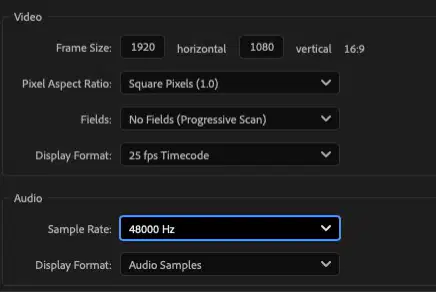
Which of the following is an important setting to configure when starting a video project in Adobe Premiere Pro?
Video resolution and frame rate
Premiere Pro Workspace
Speaker volume
Distance of monitor
What is the main reason for setting up the correct sequence settings in Adobe Premiere Pro?
To ensure it meets technical requirements and look professional
To be able to adjust colors of the video
To make the video longer
To make editing more efficient

The numbers in the slate represents
05
Hours
45
Minutes
22
seconds
13
frames
Which broadcast standard is used in Singapore?
PAL
NTSC
SECAM
NTFS
If a video has a resolution of 1920x1080, what does the number 1920 represent?
The width in pixels
The height in pixels
The frame rate
The color encoding
Why do higher resolutions require more storage space and processing power?
Because there are more pixels to display
Because the video is shorter
Because the frame rate is lower
Because the color is brighter
A broadcaster needs to prepare content for traditional TV in Europe. Which frame rate should they use to meet the PAL standard?
25 fps
29.97 fps
60 fps
15 fps
Which of the following is the pixel size for Full HD (FHD)?
1920 x 1080
1280 x 720
640 x 480
3840 x 2160
Which aspect ratio is used for HD (High Definition) and Full HD (FHD) resolutions?
4:3
1:1.9
16:9
3:2
A student wants to create a video with the most widely used resolution for broadcast and streaming today. Which resolution should they choose?
640 x 480
1280 x 720
1920 x 1080
7680 x 4320

What is the difference between pillarboxing and letterboxing?
Pillarboxing adds vertical black bars; letterboxing adds horizontal black bars
Pillarboxing adds horizontal black bars; letterboxing adds vertical black bars
Both add only vertical black bars
Both add only horizontal black bars
How does timecode help in editing videos?
It allows you to locate frames quickly and accurately
It adds music to the video
It changes the video resolution
It removes unwanted frames automatically
What does time code help you do when editing scenes and shows?
Edit on the exact frame you wish
Edit only the beginning of scenes
Ignore the duration of scenes
Add special effects automatically
How does time code aid the online edit process?
By allowing each edit made offline to be reproduced during the online from the source tapes
By adding music to the scenes
By changing the color of the video
By speeding up the editing process automatically
Which audio sample rate is commonly used in video production and is the default for film, TV, and video editing?
48 kHz
44.1 kHz
96 kHz
192 kHz
Why is it important to set up your project files in one central folder on your hard drive?
So you can easily lose your files.
So your files have a home and the editing software can locate them.
So your computer works harder.
So you can share your files with everyone.
The term Assembly edit, means editing together the best raw selected material into a
(a) framework of the entire story.
Suppose you need to move your project to another editing station. Why is it important to know where your files are stored?
So you can delete them easily.
So you can bring the files over and fix any problems quickly. It will avoid having Media Offline.
So you can forget about your files.
So you can make your computer slower.
What is the importance of referring to log sheet during the editing process?
It provides necessary instructions on what the editor should install.
It gives editor an idea on how the film will play out.
Editor can implement their own creativity to the film that is within the instructions.
Editor can retrieve the information on the good and bad takes.
Why should the script always be accessible to the editor?
so the editor can share with his friends on how the story goes
so the editor can give his opinions to the director and talents
so that the editor can edit the program according to the script
so the editor can print the script for the talents
Which type of script is created AFTER filming an interview?
Transcript
Off Book script
Sceenplay script
Two column script
Which stage of the production workflow states that there will be no more changes to be done on the video tracks?
Fine cut
Picture Lock
Rough Cut
Review
In the Post-Production Workflow, the stage 'Assemble' indicates
editing all the major pieces of project into a logical sequence of picture and sound elements.
getting all the media from the producer.
re-working on your edit to ensure seamless editing.
labelling and organising the clips in the correct folders.
Which of the following explains what acquisition means in the Post-production workflow?
Worked and re-worked project, making sure it is finely edited.
A clear system of labeling, grouping, or sorting out the material needed for the project.
Reviewing all materials and picking out the best shots that will work in the project.
Footage, graphics and sound element that are gathered together for the duration in post-production process.
A word for word typed document of all interviews done after shoot is called
script
transcript
logsheet
Edit decision list
A rough cut is when
the footages are perfectly trimmed.
there is a narrative flow in the edit.
no major changes are needed.
no further tweaks are required.
Which post production document is used to identify the scenes, shots and takes that are good?
Transcript
Daily Production Log sheets
Script
Edit decision list
Which of the following is NOT a post-production document?
Transcript
Logsheet
Callsheet
Script
What is an EDL (edit decision list)?
It is used for transferring all of the editing choices from a finished reduced-quality session to a final high quality session.
Creating elements at any image or audio resolution less than offline.
A decision to edit on offline or online.
Editing on an inexpensive computer or a portable one and finishing at full quality on another system.
Which of the following matches the characteristics of a fine cut?
The excess is trimmed away
The best raw selected footages of the story
There are no glitches in picture or sound and the final tweaks are made
Acquiring the visual and aural elements
Organize these options into the right categories
Edit together the best raw selected material into a
skeleton framework of the entire story.
The pacing is tight; there are no glitches in picture or
sound.
Tweak the assemble edit until the flow is cleaner. The
excess is trimmed away.
All visual elements are rock solid and no further
changes will be made.
Select ALL the key responsibilities of a Data Wrangler.
Data Management & Backup
Organization & Documentation
Quality Control
Data transfer to Post-production team
Communication
As a data wrangler, he/she is tasked to guarantee data completeness with multiple instances (Data Redundancy). This means the he/she must creating at least _ backups of a camera card.
(a)
(a) is a general term for importing video, audio and still images to your editing
program.

The black bars in the image is called (a) .

The black bars on the top and bottom of the screen is called (a) .
What is the standard audio sample rate for CD-quality audio?
The commonly used audio sample rate for editing of a Full HD video is (a) kHz.
What is the maximum file size that can be stored on a FAT32 formatted drive?
16 GB
8 GB
2 GB
4 GB
What is a primary advantage of using the exFAT file system over FAT32?
It is only compatible with Windows.
It is more complex than NTFS.
It has a slower read and write speed.
It supports file sizes larger than 4 GB.
When should you consider formatting a drive with exFAT instead of NTFS?
When you are working with very small files.
When you want to use the drive only on Windows systems.
When you require compatibility with a wider range of devices.
When you need advanced security features.
48Khz is the same as _Hz.
(a)

