
 Worksheets
JOBSHEETQUIZ
Total questions: 11
Worksheet time: 6mins
What kind of cable is required to connect from NIC to router?
Straight-through cable
Serial cable
Rollover (console) cable
Crossover cable
Are all link lights lit on both PC NICs and the router interfaces?
Yes, all link lights are lit.
No, some link lights are off.
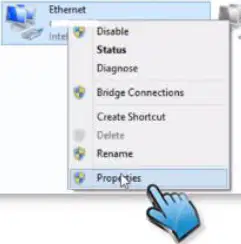
Windows 10 users should do the following to access the IP settings window: Right-Click on the Start Button, go to Network Connections, click Change Adapter Option, then Right-Click Ethernet and select Properties. Which item is selected after Right-Clicking Ethernet?
Properties
Disable
Status
Rename
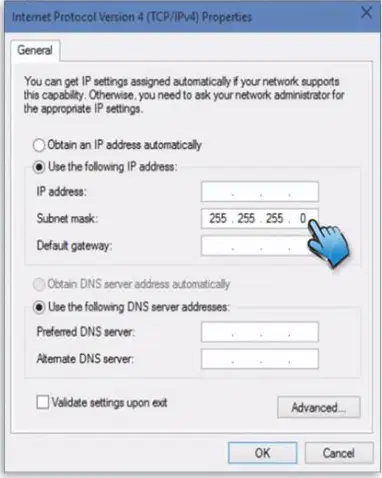
In the TCP/IP Properties, which option must be selected to manually enter IP information for each PC?
Obtain an IP address automatically
Use the following IP address
Validate settings upon exit
Use the following DNS server addresses

According to the table, what IP address should be set for PC – A?
192.168.1.1
192.168.1.2
255.255.255.0
192.168.0.1
According to the table, what IP address should be set for PC – B?
192.168.1.1
192.168.1.2
255.255.255.0
192.168.0.2
Is a default gateway IP address required for these PCs when directly connected?
Required
Not required
Windows 10 users should do the following: Search > Command Prompt. What tool is being accessed?
Command Prompt
Device Manager
Task Manager
Control Panel
Which command is used to test connectivity between the two PCs?
ipconfig
ping 192.168.1.1 (or 192.168.1.2)
tracert
netstat
Look for results similar to: Packets: Sent = 4, Received = 4, Lost = 0 (0% loss). What was the ping result?
Success with 0% loss
Partial loss
Complete loss
Request timed out
Windows users should type the ipconfig command from the Command Prompt and record the results. Do the IP addresses for both PCs match the table given in Step 4?
Yes, they match.
No, they do not match.

