
NEW
Font size
 Worksheets
18.1 Create a database structure: Introduction
Total questions: 30
Worksheet time: 15mins
Which statement best defines a database?
A list of files saved on a computer
An organised collection of data stored and retrieved in a structured way
A single spreadsheet for charts
A program that performs calculations
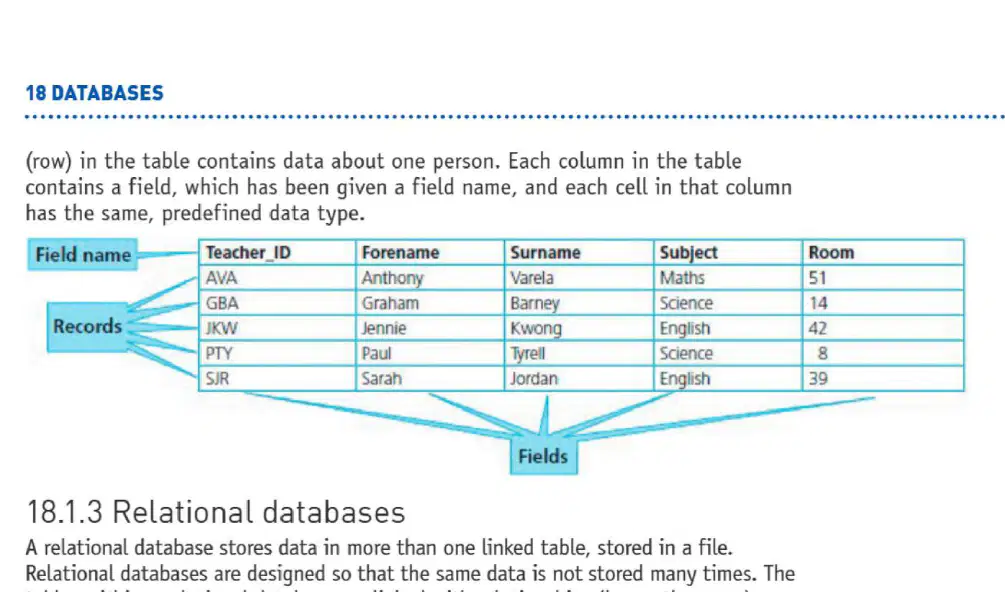
In a flat-file database, data is stored in one table. What do the rows and columns represent?
Each row is a field and each column is a record
Each row is a record about one item, and each column is a field with a defined data type
Each row is a file and each column is a table
Each row and column are both fields containing the same data type
What is the main difference between a primary key and a foreign key in a relational database?
A primary key can repeat values, while a foreign key must be unique
A primary key uniquely identifies a record in its table; a foreign key links to a primary key in another table
Both keys are optional and used only for sorting
A foreign key uniquely identifies records in all tables
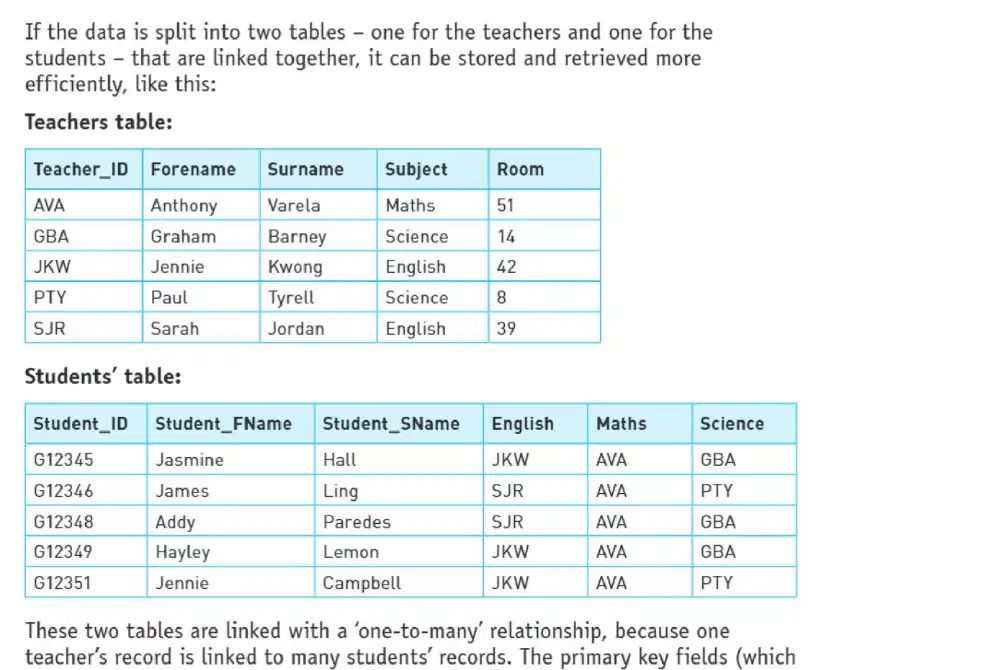
Splitting data into a teachers table and a students table linked by keys is an example of which database structure, and what storage benefit does it provide?
Flat-file database; increases duplication for quicker data entry
Relational database; reduces repeated storage of the same data
Flat-file database; allows more columns in one sheet
Relational database; requires identical fields in every table
Which statement about the advantages of relational databases over flat-file databases is correct?
Relational databases always search faster than flat-file databases
Relational databases eliminate repeated data, so updates are made only once and storage is saved
Flat-file databases use less memory because data is kept in one table
Relational databases cannot produce reports as easily as flat-file databases
Which data type stores letters, digits (not for calculations), and symbols like spaces in a database field?
Alphanumeric
Numeric
Boolean
Currency
What does the Boolean data type represent in databases?
Stores text and numbers that won’t be calculated
Stores numeric values for calculations, including telephone numbers
Stores one of two logical states, displayed as Yes/No or 0/1
Stores dates only and formats them automatically
Which numeric sub-type is intended for values with many decimal places or specific precision?
Integer
Decimal
Date and time
Text
What is the most appropriate data type for the field "Does the car need cleaning?" when importing the cars.csv file?
Text
Boolean/Logical (Yes/No)
Numeric/Integer
Date/Time
You are renaming fields before importing the CSV. Which rename best matches "Price that we bought the car for"?
BuyingCost
Purchase Price
Car Price In
OriginalAmountPaid
InitialPurchaseMoney
In Access, how do you start creating a flat-file database from cars1.csv?
Start Access, choose Blank desktop database, then import From File via External Data > New Data Source.
Open Access and directly open the CSV without creating a database first.
Start Excel and use Save As to convert the CSV into an MDB file.
Start Access, choose a template database and paste the CSV data into a table.
In a flat-file database, which field is most appropriate to set as the primary key when importing product records with a unique Code for each item?
The Colour field because it is text and easy to sort
The Sales price field because currency values are precise
The Code field because it uniquely identifies each record
The Discount field because it is Boolean and simple
When setting up currency fields PPrice and SPrice, what setting should you apply to display values as £1,234.00 instead of £1,234.0 or £1,234?
Change Data Type to Short Text and set Format to Pound
Keep Numeric/Integer and set Decimal Places to 0
Use Currency data type and set Decimal Places to 2
Use Yes/No data type and set Format to True/False
For a Boolean field like Valet in the cars table, which format should be used to display Yes or No during data entry?
Set Data Type to Currency and Format to General Number
Set Data Type to Yes/No and Format to Yes/No
Set Data Type to Short Text and Format to Title Case
Set Data Type to Number and Format to Percentage
Which data type should you choose to store the purchase date in a database table?
Text
Date/Time
Number
Currency
You are creating a relational database for a school. The Teachers table has a key field named SCode. You want a one-to-many relationship between Teachers and Students using the Maths field in Students. Which statement correctly describes the key fields in this relationship?
SCode is the primary key in Teachers and Maths is the foreign key in Students
Maths is the primary key in Students and SCode is the foreign key in Teachers
Both SCode and Maths are primary keys in their tables
Neither SCode nor Maths is a key field in the relationship

In the Form Wizard, what should you select to include all fields from tblStudents on your form before clicking Next?
Use the right arrow to move only Student_ID
Use the double right arrow to move all fields
Type each field name into the Selected Fields box
Change to Design View first
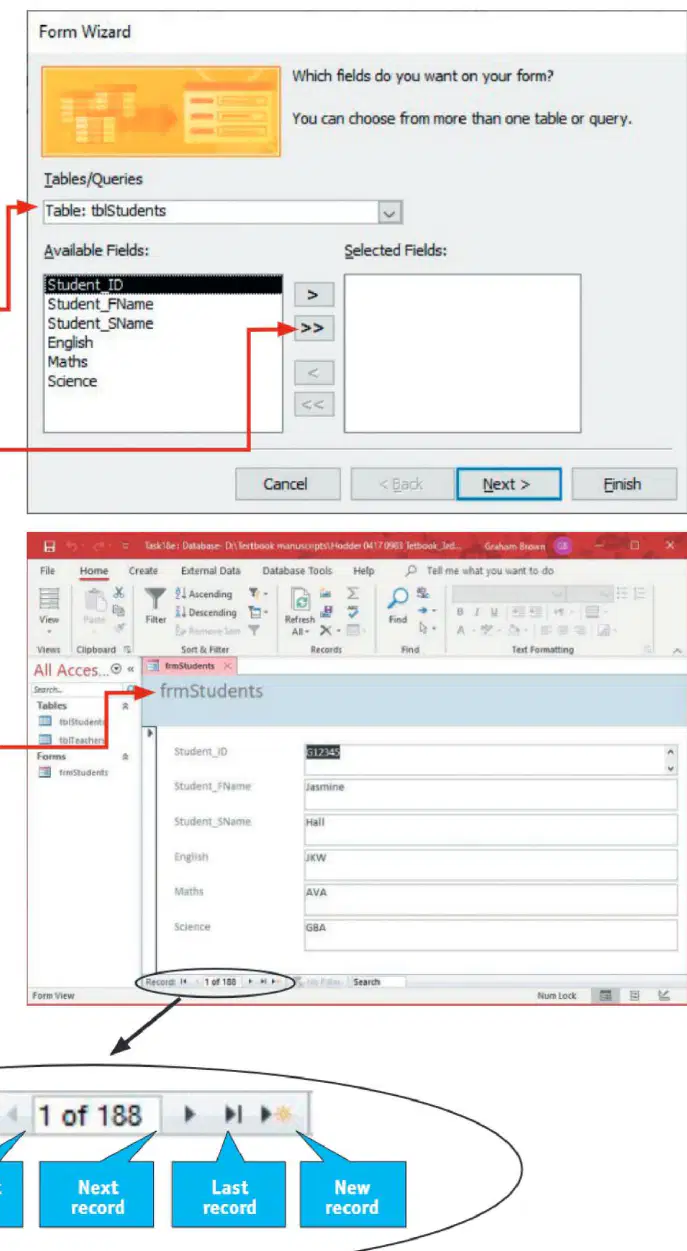
Which navigation control at the bottom of the form lets you add a new record?
Go to the first record button
Current record indicator
Next record button
New record button
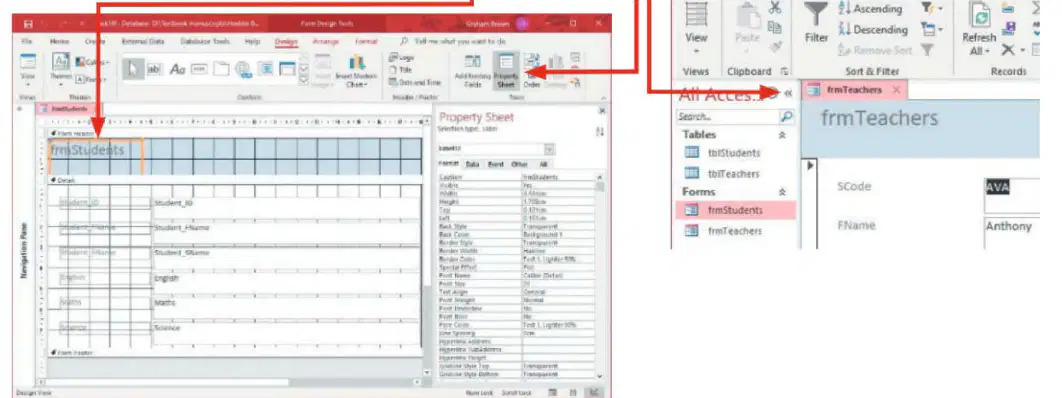
To edit frmStudents so it is easier for students to enter data, which sequence starts the process according to the instructions?
Open frmStudents, choose Home tab > Views drop-down > Design View
Open frmStudents, click Create tab > Form Wizard
Open frmStudents, select External Data > Import
Open frmStudents, press Layout View then Save as Design
When customizing a form label’s text alignment, which property do you change to center the text within the label?
Fore Color
Back Color
Text Align
Detail Bar
A new field named Year_Group needs to be added for students. Which data type should be selected for this field?
Short Text, because it stores words like "Year 7"
Number, because the values are limited to numeric years 7–11
Date/Time, because years are a time measure
Yes/No, because students either are or are not in a year group
In Access, which control should users use to select from a fixed set of values without typing new entries?
Text box
Combo box
List box
Subform
Which field from tblTeachers should be moved to the Selected fields list to record each student’s tutor by code?
TeacherName
SCode
TutorID
Department
Which criteria in a database query lists only Ford cars that need valeting?
Make: Ford in Criteria row; Valet: Yes in Criteria row
Make: Ford in Criteria row; Valet: Yes in the Or row
Make: Ford in Or row; Valet: Yes in the Or row
Make: Ford in Or row; Valet: Yes left blank
Which criterion uses a wildcard search to find cars with Alloy Wheels in the Extras field?
Extras: Like "*Alloy Wheels*"
Extras: = "Alloy Wheels"
Extras: > "Alloy Wheels"
Extras: Not "Alloy Wheels*"
Which pair of tables should be included in a query to list all students taught Maths by Mr Varela, showing each student’s first name, surname, and teaching room?
tblTeachers and tblStudents
tblCars and tblStudents
tblTeachers and tblCars
tblStationery and tblTeachers
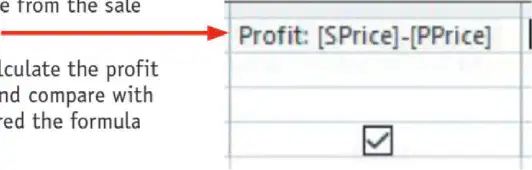
To create a calculated field called Profit that subtracts the purchase price from the sale price, what expression should you use?
[SPrice]-[PPrice]
[PPrice]-[SPrice]
[SPrice]*[PPrice]
[SPrice]/[PPrice]
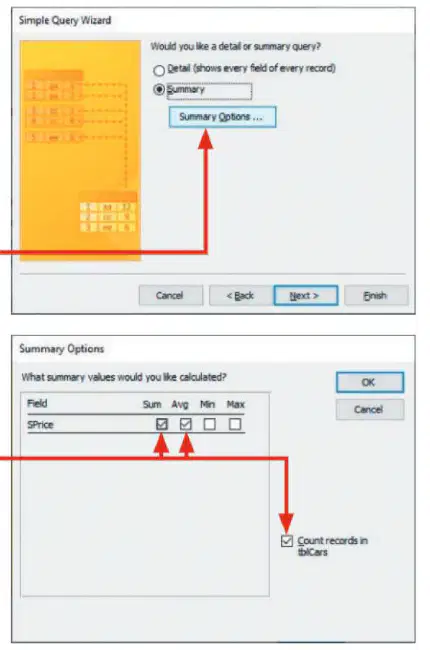
In a Simple Query Wizard summary query on tblCars, which option counts the number of cars in stock?
Tick the check box for Sum on SPrice
Tick the check box for Avg on SPrice
Tick the check box for Count records in tblCars
Select Detail instead of Summary
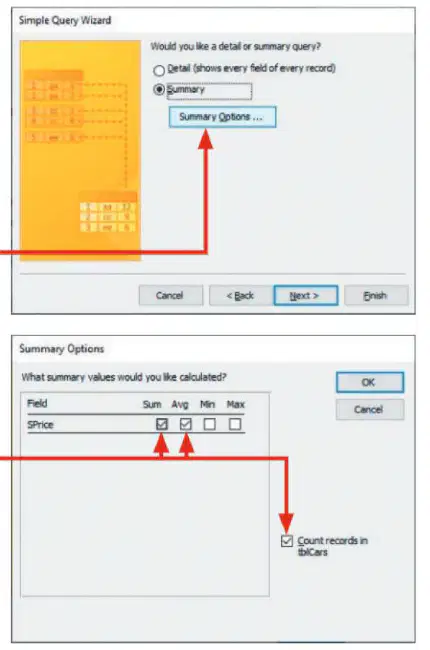
You added Make and SPrice to a summary query and need the database to show the average sale price for each make. What setting completes this?
Tick Avg for SPrice in Summary Options
Tick Sum for Make in Summary Options
Change query to Detail view
Sort by Make in ascending order only
When using Report Wizard to create a report for cars from a specific manufacturer, which step is correct?
Create the report first, then build the query later
Base the report on a query that filters to the required cars
Select only the Valet field to narrow the report
Always use Portrait orientation regardless of field count

