
 Worksheets
Google Sheet basics
Total questions: 61
Worksheet time: 1hrs 3mins


What is the name of this cell?
B10
5B
B5
B6

B1 is a?
row address
column address
cell address
sheet address

Google Sheets is a program that allows a user to _____.
create electronic slide shows
browse sites on the internet
write letters
calculate numerical information

What is the name of a horizontal section of a spreadsheet as selected in the image?
row
cell
column
format
What is the purpose of the following formula: SUM(B2:B6)?
To subtract the values of cells B2:B6
To multiply the values of cells B2:B6
To add the values of cells B2:B6

What is this icon used for?
Skyscrapers
Arrangemnet
Alignment
Audio/Video Adjustment

What is this icon used for?
Adjusting the Border Style of Selected Cells
Connect Four
4 Square
Rubic's Cube
You can not adjust a row height or column width.
True
False
A cell's name is based on its column letter and row number. What do you call a cell name?
cell bar
cell address
cell location
The function to find the smallest value in a group is
max
min
sum
average
You can adjust the size of columns in Sheets.
True
False
You can only apply a border to the bottom of cells in Google Sheets
True
False
What is a spreadsheet?
An application to processes text and pictures.
An application to organise, analyse and store data in a tabular form.
An application to draw and edit images.
An application to present slides to a large group of audience.

This is called a...
Box
Cube
Rectangle
Cell
What are columns in a spreadsheet?
Columns go across
Columns go up and down
Columns go diagonal
How do you select a large group of cells?
Click on the first cell in the group and press the shift key and then click on the last cell.
Press the Ctrl key and click on the cell
Click and drag
Press Shift and Ctrl and then click on the cell.
Pieces of info that describe the appearance of a cell’s content?
Paint
Format Attributes
Edit

Which Google app does this icon represent?
Docs
Slides
Sheets
Forms

Where would I click to change the title of my project?
(the name of the save file)
1
2
3
I want to merge cells together. Which button do I press?


I want to change the fill color of a cell. Which button do I press?


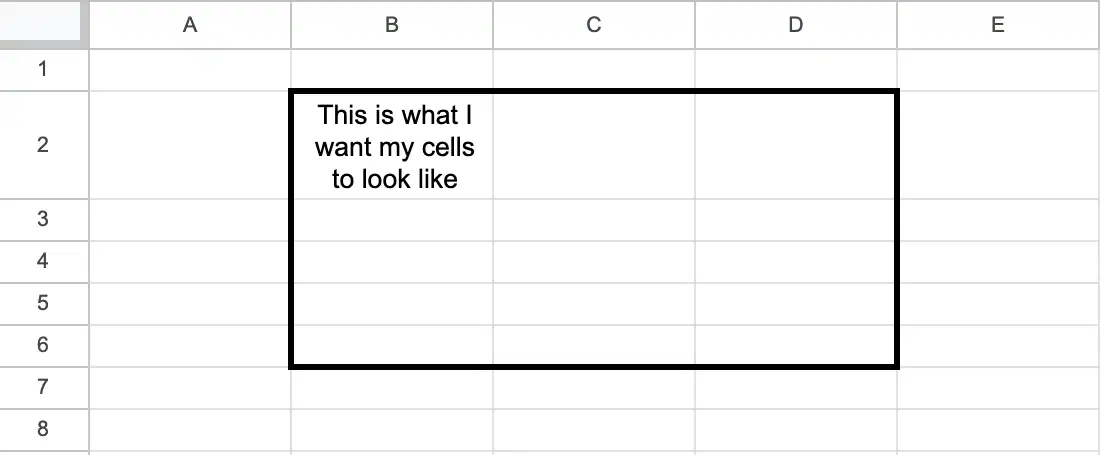
I want to have borders, but only on the outside edge of my cells.
I highlighted my cells, now which option should I choose?


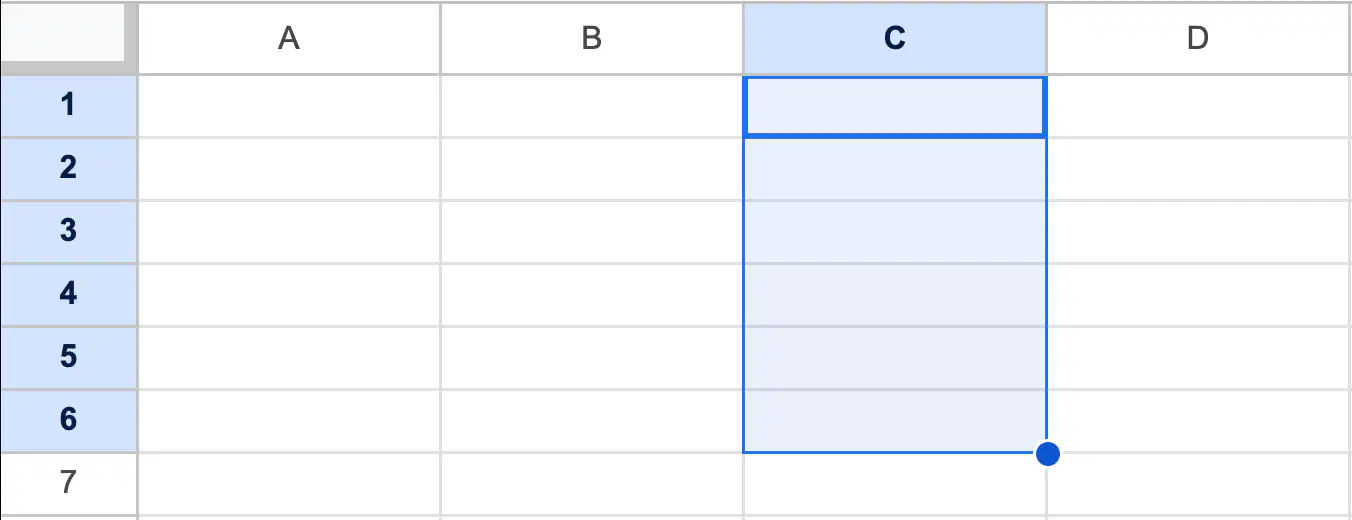
What is the easiest way to refer to these highlighted cells?
C1:C6
C1-C6
C1, C2, C3, C4, C5, C6
C1"C6
Which of the following is NOT a valid way to format text in Google Sheets?
Underline
Italic
Bold
Highlight


Double-clicking between two columns will ____________ the column.
Delete
Copy
Resize
Fill
A Sheets document is called a?
Work page
Work paper
Spreadsheet
Slide

If I want to make a cell a particular color, which button would I click on?
Format tab
Font style
Text color
Fill color

What do these buttons do?
Back space and move forward
Look back before moving forward
Undo or Redo
Get Out the Way

Google Sheets uses standard operators for formulas, for division is:
asterisk
minus
caret
forward slash
A group of cells is called a ________.
Chart
Cell range
Cell cluster
Multicell
The correct formula to add cell B1 and B2 is
AddB1+C1
=add(b1:b2)
=B1+B2
=total(B1-B2)

Which method is best for selecting the cells highlighted in red?
Press the Shift key and click on the cells.
Click and drag the mouse to select the cells.
Press the Ctrl key and click on the cells.
Press the Alt key and click on the cells.

What function should be entered into B7 to calculate the total budget?
=SUM(B3:B6)
=CALCULATE(B3:B6
=SUM(B3-B6)
=AVERAGE(B3:B6)


Which of the following can you do in a spreadsheet?
Sort in alphabetical order
Sort in number order
Sort in reverse alphabetical order
Sort in reverse number order
All of these can be done using spreadsheets
The structure of a Google spreadsheet consists of vertical _______________ and horizontal _________________.
Columns; rows
Charts; images
Forms; equations
Formulas; links

Using this picture, what would the formula be to find the average in B16 for the given set of data?
+AVERAGE(B2:B13)
=AVERAGE(B2:B13)
=AVERAGE(A2:A13)
+AVERAGE(A2:A13)
How can one sort items in a sheet?
Right click on the column, choose the way in which you want to sort
Choose the drop down arrow on a column, choose the way you want to sort
Highlight the area to sort, go to Data at the top of the page and choose the way you want to sort
Serenity, Camille, and Janiya are collaborating on a budget report using Google Sheets for their economics class. To enhance the readability of their shared document, they need to combine several cells. What steps should they follow to merge these cells?
Go to the 'Format' menu and select 'Merge cells'
Press the 'Ctrl' key and click on the cells to be merged
Click on the 'Merge cells' button in the toolbar
Right-click on the selected cells and choose 'Merge cells'
Garrard and Xavier are working together on a school project to create a budget spreadsheet in Google Sheets for their school's annual sports event. What is the purpose of the cell reference in a formula they use in their spreadsheet?
To determine the order of operations in the formula
To identify the formatting of the cells in the formula
To exclude certain cells from the budget calculations for specific sports
To specify which cells the formula should use for calculations related to different sports
Takari is organizing a budget in Google Sheets for a school project. What are the cells that Takari is using to enter and manipulate data?
Individual circular boxes where you can enter and manipulate data
Individual square boxes where you can enter and manipulate data
Individual triangular boxes where you can enter and manipulate data
Individual rectangular boxes where you can enter and manipulate data
Jamiracle, Reynard, and Jasmine are collaborating on a market research project where they have to evaluate customer feedback. They need to count the number of feedback entries that contain text. Which function should they use?
SUM
AVERAGE
COUNTA
COUNT
Jordan is working on a budget spreadsheet for a school project. How can Zavian use functions to make his task easier?
Functions in spreadsheets can be used to perform calculations, summarize expenses, and automate repetitive tasks.
Functions in spreadsheets are not useful for budgeting and should be avoided by Zavian.
Functions in spreadsheets are only used by Jamiracle for formatting the budget report.
Saniya uses functions in spreadsheets exclusively to create charts and graphs for the economics class.

