
 Worksheets
Google Sheets 02
Total questions: 69
Worksheet time: 55mins

¿Cuál es la formula que debo aplicar para obtener el resultado?
=(A2 + A3)
=A2+A3
=B1+B2
=B2+B3

El resultado de la fórmula =(A2+B3)*B1 es:
12
9
36
Ninguna de las anteriores

Indica cuál es el rango del área pintada:
A1: D4
B2:C4
B4:D4
B3:D4

Para dibujar una tabla (hacer visibles los bordes), una ves seleccionadas las celdas se debe hacer click en:


¿Cómo se convierten los nombres a mayúsculas en Google Sheets?
Utiliza la función CONCATENATE para cambiar a mayúsculas.
Usa la función LOWER en Google Sheets.
Aplica el formato de texto en negrita.
Usa la función UPPER en Google Sheets.
¿Qué función se utiliza para poner los apellidos en minúscula?
lower()
capitalize()
titlecase()
uppercase()
¿Qué función se utiliza para unir el primer nombre y el primer apellido?
merge
join
combine
concat
¿Qué función se usa para extraer los últimos 3 dígitos de un número de teléfono?
LEFT(numeroTelefono, 3)
numeroTelefono.substring(0, 3)
numeroTelefono.substr(-3)
RIGHT(numeroTelefono, 3)


To select only a few random cells, hold down the _______ key.
Tab
Option
Shift
Command
Double-clicking between two columns will ____________ the column.
Delete
Copy
Resize
Fill
A Sheets document is called a?
Work page
Work paper
Spreadsheet
Slide
Google Sheets is used to? (Select ALL that apply?)
Add numbers.
Make charts (graphs).
Put information in columns and rows.
Collect Data

What does this icon represent?
Google Sheets
Google Slides
Google Docs
Google Classroom

What number should be in cell E1 (based on the formula)?
1
2
5
9


What formula is being used here =j2-g3 choose from the list
Adding
Subtraction
Divide
Multiply
What formula is being used here =j2*g3 choose from the list
Adding
Subtraction
Divide
Multiply
What formula is being used here =j2/g3 choose from the list
Adding
Subtraction
Divide
Multiply
If I wanted to add more than 5 cells together I should use which formula?
=MAX(A1:A6)
=SUM(A1:A6)
=A1+A2+A3+A4+A5+A6
=SUM(A1...A6)
If I wanted to to find the lowest number in a group of numbers what formula is the best for that?
=MAX(A1:G5)
=MIN(A1:G5)
=LOW(A1:G5)
=SUM(A1:G5)

What number is for bordering tool?
3
4
9
8
6
What number is the text color tool?
3
4
9
8
6
What number is the bold tool?
3
4
9
8
6
What number is the text size?
1
4
2
8
6
A page within a workbook that contains columns, rows, and cells.
Worksheet
An online spreadsheet app by Google that lets you create and format spreadsheets and work with other people.
True
False
Which of the following formulas is used to find the round a number DOWN a number to the nearest integer?
=FLOOR()
=CEILING()
=LOWER()
=UPPER()
Which of the following formulas is used to find the round a number UP a number to the nearest integer?
=FLOOR()
=CEILING()
=LOWER()
=UPPER()
Which of the following formulas is used to make all letters lowercase in a cell?
=FLOOR()
=CEILING()
=LOWER()
=UPPER()
Which of the following formulas is used to format the word in a cell so that the first letter is capitalized?
=FORMAT()
=PROPER()
=LOWER()
=UPPER()
Which of the following formulas is used to find the average of set of numbers?
=AVERAGE()
=MAX()
=SUM()
=MODE()
Which of the following formulas is used to find the most common value in a set of numbers?
=AVERAGE()
=MAX()
=SUM()
=MODE()
Which of the following formulas is used to find the most common value in a set of numbers?
=AVERAGE()
=MAX()
=SUM()
=MODE()
Which function finds the list of different values within a range of cells?
=UNIQUE()
=FLOOR()
=SUM()
=MODE()
Using Google Drive, the sharing settings are the same in Docs, Sheets and Slides
TRUE
FALSE
Where would you go if you wanted to add a theme, border, font or change a number type in a sheet?
Insert
Format
Data
None of the above.

Using this picture, what would the formula be to find the average in B16 for the given set of data?
+AVERAGE(B2:B13)
=AVERAGE(B2:B13)
=AVERAGE(B1:B13)
+AVERAGE(A2:A13)
True or False: You share Google Sheets the same way you share Docs.
True
False
¿Qué es una función en Hojas de Cálculo?
Una imagen insertada en la hoja de cálculo
Un formato de texto aplicado a las celdas
Una fórmula predefinida que realiza cálculos o manipula datos en las celdas.
Un tipo de gráfico utilizado para representar datos
¿Por qué es importante la organización de filas y columnas en una hoja de cálculo?
No es importante, la organización aleatoria es más efectiva
La organización de filas y columnas no afecta la visualización de datos
Es importante para facilitar la visualización y manipulación de datos de manera estructurada y ordenada.
Es irrelevante, los datos se pueden colocar en cualquier orden
¿Cuál es la importancia de la función IF en una hoja de cálculo?
La función IF en una hoja de cálculo es importante porque permite realizar evaluaciones lógicas y condicionales, devolviendo un valor específico si la condición es verdadera y otro valor si es falsa.
La función IF en una hoja de cálculo es importante para realizar operaciones matemáticas complejas
La función IF en una hoja de cálculo solo se utiliza para cambiar el formato de las celdas
IF es una función obsoleta en las hojas de cálculo modernas
¿Qué es la función CONCATENATE y cómo se aplica en Google Sheets?
La función CONCATENATE en Google Sheets se utiliza para dividir celdas en múltiples partes
La función CONCATENATE en Google Sheets se utiliza para combinar o unir múltiples cadenas de texto en una sola celda. Para aplicarla, simplemente se escribe =CONCATENATE(texto1, texto2, ... textoN) en la celda donde se desea que aparezca la concatenación de los textos.
La función CONCATENATE en Google Sheets se utiliza para realizar cálculos matemáticos entre celdas
Para aplicar la función CONCATENATE, se escribe =COMBINE(texto1, texto2, ... textoN) en la celda
Google Sheets saves your changes automatically.
True
False
I want to merge cells together. Which button do I press?


I want to change the fill color of a cell. Which button do I press?


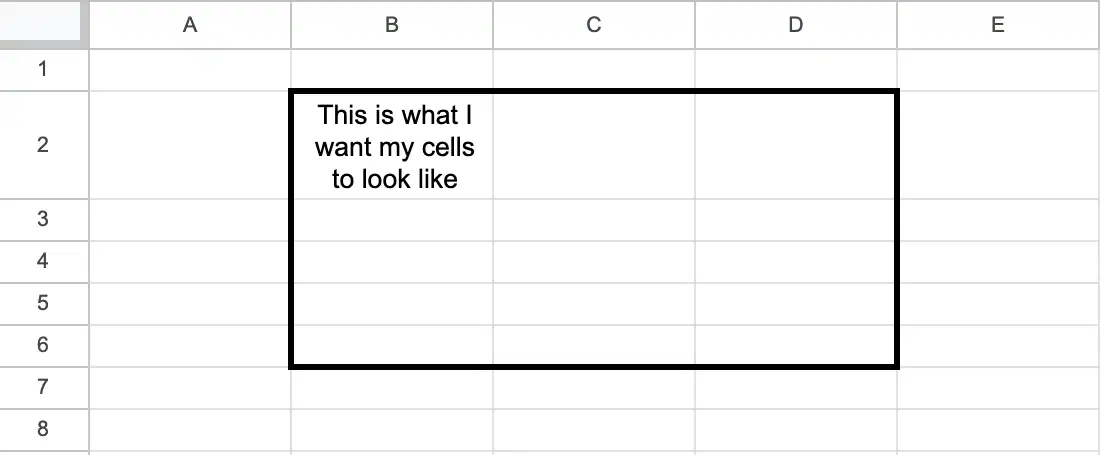
I want to have borders, but only on the outside edge of my cells.
I highlighted my cells, now which option should I choose?


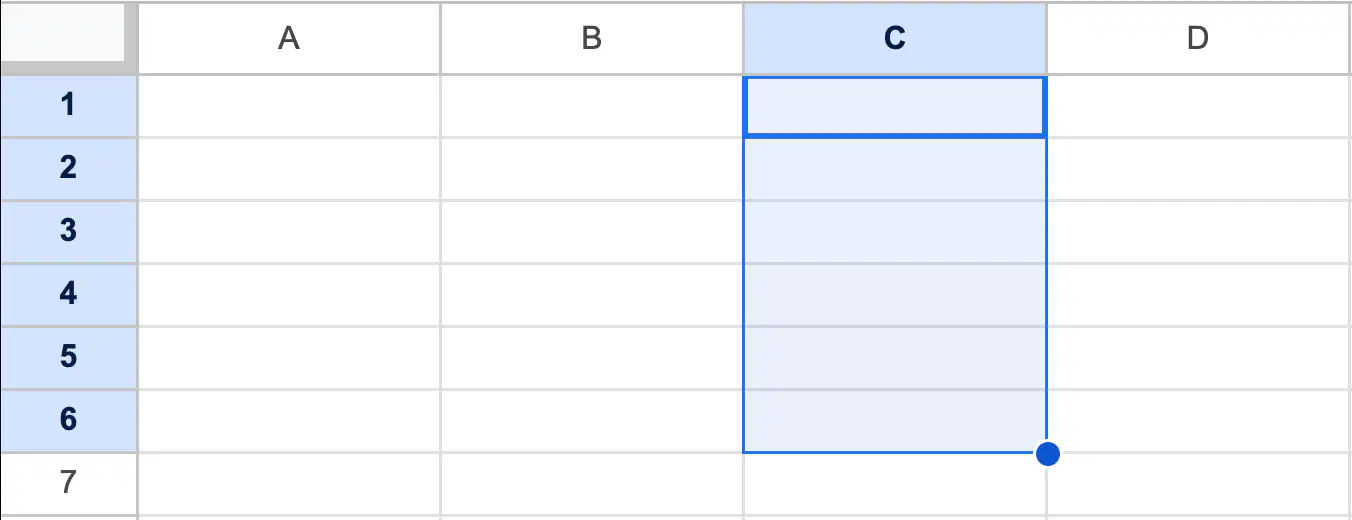
What is the easiest way to refer to these highlighted cells?
C1:C6
C1-C6
C1, C2, C3, C4, C5, C6
C1"C6
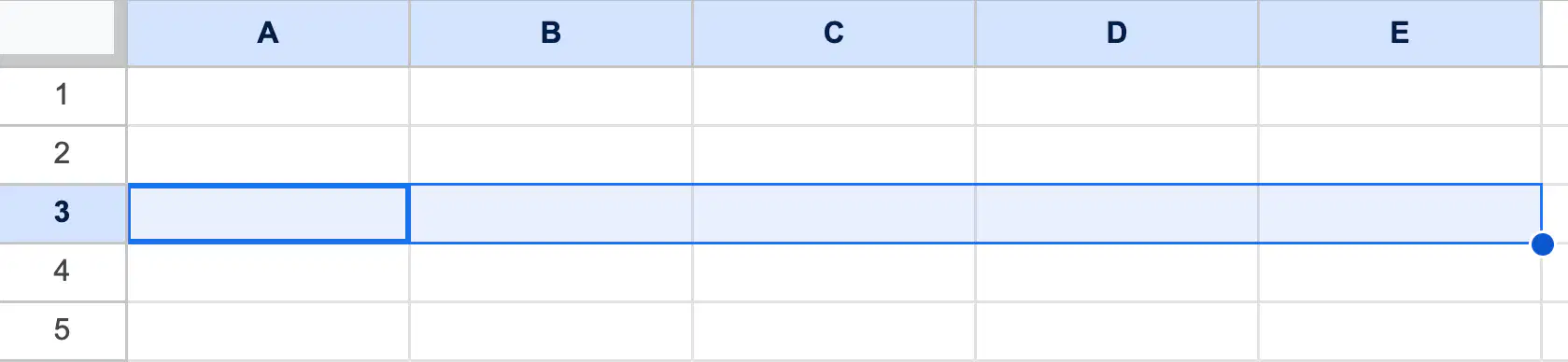
What is the easiest way to refer to these highlighted cells?
A1:A5
A:E, 3
A3, B3, C3, D3, E3
A3:E3
Which of the following can I type in a cell to find the answer to 3x7?
=3*7
=3x7
=MULTIPLY(3, 7)
3x7
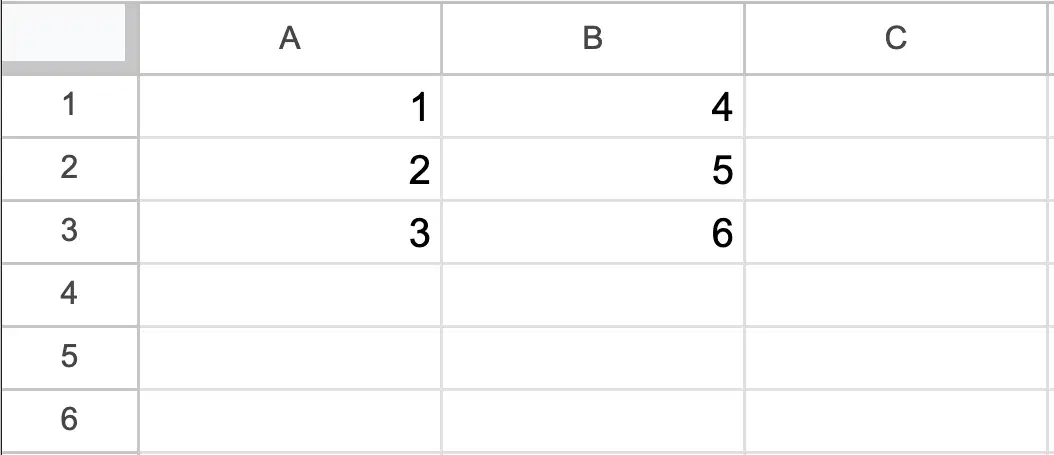
Here's my data set.
Which of the following can I type in a cell to find the answer to 3x5?
3x5
A3*B2
=A3*B2
=MULTIPLY(A3, B2)
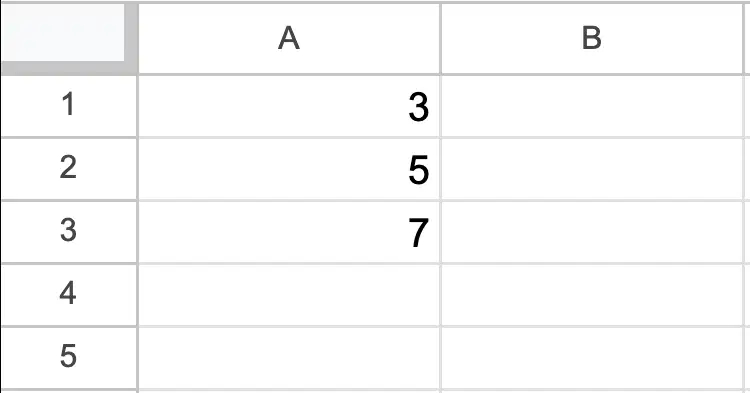
Which of the following can I type in a cell to find the average of these 3 numbers?
=AVERAGE(A1, A2, A3)
=AVERAGE(A1:A3)
=(3+5+7)/3

