
 Worksheets
CCS0001 M1 - M8 Review
Total questions: 85
Worksheet time: 53mins
This area of computing offers a foundation that permits graduates to adapt to new technologies and new ideas.
Computer Science
Information Systems
Information Technology
All the other choices are correct.
This area of computing ranges from theory through programming to cutting edge development of computing solutions.
Information Systems
Computer Science
Information Technology
All the other choices are correct.
What computing area is focused on developing effective ways to solve computing problems, such as storing information in databases, sending data over networks or providing new approaches to security problems?
All the other choices are correct.
Information Technology
Computer Science
Information Systems
What computing area is concerned with the information that computer systems can provide to aid a company, non-profit or governmental organization in defining and achieving its goals?
Information Systems
Computer Science
Information Technology
All the other choices are correct.
What discipline requires understanding how networked systems are composed and structured, and what their strengths and weaknesses are?
Information Technology
Computer Science
Information Systems
All the other choices are correct.
What department is responsible for keeping all computer operations and networks operating smoothly?
Computer service and repair field
Computer equipment field
Computer sales
IT department
The people in this field need general understanding of computers and specific knowledge of the product they are selling.
Computer equipment field
Computer service and repair field
Computer sales
IT department
They provide preventative maintenance, component installation, and repair services.
Computer equipment field
Computer service and repair field
Computer sales
IT department
He/She is the one who designs and develops software.
Programmer
Software engineer
Project leader
Computer scientist
He researches, invents, and develops solutions to complex software problems
Computer scientist
Programmer
Software engineer
Project leader
It is an electronic device, operating under the control of instructions stored in its own memory.
Appliance
Robot
Cell phone
Computer
It is a type of computer that can perform all of its input, processing, output, and storage activities by itself.
Servers
Personal computer
Game console
Mainframes
It is a is a mobile computing device designed for single player or multiplayer video games.
Personal computer
Game console
Servers
Mainframes
It controls access to the hardware, software, and other resources on a network.
Game console
Personal computer
Servers
Mainframes
It is a large, expensive, and powerful computer that can handle hundreds or thousands of connected users simultaneously.
Servers
Personal computer
Mainframes
Game console
It is considered as the fastest and most powerful computer.
Supercomputers
Personal computer
Servers
Ultimate computers
It is a special purpose computer that functions as a component in a larger product.
Personal computer
Game console
Desktop computer
Embedded computer
It is considered as the first computing device, composed of beads on r
Slide rule
Napier’s bones
Abacus
Jacquard Loom
This machine can be “programmed” to simplify the process of manufacturing textiles with complex patterns.
Jacquard Loom
Analytical Engine
Difference Engine
Slide Rule
He is considered as the father of computers.
Charles Babbage
John Mauchly
Joseph Marie Jacquard
John Bardeen
LED Monitor
Input
Output
Storage
Joystick
Input
Output
Storage
Touch pad
Input
Output
Storage
Scanner
Input
Output
Storage
Hard Drive
Input
Output
Storage
USB Flash Drive
Input
Output
Storage
Plotter
Input
Output
Storage
Speakers
Input
Output
Storage
Microphone
Input
Output
Storage
Microphone
Input
Output
Storage
Hexadecimal conversion of -> 111001112
(a)
Octal conversion of -> 101010012
(a)
Decimal conversion of -> 110110102
(a)
Binary conversion of -> 50910
(a)
Octal conversion of -> 59910
(a)
Hexadecimal conversion of -> 59110
(a)
Binary conversion of -> B0416
(a)
Octal conversion of -> A4116
(a)
Decimal conversion of -> C1416
(a)

(a)

(a)

(a)

(a)
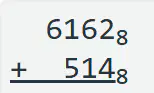
(a)
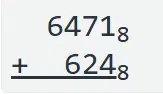
(a)
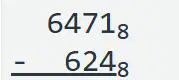
(a)
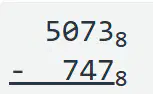
(a)

(a)

(a)

(a)

(a)
It consists of the programs that control or maintain the operations of the computer and its devices.
Operating System
System Software
Utility Programs
Application Software
It is a set of programs containing instructions that work together to coordinate all the activities among computer hardware resources.
System Software
System Software
Utility Programs
Operating System
It is the process of starting or restarting a computer.
booting
turn on
power on
starting
It is a kind of boot process where you use your operating system to restart your computer.
warm boot
cold boot
reboot
restart boot
It is a kind of boot process where you turn on your computer that has been powered off completely.
warm boot
cold boot
reboot
restart boot
Zip Code to Address
One-to-One
One-to-Many
Many-to-Many
Student ID to Student
One-to-One
One-to-Many
Many-to-Many
Driver to Driver License
One-to-One
One-to-Many
Many-to-Many
Book to Publisher
One-to-One
One-to-Many
Many-to-Many
Book to Author
One-to-One
One-to-Many
Many-to-Many
Province to Municipality
One-to-One
One-to-Many
Many-to-Many
Album to Song
One-to-One
One-to-Many
Many-to-Many
Book to Category
One-to-One
One-to-Many
Many-to-Many
Doctor to Patient
One-to-One
One-to-Many
Many-to-Many
Worker to Task
One-to-One
One-to-Many
Many-to-Many
Country to People
One-to-One
One-to-Many
Many-to-Many
It refers to a group of computer systems and other computing hardware devices that are linked together through communication channels to facilitate communication.
WiFi
LAN
Internet
Network
What does the acronym LAN stand for?
Land Area Network
Local Area Network
Land Aerial Network
Local Aerial Network
What does the acronym WAN stand for?
Wide Area Network
Wind Area Network
Wide Aerial Network
Wind Aerial Network
It refers to the arrangement of a network which comprises of nodes and connecting lines.
network arrangement
network design
network topology
network connection
Which of the following is NOT one of the network topologies?
Circle
Ring
Bus
Star
It is a network topology is a network type in which every computer and network device is connected to single cable.
Mesh
Bus
Star
Hybrid
This network topology forms a ring connecting devices.
Bus
Ring
Mesh
Star
It refers to a network topology which combines two or more topologies.
Mutant
Hybrid
Mesh
Special
It refers to actions that cause loss of or damage to computer system.
computer security risk
computer virus
computer ethics
computer hacking
It is a computer program that is potentially damaging to computer systems.
malware
trojan horse
worm
virus
It copies itself using computer resources and can shut down computer systems and networks.
malware
trojan horse
worm
virus
This can look like a legitimate software or hide inside legitimate programs until they are triggered.
malware
trojan horse
worm
virus
What is the best thing to do when you receive an email with an attachment from an unknown sender?
Forward the email to your friend and ask help from him.
Ignore the email and just let it stay in your inbox.
Delete the email.
Download the attachment and check it for possible viruses.
These are small programs that are embedded in other applications such as word processing or spreadsheet programs.
macro
malware
virus
worm
Antivirus software look for __________________ to determine if a file contains or is a virus.
virus file
virus activation
virus signature
virus program
This term refers to an action of the antivirus software where it keeps virus-infected files in a separate area of the hard disk drive.
quarantine
detection
cleaning
separation
It is a form of an assault which disrupts computer access to an Internet service.
denial of service
back door
It refers to a program or set of instructions in a program that allows you to bypass security controls.
denial of service
back door

