
 Worksheets
Python File Handling
Total questions: 39
Worksheet time: 20mins
In Python, which of the following is NOT a file operation you can perform?
Open a file
Read or write data to / from a file
Delete a file
Close the file
Read records into lists
In Python, the open() function takes the ______ of the file and an optional ______ as parameters.
name, file mode
size, encoding
type, path
location, extension
What is the default mode when opening a file using open(filename) in Python?
'w' (write)
'r' (read)
'a' (append)
'w+' (read and write)
Which code snippet opens a file for both reading and writing in Python?
inputfile = open(filename)
inputfile = open(filename, 'w')
inputfile = open(filename, 'w+')
inputfile = open(filename, 'r')
What does the 'w' mode do when opening a file?
Opens the file for reading
Opens the file for writing
Opens the file for appending
Opens the file for both reading and writing
Which file mode in Python allows you to read from a file and sets the initial position at the beginning?
r
w
a
w+
Which file mode in Python allows you to write to a file and truncates the file if it already exists?
r
w
a
r+
Which file mode in Python allows you to append to a file and sets the initial position at the end?
r
w
a
r+
Which file mode in Python allows both reading and writing, and truncates the file if it already exists?
r+
w+
a+
r
Which file mode in Python allows both reading and writing, and sets the initial position at the beginning?
r+
w+
a+
a
Which file mode in Python allows both reading and appending, and sets the initial position at the end?
r+
w+
a+
w
Fill in the blank: Truncate refers to a process or operation that ______ or cuts off a piece of data, such as a string or a file, by removing characters, digits, or bytes from the end.
shortens
expands
encrypts
duplicates
Which Python module provides a way of accessing and interacting with the operating system?
sys
os
math
random
The os.path is a submodule of the ______ module.
os
sys
pathlib
shutil
What does the isfile() function in the os.path module return?
The size of the file
True or False depending on whether a file exists
The contents of the file
The file extension
In the code example, what will be printed if the file 'data.txt' does not exist?
The file data.txt does not exist, creating the file...
Error: File not found.
File opened successfully.
No output will be printed.
To check if a file exists in Python, you need to:
1. import the os.path module into your program
2. use the ______ function.
isfile()
exists()
checkfile()
fileexists()
What does the write() function do in Python file handling?
Writes a single line to the text file
Writes multiple lines to a file
Reads a single line from a file
Reads the entire file
What is the purpose of the writelines() function in Python file handling?
Write a single line to the text file
Write multiple lines to a file (a list)
Read a single line from a file
Read all lines from a file
Fill in the blank: In Python, a file handle is like a ______ that points to a position in a file where data will be written to or read from.
cursor
window
pointer
index
Which seek() parameter sets the reference point at the beginning of the file?
0
1
2
None of the above
Fill in the blank: The seek() function in Python file handling is used to reset the file handle to the ______ of the file.
beginning
end
middle
current position
What does the read() function do in Python file handling?
Reads the entire file and returns the file content in a STRING
Reads a line of the file and returns the line in a STRING
Reads all the lines of the file and returns the lines in a LIST
Writes a line to the file
Which function reads a line of the file and returns the line in a STRING?
read()
readline()
readlines()
writelines()
Which function reads all the lines of the file and returns the lines in a LIST?
read()
readline()
readlines()
write()
What does the close() function do in Python file handling?
A) Opens a file
B) Closes an open file
C) Reads a file
D) Writes to a file
Why is it good practice to always close a file that has been opened in Python?
Because changes made to a file may not be applied until the file is closed.
Because closing a file increases the speed of the program.
Because closing a file automatically deletes the file.
Because closing a file prevents syntax errors.
What is the main advantage of using the with statement when working with files in Python?
It automatically closes the file
It opens multiple files
It writes data to the file
It reads data from the file
Fill in the blank: The following Python list contains the names of three TV shows: ["Big Bang Theory\n", "Greys Anatomy\n", "Breaking Bad\n"]. The second TV show in the list is _______.
Greys Anatomy
Friends
The Office
Game of Thrones
What does the 'w+' mode do when opening a file in Python?
It overwrites the file if it already exists and allows both writing and reading.
It opens the file for reading only and throws an error if the file does not exist.
It appends to the file if it exists and allows both writing and reading.
It opens the file for writing only and does not allow reading.
Fill in the blank: To append data to a file instead of overwriting it, you should use the mode "___" when opening the file in Python.
a+
w
r
w+
What function can be used to read all the lines from a text file and store them as a list in Python?
readlines()
read()
write()
writelines()
Which of the following statements about CSV (Comma Separated Values) files is true?
Each line of the file is a data record
Each record consists of one or more fields, separated by commas
Both A and B
None of the above
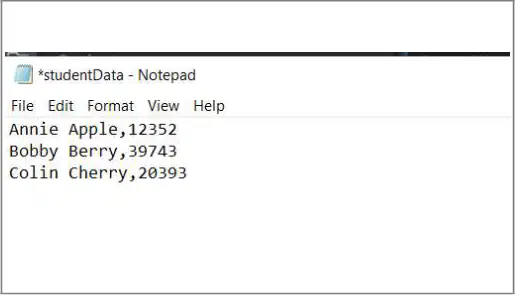
What is the ID of Bobby Berry?
39743
58291
76420
18356
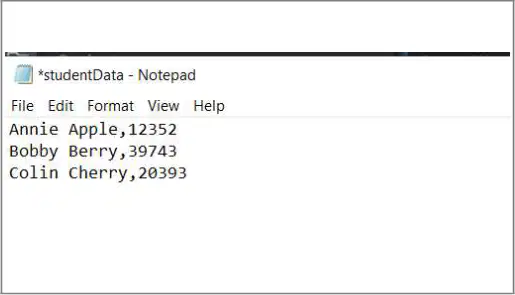
What is the name of the student with ID 20393?
Colin Cherry
John Smith
Emily Watson
Sarah Lee
For working with CSV files in Python, there is an inbuilt module called csv that we can import into our programs. The following code uses the csv function reader() to read each line from the file, split the line according to the position of the comma, and add the data to a list named readerList. Which function is used to read and split lines from a CSV file in Python?
open()
reader()
split()
append()
For working with CSV files in Python, there is an inbuilt module called csv that we can import into our programs. The following code uses the csv function reader() to read each line from the file, split the line according to the position of the comma, and add the data to a list named readerList. What does the code print when executing the section: for row in studentList: print(row[0])
All student IDs
All student names
All student names and IDs
Nothing
Explain the purpose of the studentList in the provided code.
It stores the list of students in the code.
It calculates the total marks of students.
It displays the student names on the screen.
It sorts the students by their grades.
What does the following Python code do? # Print names and IDs together print("\nPrinting all names and IDs:") for row in studentList : print(row[0], row[1])
It prints only the names from studentList
It prints only the IDs from studentList
It prints both names and IDs from studentList
It adds new names and IDs to studentList

