
 Worksheets
Computer Basics Worksheet Extraction (Grade 4)
Total questions: 40
Worksheet time: 20mins
Choose and circle the correct answer: Which of the following is an input device?
Monitor
Printer
Keyboard
Speakers
Choose and circle the correct answer: The brain of the computer is:
Monitor
CPU
Mouse
Keyboard
Choose and circle the correct answer: RAM stands for:
Read Access Memory
Random Access Memory
Ready Access Memory
Read And Memory
Choose and circle the correct answer: Which type of memory is permanent in nature?
RAM
ROM
Cache
Virtual Memory
Choose and circle the correct answer: A barcode reader is used to:
Print pictures
Read barcodes on packages
Type documents
Play games
Choose and circle the correct answer: Which device is used for video chatting?
Scanner
Printer
Web camera
Joystick
Choose and circle the correct answer: The output displayed on the monitor is called:
Hard copy
Soft copy
Print copy
Digital copy
Choose and circle the correct answer: A flash drive is also known as:
Hard disk
CD
Pen drive
Floppy disk
Choose and circle the correct answer: Which of the following has the largest storage capacity?
CD
DVD
Blu-ray disc
Floppy disk
Choose and circle the correct answer: ALU stands for:
Automatic Logic Unit
Arithmetic Logic Unit
Advanced Logic Unit
Application Logic Unit
Fill in the blank converted to MCQ: The ________ is a pointing device that moves the pointer on the screen.
Mouse
Keyboard
Monitor
Printer
Fill in the blank converted to MCQ: ________ memory is also called volatile memory because data is lost when the computer shuts down.
RAM
ROM
Cache
Hard disk
Fill in the blank converted to MCQ: A ________ is a device that transfers pictures and text into the computer in digital format.
Scanner
Speaker
Joystick
Plotter
Fill in the blank converted to MCQ: The storage capacity of a computer is measured in ________.
Bytes
Hertz
Inches
Volts
Fill in the blank converted to MCQ: ________ is a circular disc used for storing audio, video and data.
CPU
CD
Keyboard
Modem
Match the following converted to MCQ: For Joystick, choose the correct match from the list: a) Permanent memory, b) Used for playing games, c) Draws pictures on paper, d) 1024 MB, e) Secondary memory device.
Permanent memory
Used for playing games
Draws pictures on paper
1024 MB
Secondary memory device
Match the following converted to MCQ: For Plotter, choose the correct match from the list: a) Permanent memory, b) Used for playing games, c) Draws pictures on paper, d) 1024 MB, e) Secondary memory device.
Permanent memory
Used for playing games
Draws pictures on paper
1024 MB
Secondary memory device
Match the following converted to MCQ: For ROM, choose the correct match from the list: a) Permanent memory, b) Used for playing games, c) Draws pictures on paper, d) 1024 MB, e) Secondary memory device.
Permanent memory
Used for playing games
Draws pictures on paper
1024 MB
Secondary memory device
Match the following converted to MCQ: For Hard disk, choose the correct match from the list: a) Permanent memory, b) Used for playing games, c) Draws pictures on paper, d) 1024 MB, e) Secondary memory device.
Permanent memory
Used for playing games
Draws pictures on paper
1024 MB
Secondary memory device
Match the following converted to MCQ: For 1 Gigabyte (GB), choose the correct match from the list: a) Permanent memory, b) Used for playing games, c) Draws pictures on paper, d) 1024 MB, e) Secondary memory device.
Permanent memory
Used for playing games
Draws pictures on paper
1024 MB
Secondary memory device
Choose the correct options: Which of the following are parts of the CPU? Select all that apply.
Arithmetic Logic Unit (ALU)
Control Unit (CU)
Monitor
Keyboard
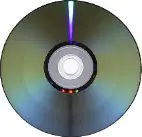
Look at the storage devices shown and choose the correct order of storage capacity from smallest to largest: CD, Blu‑ray disc, Flash drive, DVD.
CD, DVD, Blu‑ray disc, Flash drive
CD, DVD, Flash drive, Blu‑ray disc
DVD, CD, Flash drive, Blu‑ray disc
Flash drive, CD, DVD, Blu‑ray disc
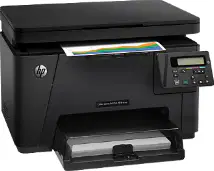
Identify the printer type shown and select one advantage of using it.
Inkjet printer — prints high‑quality color images and photos
Dot matrix printer — very quiet and best for photo printing
Laser printer — uses ink ribbons and needs continuous paper
3D printer — mainly used for plastic models at home
Which statement best describes the difference between RAM and ROM?
RAM stores data permanently and ROM is temporary
RAM is temporary working memory and ROM is permanent memory
Both RAM and ROM are permanent storage inside the CPU
ROM is used to run programs while RAM stores photos and videos forever
Choose the option that correctly lists two input devices with a suitable use for each.
Keyboard — typing text; Mouse — moving and clicking items on the screen
Monitor — displaying pictures; Printer — making paper copies
Speaker — playing music; Scanner — capturing screenshots
Projector — showing slides; Joystick — printing photos
What is a touch screen and where is it commonly used?
A screen that needs a special pen; used only in printers
A screen that responds to touch; used in smartphones and tablets
A screen that projects light; used only in classrooms
A screen for 3D pictures; used in cameras
Which statement best explains the difference between primary memory and secondary memory?
Primary memory is inside the CPU and works fast; secondary memory stores data for a long time outside the CPU
Primary memory is used only for music; secondary memory is only for games
Secondary memory is faster than primary memory in all cases
Primary memory means pen drives and DVDs; secondary memory means RAM
Which of the following are uses of computers in education? (Select all that apply)
Researching information on the internet
Creating presentations and documents
Cooking food in the cafeteria
Learning with educational videos
Unscramble the word to get its meaning: YBTES
BYTES
BEAST
STYEB
YEAST
Unscramble the word to get its meaning: NITOMOR
MONITOR
MOTIONR
MINOTOR
MONITER
Unscramble the word to get its meaning: OTPLTER
PLOTTER
PORTLET
PILOTER
PROTLER
Unscramble the word to get its meaning: NRESCNA
SCANNER
SCREEN
SCANNERA
SCANNERs
Unscramble the word to get its meaning: KCYOSIJT
JOYSTICK
KEYSTICK
JOYCLICK
JOYSCREEN
Which of the following are parts of the CPU? (Select all that apply)
Arithmetic Logic Unit (ALU)
Control Unit (CU)
Memory Unit
Monitor
Which of the following are secondary storage devices? (Select all that apply)
Hard disk
DVD
USB flash drive
RAM
Which statement about printers is true?
Impact printers strike the paper to print (e.g., dot matrix), while non‑impact printers do not strike the paper (e.g., inkjet, laser)
Non‑impact printers make marks by hitting the ribbon, while impact printers spray ink without touching paper
Both impact and non‑impact printers always use pins to hit paper
Impact printers are always color‑only printers
Scenario: Sarah wants to store her school project which includes videos, pictures and documents. The total size of her project is 6 GB. She tried to save it on a CD but couldn't. Why couldn't she save her project on a CD?
A CD’s storage capacity is too small for 6 GB
CDs can only store pictures, not videos
She needed a password to use the CD
CDs work only on desktop computers
Scenario: Sarah’s project is 6 GB. Suggest two appropriate storage devices she can use.
USB flash drive (8 GB) or Blu‑ray disc
CD or floppy disk
RAM or cache memory
Keyboard or mouse
Scenario: Mr. Ahmed runs a grocery shop and wants to make billing faster and more accurate using a computer with a barcode reader. How will a barcode reader help Mr. Ahmed in his shop?
By scanning product codes to quickly enter item details and reduce typing errors
By printing bills directly without a printer
By speaking prices aloud to customers
By storing all money collected in the computer
Scenario: Mr. Ahmed needs to print bills. Which output device will he need?
Printer
Monitor
Scanner
Webcam

