Worksheets
Assessment Test 1
Total questions: 35
Worksheet time: 19mins
What does an output device do?
Makes something happen or displays information to the user.
Collects data from the environment.
Stores files and documents.
Controls the speed of a car.
How does a control system know what instructions to give to a device?
It collects data about current conditions and does calculations.
It guesses what the user wants.
It only follows instructions from people.
It waits for someone to press a button.
Which of the following is a simple input device?
Mouse
Printer
Monitor
Motor
Sensor
If you want to save numbers and do calculations, which application software should you use?
Spreadsheet software.
Web browser.
Graphics software.
Email software.
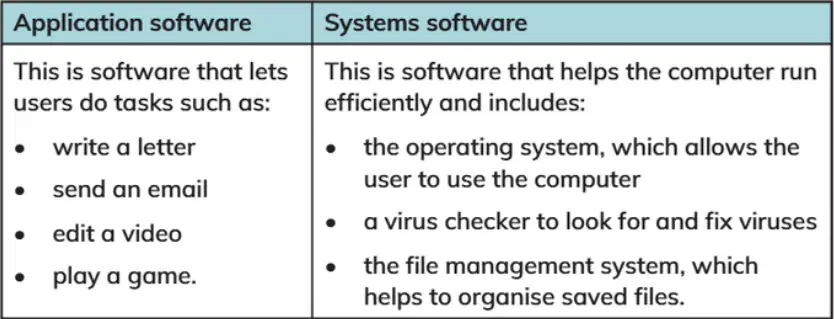
Which type of systems software allows a user to organise their files into folders so they can find them again easily?
operating system
spreadsheet software
file management system
Virus Checker
Which device is used for movement?
Motion sensor
Microphone
Heat sensor
Keyboard
What is the difference between data and information in a computer system?
Data is put into the computer system, and information is what we get out.
Data and information are the same thing.
Information is put into the computer system, and data is what we get out.
Data is only used for games.
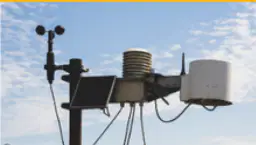
What do scientists use data loggers for in weather stations?
To record rainfall, temperature, and wind speed
To print weather reports
To display weather images
To play weather sounds
Which of the following statements is true about computers and files?
Computers store data in files.
Computers store data in books.
Computers store data in clouds only.
Computers do not store data.
If you want to save space on your computer, which type of file should you use more?
Text files
Video files
Sound files
Image files
What is one thing you can understand from learning about file sizes?
Different types of files have different sizes.
All files are the same size.
File size does not matter.
Only pictures have file sizes.
Why are robots useful for jobs that repeat over and over again?
Robots do not get tired and can work continuously
Robots like to play games
Robots can sing songs
Robots can fly
What is virtual reality?
Creating 3D computer worlds that people can enter
Building real houses
Writing books
Cooking food
Which of the following is an example of using an algorithm in everyday life?
Playing a game using instructions
Watching TV
Sleeping
Running fast
What is another name for a forever loop?
Indefinite loop
Definite loop
Short loop
Quick loop
How does repetition help an algorithm?
It makes the algorithm shorter and uses fewer instructions.
It makes the algorithm longer and harder to follow.
It removes important steps from the algorithm.
It makes the algorithm stop working.
Which block in Scratch is used to create indefinite loops?
Forever block
Start block
Repeat block
End block
What should you do first when developing a repeating algorithm?
Decide on the starting point
Write REPEAT FOREVER
Think about random elements
Predict the output
Why is it important to predict the outcome of an algorithm?
To identify possible errors before creating the program
To make the algorithm longer
To avoid using loops
To skip steps in the algorithm
What is the first step in the algorithm shown in Activity 1?
Add 10 to the number.
Think of a number between 1 and 10 and write it on your paper.
Subtract 3.
Multiply by 2.
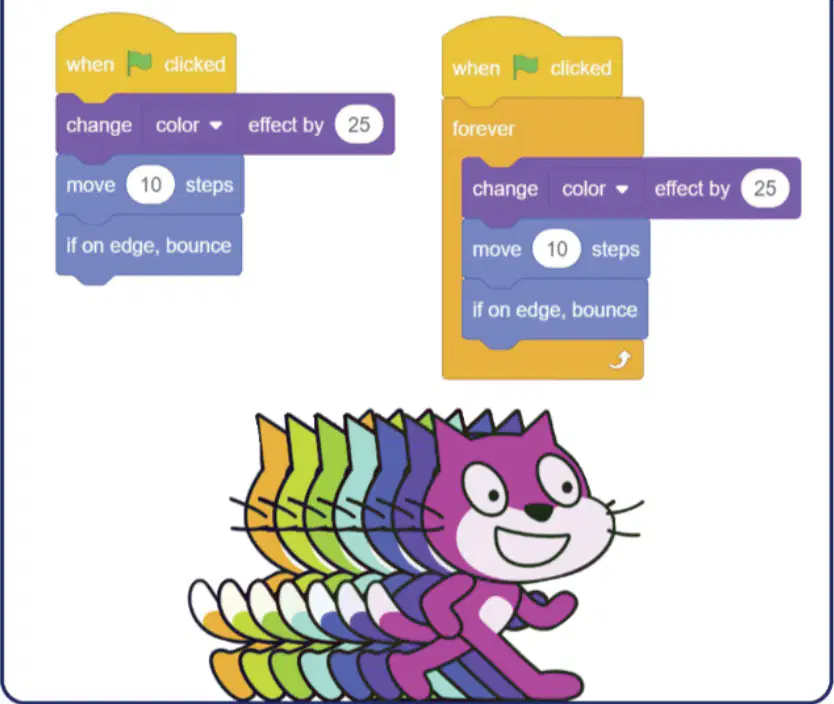
There are 2 type of program, what is the extra code in the second program?
Change color effect by 25.
Move 10 steps.
Forever block.
If on edge, bounce.
What will happen when the green flag is clicked in the first program?
The sprite will move and bounce only once.
The sprite will move and bounce forever.
The sprite will disappear.
The sprite will change size.
Which block in Scratch can be used to make actions repeat forever?
Forever block
Start block
Colour block
Clone block
How does iteration help when writing instructions or code?
It repeats the instruction so you don’t have to write it many times.
It makes the code longer.
It makes the code harder to read.
It removes all instructions.
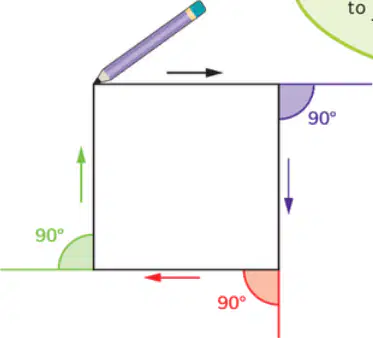
What type of shape will the code create on the screen?
Triangle
Circle
Square
Rectangle
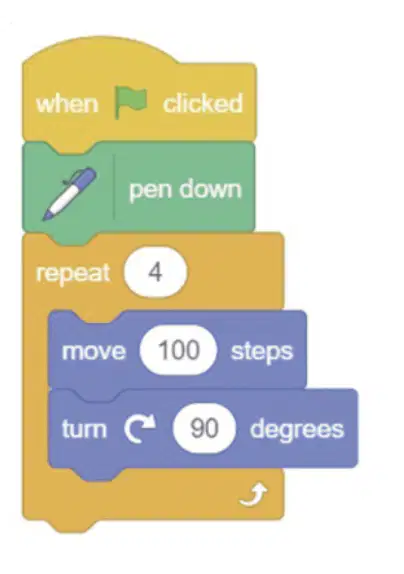
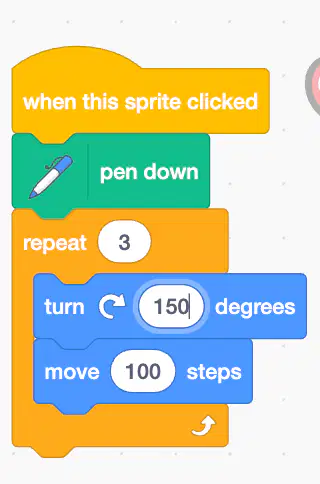
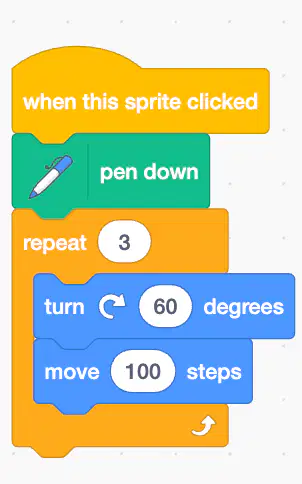
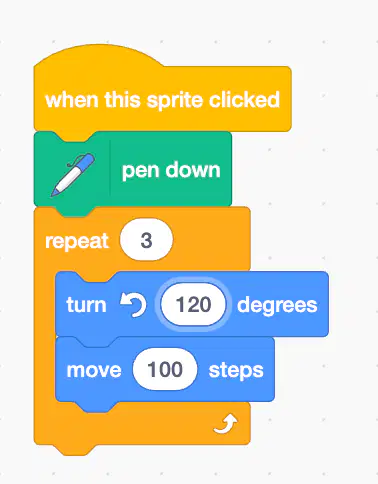
What is the result of this instruction on Scratch?
triangle
rectangle
square
circle
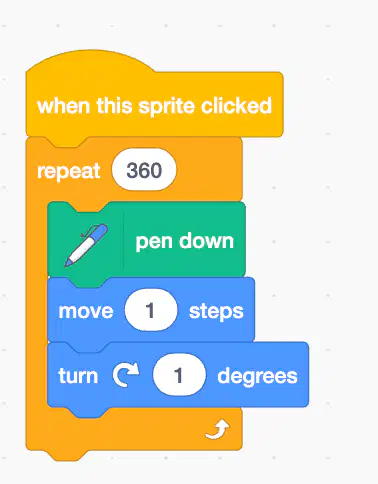
What is the result of this instruction on Scratch?
triangle
rectangle
square
circle
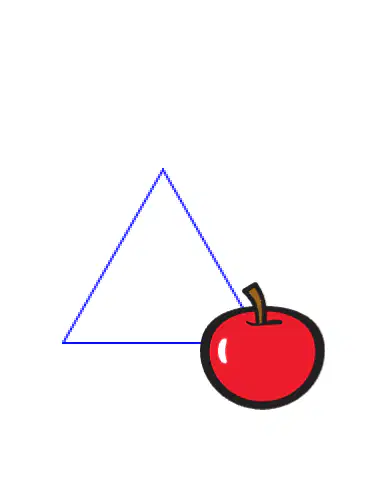
Which command is correct to draw this picture?
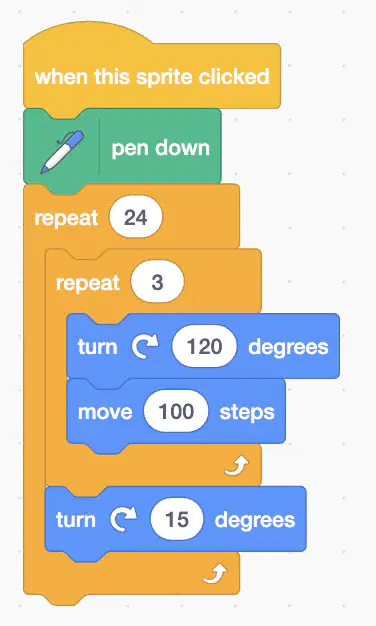

What will happen when the green flag is clicked
the sprite will rotate 15 times
the sprite will rotate 10 times
the sprite will move 15 spaces
the sprite will move 10 spaces
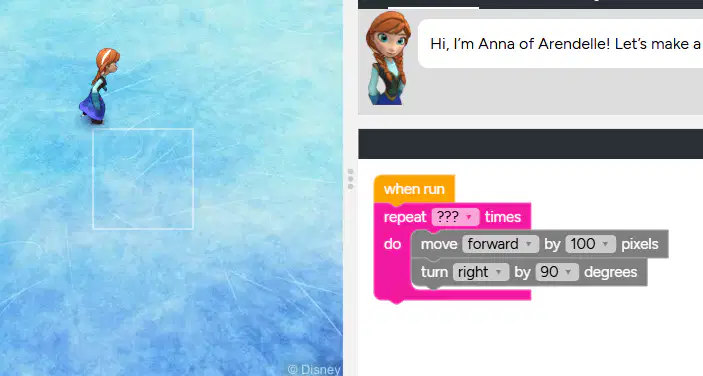
What is the correct number on to fill the questions?
2
2
4
5
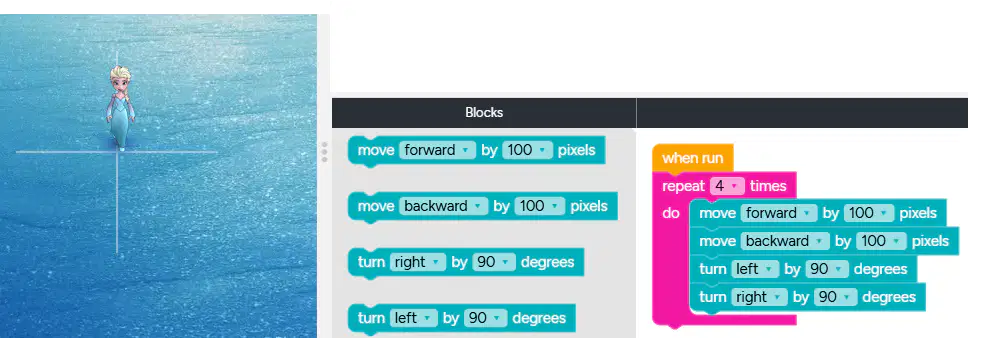
Which code must be remove to make the object move to all the path?


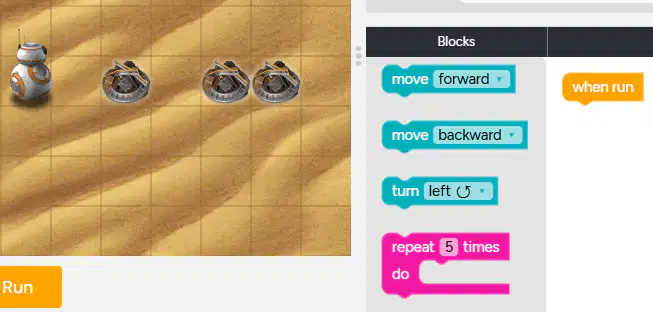
Which code must be choose for moving this BB-8 robot?



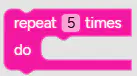

Re-arrange this code to make the BB-8 take all the scrap metal.
1-2-3-4
2-1-3-4
1-3-2-4
2-1-4-3
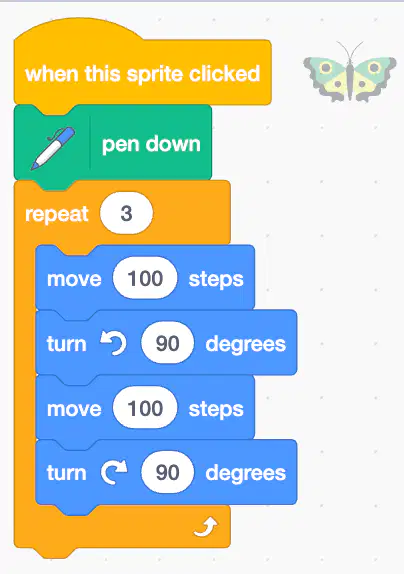
What is the result of this code?