
 Worksheets
Page 1
Total questions: 30
Worksheet time: 15mins
Which part of a computer helps you interact using pictures and menus?
Internet web browser program
Random Access Memory storage
Central Processing Unit hardware
Graphical User Interface software
What is another name for a desktop background on a computer?
Browser theme
Wallpaper
Taskbar skin
Screen saver image
Where do you find the command to set the picture as desktop background in Paint?
On the Paint button menu
In the zoom controls
Under the view tab
Inside the color palette
If you want a photo as your desktop background, what should you do?
Convert it to a theme
Place it in Downloads folder
Rename it to wallpaper.txt
Open it in Paint and set background
What is the first action to change the screen saver on a Windows computer?
Open Personalization window
Click the Close button
Select Apply option
Press Resume checkbox
Which step comes right after opening the Personalization window when setting a screen saver?
Click Screen Saver option
Choose OK or Apply
Set the wait time
Close the window
Which small area on the right end of the taskbar shows the clock and notifications?
Start menu panel on the left
Desktop wallpaper center
System tray near the clock
File Explorer top bar
Which option lets you change the computer’s date and time settings?
Change date and time settings
Network sharing center
Personalization themes tab
Display resolution menu
If you want to view, copy, or move files, which tool should you open?
Date and Time dialog
Screen saver settings
Windows Explorer tool
Control Panel network
Which feature shows a calendar and lets you adjust the clock?
Windows Media Player
Date and Time dialog box
Paint drawing window
Task Manager performance tab
Which example is a type of file mentioned in the material?
Text file with words
Keyboard layout file
Wallpaper theme pack
Mouse driver setting
Which item shows the kind of program that made the file, like .docx or .xlsx?
Secondary name
Primary name
Navigation pane
Folder icon
What is a folder mainly used for on a computer?
To delete programs
To print documents
To group related files
To edit file text
What can the Change your view drop-down help you do?
Install new folders
Rename the computer
Change the file type
Switch how files are shown
To select a single file or folder, what is the simplest action to perform?
Click the item once
Double-click the item
Right-click the item
Drag around the item
What is the first step to create a new folder in Windows Explorer?
Right‑click the desktop background
Open the Control Panel window
Click New on the ribbon bar
Click the folder in the left pane
Which menu item do you select after clicking New to finish making the folder?
File
Shortcut
Library
Folder
Which statement best describes the difference between the left and right panes in Windows Explorer?
Left shows drives; right shows contents
Left shows printer settings; right shows apps
Left shows wallpaper; right shows taskbar
Left shows recycle bin; right shows clock
Copying a folder means what?
Moving it to a new place
Deleting it from its place
Making another copy elsewhere
Renaming it in the same place
Which action keeps the original folder and also creates a duplicate?
Rename the folder
Delete the folder
Copy the folder
Move the folder
If you press Shift + Delete by mistake, what happened to the file?
Moved to Documents
Renamed automatically
Permanently removed
Sent to Recycle Bin
What is the Address bar used for when moving files?
To type or click a folder path
To adjust screen brightness
To open the printer settings
To rename selected files
Which step should come first when moving a folder to another location?
Open printer settings
Click Paste in destination
Select the folder to be moved
Choose Cut from Organize
Where do you right-click to paste a cut file into the destination?
On the taskbar area
On the destination folder
On the source folder icon
On the Recycle Bin
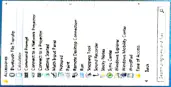
Which item is NOT listed as a Windows Accessory on the page?
Paint
Calculator
Notepad
Spreadsheet
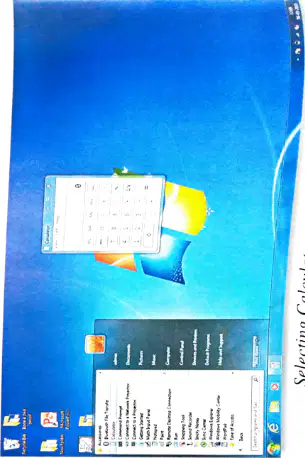
What is the first step to open an Accessory using the Start menu?
Click All Programs
Click Start
Click Accessories
Click Calculator
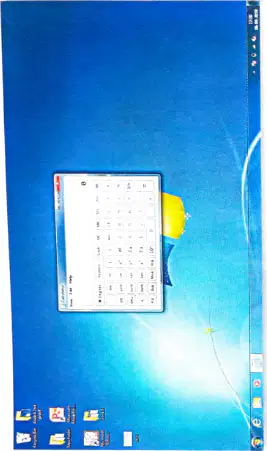
Which calculator feature helps find time between two dates?
Unit conversion tool
Date calculation option
Memory clear button
Standard mode switch
Which task is more advanced in WordPad than in Notepad?
Insert an image into a document
Record audio directly in a file
Compile code into an application
Animate pictures frame by frame
Where can you see the built-in Calendar and Clock on a computer?
Left end of taskbar
Right end of taskbar
On the desktop background
Inside Windows Explorer
A primary name and a secondary name of a file are also called what?
Program and accessory
Filename and file extension
Desktop and wallpaper
Folder and subfolder

