
 Worksheets
Adobe Illustrator Quiz
Total questions: 50
Worksheet time: 40mins
What is the primary function of the Shape Builder tool in Adobe Illustrator?
To adjust the color of objects
To export files in different formats
To add text to a design
To create shapes by combining or subtracting shapes
Which tool in Adobe Illustrator allows you to combine multiple shapes into one?
Eraser Tool
Gradient Tool
Shape Builder Tool
Pen Tool
What is the file format commonly used for saving vector graphics in Adobe Illustrator?
.png
.jpg
.mp4
.ai
What is the advantage of using vector graphics in design?
They are resolution-independent
They use less memory than raster images
They are easier to edit than raster images
They are compatible with all software
Which Adobe Illustrator tool is used to adjust the transparency of an object?
Transparency Panel
Gradient Tool
Opacity Tool
Shape Builder Tool
What is the shortcut key for the Shape Builder tool in Adobe Illustrator?
Ctrl + S
Alt + T
Shift + M
Ctrl + M
Which panel in Adobe Illustrator allows you to manage layers?
Properties Panel
Layers Panel
Tools Panel
Artboard Panel

What is the name of this tool?
Selection
Direct Selection
Scaler
Crop

In Adobe Illustrator, what is the primary function of the Direct Selection tool?
To select entire objects
To select and move anchor points or paths
To group objects together
To select similar objects based on color
What is the shortcut key to access the Shape Builder Tool?
CTRL C
SHIFT M
ALT Z
What does the Shape Builder tool do?
creating new shapes and erasing unwanted shapes
attaches a document
builds anchors and handles to a certain path
This tool activates all anchor points in an object or group simultaneously, allowing you to move an object without altering its shape.
shape builder tool
basic shape tool
selection tool

What is the shortcut key to group objects?
CTRL C
Ctrl V
Command G

Used to select, move, or modify paths or shapes. With this tool, you can select individual handle or anchor points in a path or shape and manipulate them.
Shape Builder Tool
Direct Selection Tool
Basic Shape Tool
Which key should we press to remove unwanted shapes when using the Shape Builder tool?
Shift
Ctrl
Option/Alt
Which key do we press to select multiple objects or widgets?
Shift
Ctrl
Alt
Draws squares and rectangles with rounded corners.
Rectangular tool
Ellipse tool
Polygon tool
Rounded Rectangle tool
Draws circles and ovals (L).
Polar Grid tool
Ellipse tool
Circular tool
Oval tool
Adjusts the starting and ending points and angle of gradients within objects, or applies a gradient to objects. (G)
Eyedropper tool
Mesh tool
Gradient tool
Paintbrush tool
Which tool in Adobe Illustrator is used to sample and apply colors?
Eyedropper tool
Gradient tool
Pen tool
Brush tool
What is the primary function of the Type Tool in Adobe Illustrator?
Create and edit text
Draw shapes
Apply filters
Adjust colors
What is the primary function of the Eyedropper Tool in Adobe Illustrator?
Sampling and applying colors
Adding text and typography
Adjusting transparency and opacity
Creating shapes and objects
Where is the toolbar that contains tools for selecting, drawing, and viewing located by default?
On the right side of the workspace
On the left side of the workspace
Above the workspace
Below the workspace
To reset the Essentials workspace to the default panel locations, you can:
Choose New Workspace from the Workspace Switcher
Choose Window > Reset Workspace > Essentials
Choose Window > Workspace > Reset Essentials
All of these answers are correct
This is a free question.
Click me!
Not me.
Not me.
Not me.
Which option allows you to change the color inside a shape?
fill
stroke
color
shape

Draws regular multi-sided shapes.
Multi-sided tool
Vertical tool
Hexagonal tool
Polygonal tool

What does this icon mean?
The color of the stroke is red.
The color of the stroke is none.
The color of the stroke is white.
The color of the stroke is red and white.

Which panel is this?
Swatches
Layers
Pathfinder
Gradient
How do you zoom out using the Zoom tool?
Shift-click
Option-click (Mac OS) or Alt-click (Windows)
Command-click (Mac OS) or Control-click (Windows)
Double-click

What does this tool do?
rotate an object
increase the size of an object
change the color of the object
Which additional key should be pressed to create a perfect square using the rectangle tool?
Tab
Control
Option
Shift

Name this tool (Shift + W) Hint: it starts with W
Warp tool
Wind tool
Width Tool
Water tool

I need to tweak ONE ANCHOR POINT to the left, which tool do I use?


I want to select ALL of these shapes and resize them at once. Which tool do I need?


Which two options are available in the Transform panel? CHOOSE TWO.
Rotate
Erase
Shear
Color
Flipping an object can be done with
Copy and Paste
Paste In Place
Transform > Reflect
Selection Tool
What is the shortcut to undo a change?
Control + V
Control + Z
Command + V
Command + Z
If you make a mistake or want to revert a change, you can use _________ > __________.
EDIT > Undo
OBJECT > Transform
WINDOW > Navigator
VIEW > Reverse

What tool is this?
Thumb tack tool
Place holder tool
Puppet Warp Tool
Warp Tool

What tools would you use to match the images?
Selection tool and Puppet Warp tool
Direct Selection tool and Puppet Warp tool
Puppet Warp tool
None of the above

What shape tool is used to create this character?
Line Segment Tool
Star Tool
Ellipse Tool

What Stylize tool is used to soften the edges?
Drop Shadow
Feather
Inner Glow
Round Corners
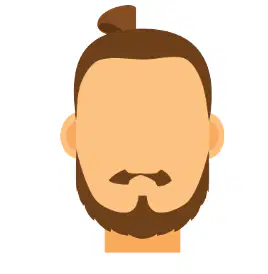
What tool is used to change the mustache?
Warp tool
Puppet tool
Width Tool
Shape tool

What tool is this?
Scale tool
Rotate tool
Shear tool
Reflect Tool

