
 Worksheets
SECTION A: Choose and circle the correct answer (10 Marks)
Total questions: 40
Worksheet time: 20mins
The first calculating machine developed in China was:
Pascaline
Abacus
Napier's Bones
Difference Engine
Which generation of computers used vacuum tubes?
First generation
Second generation
Third generation
Fourth generation
A group of 8 bits is called:
Nibble
Byte
Kilobyte
Megabyte
RAM stands for:
Read Access Memory
Random Access Memory
Rapid Access Memory
Ready Access Memory
The process that starts the operating system when you turn on a computer is called:
Processing
Loading
Booting
Starting
Which type of memory is volatile in nature?
ROM
RAM
Hard disk
Flash drive
7. BIOS stands for:
Basic Input Output System
Binary Input Output System
Basic Internet Output System
Binary Internet Output System
A compiler is used to translate:
Assembly language to machine language
High-level language to machine language
Machine language to assembly language
Binary to decimal
Pressing the Restart button while the computer is already on is called:
Cold boot
Warm boot
Soft boot
Hard boot
Which operating system provides a graphical environment?
DOS
CUI
Windows (GUI)
Command line
The (a) was invented by Blaise Pascal in 1642.
The brain of the computer is the (a) .
A group of 4 bits is called a (a) .
(a) memory is permanent and non-volatile in nature.
An operating system that supports multiple users at the same time is called a (a) operating system.
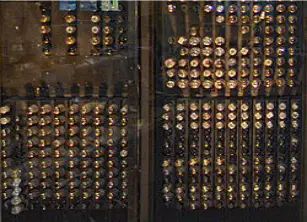
Identify the generation of computer shown:
First Generation
Second Generation
Third Generation
Fourth Generation
Which of the following diagrams correctly shows and labels the functional components of a computer?
A diagram showing Input Unit, Output Unit, Memory Unit, and Central Processing Unit (CPU) connected together.
A diagram showing only a monitor and keyboard.
A diagram showing a printer, scanner, and mouse.
A diagram showing a CPU connected to a single hard disk.
The difference between RAM and ROM is:
RAM is volatile memory, while ROM is non-volatile memory.
RAM stores permanent data, while ROM stores temporary data.
RAM is used only for graphics, while ROM is used for processing.
RAM and ROM are both types of permanent storage.
Select two characteristics of first generation computers.
Used vacuum tubes and were very large in size
Used microprocessors and were portable
Had touch screens and wireless connectivity
Used artificial intelligence and cloud computing
Booting refers to the process of starting a computer. What are the two types of booting?
Cold booting and warm booting
Hard booting and soft booting
Fast booting and slow booting
Primary booting and secondary booting
The difference between a compiler and an interpreter is:
A compiler translates the entire program before execution, while an interpreter translates and executes line by line.
A compiler executes code line by line, while an interpreter translates the whole program before execution.
Both compiler and interpreter execute the program in the same way.
A compiler and an interpreter are the same.
Select two functions of an operating system.
Managing hardware resources and providing user interface
Compiling source code and debugging programs
Designing web pages and hosting websites
Encrypting files and sending emails
Unscramble the term: 'tneorwok'
(a)
Unscramble the term: 'sotemr'
(a)
Unscramble the term: 'sytsems'
(a)
Unscramble the term: 'cimputre'
(a)
Unscramble the term: 'nigatcno'
(a)
Which of the following correctly describes the differences between system software and application software, along with three examples of each?
System software manages hardware and provides a platform for application software; examples include Windows, Linux, and macOS. Application software performs specific tasks for users; examples include MS Word, Photoshop, and Chrome.
System software is used for entertainment purposes; examples include games, music players, and video editors. Application software controls hardware; examples include BIOS, device drivers, and firmware.
System software is only used on mobile devices; examples include Android, iOS, and Windows Phone. Application software is only used on computers; examples include Excel, PowerPoint, and Notepad.
System software is a type of application software; examples include MS Word, Excel, and PowerPoint. Application software is a type of system software; examples include Windows, Linux, and macOS.
An operating system is:
a software that manages computer hardware and software resources
a device used to store data
a programming language
a type of computer virus
B. Name three functions that an operating system performs.
Managing hardware resources, providing user interface, running applications
Designing web pages, sending emails, creating spreadsheets
Building computer hardware, manufacturing chips, assembling devices
Writing novels, painting pictures, composing music
It is important to shut down a computer properly because:
It helps prevent data loss and system errors.
It makes the computer run faster.
It increases the size of the hard drive.
It automatically updates all software.
D. The consequences of not shutting down a computer properly are:
Loss of unsaved data
Increase in internet speed
Improved battery life
Faster computer startup
E. Select the correct steps to shut down a computer safely.
Click on the Start menu, select 'Shut Down', and wait for the computer to turn off.
Press and hold the power button until the computer turns off immediately.
Unplug the computer from the power source without shutting down.
Close all programs and turn off the monitor only.
It is necessary to update your computer regularly because:
It helps protect against security threats and improves performance.
It makes your computer slower.
It deletes important files automatically.
It prevents you from installing new software.
If your computer freezes, you should:
Restart the computer immediately.
Unplug the computer without shutting it down.
Wait for a few minutes to see if it responds, then try pressing Ctrl+Alt+Del.
Ignore the problem and continue working.
What is the primary function of the CPU in a computer?
To store data permanently
To display graphics on the screen
To process instructions and manage operations
To connect to the internet
Which of the following is a type of non-volatile memory?
Registers
RAM
Cache Memory
ROM
Which of the following is an example of application software?
Linux
Windows
Microsoft Excel
BIOS
Which generation of computers is characterized by the use of transistors?
Fourth generation
First generation
Third generation
Second generation
Which of the following is a function of the operating system?
Creating hardware components
Designing software applications
Managing files and directories
Manufacturing computer parts

