
NEW
Font size
 Worksheets
Internet Safety and Information Retrieval Quiz
Total questions: 75
Worksheet time: 38mins
What is one way to find information using the world wide web?
By guessing the information
By using a web search
By asking a friend
By reading a book
What should you do if you see unsuitable content or behavior on the internet?
Ignore it completely
Share it with others
Report your concerns
Save it for later
Why is the world wide web considered a great source of information?
It is always offline
It provides access to a wide range of information
It only contains games
It is only for entertainment
What is one way to stay safe when using the world wide web?
Share personal information freely
Avoid reporting concerns
Spot unsuitable content and behavior
Ignore safety tips
What does "WWW" stand for in relation to the internet?
World Wide Web
World Wide Window
Web Wide World
World Web Wide
Approximately how many people use the internet worldwide?
2 billion
4 billion
6 billion
8 billion
How many questions does the Google search engine answer every day?
5 billion
6 billion
7 billion
8 billion
What is a "search engine" used for?
To browse books
To find information online
To play games
To send emails
Which of the following is an example of a "web browser"?
Google Chrome
Microsoft Word
Adobe Photoshop
Excel
What is the world wide web commonly shortened to?
www
web link
multimedia
website
What does a web page usually contain?
Only text
Text, images, video, sound, and animations
Only images
Only animations
What is the term used for combining several media formats on a web page?
Web link
Multimedia
Website
Spiral back
What is a web link?
A collection of web pages
A word, picture, or button that takes you to another web page
A type of multimedia
A government-owned website
Who can own a website?
Only governments
Only newspapers
Anyone
Only TV channels
What is browsing on the web?
Using a web browser to search for information
Moving from one website to another to find information
Downloading files from the internet
Sending emails to friends
What is a web browser?
A device used to connect to the internet
A special application used to browse the internet
A type of computer hardware
A tool for creating websites
Which of the following is NOT an example of a web browser?
Internet Explorer
Firefox
Google Chrome
Microsoft Word
Who invented the World Wide Web?
Tim Berners-Lee
Bill Gates
Steve Jobs
Mark Zuckerberg
In what year was the World Wide Web invented?
1985
1990
1995
2000
What activity is suggested for students to learn about internet usage?
Create a poster about the internet
Make a questionnaire to find out how classmates use the internet
Write an essay about the history of the internet
Design a website
What is the purpose of a search engine?
To create web pages
To find information by typing a question
To design websites
To store personal data
What is the recommended length for a web search question?
One word
Three to five words
Ten words
A full sentence
What is an example of key words for a web search about the world record in 100 meters for women?
Who holds the record?
World record 100 meters women
Fastest runner in the world
Women athletes
What is the best combination of key words for an internet search?
Long sentences with punctuation marks
Short, common words like 'and', 'the', and 'a'
Important key words in the correct order
Random words without any order
Why should punctuation marks be avoided in search queries?
They make the search query longer
They confuse the search engine
They are unnecessary for finding results
They are required for proper grammar
What word did Selina use in the search engine to find pizza recipes?
Margherita
Vegetarian
Pizza
Recipe
What is the purpose of using a minus symbol (-) in a web search?
To add more keywords to the search
To remove specific items from the search results
To highlight important keywords
To sort the search results alphabetically
Which search query would exclude margherita pizza recipes from the results?
pizza recipe vegetarian
pizza recipe vegetarian -margherita
pizza recipe margherita vegetarian
pizza recipe vegetarian +margherita
Which symbol can be used in a search engine to look for the exact text you have typed?
Asterisk (*)
Double quote marks (“)
Exclamation mark (!)
Hash (#)
What does an asterisk (*) help you do in a search engine?
Search for exact text
Search for a word you are unsure about
Search for images
Search for videos
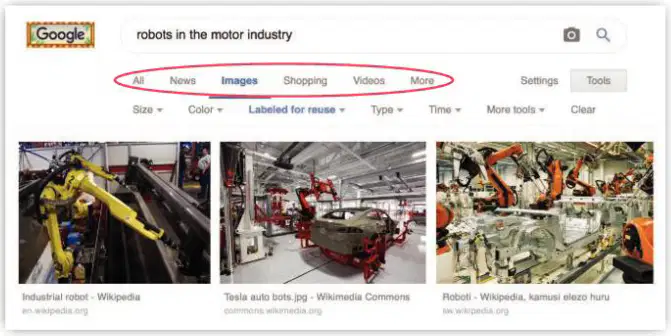
Where can you click to see pictures and videos that match your search?
The 'Shopping' link
The 'Images' and 'Videos' links
The 'Settings' link
The 'News' link
What should you do if you are unsure of the third word in a book title while searching?
Use double quote marks around the title
Use an asterisk (*) in place of the word
Use a hashtag (#) in place of the word
Use an exclamation mark (!) in place of the word
What is the purpose of using double quote marks (“) in a search?
To search for images
To search for videos
To search for the exact text you typed
To search for related topics
What is the purpose of a menu on a website?
To divide the website into sections and provide navigation.
To display advertisements on the website.
To show the website's search results.
To provide links to external websites.
What do links on a website usually do?
Take you to another page on the website.
Display the website's menu.
Open a search box for queries.
Show the website's homepage.
What is the function of the search box on a website?
To search pages within the website.
To search the entire internet.
To display the website's menu.
To provide links to external websites.
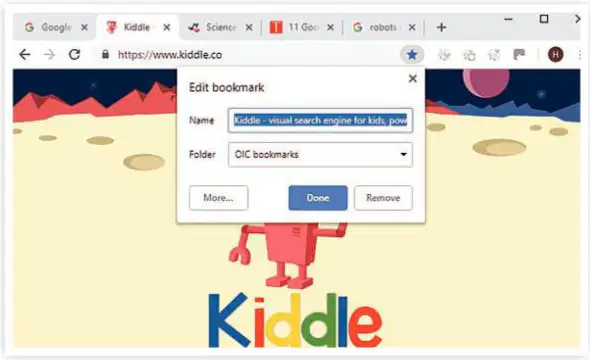
What is the purpose of bookmarks in web browsers?
To save useful websites and web pages for easy access later
To delete websites from your browsing history
To block websites from appearing in search results
To share websites directly with friends
In Lesson 1.5, what did you learn about saving files?
Saving files in folders helps organize information
Saving files deletes unnecessary data
Saving files automatically shares them online
Saving files creates duplicates of the original file
How can bookmarks be organized for better use?
By saving them in folders based on subjects or topics
By deleting old bookmarks regularly
By sharing bookmarks with friends
By renaming bookmarks every week
What activity is suggested to learn more about endangered animals?
Create a bookmark folder for endangered animals
Work in a team to find websites with facts about endangered animals
Write a review of your favorite website about animals
Save websites about animals in your browsing history
What is the extra challenge mentioned in the learning material?
Create a bookmark for the sites used in the activity
Write a review of your favorite website
Save bookmarks in folders for different subjects
Research endangered animals using the internet
What is one of the good sides of using the web?
It always provides correct information.
You can find information and facts to help with homework and projects.
It guarantees safety from unsuitable content.
It prevents you from talking to friends.
What should you do if you find something upsetting or confusing on the web?
Ignore it and continue browsing.
Share it with friends immediately.
Ask for help and act responsibly.
Trust everything you see on the web.
Which of the following is a way to check if the content on the web is true?
Trust the first website you visit.
Check the information against other websites.
Assume all opinions are facts.
Bookmark random websites.
Why is it important to check when the information was written?
To ensure the information is up to date.
To find out who wrote the information.
To bookmark the website.
To avoid reading opinions.
What does "Is it fact or opinion?" mean when checking web content?
Opinions are always true.
Facts are backed up by opinions.
Opinions should be backed up by facts.
Facts and opinions are the same.
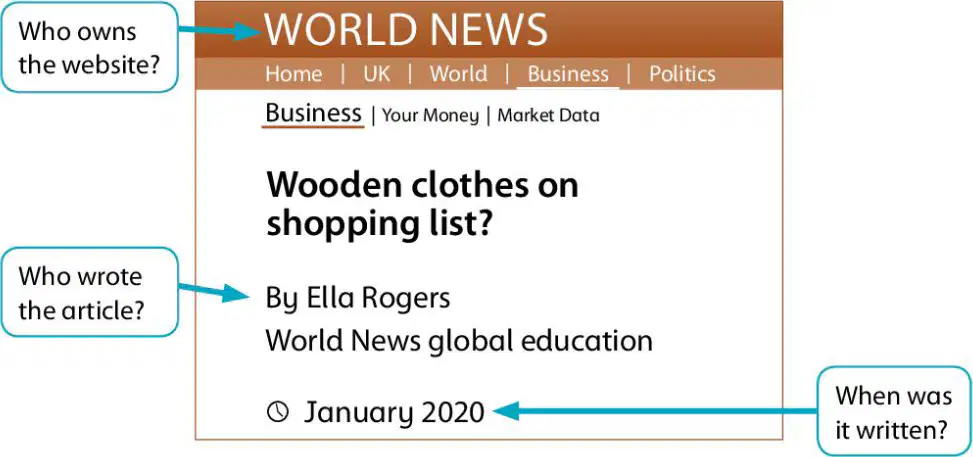
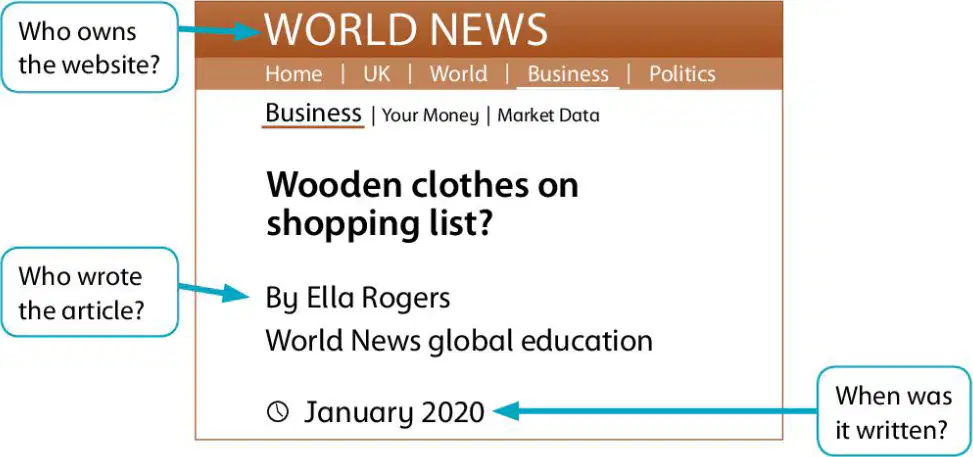
Who owns the website mentioned in the article?
World News
Ella Rogers
January 2020
Wooden Clothes
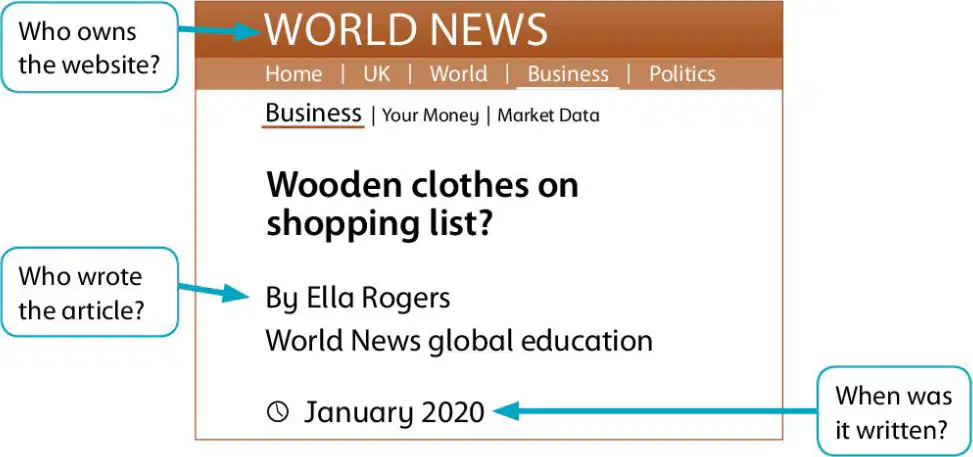
Who wrote the article titled "Wooden clothes on shopping list"?
Ella Rogers
World News
January 2020
Wooden Clothes
When was the article "Wooden clothes on shopping list" written?
January 2020
February 2021
March 2019
December 2020
What should you do if something on the web upsets you or seems confusing?
Close the page and do not look at it again.
Share it with your friends.
Ignore it and keep browsing.
Post about it on social media.
What is one way to report something upsetting on the web?
Tell an adult you trust, like a parent, family member, or teacher.
Keep it to yourself and forget about it.
Delete the upsetting content immediately.
Share it with your classmates.
What is the benefit of using search engines designed for young people?
They show fewer adverts and control the content.
They provide unlimited access to all websites.
They allow you to browse anonymously.
They block all search results.
What should you search for to find child-friendly search engines?
"Child-friendly search engine"
"Search engine for adults"
"Popular search engines"
"Advanced search tools"
What is the safest way to chat online?
Chat with strangers online.
Chat with people you know in real life.
Accept friend requests from strangers.
Share your personal information with strangers.
What should you do if you feel uncomfortable about someone who sends you a message online?
Share your address with them.
Block them.
Open their files.
Add them to your friends list.
What should you avoid sharing with strangers online?
Your favorite color.
Your personal information or photographs.
Your hobbies.
Your favorite food.
What should you do if you receive a file from someone you don’t know?
Open it immediately.
Ask an adult you trust for help.
Share it with your friends.
Save it to your computer.
What do privacy levels on social media and game sites allow you to do?
Decide who can see what you share online.
Add strangers to your friends list.
Share files with everyone.
Remove all security settings.
How should you behave online?
Be kind and respectful.
Ignore everyone.
Be rude to strangers.
Share personal information.
What should you do if someone you know is upset or frightened by something they have seen online?
Ignore them.
Advise them to talk to a trusted adult.
Tell them to share their feelings online.
Ask them to delete their account.
What should you do if something online scares or upsets you?
Ignore it and hope it goes away.
Tell a trusted adult, such as a family member or teacher.
Share it with your friends online.
Keep it to yourself and delete the content.
Why is it important to write down what happened when you face an online problem?
To share it with strangers online.
To remember the details when talking to a trusted adult.
To post it on social media for advice.
To forget about the incident quickly.
What is one way to manage your privacy settings online?
Ignore privacy settings completely.
Ask for help from a trusted adult.
Share your passwords with friends.
Use the same password for all accounts.
What should you do if you see a friend acting irresponsibly online?
Ignore their behavior.
Share your knowledge of online safety with them.
Encourage them to continue their actions.
Report them to the police immediately.
What is a web browser used for?
To create websites
To search and access information on the internet
To edit documents
To play video games
Why should you check when information on a website was written?
To ensure the website is visually appealing
To verify the information is up-to-date and relevant
To find out the author’s name
To check the website’s popularity
Who should you talk to if you are upset about something you see or read online?
A trusted adult or teacher
A stranger online
A website administrator
A search engine
What is a bookmark and what is it used for?
A tool to save and quickly access favorite websites
A feature to block websites
A tool to edit website content
A feature to share websites with friends
What steps should you take if someone sends you an upsetting message online?
Ignore the message and delete it
Respond angrily to the sender
Report the message and talk to a trusted adult
Share the message with friends
List three things you can do to check if the information you find on a website is reliable.
Check the website’s design, popularity, and advertisements
Verify the author’s credentials, check the publication date, and cross-check with other sources
Look for colorful images, user reviews, and social media links
Check the website’s domain, font style, and number of visitors
List four things you can do to stay safe online.
Use strong passwords, avoid sharing personal information, report suspicious activity, and think before clicking on links
Share personal information, click on unknown links, and trust all websites
Use weak passwords, ignore privacy settings, and trust strangers online
Share passwords with friends, click on pop-up ads, and ignore security warnings
Which website is suggested for finding advice on staying safe on the internet?
www.childnet.com/young-people/primary
www.safekids.com
www.internetsecurity.com
www.websafety.org
What should you do after finding advice from other websites about staying safe online?
Bookmark the best ones in a folder called ‘Staying safe online.’
Share the links with your friends.
Print the information and keep it in a file.
Write a blog post about the advice.
What is the purpose of creating an information sheet based on your research?
To help younger children in your school stay safe on the internet.
To submit it as a homework assignment.
To share it with your teacher.
To use it for a class presentation.
What should you do if you feel unsure about any part of the unit?
Re-read the unit and try the test and activities again.
Skip the unsure parts and move on.
Ask your friends for help.
Write down your doubts and leave them unresolved.

