
NEW
Font size
 Worksheets
loops
Total questions: 24
Worksheet time: 12mins
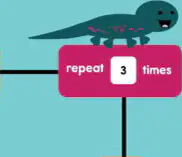
Look at the path blocks and the red block that says repeat 3 times. What does a repeat block do?
Skips all the steps completely
Runs steps only once
Runs steps a set number of times
Runs steps forever without stopping
Which block keeps doing the steps and never stops by itself?
Start block for one action
Repeat block with a number
Forever block that loops
Stop block at the end
Day comes, then night, and it happens again and again. What is this called?
A changing loop pattern
A single event once
A random surprise day
A broken time line
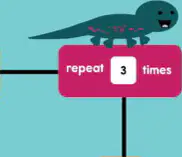
You want a character to jump five times without dragging five jump blocks. Which choice is best?
Use a repeat block set to five
Delete all the jump blocks
Use a forever block for jumping
Place one jump block once
Where can you find the repeat and forever blocks in Scratch?
In the Control category menu
In the Sound category list
Inside the Events category tray
Under the Sensing category tab
What does the repeat block do when you put steps inside it?
Makes the steps run slower
Runs the steps a set number of times
Runs the steps one time only
Stops the steps from running
A script should keep moving forever without stopping. Which block should you use?
Use the forever loop block
Use the sound play block
Use the stop all actions block
Use the repeat ten times block
Which block makes the sprite go forward in Scratch?
Wait seconds block
Move steps block
Go to position block
Turn degrees block
How many degrees should the sprite turn to make a square corner?
120 degrees turn
90 degrees turn
60 degrees turn
45 degrees turn
You want the sprite to travel one side of a square. What two blocks do you use in order: first to go straight, then to turn?
Go to then turn
Turn then move steps
Move steps then turn
Wait then go to
To complete all four sides without dragging the same blocks many times, what idea should you use?
Pick random position
Add a sound
Change the costume
Repeat the steps
What does the repeat block help the sprite do when drawing a square?
Do the same steps many times
Move only one single step
Stop the script right away
Change the sprite’s costume
How many times should the square path steps run to make a full square?
Two times total
Three times total
Five times total
Four times total
You place move 200 steps, turn 90 degrees, and wait 1 second inside a repeat. What should you change to finish a square?
Set repeat to 4 times
Set repeat to 2 times
Remove the wait block
Turn 45 degrees instead
Why add a wait 1 seconds block between move and turn for the square path?
To make the sprite jump higher
To stop the program forever
To pause so we can see movement
To change the sprite’s color
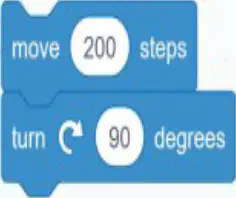
Which block makes the sprite move forward in the script shown?
turn 90 degrees block
wait 1 seconds block
move 200 steps block
forever control block
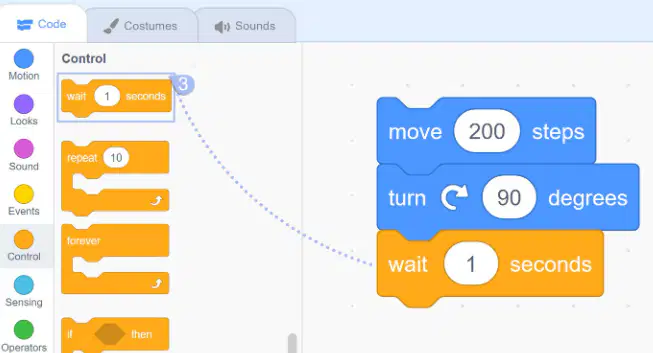
You want the sprite to keep walking the same square over and over. Which block should you add around the steps?
go to random position block
turn 15 degrees block
repeat 10 control block
forever control block
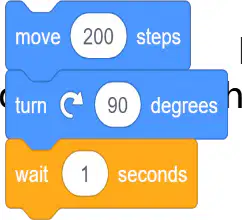
After the sprite moves straight, what turn makes a square corner?
turn 180 degrees back
turn 30 degrees left
turn 5 degrees right
turn 90 degrees right
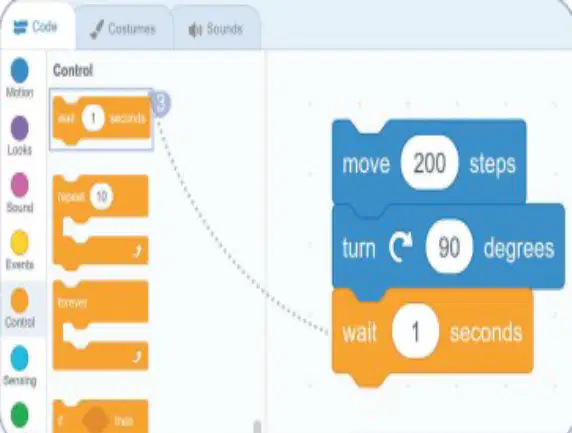
You place move, turn, and wait inside a forever block. What will the sprite do?
Move once then stop
Turn without moving forward
Wait forever without turning
Keep tracing a square path
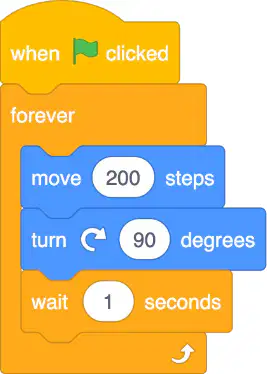
Look at the code blocks in the picture. What starts the sprite moving along the square path?
Clicking on the stage background
Typing the sprite’s name
Dragging the move block again
Pressing the green flag button
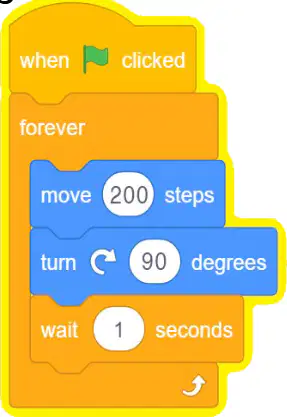
Why does the yellow outline stay around the blocks while the sprite moves?
The blocks are turned off
The sprite is paused now
The flag is hidden now
The program is still running

If the sprite does not move after you press the green flag, what should you check first?
Make the stage color darker
Connect when clicked to forever
Change the sprite’s costume
Delete the wait block quickly
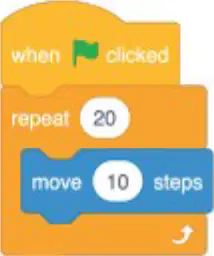
Look at Sprite 1: it repeats 20 times and moves 10 steps each time. How many total steps does Sprite 1 move?
200 steps total movement
150 steps total movement
100 steps total movement
250 steps total movement
Two sprites use repeat blocks. Sprite 1 repeats 20 times moving 10 steps. Sprite 2 repeats 10 times moving 20 steps. Which statement is true when the green flag is clicked?
Both sprites move different total distances
Sprite 2 moves less than Sprite 1
Both sprites move the same total distance
Sprite 1 moves less than Sprite 2

