
 Worksheets
Drivetrain Configuration and Functionality Quiz
Total questions: 10
Worksheet time: 5mins
Which of the following is NOT true of a Drivetrain?
It consists of two or more motors
It needs to be configured in VEXcode IQ
It makes you have to code individual motors in order to drive your robot forward
It makes it easier for you to code your robot to drive or turn specific distances
Which of the following is the correct order of steps to configure a Drivetrain in VEXcode IQ?
Select the [Drive] block, Select Help, Drag the [Drive] block into your project
Open the Devices Window, Select ‘Add a Device’, Select ‘2 Motor Drivetrain’, Select the ports on the Brain that your motors are plugged into, Select ‘Done’
Open the File menu, Select ‘Open Examples’, and select a project
Open the Devices Window, Select ‘Add a Device’, Select ‘Bumper Switch’, Select ‘Done’
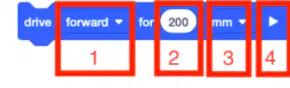
Which part of the [Drive for] block do you use to change the distance the robot will travel?
1
2
3
4
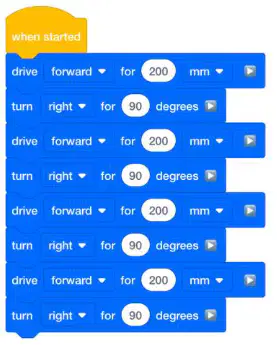
Which of the following best describes what the robot will do when this project is run?
The robot will drive forward for 200mm then turn right 90 degrees, four times, to drive in a square.
The robot will drive forward 200mm, then turn right 180, then drive back to its starting position.
The robot will open the ClawMotor 90 degrees, then close it 90 degrees, four times.
The robot will turn left 90 degrees four times, to rotate in a circle.
What is the purpose of configuring a Drivetrain in VEXcode IQ?
To make the robot move forward and backward only
To simplify coding for driving and turning specific distances
To connect the robot to the computer
To enable the robot to perform claw movements
Spin for blocks are used to code which of the following in VEXcode IQ?
A Bumper Switch
A Touch LED
A Drivetrain
An individual motor or motor group
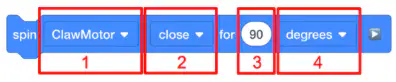
Which part of this [Spin for] block do you use to change the direction the ClawMotor moves?
1
2
3
4
Where can you label your motor and the direction it spins in VEXcode IQ, to make it easier to code your robot?
Robot configuration
Drivetrain
Help
Toolbox
Which of the following best describes path planning?
The process of guessing and checking your way to a challenge solution with your robot
Identifying general steps needed to accomplish a task, like ‘drive forward then turn left’
The process of decomposing a project into the smallest possible behaviors that you can then attach code to
A cycle of defining, developing solutions, and optimizing your project or robot for competition
Path planning is __________ than guessing and checking to solve a coding challenge or accomplish a task with your robot.
Less effective
More effective
Equally as effective
Ineffective

