
 Worksheets
Scratch Quiz 6B (Pen Functionality)
Total questions: 49
Worksheet time: 25mins
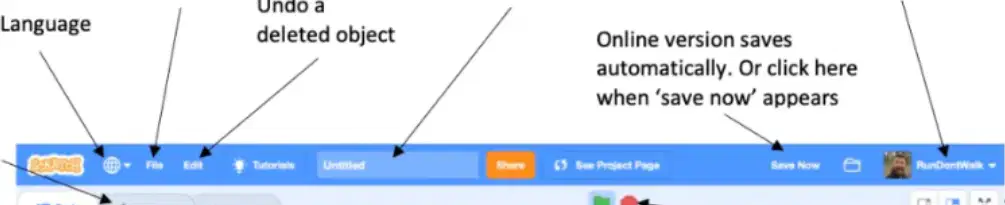
What is the function of the "Stage/Gaming Window" in Scratch?
It displays the code blocks.
It shows the output of the program or the game being created.
It lists all the sprites in the project.
It allows users to change the language of the interface.
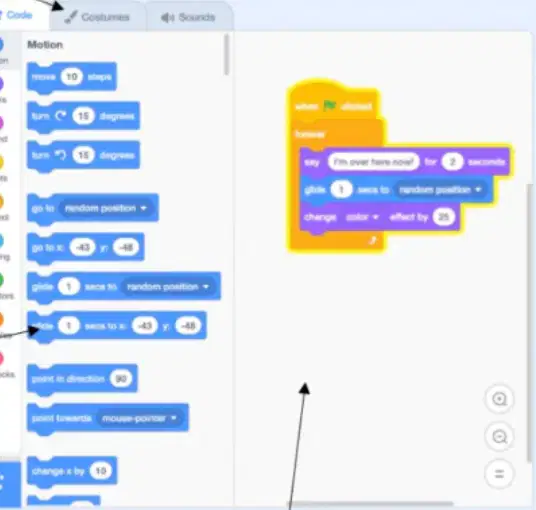
What happens when you select the "Costumes" tab in Scratch?
You can add or change multiple looks for the same sprite.
You can add sound effects to the project.
You can write code for the sprite.
You can delete a sprite.
What is the purpose of the "Backdrops/Stages" section in Scratch?
To create or select a new sprite.
To create or select a new backdrop for the stage.
To delete a sprite.
To change the language of the interface.
What is the significance of the "Trash Icon" in the sprite panel?
It deletes the selected sprite and all its code.
It saves the project.
It changes the language of the interface.
It adds a new sprite to the project.
What does the "Start/Stop Controls" in Scratch do?
It starts or stops the execution of the program.
It deletes the current sprite.
It changes the language of the interface.
It saves the project.
What does the "when green flag clicked" block do in Scratch programming?
Runs blocks when a key is pressed.
Runs blocks when the left mouse button is clicked.
Attaches blocks to run when the green flag is clicked.
Stops all scripts from running.
What does the "point in direction 90" block do?
Moves the sprite to a random position.
Turns the sprite left by 15 degrees.
Points the sprite in a specific direction.
Stops all scripts from running.
Which block is used to pause the program for a specific number of seconds?
Stop all block.
Wait block.
Forever block.
Repeat block.
What does the "delete this clone" block do?
Deletes the current clone so it disappears from the stage.
Creates a clone of a sprite.
Moves the sprite to a random position.
Stops all scripts from running.
What does the "if-then" block do in Scratch programming?
Runs blocks inside only when the conditions are met.
Runs blocks repeatedly for a certain number of times.
Stops all scripts from running.
Moves the sprite to a random position.
Which block is used to follow the mouse cursor or go to a random position?
Go to x: 0 y: 0 block.
Go to mouse-pointer block.
Point in direction block.
Move 10 steps block.
What does the "stop all" block do in Scratch programming?
Stops all scripts from running.
Runs blocks repeatedly for a certain number of times.
Moves the sprite to a random position.
Points the sprite in a specific direction.
Which block is used to run blocks repeatedly for a certain number of times?
Forever block.
Repeat block.
If-then block.
Stop all block.
What does the "direction" block represent in Scratch programming?
The degree of which the sprite is currently facing.
The value of the x position of the sprite.
The value of the y position of the sprite.
The number of steps the sprite moves.
Which block is used to run blocks repeatedly until the red stop button is clicked?
Forever block.
Repeat block.
If-then block.
Stop all block.
What does the "change y by 10" block do?
Moves the sprite up or down by a number of steps.
Moves the sprite left or right by a number of steps.
Points the sprite in a specific direction.
Stops all scripts from running.
Which block is used to go to any position where x is between -240 and 240, and y is between -180 and 180?
Go to mouse-pointer block.
Go to x: 0 y: 0 block.
Point in direction block.
Move 10 steps block.
What does the "x position" block represent in Scratch programming?
The value of the x position where the sprite currently is.
The value of the y position where the sprite currently is.
The degree of which the sprite is currently facing.
The number of steps the sprite moves.
What does the "y position" block represent in Scratch programming?
The value of the x position where the sprite currently is.
The value of the y position where the sprite currently is.
The degree of which the sprite is currently facing.
The number of steps the sprite moves.
Which block is used to turn the sprite left by a certain number of degrees?
Turn left block.
Turn right block.
Point in direction block.
Move 10 steps block.
Which block is used to turn the sprite right by a certain number of degrees?
Turn left block.
Turn right block.
Point in direction block.
Move 10 steps block.
What does the "wait until" block do in Scratch programming?
Pauses the program for some seconds.
Pauses the program until the conditions are met.
Stops all scripts from running.
Runs blocks repeatedly for a certain number of times.
Which block is used to run blocks when a key is pressed on the keyboard?
When green flag clicked block.
When space key pressed block.
When this sprite clicked block.
Forever block.
Which block is used to run blocks when the left mouse button is clicked at a sprite?
When green flag clicked block.
When space key pressed block.
When this sprite clicked block.
Forever block.
What does the "if-then-else" block do in Scratch programming?
Runs blocks inside only when the conditions are met.
Runs blocks below "if" when conditions are met, or blocks below "else" if not.
Stops all scripts from running.
Moves the sprite to a random position.
Which block is the first block for all other blocks that are used to control a clone?
Create clone of myself block.
Delete this clone block.
When I start as a clone block.
Forever block.
What does the "set y to 0" block do in Scratch programming?
Moves the sprite left or right to a position.
Moves the sprite up or down to a position.
Points the sprite in a specific direction.
Stops all scripts from running.
Which block is used to turn the sprite to any direction, such as 0 degrees for left, 90 degrees for up, 180 degrees for right, and 270 degrees for down?
Turn left block.
Turn right block.
Point in direction block.
Move 10 steps block.
Which block is used to run blocks inside repeatedly for a certain number of times?
Forever block.
Repeat block.
If-then block.
Stop all block.
What does the "wait 1 secs" block do in Scratch programming?
Pauses the program for some seconds and then continues.
Pauses the program until the conditions are met.
Stops all scripts from running.
Runs blocks repeatedly for a certain number of times.

The Pen Down block tells ...
The Sprite to start drawing
The Sprite to erase a drawing
The Sprite to stop drawing
The Sprite to draw

The Pen Up block tells ...
The Sprite to start drawing
The Sprite to erase a drawing
The Sprite to draw
The Sprite to stop drawing

Use Erase All at the start of each program if you want ...
To remove any lines
To remove any previous lines
To remove any shapes
To remove steps

This block for
Change the color
Change the size
Choose the pen block


This block is used for
assigning the pen a size of 1
Increasing the size of the pen by 1
This command sets pen colour based on your choice from colour picker.
Set pen color to
Change pen shade to
Pen up
Pen down
Which block do we use to assign pen size to 1
Stamp
Pen down
Set pen size to 1
Change pen color by 10
which command in Scratch that allows a sprite to draw shapes?
Pencil commands
Pen commands
Motion commands
Drawing commands
To increase the the pen size by 1, we use
'Set pen size' Command
'Change pen size' Command
'Pen size' Command
'Change pen' Command

How many times should this be repeated to draw a CLOSED shape?
360
100
4
10

Should you use this script to start drawing from the centre?
Yes
No

Why should you NOT use this script to start drawing from the centre?
Everything might not be erased
A line might be drawn to the centre
Everyhing might be erased
(x = 0, y = 0) is not the centre

These sprites do the same thing
True
False
What will be the pen size after you run any one of these scripts?
0
1
10
100
To get Pen block, I choose


This block is used for
set color
change color

This block is used for
set pen size
change pen size
Which command is used to duplicate the sprite?



