
 Worksheets
Flash Photography Techniques Quiz
Total questions: 20
Worksheet time: 10mins
Henry, Evelyn, and Mia are experimenting with photography. According to the module, what is one cool way they can use a separate flash?
To provide gentler and more directional illumination off the camera.
To only take black and white photos.
To increase the camera’s battery life.
To reduce the need for editing software.
Abigail, David, and Lily are excited to master new photography skills! Which of the following is NOT one of their goals in this module?
Learn how to freeze motion in low-light scenes.
Study how flash works and how to use bounce flash.
Learn how to develop film in a darkroom.
Correct mistakes such as red eye using editing software.
Maya, Sophia, and Aria are experimenting with their cameras and want to use their flash in the most creative way possible. According to the module, what should they do to achieve this?
Review your photographs.
Only use the built-in flash.
Avoid using flash altogether.
Always use automatic settings.
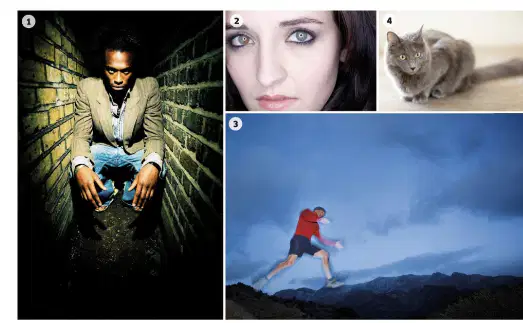
Arjun is trying to capture Michael as he leaps over a puddle during a nighttime adventure! He wants to use a flash that creates a strong, harsh light to freeze the action and make Michael stand out. Which type of flash should Arjun use?
Diffused flash
Direct flash
Overpowering flash
Ambient flash
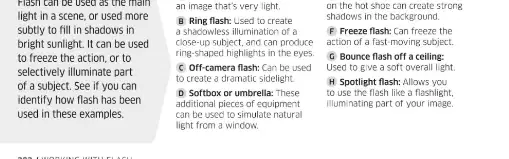
Sophia is taking a portrait of her friend Lily, but she wants to make sure there are no harsh shadows on Lily's face. Which flash technique should Sophia use to get a soft, flattering light?
Overpowering flash
Direct flash
Diffused flash
Colored flash
Jackson and Lily are setting up for a school photo shoot. They notice a device called a flashgun in their camera kit. What is the primary function of a flashgun in photography?
To provide additional light for a scene
To zoom in on distant objects
To change the color of the photograph
To increase the camera's battery life
Michael and Sophia are experimenting with a flashgun for their photography project. If they adjust the power setting, what are they actually controlling?
The intensity of the light output
The color of the light
The size of the flashgun
The camera's shutter speed
Anika and Evelyn are experimenting with photography. If they move the flash off-camera, what cool effect will it have on their photos?
It creates more interesting and dimensional lighting
It makes the image blurrier
It reduces the amount of light in the photo
It automatically focuses the camera
Olivia and Mason are setting up for a dramatic photo shoot. They want to create a cool spotlight effect with their flash. Which accessory should they use to make their photos pop?
A snoot
A diffuser
A tripod
A reflector
Samuel, Aiden, and Nora just finished a fun photo shoot using flash techniques! Why should they review their images afterwards?
To check if the lighting and exposure are as desired
To delete all the photos
To change the camera lens
To increase the flash power
Abigail and Liam are experimenting with flash photography for their school project. If they increase the flash power, what will happen to the exposure in their photos?
Higher flash power increases exposure, making the image brighter
Higher flash power decreases exposure, making the image darker
Flash power does not affect exposure
Flash power only affects color, not exposure
Samuel and Evelyn are setting up for a flash photography shoot. They have gear diffusers and softboxes ready. What magical effect do these tools create in their photos?
To sharpen the image
To soften and spread the light
To increase flash power
To change the color of the flash
Abigail and Michael are setting up a photoshoot, and they want their pictures to look amazing! When using flash as the main light, what should they do to avoid harsh shadows and make their photos pop?
Use a faster shutter speed
Move the subject closer to the background
Use a diffuser or softbox
Increase ISO
Kai and Aria are experimenting with flash photography for their school project. They want to capture cool motion effects! What does the rear curtain sync feature do when they use it?
Fires the flash at the start of the exposure
Fires the flash at the end of the exposure
Fires the flash multiple times
Disables the flash
William and Nora are getting ready for a close-up photography contest! Which piece of gear should they use to get even, shadow-free lighting for their amazing shots?
Softbox
Ring light
Bounce card
Umbrella
Abigail and Noah just finished a creative flash photoshoot! What’s one fun way they can check if their shots turned out great?
Look for any dark shadows in the image
Ignore the background
Only look at the colors
Focus only on the subject’s face
Scarlett and Nora are taking selfies at a party, but their eyes look super red in the photos! Why does this red eye effect happen?
Light from a flash is reflected by the retina at the back of the subject’s eyes
The camera lens is dirty
The subject is wearing red clothes
The background is too bright
Elijah is trying to take a photo of William running across the playground. What effect will using a slower shutter speed have on William in the photo?
It creates motion blur
It sharpens the image
It increases red eye
It darkens the photo
After a fun photo session with William, Harper, and Rohan, why should you take some time to review your shots?
To assess your images and improve your results next time
To delete all photos
To print every image
To ignore mistakes
Kai took a fun group photo, but everyone ended up with glowing red eyes! What should Kai use in a photo editing program to fix this spooky look?
Use the red eye reduction tool
Increase saturation
Crop the image
Add a filter

