
 Worksheets
Quiz
Total questions: 84
Worksheet time: 42mins
What is the main objective of the Computer Components experiment?
The main objective is to offer hands-on experience in identifying, assembling, and understanding the function of various hardware elements within a computer system.
The main objective is to learn programming languages used in software development.
The main objective is to study the history of computers and their evolution.
The main objective is to design websites using HTML and CSS.
Explain the difference between hardware and software in a computer system.
Hardware refers to the physical parts or components of a computer that are tangible, such as the monitor, mouse, keyboard, etc. Software refers to instructions that can be stored and run by hardware.
Hardware refers to the programs and applications, while software refers to the physical devices.
Hardware and software are both physical components of a computer system.
Software refers to the tangible parts of a computer, while hardware refers to the instructions.
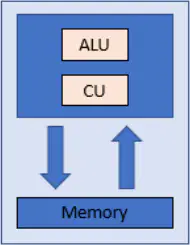
Label the three main parts inside a computer shown in the block diagram: ALU, CU, and Memory.
ALU, CU, and Memory are the three main parts inside a computer shown in the block diagram.
Monitor, Keyboard, and Mouse are the three main parts inside a computer shown in the block diagram.
Printer, Scanner, and Speaker are the three main parts inside a computer shown in the block diagram.
Hard Disk, CD Drive, and USB Port are the three main parts inside a computer shown in the block diagram.
Which of the following is NOT a physical component of a computer?
Monitor
Mouse
Software
Hard disk drive (HDD)
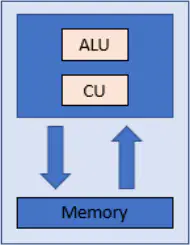
The function of the block diagram shown in Fig. 1.1 is:
To illustrate the working of the system represented in Fig. 1.1.
To show the historical background of the system.
To display the physical appearance of the system.
To provide a list of components without their connections.
What are the three main components of the Central Processing Unit (CPU)?
Control Unit, Arithmetic/Logic Unit, Register
RAM, Hard Drive, Output Unit
Input Unit, Output Unit, Register
Control Unit, RAM, Hard Drive
The CPU acts like the ______ of a computer system. It contains the circuitry to interpret and execute program instructions.
brain
heart
engine
memory
What is the function of the Control Unit (CU) in a computer?
The Control Unit acts like a manager in a computer. It receives orders from RAM in the form of instructions and decodes those instructions into specific commands for other components inside the computer system. It directs the data flow and the operation of the ALU.
The Control Unit stores all the data and programs in the computer permanently.
The Control Unit is responsible for performing all arithmetic and logical operations in the computer.
The Control Unit is used to display the output to the user.
The Arithmetic and Logic Unit (ALU) performs which of the following operations?
Only arithmetic operations
Only logical operations
Both arithmetic and logical operations
Only data storage operations
RAM is the super-fast and temporary data storage space that a CPU needs to access.
True
False
Where is all your data, including files and folders, stored in a computer?
RAM
Hard Drive
Output Unit
Input Unit
Data and programs from the outside world enter a computer system through an ______.
input unit
output unit
control unit
memory unit
An output unit is a device that prints or displays data stored in memory or creates a permanent copy of information previously stored in memory.
True
False
What are two common cooling methods used to prevent excessive heat in CPUs?
Air cooling (using fans and heat sinks) and liquid cooling (using water or other coolants)
Thermal paste and copper wiring
Magnetic cooling and solar panels
Oil immersion and dry ice cooling
The main hardware components of a computer are:
CPU, Memory, Storage, Input/Output devices
Monitor, Keyboard, Mouse, Printer
Software, Applications, Operating System, Drivers
Internet, Wi-Fi, Bluetooth, Ethernet
2- Cooling the CPU is necessary to prevent overheating. Which two methods are commonly used for cooling?
Using fans and liquid cooling
Using only software updates and cleaning the screen
Increasing CPU voltage and removing the case
Reducing screen brightness and closing unused apps
Select two reasons for increasing heat in laptops.
Running heavy applications and poor ventilation
Low screen brightness and frequent shutdowns
Using external mouse and keyboard
Regular software updates and antivirus scans
The part of the computer responsible for running multi-applications is:
CPU
Monitor
Keyboard
Mouse
5- Select the correct list of 4 types of operating systems.
Batch, Time-sharing, Distributed, Real-time
Batch, Spreadsheet, Database, Real-time
Linux, Windows, MacOS, Android
Distributed, Spreadsheet, Database, Real-time
What is the main objective of organizing files and folders within a computer system?
To make the computer look neat
To enhance productivity and facilitate collaboration and communication
To increase the size of the hard drive
To slow down the computer
A file is the common storage unit in a computer, and all programs and data are "written" into a file and "read" from a file.
True
False

Which of the following is an example of a Microsoft Word file icon? Choose the correct option.
DOC
XLS
PPT

PDF stands for ________ Document Format.
Portable
Printable
Public
Personal
Google Docs is word processing software you can access on ________.
Google Drive
Microsoft Word
Adobe Photoshop
Dropbox
Pages is word processing software for which operating system?
Windows
Linux
MAC
Android
What does the file attribute 'Hidden (H)' indicate?
It indicates that the hosting file is hidden.
It indicates that the file is read-only.
It indicates that the file is a system file.
It indicates that the file is encrypted.
What does the file attribute 'Read-only (R)' allow?
It allows a file to be read, but nothing can be written to the file or changed.
It allows a file to be deleted but not opened.
It allows a file to be executed as a program.
It allows a file to be hidden from the user.
What is a folder within a folder usually called?
A subfolder.
A root folder.
A main folder.
A parent folder.
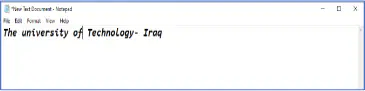
What should you do first to save a file in Windows?
Open the Application (such as Microsoft Word, Notepad, or any other program) where you are creating or editing the file you want to save.
Close the Application.
Print the file.
Delete the file.
Step 2: Fill in the blank: To save a file in Windows, you need to type or ______ the content of your file as needed.
edit
delete
copy
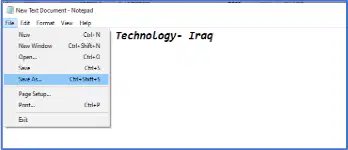
Where is the 'Save as' or 'Save' option typically found in the application window?
Upper right corner
Upper left corner
Bottom right corner
Center
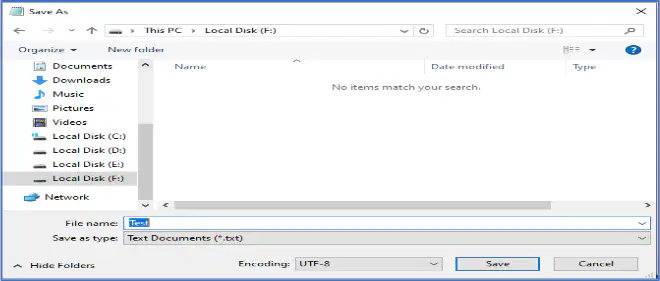
What does the dialog box that appears after choosing 'Save as' or 'Save' allow you to do?
Print the file
Choose where you want to save the file
Delete the file
Rename the application
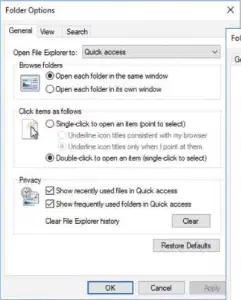
In the Folder Options dialog box, which two tabs allow you to customize how you browse folders and change the default view for all folders?
General and View
Search and Privacy
Security and Sharing
Details and Customize
To hide or unhide items in the folders, which tab should you click in the Folder Options dialog box?
View tab
General tab
Search tab
Security tab
Which option should you select to show hidden files, folders, and drives in the Folder Options dialog box?
Show hidden files, folders, and drives
Hide protected operating system files
Don't show hidden files, folders, or drives
Restore default settings
What is the first step to create a new folder?
Select the location for the new folder.
Rename the folder.
Delete an existing folder.
Open a file.
After selecting the location for the new folder, what should you select from the menu bar to create a new folder?
New Folder
Delete
Rename
Properties
Fill in the blank: The University of Technology was established in _____?
1975
1980
1965
1990
Making a hidden file/folder is necessary to:
Protect sensitive data from casual users
Increase the speed of the computer
Make files larger in size
Allow files to be accessed by everyone
To show hidden files/folders, which option should be used?
Enable 'Show hidden files/folders' in folder options
Delete the files/folders
Rename the files/folders
Compress the files/folders
Some files have the read-only attribute because:
They are protected from being modified or deleted.
They can be executed automatically.
They are hidden from the user.
They are compressed to save space.
The path in Windows refers to:
The location of a file or folder in the file system
The version of the Windows operating system
The speed of the computer's processor
The type of monitor used
What is the main objective of the Disk Operating System (DOS) as described in the experiment?
To provide a graphical user interface for users
To provide basic disk management functionalities such as file storage, directory structure management, file manipulation, and disk formatting
To run only on CD-ROMs
To replace all modern operating systems
DOS enables users to access and manipulate files stored on which types of storage media?
Only hard drives
Only floppy disks
Floppy disks, hard drives, and CD-ROMs
Only CD-ROMs
Fill in the blank: DOS typically offers a __________ where users interact with the system by typing commands, allowing navigation of the file system, execution of programs, and performance of various system tasks.
command-line interface (CLI)
graphical user interface (GUI)
touchscreen interface
voice-controlled interface
DOS is a type of operating system that uses a graphical user interface (GUI) rather than a command line.
True
False
What is Command Prompt officially called in Windows operating systems?
Windows Command Processor
MS-DOS
Command Shell
CMD.exe
Command Prompt emulates many of the command-line abilities available in MS-DOS, but it is not MS-DOS itself.
True
False
What is the command used to switch the current directory in DOS?
dir
cd
copy
del
Which command allows you to view available files and folders within the selected directory in DOS?
cd
dir
mkdir
del
Fill in the blank: To move to the root directory in DOS, type '___' and hit Enter.
cd\
cd..
dir
md
What does the command 'cd..' do in DOS?
Moves back one directory.
Deletes the current directory.
Creates a new directory.
Displays the contents of the directory.
For example, typing 'dir' at the C:\> prompt will display the contents of the ________ directory or drive.
C:
D:
E:
F:
What does the 'Help (/?)' command do?
Deletes files
Provides information about another command, including available switches to perform additional tasks
Creates directories
Displays network information
Which command allows you to create your own directories in the specified path?
rd
md
ping
attrib
To remove empty directories, which command should you use?
md
rd
ping
attrib
The command 'ipconfig' will display the current network information for your adapters, including IP Address, Default Gateway, Subnet Mask, etc.
True
False
Which command is used as a troubleshooting tool to resolve network issues by sending a data packet to another system and waiting for a reply?
md
rd
ping
attrib
Fill in the blank: The command to add the read-only attribute to a file is _______.
attrib +r
chmod +x
set +r
readonly file
Fill in the blank: The command to add the hidden attribute to a file is _______.
attrib +h
attrib -h
hide file
set +hidden
What does the command 'attrib -h' do?
Adds the hidden attribute
Removes the hidden attribute
Adds the read-only attribute
Deletes the file
What does '/d' refer to in file attributes?
A) All files
B) All subdirectories
C) Only mp3 files
D) Only hidden files
What does '*.mp3' refer to in file attributes?
All files
All files with mp3 extensions only
All directories
All hidden files
What is the maximum number of lines a file can have when opened with the Edit command?
65,280 lines
32,768 lines
100,000 lines
16,384 lines
Which command allows a user to copy one or more files to an alternate location?
Edit
Copy
Rename
Del
What does the following command do? copy *.* d:
Copies all files in the current directory to the D: disk drive
Deletes all files in the current directory
Renames all files in the current directory
Moves all files to the C: drive
Which command is used to rename files and directories from the original name to a new name?
Edit
Copy
Rename
Del
You can specify a new drive or path for your destination when using the Rename command.
True
False
What does the command 'del test.tmp' do?
Deletes the test.tmp file in the directory that you are currently in, if the file exists.
Creates a new file named test.tmp in the current directory.
Renames the test.tmp file to test.bak in the current directory.
Moves the test.tmp file to the recycle bin.
What does the wildcard '*' represent in the command 'del c:\windows\temp\*.*'?
It represents all files in the c:\windows\temp directory.
It represents only hidden files in the directory.
It represents only subdirectories in the directory.
It represents only files with a .txt extension.
What does the command 'del c:\windows\temp\?est.tmp' do?
Deletes any file ending with est.tmp such as pest.tmp or zest.tmp in the c:\windows\temp directory.
Deletes the entire c:\windows\temp directory.
Deletes only the file named ?est.tmp in the c:\windows\temp directory.
Deletes all files in the C:\ drive.
The commands we may need in a network are:
ping, ipconfig, tracert, netstat
copy, paste, delete, rename
print, scan, fax, copy
run, stop, pause, play
To hide all files in the directory D:\test, which command should be used?
attrib +h D:\test\*.*
hide D:\test\*.*
set hidden D:\test\*.*
conceal D:\test\*.*
Scripts of commands are saved as batch files because:
they can be executed automatically as a group of commands.
they increase the speed of the computer hardware.
they are used to store multimedia files.
they are required for internet browsing.
Designing a simple, annoying virus involves which of the following actions?
Creating a program that repeatedly opens pop-up windows
Installing antivirus software
Optimizing system performance
Backing up important files
What is the main objective of the Windows operating system developed by Microsoft?
To provide a user-friendly platform for running software applications on personal computers (PCs) and other compatible devices.
To restrict access to all third-party applications.
To serve only as a gaming console interface.
To function solely as a web browser.
Which of the following is NOT a task facilitated by Microsoft Office?
Document creation
Data analysis
Multimedia editing
Presentation design
Windows maintains compatibility with a wide range of hardware configurations and peripherals, ensuring a seamless user experience across diverse computing environments.
True
False
When was Microsoft Windows first introduced?
November 10, 1983
August 24, 1995
January 1, 1985
October 20, 1982
What is the primary interface through which you interact with your PC in Windows 11?
The Windows 11 desktop
The BIOS setup screen
The Task Manager window
The Command Prompt
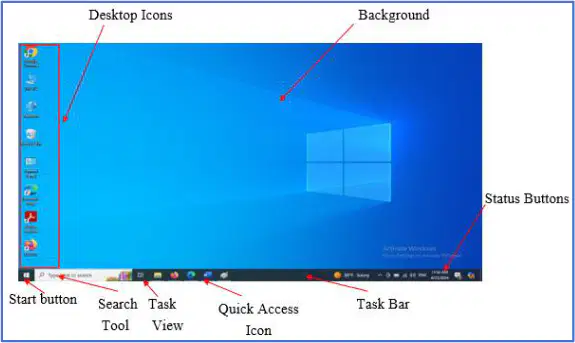
What does the 'Desktop Icons' control do?
Fills background of the desktop
Allows quick access to Programs and files
Displays the Start Menu
Searches the computer for file names
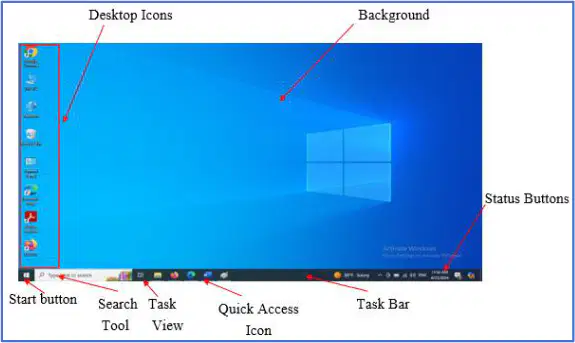
When do you use the 'Background' control?
To find an application
When you need to open a file
To show a picture or use the standard options
When you need to know if an application is open
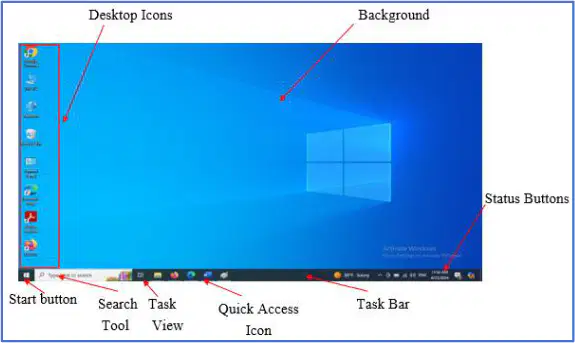
The 'Start Button' control displays the _________.
Start Menu
Recycle Bin
Task Manager
Control Panel
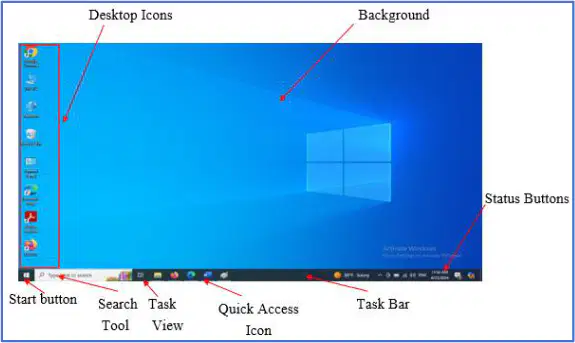
Which control is used to search the computer for file names, program names, and application names?
Desktop Icons
Search Tool
Task View
Background

