
 Worksheets
Excel Module 2 Vocab Refresher
Total questions: 20
Worksheet time: 16mins
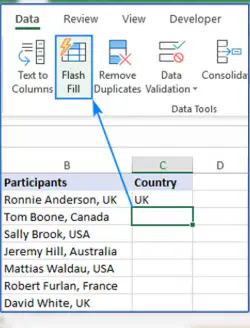
Flash Fill - Page EX-2-6
mathematical statement in spreadsheet that calculates value using cell references, numbers, and arithmetic operators.
fills in the whole documents.
patterns in data that automatically fills data in remaining cells based on patterns.
occur when formula in a cell refers to another cell that include a formula that refers back to original cell.
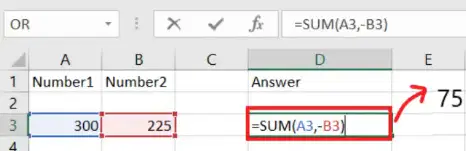
mathematical statement in a spreadsheet/table that calculates a value using cell references, numbers, and arithmetic operators (+, -, *, /) Page EX 2-9
flash fill
formula
MAX function
MIN function
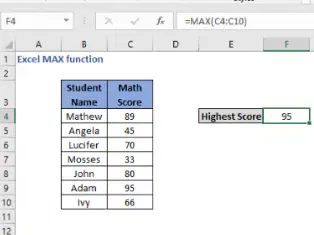
MAX function- Page 2-16
displays highest value in a range
determine lowest number in the range
average value of a collection of numbers
checks which cells are referenced in the formula assigned to the active cell.
circular reference - Page EX 2-9
formula in cell refers to another cell/cells that include a formula that refers back to original cell.
formula refers to the same cell in which is entered.
error that occurs when one of the defining values in a cell is itself
calculates average value of a collection of numbers
MAX function
AVERAGE function
MIN function
order of operators
Point Mode - Page EX 2-11
formula refers to the same cell in which is entered
range is used as a source
allows you to select cells for use in a formula by using pointer or a screen tap
font, font color, background fill and other options that is applied if cell values meet specified criteria
sequence in which operators are applied in a calculation (left to right) - Page EX 2-10
order of operations
order in sequence
average function
formula
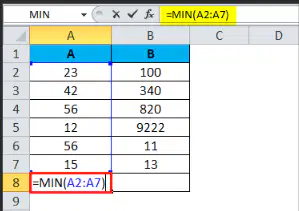
MIN Function - Page EX 2-18
calculates average value of a collection of numbers
sequence in which operators are applied in a calculation
double click the cell with the formula you want to check
lowest or minimum number in the range
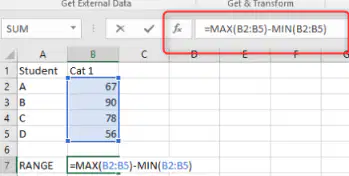
Range Finder
formula refers to the same cell in which is entered
displays highest value in a range
an easy way to verify that a formula references the cells you want it to reference

formats a worksheet by applying a collection of fonts, font styles, colors and effects
formats a worksheet by applying a collection of fonts, font styles, colors and effects
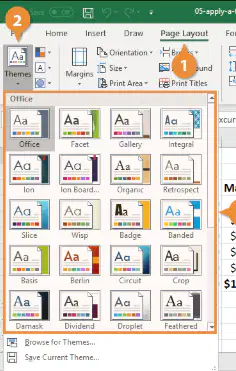
Theme - Page EX 2-23
picture element; an individual point of color on a display screen or printout
background color
formats a worksheet by applying a collection of fonts, font styles, colors and effects
character Page EX 2-35
individual point of color on a screen
letter, number, symbol or punctuation mark
individual
best fit Page EX 2-35
fits the spreadsheet specifically
formats a worksheet by applying a collection of fonts
automatically increases or decreases width of a column so the widest entry will fit
letter, number, symbol, or punctuation mark
individual point of color on a display screen or printout. Page EX 2-35
pixel
character
best fit
range finder
letter, number, symbol or punctuation mark
character
footer
header
pixel
text and graphics that print at the top of each page Page EX 2-41
footer
header
indent
line spacing
footer Page EX 2-42
bottom of page
top of page
text and graphics that print at the top of each page
text and graphics that print at the bottom of each page
Page Layout View Page EX 2-42
formula refers to the same cell
provides accurate view of how a worksheet will look when printed
text graphics printed at the bottom of the page
letter, number, symbol
Margins Page EX 2-42
error that occur when one's values in a cell
space between the page content and the edges of the page.
text and graphics that print at the top of the page
formats a worksheet by applying a collection of fonts
process of finding and correcting errors in the worksheet Page EX 2-46
debugging
margins
page layout view
destination range
relative references Page EX 2-13
cells that automatically change to reflect the new location when the formulas are copied or moved
a range is used as a destination in a data exchange
a range used as a source
small square in the lower right corner

