
NEW
Font size
 Worksheets
Middle School Google Sheets Test
Total questions: 75
Worksheet time: 40mins
Which task is Google Sheets especially good at for organizing information?
Building 3D animations for movies
Programming mobile games from scratch
Keeping class rosters and project lists
Editing high-resolution photos professionally
What is a key benefit of Google Sheets being cloud-based?
Files only open on the original computer
Access from any device with internet
Work must be emailed back and forth
Requires carrying a flash drive everywhere
You and three classmates need to enter scores at the same time. What feature makes this possible in Google Sheets?
Offline-only editing mode
Real-time collaboration on one sheet
Locked cells for solo editing
Automatic chart suggestions only
Which statement best describes calculations in Google Sheets?
It prints spreadsheets without formulas
It can only type text in cells
It acts like a super-calculator for math
It replaces every number with emojis
You have a table of survey numbers and want a visual summary. What should you create in Google Sheets?
A long essay paragraph
A web browser bookmark
A pie chart or bar graph
A slideshow of photos
In a spreadsheet, what is a row?
The vertical line of cells labeled with letters
The horizontal line of cells labeled with numbers
A named shortcut that performs calculations
The single box where a row and column meet
Which label identifies columns in most spreadsheets?
Numbers like 1, 2, 3
Words like Sum, Average
Letters like A, B, C
Symbols like +, -, =
What is the cell in a spreadsheet?
A group of rows combined together
A group of columns combined together
The single box where a row and column meet
The entire worksheet area
Which example shows a correct cell reference?
Row5ColB
B-5
5B
B5
Why is a cell reference useful when writing calculations?
It tells how to format the text
It tells the file where to save
It tells which worksheet to open
It tells formulas which cells to use
Which rule must every formula follow in a spreadsheet?
It must be written in uppercase letters
It must end with a semicolon
It must start with an equals sign
It must include at least two numbers
Which statement best describes a function in spreadsheets?
A file that stores multiple sheets
A diagram that shows data visually
A pre-built formula shortcut with a name
An equation you write from scratch
Which formula correctly adds the values in cells A1 and B1?
A1 + B1
SUM(A1:B1)
=A1B1+
=A1 + B1
Which function adds all numbers from A1 through A10?
=ADD(A1:A10)
=SUM(A1:A10)
=PLUS(A1:A10)
=TOTAL(A1:A10)
Which tool changes the background color of a header row in a spreadsheet?
Borders add neat table lines
Filter hides unwanted rows
Merge Cells creates one title
Fill Color changes background
What is the main purpose of Borders in a table?
Add lines for organization
Change cell color quickly
Hide rows temporarily
Combine cells into one
You want one large title across several columns. Which feature should you use?
Filter to hide columns
Merge Cells for the title
Sort A–Z on the list
Conditional Formats colors
Which tool organizes a list alphabetically or numerically?
Filter hides certain data
Sort arranges A–Z or 0–9
Borders draw clean lines
Fill Color changes header
A teacher wants all failing grades to appear red automatically. Which feature will do this?
Filter out low scores
Conditional Formatting colors
Sort by highest to lowest
Merge Cells for emphasis
You need to view only rows where “Status” is Complete without deleting others. What tool should you apply?
Fill Color to mark cells
Borders to separate rows
Sort to group by status
Filter to show matching rows
In a class schedule table, what does Merge & Center typically do to a title row?
Combines cells and centers text
Hides cells and right aligns text
Duplicates cells and left aligns text
Splits cells and centers text
Which formatting step best improves header visibility in a schedule table?
Insert blank rows between headers
Turn off gridlines for all cells
Reduce font size of header text
Apply fill color to header cells
You created a timetable but borders are missing. Which action adds visible lines around cells?
Apply cell borders
Use text wrapping
Enable auto-fit columns
Change number format
In a field trip budget sheet, which formula correctly multiplies price by quantity in row 2?
=SUM(B2:C2)
=B2*C2
=B2+C2
=AVERAGE(B2:C2)
You need a grand total of all expenses in column F from F2 to F12. Which formula is most appropriate?
=F2+F12
=MAX(F2:F12)
=COUNT(F2:F12)
=SUM(F2:F12)
A budget status cell shows Over Budget if balance in B14 is less than zero. Which IF formula fits this rule?
=IF(B14<0,"Over Budget","Within Budget")
=IF(B14>0,"Over Budget","Within Budget")
=IF(B14=0,"Over Budget","Within Budget")
=IF(B14<0,"Within Budget","Over Budget")
To analyze class survey responses for favorite subjects, which first step helps organize the data by subject name?
Sort the data by subject
Insert a new worksheet
Change all text to uppercase
Hide all empty rows
You want to view responses for only Science. What spreadsheet tool shows just this one subject?
Format Science cells as currency
Insert a hyperlink to Science
Use merge cells on Science
Apply a filter for Science
After summarizing survey counts by subject, which chart best displays each subject’s share of the whole?
Insert a histogram
Insert a line chart
Insert a scatter plot
Insert a pie chart
Which phrase best describes Google Sheets in the Magic Notebook analogy shown?
A super smart digital notebook tool
A coding editor for writing programs
A drawing app for making pictures
A web browser for surfing sites
You need to track your video game scores over a month. Which use fits Google Sheets as described?
Streaming live gameplay
Editing long movies
Designing 3D characters
Tracking stuff like scores
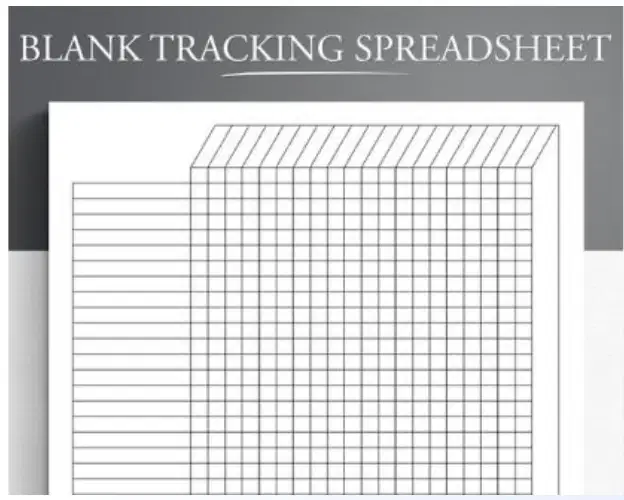
In the grid image, what is the big organized area of little boxes called?
A photo collage board
A sheet in a spreadsheet
A slideshow template
A text document page
When entering data into a sheet, which step helps keep information organized in the little boxes?
Rename your computer
Paste text into chat
Print pages for filing
Type values into cells
Which statement correctly describes columns in a spreadsheet?
Columns go up and down with letter names
Columns go side to side with number names
Columns go diagonally with symbol names
Columns go up and down with number names
What is the correct way to identify a single cell where column B meets row 2?
B2 is the cell address for that box
2B is the cell address for that box
B-2 is the cell address for that box
Row2ColB is the address for that box
Which statement correctly describes rows in a spreadsheet?
Rows go side to side with letter names
Rows go diagonally with letter names
Rows go up and down with letter names
Rows go side to side with number names
You want to type the number 45 into cell C3. What are the correct steps?
Click any cell, type 45, close the sheet
Click C3, press Enter, then type 45
Type 45, click C3, press Enter
Click C3, type 45, press Enter
A friend says the cell at column D and row 5 should be written as 5D. What is the best response?
Cell addresses use words, so Row5ColumnD
Cell addresses use letter then number, so D5
Cell addresses use symbols, so D-5
Cell addresses use number then letter, so 5D
Which simple formula correctly adds the values in A1 and A2?
=ADD(A1,A2) is the only way
=A1+A2 adds those two cells
A1 plus A2 equals the sum
SUM A1 A2 adds those cells
Which symbol must start every spreadsheet formula to make it calculate?
A slash before the formula
An asterisk before each value
The equals sign at the beginning
A plus sign before numbers
What is the correct result when you type =5+3 in a cell and press Enter?
It leaves the cell unchanged
It writes the text five plus three
It displays the number seven
It shows the number eight
Which operator performs multiplication in a spreadsheet formula?
The asterisk symbol
The minus symbol
The slash symbol
The plus symbol
Which operator splits a number into parts, like 10 / 2?
The division slash
The addition plus
The subtraction dash
The multiply asterisk
You want to add numbers in cells A1 through A5 at once. Which formula should you type?
=PLUS(A1:A5)
=TOTAL(A1:A5)
=ADD(A1:A5)
=SUM(A1:A5)
Which range reference correctly selects cells from A1 to A5 in a column?
A1-A5 as two ranges
A1:A5 as one range
A1,A5 as separate cells
A1>A5 as a comparison
A student types =20+5. According to the reference table, what operation is this?
Division splitting a number
Multiplication times something
Subtraction taking away
Addition joining numbers
Which formula uses subtraction to take one number away?
=10/2 gives five
=30-12 gives eighteen
=4*6 gives twenty-four
=20+5 gives twenty-five
You have a list of five test scores in A1:A5. Which function is best to quickly add them all?
MIN to find the smallest
AVERAGE to compute mean
MAX to find the biggest
SUM to add the list
If you forget the equals sign and type 100 + 50, what will most spreadsheets do?
Delete the entry
Treat it as plain text
Automatically calculate
Convert it to a date
Which statement best describes the role of the equals sign in formulas?
It selects a cell range
It tells Sheets to calculate
It hides the formula from view
It formats numbers as currency
You need the result 24 using basic operators and whole numbers. Which example matches the table?
=4*6 gives twenty-four
=30-12 gives twenty-four
=10/2 gives twenty-four
=20+5 gives twenty-four
Which formula returns the biggest number from a list of cells like D1:D50?
=SUM(D1:D50)
=AVERAGE(D1:D50)
=MAX(D1:D50)
=COUNT(D1:D50)
What does the COUNT function do when used on a range such as A1:A20?
Adds all numeric values together
Displays today’s date automatically
Counts cells that contain numbers
Finds the smallest value in range
A student needs the middle score of C1:C10 for their average grade. Which formula fits?
=AVERAGE(C1:C10)
=SUM(C1:C10)
=MIN(C1:C10)
=COUNT(C1:C10)
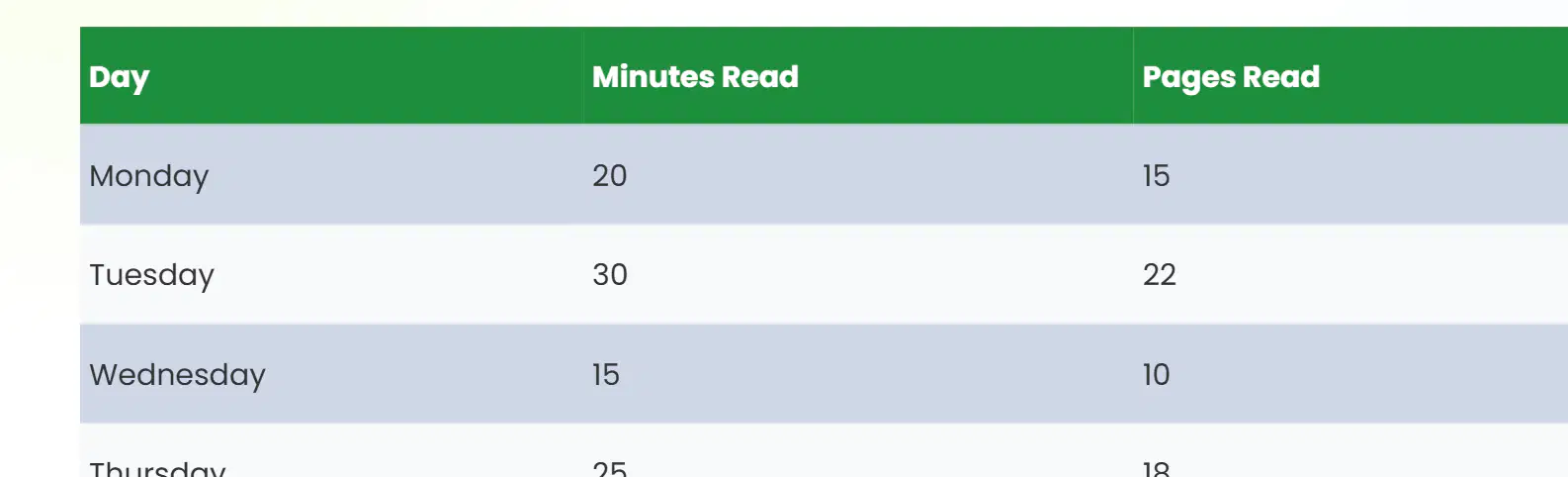
In the reading log table, which day has the smallest number of minutes read?
Wednesday with 15 minutes
Thursday with 25 minutes
Tuesday with 30 minutes
Monday with 20 minutes

If you want to highlight cells with a background color, which tool should you use?
Bold icon labeled B
Font size icon labeled A
Paint can fill icon
Underline icon labeled U
Using spreadsheet formulas, which function would help find the smallest number in D1:D50?
=MIN(D1:D50)
=MAX(D1:D50)
=SUM(D1:D50)
=COUNT(D1:D50)
To make a heading easier to read, which editing action best matches the tip shown?
Decrease text size to tiny
Increase text size with A
Make the text bold with B
Fill the cell with paint can
Which step comes first when making a chart in Google Sheets?
Highlight the cells to include
Choose Chart from the Insert menu
Enter words and numbers in columns
Click Insert on the menu bar
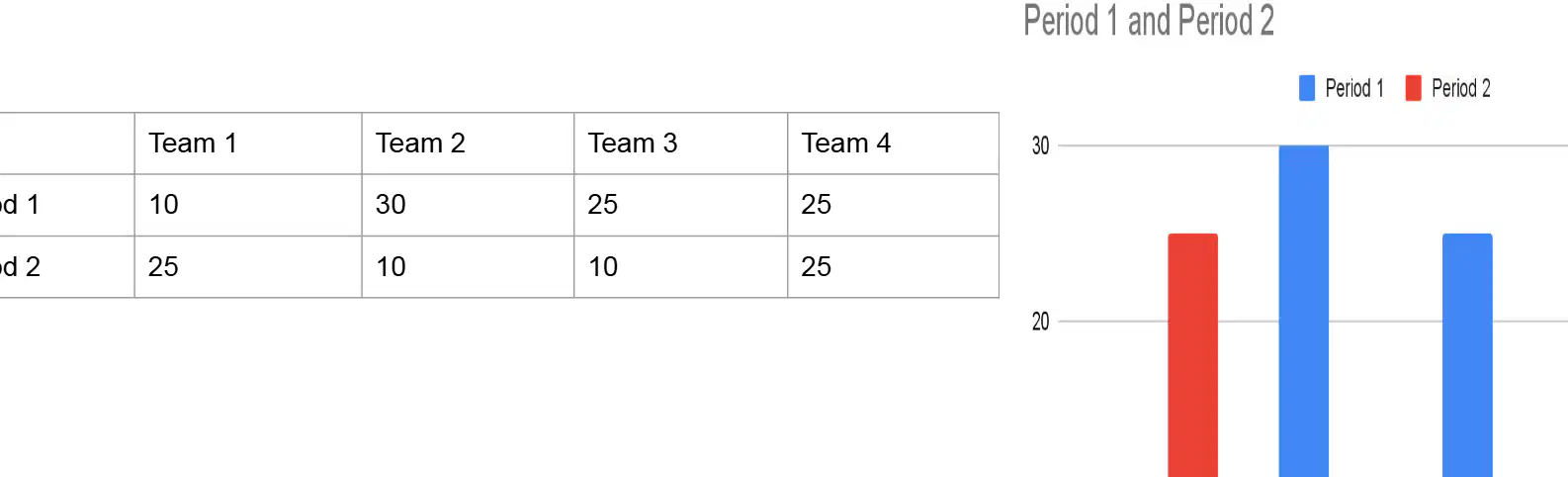
In the table, which team scored the highest in Period 1?
Team 4 scored 25 points
Team 2 scored 30 points
Team 1 scored 10 points
Team 3 scored 25 points
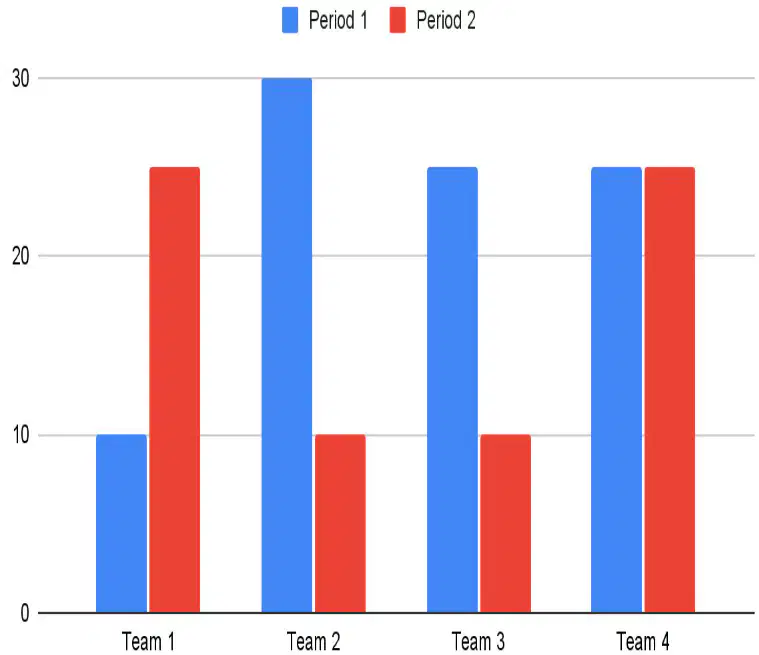
If you want the chart to compare both Period 1 and Period 2, what data range should be selected?
Only the Period 2 row
Only the Team 2 column
Both rows and all team columns
Just the header cells
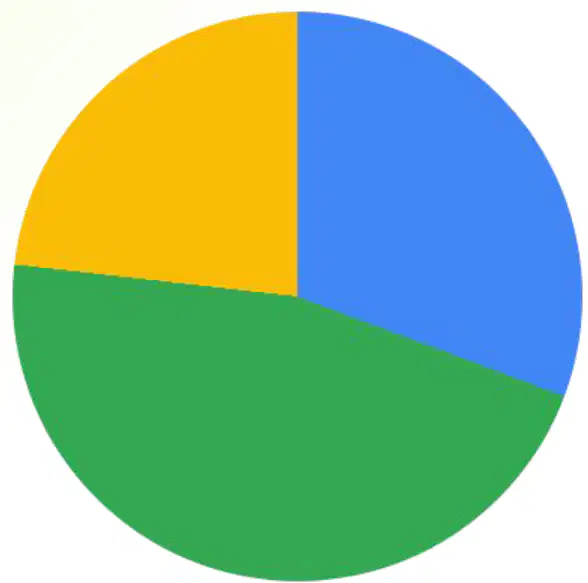
Looking at the pie chart, which day has the largest share of minutes?
Tuesday with thirty minutes
All days have equal minutes
Wednesday with fifteen minutes
Monday with twenty minutes
A group wants to collaborate on the sheet. What permission lets everyone edit the chart and data?
Owner transfer required
Viewer access only
Commenter access only
Editor access for group

Which action lets a group edit the same spreadsheet at the same time?
Email screenshots of the sheet to friends
Click the Share button to invite collaborators
Copy the file to each person’s desktop
Turn on airplane mode for all devices

A team wants real-time editing for a class project. What is the best first step?
Set computers to offline editing only
Create separate files for each teammate
Disable notifications for the document
Invite teammates using the Share feature
Which action helps make column headers stand out in a spreadsheet?
Remove all cell borders
Decrease header font size
Hide the header row
Use bold font for header text
What is the result of typing =A2-B2 in a cell?
The cell shows the difference between A2 and B2
The cell displays the product of A2 and B2
The cell remains empty
The cell displays the sum of A2 and B2
Which feature allows you to combine several cells into one larger cell in a table?
Conditional formatting
Auto-fit columns
Merge cells
Text wrapping
All formulas in Google sheets begin with the following symbol:
+
-
=
%
Which of the following options will allow all text to fit into one cell without spilling into the next column?
Overflow
Text wrapping
Clip
Which formula would you use to find the average of numbers in cells A1 to A5?
=MIN(A1:A5)
=SUM(A1:A5)
=MAX(A1:A5)
=AVERAGE(A1:A5)
What tool in Google Sheets allows you to sort data from highest to lowest?
Merge Cells
Sort Range
Fill Color
Text Wrapping
Which option best describes a column in a spreadsheet?
A sheet of paper
A horizontal group of cells
A single cell
A vertical group of cells

