
 Worksheets
Creating Procedures in Scratch
Total questions: 10
Worksheet time: 20mins
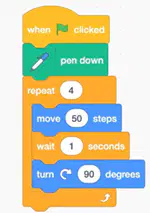
Look at the code below. What will the program do when it runs?
Square
Rectangle
Triangle
What is a procedure (My Block) in Scratch?
A block that moves a sprite forward
A custom block that groups instructions to use multiple times
A block that repeats forever
Which of the following is an advantage of using procedures?
Makes the code longer
Helps to organize code and avoid repetition
Makes the sprite jump higher
What happens when the pen down block is used?
The sprite draws a line as it moves
The sprite stops moving
The sprite changes colour
What does the pen up block do?
Stops the program
Stops drawing while the sprite moves
Deletes all drawings
You want the sprite to draw a rectangle. Which blocks are needed?
move, turn, pen down
say, wait, pen up
glide, clear, repeat forever
Why is the pen down block usually placed before movement blocks?
To make the sprite move faster
To make sure the drawing starts when the sprite moves
To change the sprite’s direction
What is a nested loop in Scratch?
A loop that runs only once
A loop that never stops
A loop inside another loop
Which code shows a nested loop?


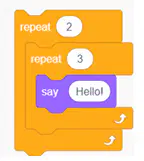
Look at this code: How many times will the sprite say “Hello”?
3
5
6

