
 Worksheets
G10 SUMMATIVE
Total questions: 55
Worksheet time: 28mins
TEST I: MULTIPLE CHOICE — Read each question carefully and choose the letter of the correct answer. What hand tool is used to tighten or loosen screws with a cross-shaped slot on computer cases and internal components?
Flat screwdriver
Allen wrench
Phillips screwdriver
Precision screwdriver
TEST I: MULTIPLE CHOICE — Read each question carefully and choose the letter of the correct answer. Which tool is specifically designed for cutting and stripping the insulation from electrical wires?
Side cutter
Crimping tool
Wire stripper
Long nose pliers
TEST I: MULTIPLE CHOICE — Read each question carefully and choose the letter of the correct answer. What tool would you use to reach into tight spaces inside a computer to hold small components like jumpers or dropped screws?
Precision screwdriver
Crimping tool
Long nose pliers
Allen wrench
TEST I: MULTIPLE CHOICE — Read each question carefully and choose the letter of the correct answer. Which hand tool is used to attach RJ-45 or RJ-11 connectors to network cables?
Wire stripper
Side cutter
Hacksaw
Crimping tool
TEST I: MULTIPLE CHOICE — Read each question carefully and choose the letter of the correct answer. What tool is best suited for removing screws with a single straight slot?
Flat screwdriver
Phillips screwdriver
Precision screwdriver
Allen wrench
TEST I: MULTIPLE CHOICE — Read each question carefully and choose the letter of the correct answer. Which tool is essential for cutting through metal casings or brackets when modifying computer enclosures?
Claw hammer
Hacksaw
Side cutter
Wire stripper
TEST I: MULTIPLE CHOICE — Read each question carefully and choose the letter of the correct answer. What hexagonal tool is commonly used to tighten or loosen hexagonal socket screws in computer hardware?
Precision screwdriver
Phillips screwdriver
Allen wrench
Flat screwdriver
TEST I: MULTIPLE CHOICE — Read each question carefully and choose the letter of the correct answer. Which tool is primarily used for cutting wire cleanly without stripping the insulation?
Wire stripper
Side cutter
Crimping tool
Hacksaw
TEST I: MULTIPLE CHOICE — Read each question carefully and choose the letter of the correct answer. What tool would you use to drive nails or remove them when assembling wooden computer workstations?
Hacksaw
Allen wrench
Claw hammer
Crimping tool
TEST I: MULTIPLE CHOICE — Read each question carefully and choose the letter of the correct answer. Which screwdriver is specifically designed for working with very small screws found in laptops and mobile devices?
Phillips screwdriver
Precision screwdriver
Flat screwdriver
Allen wrench
TEST I: MULTIPLE CHOICE — Read each question carefully and choose the letter of the correct answer. What equipment is used to measure voltage, current, and resistance in electrical circuits and computer power supplies?
Test light
LAN tester
Multitester
Electric drill
TEST I: MULTIPLE CHOICE — Read each question carefully and choose the letter of the correct answer. Which equipment would you use to verify the proper wiring configuration and connectivity of network cables?
LAN tester
Multitester
Soldering iron
Test light
TEST I: MULTIPLE CHOICE — Read each question carefully and choose the letter of the correct answer. What equipment is necessary for joining electronic components by melting solder to create electrical connections?
Electric drill
Test light
LAN tester
Soldering iron
TEST I: MULTIPLE CHOICE — Read each question carefully and choose the letter of the correct answer. Which equipment is used to make holes in computer cases or mounting brackets for installation purposes?
Electric drill
Multitester
Soldering iron
LAN tester
TEST I: MULTIPLE CHOICE — Read each question carefully and choose the letter of the correct answer. What simple equipment is used to quickly check if an electrical circuit is live or has voltage present?
Multitester
Test light
LAN tester
Soldering iron
TEST II: MATCHING TYPE — Match the Personal Protective Equipment (PPE) in Column A with their correct use and description in Column B. Select the best answer. Anti-Static Wrist Strap — Choose the correct use.
Prevents static electricity from damaging motherboard components
Protects eyes from dust and debris when servicing computers
Dissipates static electricity on work surfaces during computer assembly
Protects clothing from dust and sharp edges of cases
TEST II: MATCHING TYPE — Match the Personal Protective Equipment (PPE) in Column A with their correct use and description in Column B. Select the best answer. Safety Glasses — Choose the correct use.
Protects feet from dropped tools and heavy equipment
Protects eyes from dust and debris when servicing computers
Filters dust when cleaning computer cases and keyboard
Protects clothing from dust and sharp case edges
TEST II: MATCHING TYPE — Match the Personal Protective Equipment (PPE) in Column A with their correct use and description in Column B. Select the best answer. Cable Management Gloves — Choose the correct use.
Protects hands from sharp metal edges and rough surfaces
Protects fingers from static when handling small sensitive components
Protects feet from dropped tools and heavy equipment
Filters dust when cleaning computer cases and keyboard
TEST II: MATCHING TYPE — Match the Personal Protective Equipment (PPE) in Column A with their correct use and description in Column B. Select the best answer. Anti-Static Mat — Choose the correct use.
Dissipates static electricity on work surfaces during computer assembly
Prevents static electricity from damaging motherboard components
Protects clothing from dust and sharp edges of cases
Filters dust when cleaning computer cases and keyboard
TEST II: MATCHING TYPE — Match the Personal Protective Equipment (PPE) in Column A with their correct use and description in Column B. Select the best answer. Closed-Toe Shoes — Choose the correct use.
Protects feet from dropped tools and heavy computer equipment
Protects fingers from static when handling small components
Protects hands from sharp metal edges and rough surfaces
Protects clothing from dust and sharp edges of cases
TEST II: MATCHING TYPE — Match the Personal Protective Equipment (PPE) in Column A with their correct use and description in Column B. Select the best answer. Dust Mask — Choose the correct use.
Filters dust when cleaning computer cases and keyboard
Protects eyes from dust and debris when servicing computers
Prevents static electricity from damaging motherboard components
Protects clothing from dust and sharp edges of cases
TEST II: MATCHING TYPE — Match the Personal Protective Equipment (PPE) in Column A with their correct use and description in Column B. Select the best answer. Finger Cots/Anti-Static Finger Guards — Choose the correct use.
Protects fingers from static when handling small sensitive components
Protects hands from sharp metal edges and rough surfaces
Protects feet from dropped tools and heavy equipment
Dissipates static electricity on work surfaces during assembly
TEST II: MATCHING TYPE — Match the Personal Protective Equipment (PPE) in Column A with their correct use and description in Column B. Select the best answer. Protective Apron — Choose the correct use.
Protects clothing from dust and sharp edges of cases
Protects eyes from dust and debris when servicing computers
Filters dust when cleaning computer cases and keyboard
Prevents static electricity from damaging motherboard components
TEST III: FILL-IN-THE-BLANKS — Fill in the missing letters to complete the full meaning of each acronym used in LAN cabling procedures. Choose the correct word. LAN — ______ Area Network.
Local
Linked
Logical
Large
TEST III: FILL-IN-THE-BLANKS — Fill in the missing letters to complete the full meaning of each acronym used in LAN cabling procedures. Choose the correct word. RJ-45 — ______ Jack 45.
Registered
Remote
Rated
Routed
TEST III: FILL-IN-THE-BLANKS — Fill in the missing letters to complete the full meaning of each acronym used in LAN cabling procedures. Choose the correct word. UTP — Unshielded ______ Pair.
Twisted
Tapered
Tinned
Terminal
TEST III: FILL-IN-THE-BLANKS — Fill in the missing letters to complete the full meaning of each acronym used in LAN cabling procedures. Choose the correct word. Cat5e — ______ 5 Enhanced.
Category
Catalog
Catenary
Categorical
TEST III: FILL-IN-THE-BLANKS — Fill in the missing letters to complete the full meaning of each acronym used in LAN cabling procedures. Choose the correct word. STP — ______ Twisted Pair.
Shielded
Structured
Secured
Split
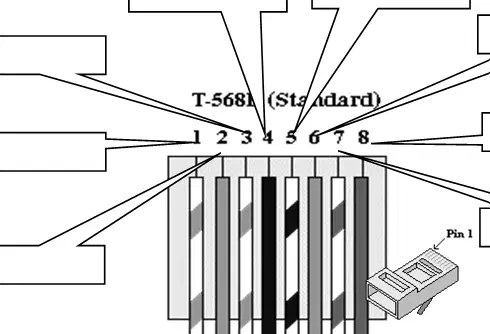
Label the twisted-pair wire colors for an RJ-45 plug wired to the T-568A standard. Which color is connected to pin 3?
White/Green
Green
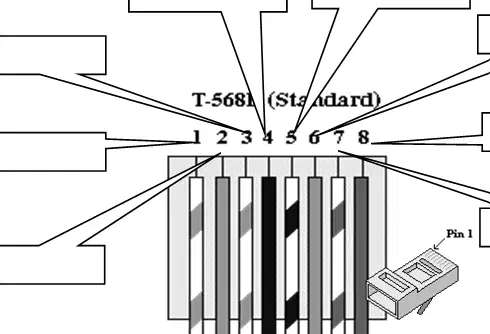
Label the twisted-pair wire colors for an RJ-45 plug wired to the T-568A standard. Which color is connected to pin 6?
White/Blue
Green
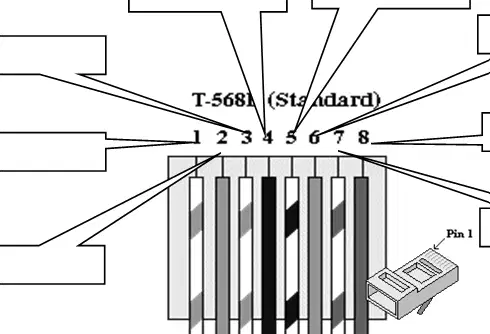
Label the twisted-pair wire colors for an RJ-45 plug wired to the T-568A standard. Which color is connected to pin 1?
White/Orange
Blue
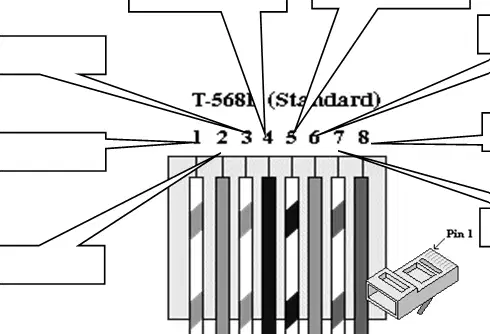
Label the twisted-pair wire colors for an RJ-45 plug wired to the T-568A standard. Which color is connected to pin 4?
Blue
Green
Label the twisted-pair wire colors for an RJ-45 plug wired to the T-568A standard. Which color is connected to pin 8?
Brown
blue
Label the twisted-pair wire colors for an RJ-45 plug wired to the T-568A standard. Which color is connected to pin 7?
White/Brown
White/orange
Label the twisted-pair wire colors for an RJ-45 plug wired to the T-568A standard. Which color is connected to pin 5?
green
blue
Label the twisted-pair wire colors for an RJ-45 plug wired to the T-568A standard. Which color is connected to pin 2?
blue
orange
Read each statement carefully and choose whether it is TRUE or FALSE:
"Before using any tools for computer servicing, you should always disconnect the power cable from the electrical outlet to prevent electrical shock."
TRUE
FALSE
It is safe to use a screwdriver with a damaged or broken handle when working on computer hardware
TRUE
FALSE
When using a LAN tester to check network cable connectivity, you should ensure both ends of the cable are
properly connected to the tester before performing the test.
TRUE
FALSE
When vacuuming dust from keyboards and system units, it is unnecessary to turn off and unplug the Computer first.
TRUE
FALSE
When hooking wires in tight spaces or racks, it is safe to force cables into narrow areas even if they become
pinched or bent at sharp angles
TRUE
FALSE
Tools should be kept organized in a proper toolbox or storage area to prevent accidents and ensure they are
readily available when needed
TRUE
FALSE
Before applying plastic molding sealant to computer case edges or openings, you should ensure the area is
clean, dry, and free from dust or debris for proper adhesion.
TRUE
FALSE
When using a crimping tool to attach RJ-45 connectors, you should verify the wire sequence follows the correct
standard (T568A or T568B) before crimping.
TRUE
FALSE
You should handle sharp tools like wire cutters and strippers carelessly since they cannot cause serious injuries.
TRUE
FALSE
After completing any computer servicing work, you should test the system to ensure all components are functioning properly and safely before returning it to regular use.
TRUE
FALSE
TEST V — Directions state to read the scenario and create a clear, accurate pictorial diagram showing the complete electrical wiring connection. According to the scenario, where must the two switches that control a single bulb be located?
One at the base of the stairs and one at the top of the stairs
Both at the base of the stairs
Both at the top of the stairs
One in the basement and one in the garage
TEST V — The requirements list the components that must appear and be labeled in the pictorial diagram for the staircase lighting controlled from two locations. Which items must be included? (Select all that apply.)
Power supply
Switch 1 (base of stairs)
Switch 2 (top of stairs)
Light bulb
Wiring connections showing how all components are connected
TEST V — The requirements specify acceptable labels for the power component in the pictorial wiring diagram of a single bulb controlled by two switches. Which labels are acceptable? (Select all that apply.)
Power Source
220V AC
Load
Neutral Wire
TEST V — The requirements specify acceptable labels for the first switch located at the base of the stairs in the pictorial wiring diagram. Which labels are acceptable? (Select all that apply.)
Switch 1 (Base of Stairs)
Bottom Switch
Switch A
Dimmer
TEST V — The requirements specify acceptable labels for the second switch located at the top of the stairs in the pictorial wiring diagram. Which labels are acceptable? (Select all that apply.)
Switch 2 (Top of Stairs)
Top Switch
Middle Switch
Timer Switch
TEST V — The requirements specify acceptable labels for the lighting load in the pictorial wiring diagram of the staircase setup. Which labels are acceptable? (Select all that apply.)
Bulb
Light
Lamp Circuit
Fuse
TEST V — According to the scenario for the staircase lighting, what capability must the wiring setup provide for convenience and safety?
Turning the light on or off from either switch location
Dimming the light from a single knob
Automatically turning the light off after a timer
Turning on the light only when motion is detected
TEST V — Directions require a specific type of drawing for the staircase lighting system. What type of diagram must be produced?
A pictorial diagram showing components and complete wiring connections
A microcontroller schematic with code
A mechanical drawing of the staircase
A bill of materials with prices
TEST V — One requirement for the diagram addresses how to depict wiring. What must the wiring connections show?
Clear lines showing how all components are connected
Approximate distances between components to scale
Only the location of labels without lines
Decorative symbols without connection lines

