
 Worksheets
Cisco Network Learning Module 3 Mobile Devices and Wi-Fi
Total questions: 86
Worksheet time: 47mins
Which statement best explains a key benefit of mobile devices using wireless connectivity?
They require physical cables for stable data transfer
They limit access to online services on campuses
They allow work and communication without fixed locations
They only support voice calls when stationary indoors
Why is connecting through Wi‑Fi often preferable to using cellular data on a mobile device?
Wi‑Fi signals always provide stronger download speeds
Cellular data drains less battery than Wi‑Fi radios
Wi‑Fi data usually is not counted against data plans
Cellular networks do not support video communications
Which practice most directly reduces the risk of exposing credentials over Wi‑Fi?
Avoid sending logins in unencrypted plaintext
Use open guest networks to improve speed
Disable WPA2 security on home routers
Share passwords through regular SMS texts
A student must submit assignments on campus with limited wired access. Which option leverages mobile wireless benefits most effectively?
Use campus Wi‑Fi to upload work from a tablet
Wait for a free Ethernet port in the lab
Carry a desktop tower to connect by cable
Print and mail the assignment on paper
A user’s phone battery is draining quickly while streaming over cellular. Which change is most likely to extend battery life?
Switch to Wi‑Fi because Wi‑Fi radios use less power
Turn on airplane mode while continuing the stream
Increase screen brightness for better reception
Disable encryption to reduce processing load
Which combination represents strong Wi‑Fi security for home use?
Enable WPA2 and use a VPN for sensitive data
Share the key widely and turn off encryption
Use open SSID and disable password prompts
Rely on cellular fallback and ignore router updates
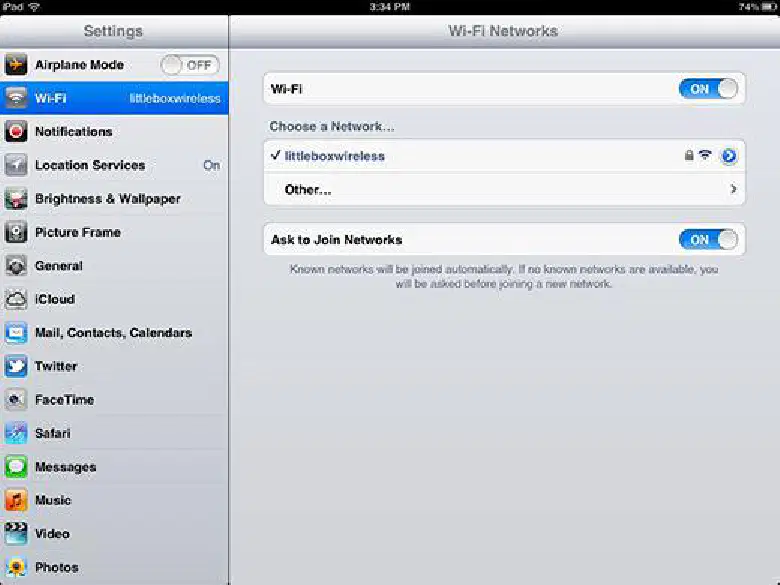
On both Android and iOS, what is the first action required before a device can list nearby Wi‑Fi networks?
Restart the mobile device
Enable airplane mode first
Disable cellular data connection
Turn Wi‑Fi on in settings

When a device is within range and Wi‑Fi is turned on, how does a user initiate joining a specific network?
Scan a QR code from ISP
Enable Bluetooth pairing mode
Type the router MAC address
Tap the SSID from the list

What occurs if Wi‑Fi is enabled but no known Wi‑Fi networks are in range?
The device repeatedly reboots
The device disables networking
The device uses cellular data
The device joins any open SSID

Which statement best describes automatic reconnection behavior for previously used networks?
Device auto‑connects to known SSIDs
Device forgets passwords after sleep
Device connects only to strongest open
Device asks every time to reconnect
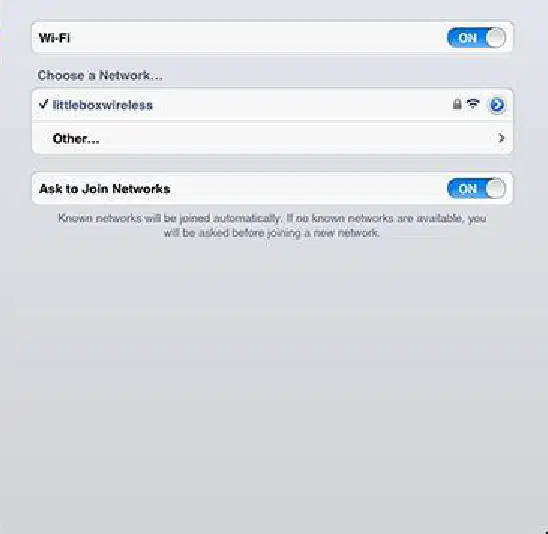
On iOS, what does the 'Ask to Join Networks' setting control?
Limit scans to hidden SSIDs
Disable saved network profiles
Force manual IP configuration
Prompt when new SSIDs appear

A phone moves out of range of its current Wi‑Fi. Which sequence reflects default behavior with Wi‑Fi left on?
Disconnect and stop networking
Switch off Wi‑Fi automatically
Try other Wi‑Fi, else use cellular
Join any open network silently
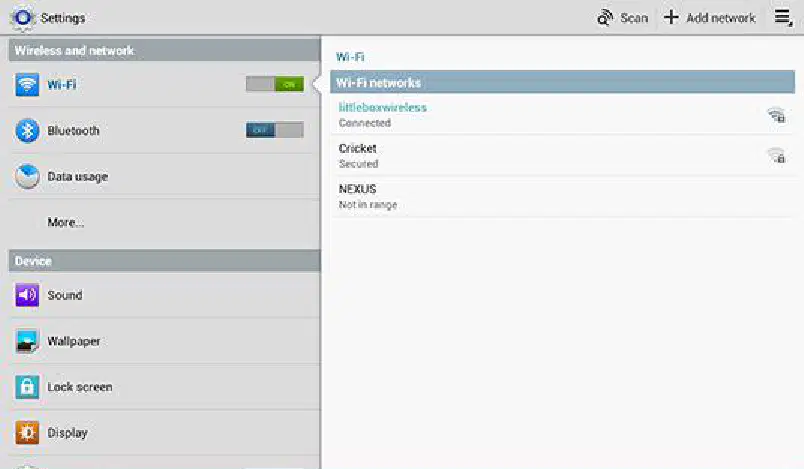
Which control lets you quickly enable or disable wireless LAN on Android and iOS devices?
Wi‑Fi switch in settings
Proxy toggle in browser
Hotspot button in apps
NFC toggle in security

Why might a device request a password after you select an SSID from the list?
The SSID is hidden only
The phone is in roaming
The router is offline
The network is secured
Which statement best explains why a hidden SSID may require manual configuration on a phone?
The network does not broadcast its name publicly
The router blocks all wireless devices permanently
The phone disables Wi‑Fi radios by default
The ISP turns off internet access at night
When entering Wi‑Fi credentials, what must be typed exactly as configured on the router to ensure connection?
MAC address and channel number
Router model and firmware version
IP address and subnet mask only
SSID and passphrase exactly as set
Which is the correct first step to add a hidden Wi‑Fi on an Android device?
Turn on Airplane mode immediately
Open Browser and search the SSID
Reboot the device and router
Open Settings and choose Add network
Select the correct sequence for manually joining a hidden Wi‑Fi on iOS.
Settings > Cellular > Other, enter SSID, select WPA2, restart, Join
Settings > Wi‑Fi > Other, enter SSID, choose security, other network, password, Join
Settings > Bluetooth > Add, type SSID, choose open, save, Join
Settings > Wi‑Fi > Add, scan SSID, auto security, finish, Join
A user types the right SSID but still cannot connect. Which action is most likely to fix the issue?
Disable DHCP on the router entirely
Lower the router transmit power immediately
Re‑enter the exact passphrase with correct case
Change the phone wallpaper and retry
Which Android step specifically sets the encryption used by the Wi‑Fi network?
Touch Security and select a security type
Touch Save to store the network
Select Settings and choose Add network
Enter the network SSID in the field
Why do manual Wi‑Fi steps sometimes differ between phones of the same OS?
Manufacturers customize interfaces and update versions
Routers always use unique SSID formats
iOS prevents any third‑party applications
Wi‑Fi requires passwords only on Android
On an iOS device, which path correctly toggles cellular data?
Settings > VPN > Cellular switch
Settings > Cellular Data > toggle switch
Settings > Wi‑Fi > Data switch
Settings > Network Mode > Enable data
What is the primary purpose of the 'Data roaming' toggle on a smartphone?
Force a switch from 4G to 3G network
Disable voice calls during travel time
Increase Wi‑Fi speed at home network
Allow data when outside home network
A phone moves from a 4G area into a 3G area. What happens to maintain connectivity?
4G radio turns off and 3G radio turns on
Both radios remain on simultaneously
The device disconnects until Wi‑Fi appears
Airplane mode activates automatically
Why might someone disable the 'Data enabled' setting shown in mobile network settings?
Restrict apps to Wi‑Fi only usage
Enable tethering for other devices
Improve cellular voice call clarity
Upgrade to a faster LTE network
Which statement best describes default network preference on mobile devices?
Use Wi‑Fi when available, otherwise cellular
Disable data until user enables manually
Always prefer cellular over any Wi‑Fi
Switch to VPN before using cellular
What is a primary advantage of Bluetooth for connecting mobile devices to accessories?
It provides the highest data throughput
It replaces the need for Wi‑Fi entirely
It requires towers for strong connections
It is wireless and uses very little power
How many Bluetooth devices can typically be connected to a mobile device at one time?
Up to twelve devices simultaneously
Up to eight devices simultaneously
Only one device at a time
Up to four devices simultaneously
Which scenario best illustrates tethering via Bluetooth?
Connecting earbuds to play stored music
Sharing a phone’s internet with a laptop
Streaming video to a smart television
Syncing contacts with a desktop app
During pairing, what must a device be set to so other Bluetooth devices can detect it?
Visible or discoverable mode
Battery saver mode
Airplane or flight mode
Privacy or hidden mode
When a device is in discoverable mode, which detail is typically broadcast?
Screen brightness and battery health
Saved Wi‑Fi passwords and emails
User location and installed apps
Name, class, services, and technical specs
What is the role of a PIN or passkey in Bluetooth pairing?
Authenticates the connection process
Increases audio quality of music
Boosts the radio transmission range
Updates the device firmware version
Which step logically comes first when pairing a headset to an Android phone?
Select the discovered headset name
Turn off Wi‑Fi to avoid interference
Place the headset in discoverable mode
Type the PIN shown on the phone
Which step is part of pairing on iOS after enabling Bluetooth?
Select the discovered device to connect
Open Developer Options for pairing
Manually assign a Bluetooth address
Disable cellular data during pairing
A student is listening to music over Bluetooth headphones, browsing the web on Wi‑Fi, and receiving texts on cellular. What concept does this demonstrate?
Simultaneous use of wireless services
Near‑field communication sharing
Channel bonding for higher speeds
Roaming between radio networks
A keyboard fails to reconnect after being paired last week. Which action best aligns with pairing concepts to restore the connection?
Disable Bluetooth visibility permanently
Reset the phone to factory defaults
Ensure the keyboard is in range and powered
Increase volume to trigger discovery
According to the video, which network is used when you speak to another person on a different cell phone?
Bluetooth
Cellular provider network
Wi‑Fi
Near Field Communication (NFC)
The video describes Bluetooth as:
A wired connection standard
A short‑range wireless network with different rules and protocols
A long‑range wireless network with the same protocols as cellular
A satellite communication system
Which technology does the video say is most commonly used to connect many different device types to the global internet?
NFC
Bluetooth
Wi‑Fi
GPS
Near Field Communication (NFC) is primarily used for:
Streaming high‑definition video between devices
Sending information over an extremely short distance (e.g., contactless payments)
Long‑distance satellite positioning
Real‑time voice calls between cell phones
The video states that all the different communication protocols and frequencies are:
Illegal to use simultaneously
Only available on specialized devices, not on smartphones
Contained within the same device (the cellphone)
Managed by separate external modules outside the phone
What capability does the cellphone have that involves signals from satellites?
Bluetooth pairing
Cellular handoff management
Receiving GPS signals to determine location
Enabling Wi‑Fi hotspots for other satellites
How accurate does the video claim a cellphone's GPS location usually is?
Not accurate enough for navigation
Exact to the centimeter by default
Within a few meters
Within a few kilometers
Which statement best describes how these communications may operate, according to the video?
The phone must disable GPS when connected to Wi‑Fi
The phone alternates between networks every 10 minutes
Multiple communication types may be happening simultaneously on the phone
Only one communication type can function at a time on a cellphone
When using a Bluetooth headset, the video indicates the device communicates through:
The global internet directly, bypassing the phone
The cellular provider network
Satellite links only
A completely different short‑range network than cellular
Which of the following is NOT explicitly mentioned in the video as a function of a cellphone?
Serving as a base station for cellular towers
Communicating over cellular voice channels
Acting as a Bluetooth endpoint for speakers and headsets
Receiving GPS signals from satellites
What does the speaker identify as the primary function of a cell phone?
Talking (voice calls)
Browsing social media
Paying for goods
Using GPS
According to the video, which component(s) inside a cell phone are used when making calls?
Only the GPS chip
Multiple radios, transmitters, and receivers
The payment chip (NFC)
The touchscreen and battery
When the speaker mentions "data" that uses a data plan, what situation are they describing?
Paying at a cash register with the phone
Making a voice call over a landline
Using Wi‑Fi at home
Accessing the internet when not near regular Wi‑Fi
Which of the following is listed as a common Wi‑Fi usage example in the video?
Satellite phone connections
Home wireless networks and hotspots
In‑car entertainment systems
Landline telephone networks
What feature do most people use their cell phones for to navigate or find places?
Contact lists
Location services (GPS, maps, places near me)
Camera stabilization
Music streaming
The speaker describes paying with a phone. How is this payment typically completed?
Bringing the phone next to a cash register or payment pad to transfer financial information
Sending an email to the cashier
Physically inserting a SIM card into a cash register
Scanning a QR code printed on paper only
Which networks are contrasted with using a data plan when accessing the internet on a phone?
Television broadcast networks
Postal networks
Wi‑Fi networks (home wireless, hotspots)
Landline phone networks
Which of the following did the speaker explicitly list as part of "location services"?
Bluetooth audio pairing
Photo editing tools
Mobile banking and budgeting apps
Maps and places near me
The speaker states that cell phones contain multiple radios. What is the main reason given for this?
To improve camera performance
To support different functions like talking and data transmission
To charge other devices wirelessly
To store more photos and videos
Which of these best summarizes the range of cell phone uses mentioned in the video?
Only voice calls and text messaging
Voice calls, data/internet access, Wi‑Fi, location services, and contactless payments
Only entertainment apps and games
Only hardware repair and battery replacement
Connecting a peripheral to a smartphone is known as:
Pairing
Wi-Fi
4G
NFC
In setting up a new office network, which of the following is NOT considered a standard layout for connecting computers and devices?
Star
Ring
Spiral
Mesh
How do smartphones connect to the internet when Wi-Fi is not available?
Through underground fiber optic cables
Using radio transmissions
By metal conductors
Through direct physical connections
Imagine a scenario where you've been using your mobile phone for various tasks daily for over a decade. According to the World Health Organization, the long-term effects of such extensive mobile phone use:
Have been proven to increase brain tumors
Require further research, especially for use over periods longer than 15 years
Show consistent evidence of adverse health effects
Are not a concern for public health
Ken is driving through the bustling streets of New York City, talking on his cell phone. In this scenario, what percentage of all motor vehicle crashes are contributed to by the use of cell phones, as reported by the National Safety Council?
5%
10%
26%
50%
Imagine you're responsible for disposing of old wireless devices at a large corporation. What should be your primary environmental concern?
Energy consumption during their operational lifetime
Air pollution generated during their manufacturing process
Water pollution resulting from battery leaks
Harmful materials from the devices affecting humans and wildlife
Malik setting up a home office and wants to have internet access. Which of the following hardware is NOT required for setting up a wireless network in your home office?
Modem
Ethernet cable
Wireless network adapter
Wireless router
Xander is setting up a mobile network for a large outdoor festival. She wants to ensure that the network can support high-speed internet access for attendees. What speeds are 4G LTE networks designed to provide up to?
100 Mbit/s for high mobility communication
300 Mbit/s download rates
1 Gbit/s for stationary communication
30 to 40 mbps for multiple users
WiMAX is considered a better choice for:
High-cost network installation in developed countries
Short-range networking within buildings
Long-range networking spanning kilometers
Exclusive use in mobile phones
When Sean uses a secure messaging app to communicate, the app uses:
Different keys for encryption and decryption
The same key for both encryption and decryption
A public key for encryption and a private key for decryption
Amy is setting up a secure home Wi-Fi network. Which encryption standard does WPA2 use to ensure the network's security?
DES
AES
SSL
WEP
Imagine you've just set up a wireless network for your home office. Which of the following actions will NOT enhance the security of your network?
Disabling SSID broadcast
Using WEP encryption
Keeping the default network password
Installing antivirus software on devices connected to the network
Selena is setting up a high-speed internet service in a new city. She is considering the technologies to deploy and come across LTE and WiMAX. LTE and WiMax are:
Incompatible with 2G and 3G systems
The same technology under different names
Considered 4G technologies
Primarily used for wired communications
Imagine you're setting up a Wi-Fi network for your coffee shop. You're deciding between using WPA2 and WEP for your network's security protocol. The primary advantage of choosing WPA2 would be:
Compatibility with older devices
Lower computational requirements
Enhanced security using AES
Faster data transmission rates
Michael is setting up a website for a customer's new online business. Which protocol would he use to ensure that the communication between the website and its visitors is secure?
WPA
SSL
WEP
AES
A local business only allows devices with known MAC addresses to connect to its Wi-Fi. This approach increases security by:
Encrypting the data they send and receive
Permitting only specific trusted devices to connect
Decreasing the wireless signal range
Completely hiding the network from unauthorized users
Which example is client software?
Authentication directory domain controller
Database management back-end service
Web browser such as Chrome or Edge
Mail transfer daemon running headless
Which server type primarily handles shared documents on a LAN?
File server
Web server
Email server
Authentication server
Which statement best distinguishes Client–Server from Peer-to-Peer (P2P) architecture?
Client–Server uses a central server; P2P is decentralized
Both rely on a single central server by design
P2P is centralized while Client–Server is distributed
Neither architecture involves direct device communication
Which example best represents a server role?
Game client sending player actions
Web server delivering content pages
Student laptop submitting homework
Browser composing a search query
What is a common additional service ISPs offer to subscribers beyond internet access?
Custom OS development
Email and web hosting
Home printer repairs
CPU overclock tuning
ISPs interconnect in a hierarchical manner mainly to achieve which networking goal?
Exclusive national control
Permanent peer isolation
Guaranteed zero latency
Shortest path routing globally
A household wants multiple devices to share one ISP link securely with NAT and Wi‑Fi. Which device is needed in addition to the modem?
A residential router
A packet sniffer
A media converter
An unmanaged hub
Which wireless technology is most commonly used for short-range data transfer between a phone and a speaker?
Wi‑Fi
Bluetooth
Cellular LTE
Satellite radio
What is the main reason for using a strong passphrase on a home Wi‑Fi network?
To reduce battery usage
To enable Bluetooth pairing
To prevent unauthorized access
To increase download speeds
When connecting a new device to a Wi‑Fi network, which information is typically required?
Device serial number
Cellular provider name
SSID and network passphrase
Bluetooth MAC address
Which of the following is necessary to establish a wireless connection to an enterprise wireless network? (Choose three)
SSID name
802.1X/EAP credentials
IP address
RF signal
Digital certificate
Which wireless protocol is most suitable for connecting a smartwatch to a smartphone for notifications?
NFC
Wi‑Fi
Bluetooth
Cellular LTE
What is the primary function of a Wi‑Fi access point in a home network?
To store backup copies of device data
To boost Bluetooth signal range
To encrypt cellular data transmissions
To provide internet access to mobile devices wirelessly
When setting up a secure wireless network, which action helps prevent unauthorized users from joining?
Disabling all password requirements
Sharing the passphrase on public forums
Using a strong, unique network passphrase
Broadcasting the SSID without encryption

