
 Worksheets
NIM QUIZZIZ FOR FINAL EXAM SEM 1 25/26
Total questions: 45
Worksheet time: 38mins
Explain the DORA process in DHCPv4 operation. (Common 4-mark question)
Compare SLAAC vs. Stateful DHCPv6. (Critical for Module 8)
Why is "Split-MAC" architecture used in WLC deployments?
Explain the "3-Way Handshake" in TCP (used in ACL logic).
Describe the difference between Management and Native VLANs.
Config: Router-on-a-Stick (Inter-VLAN). Topology: R1 connected to Switch Trunk. Write the configuration to achieve this.
Topology: R1 connected to Switch Trunk
Config: DHCP Relay Agent. Scenario: PC is on VLAN 10 and the DHCP Server is on VLAN 20. Go to the interface facing the client (the Gateway): interface g0/0/1. Enter the command that points to the remote server at 192.168.11.6.
Scenario: PC is on VLAN 10, DHCP Server is on VLAN 20
(a)
Config: Standard ACL (Placement). Scenario: Block VLAN 10 from accessing VLAN 30. Where should the standard ACL be placed?
Closest to Destination
Closest to Source
On VLAN 10 interface inbound on R3
On VLAN 30 interface inbound on R3
Config: Standard ACL. Scenario: Block VLAN 10 from accessing VLAN 30. Which single ACL statement correctly denies traffic from 192.168.10.0/24?
access-list 10 deny 192.168.10.0 0.0.0.255
access-list 10 deny 192.168.10.0 255.255.255.0
access-list 10 deny 192.168.10.0 0.255.255.0
access-list 10 deny host 192.168.10.0
Config: Extended ACL (Placement). Scenario: Block PC A (Source) from FTP to Server B. Where should the extended ACL be placed?
Closest to Source
Closest to Destination
On the server’s interface outbound
On a distribution switch only
Config: Extended ACL. Scenario: Block PC A (Source) from FTP to Server B. Which ACE denies FTP from 192.168.10.10 to 192.168.30.5?
deny tcp host 192.168.10.10 host 192.168.30.5 eq 21
deny udp host 192.168.10.10 host 192.168.30.5 eq 69
deny tcp 192.168.10.0 0.0.0.255 192.168.30.0 0.0.0.255 eq 80
deny ip host 192.168.10.10 host 192.168.30.5
Config: Extended ACL application. Scenario: Block PC A (Source) from FTP to Server B. The ACL named FTP-BLOCK is applied on interface g0/0/0 on R1. In which direction is it applied?
Inbound
Outbound
Both directions
Not applied
Config: Switch Port Security. Scenario: Limit to 1 MAC, shutdown on violation. Which command sets the violation action to shutdown?
switchport port-security violation shutdown
shutdown
switchport port-security violation restrict
switchport port-security protect
Config: Switch Port Security. Scenario: Limit to 1 MAC, shutdown on violation. Which command limits the interface to learn only one MAC address?
switchport port-security maximum 1
switchport port-security mac-address 1
switchport maximum-mac 1
switchport port-security limit 1
Troubleshooting & Logic (Application). Symptom: You configured ROAS, but PCs in VLAN 10 can't ping PCs in VLAN 20. Which checks help diagnose the issue? Select all that apply.
Enable trunking on the switch port connected to the router
Configure encapsulation dot1q 10 before adding the IP address on the subinterface
Enable OSPF on both VLAN interfaces
Create static ARP entries on the PCs
Troubleshooting & Logic (Application). Symptom: DHCP client gets an IP starting with 169.254.x.x (APIPA). What is the likely cause?
The DHCP server is unreachable or down
The client’s default gateway is misconfigured
DNS resolution failed
The subnet mask on the client is /16 instead of /24
A client sends a DHCPDISCOVER but gets no IP. You find the server is on a different subnet. What command is missing?
Configure ip helper-address on the router interface facing the client
Enable DHCP snooping on the access switch
Set the port to access mode instead of trunk
Add a static ARP entry for the DHCP server
In an IPv6 Router Advertisement (RA), the M-flag is set to 1. What does the client do?
Uses Stateless Address Autoconfiguration (SLAAC) only
Uses Stateful DhCPv6. Contacts a DHCPv6 server for stateful configuration (address and other details)
Generates a temporary IPv6 address and disables DHCPv6
Uses Stateless DHCPvs6. Requests only DNS information via DHCPv6 while using SLAAC for the address
You connect a new switch, and it immediately causes a loop/broadcast storm. The port was set to "Dynamic Auto". Why did it form a trunk?
The other side was configured as Dynamic Desirable or Trunk
Spanning Tree was disabled on both switches
The port speed was mismatched
The native VLAN was misconfigured
An administrator wants to block FTP traffic from the Sales VLAN to the Admin VLAN. Where should the ACL be placed?
On the destination interface closest to the Admin VLAN
On the source interface closest to the Sales VLAN
On the core switch uplink only
On the WAN edge router
What is the specific role of the "Native VLAN" on a trunk link?
It carries tagged frames only
It carries untagged frames on the trunk
It prevents VLAN hopping by default
It is used for management traffic only
Why would a network admin use a "Split-MAC" architecture in WLANs?
To have the Access Point handle real-time functions while the WLC handles management and security
To ensure all encryption happens only on the WLC
To allow APs to operate without any controller
To split RF channels across multiple VLANs
Which Syslog level is "Critical" and what number is it?
0
1
3
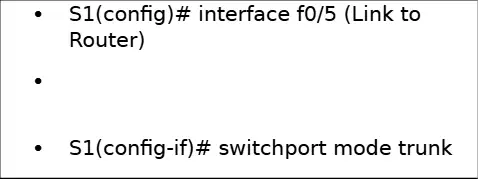
Scenario A: Configure Router-on-a-Stick (Inter-VLAN Routing). Task: Enable communication between VLAN 10 and VLAN 20 using Router R1. Topology: R1 (G0/0/1) connected to Switch S1 (Trunk). On S1, which command sets the link to the router as a trunk?
S1(config-if)# switchport mode trunk
S1(config-if)# encapsulation dot1q 10
S1(config-if)# ip address 192.168.10.1 255.255.255.0
S1(config-if)# no shutdown
Scenario A: Configure Router-on-a-Stick (Inter-VLAN Routing)
Task: Enable communication between VLAN 10 and VLAN 20 using Router R1.
Topology: R1 (G0/0/1) connected to Switch S1 (Trunk)
For the VLAN 10 subinterface on R1, which interface should be created?
R1(config)# interface g0/0/1.10
R1(config)# interface g0/0/1.20
R1(config)# interface g0/0/1
R1(config)# interface f0/5
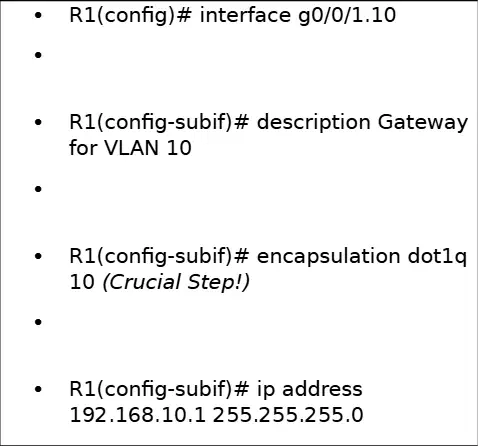
Scenario A. For VLAN 10 on R1, which encapsulation command is required (Crucial Step!)?
R1(config-subif)# encapsulation dot1q 10
R1(config-subif)# encapsulation dot1q 20
R1(config-subif)# switchport mode trunk
R1(config-subif)# ip access-group SURFING in
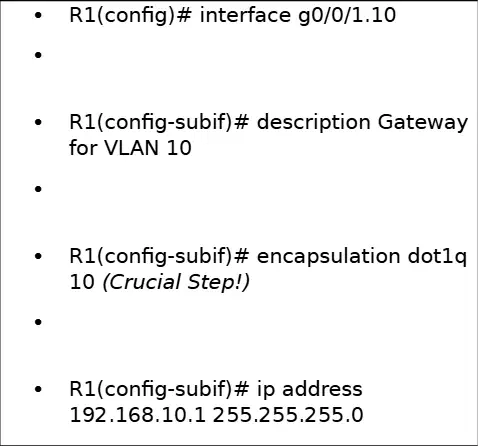
Scenario A. What IP address and mask are assigned to R1's VLAN 10 subinterface?
192.168.10.1 255.255.255.0
192.168.20.1 255.255.255.0
192.168.10.254 255.255.255.0
10.0.0.1 255.255.255.0

Scenario A. For VLAN 20 on R1, which encapsulation command must be configured on the subinterface?
R1(config-subif)# encapsulation dot1q 20
R1(config-subif)# encapsulation dot1q 10
R1(config-subif)# switchport access vlan 20
R1(config-subif)# ip access-group SURFING out

Scenario A. What IP address and mask are assigned to R1's VLAN 20 subinterface?
192.168.20.1 255.255.255.0
192.168.10.1 255.255.255.0
192.168.20.254 255.255.255.0
10.0.0.2 255.255.255.0

Scenario A. To activate R1's physical interface for the subinterfaces, which command must be entered on interface g0/0/1?
R1(config-if)# no shutdown
R1(config-if)# shutdown
R1(config-if)# ip access-group SURFING in
R1(config-if)# switchport mode trunk
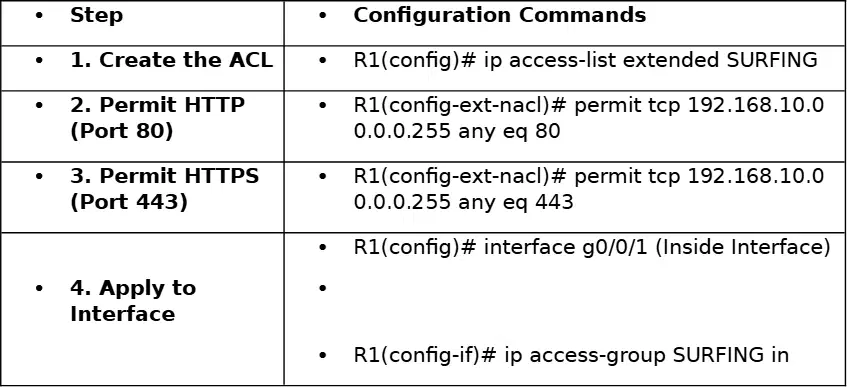
Scenario B: Configure a Named Extended ACL. Task: Allow "SURFING" (HTTP/HTTPS) from the inside network (192.168.10.0/24) to the Internet, but block everything else. Which command creates the named extended ACL SURFING?
R1(config)# ip access-list extended SURFING
R1(config)# access-list 100
R1(config)# ip access-list standard SURFING
R1(config)# ip access-group SURFING in
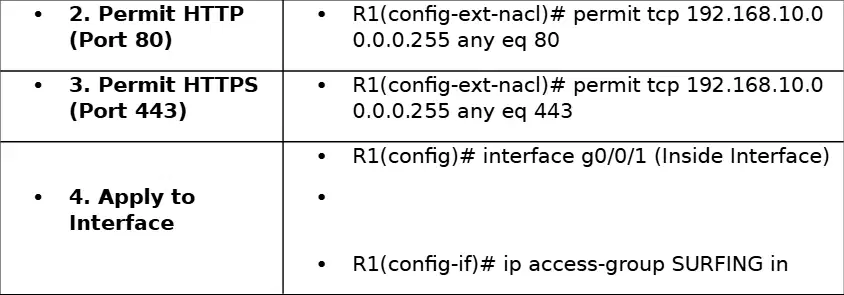
Which ACL entry permits HTTP (Port 80) from 192.168.10.0/24 to any destination?
R1(config-ext-nacl)# permit tcp 192.168.10.0 0.0.0.255 any eq 80
R1(config-ext-nacl)# permit tcp 192.168.10.0 0.0.0.255 any eq 443
R1(config-ext-nacl)# deny ip any any
R1(config-ext-nacl)# permit udp 192.168.10.0 0.0.0.255 any eq 80
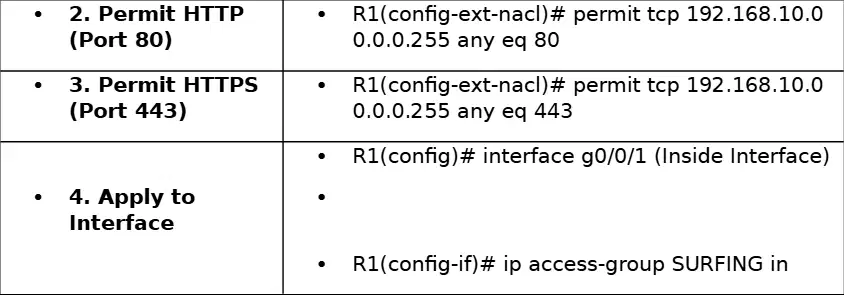
Scenario B. Which ACL entry permits HTTPS (Port 443) from 192.168.10.0/24 to any destination?
R1(config-ext-nacl)# permit tcp 192.168.10.0 0.0.0.255 any eq 443
R1(config-ext-nacl)# permit udp 192.168.10.0 0.0.0.255 any eq 443
R1(config-ext-nacl)# permit tcp any any eq 443
R1(config-ext-nacl)# deny tcp 192.168.10.0 0.0.0.255 any eq 443

Scenario B. According to the worksheet, on which interface is the ACL applied?
R1(config)# interface g0/0/1 (Inside Interface)
R1(config)# interface g0/0/0
R1(config)# interface f0/5
R1(config)# interface vlan 1

Scenario B. Which command applies the named ACL SURFING inbound on the inside interface?
R1(config-if)# ip access-group SURFING in
R1(config-if)# ip access-group SURFING out
R1(config-if)# access-class SURFING in
R1(config-if)# ip access-list SURFING in
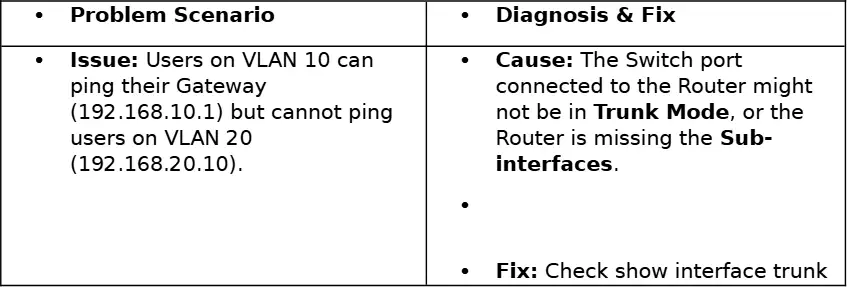
Troubleshooting "Critical Thinking" (Short Answer). The exam asks "Why?"—Use these logic chains. Issue: Users on VLAN 10 can ping their Gateway (192.168.10.1) but cannot ping users on VLAN 20 (192.168.20.10). Which diagnosis from the worksheet best explains the issue?
The switch port connected to the router is not in trunk mode, or the router is missing the subinterfaces
The default gateway on VLAN 10 is misconfigured
A DNS outage is preventing name resolution
The ACL SURFING blocks ICMP on the inside network
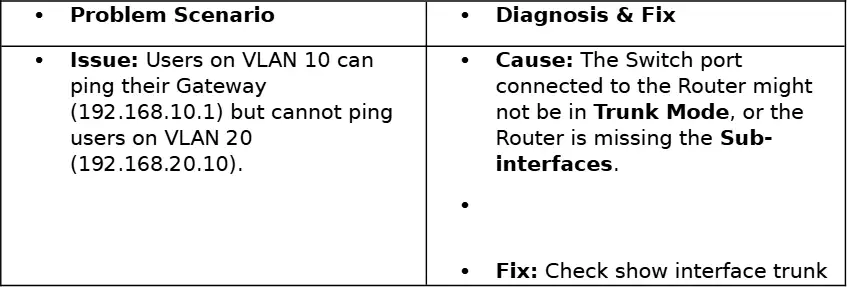
Troubleshooting. For the issue where VLAN 10 cannot reach VLAN 20, which verification command is recommended in the fix?
show interface trunk
show ip route
show access-lists
show running-config | section ospf
Problem Scenario: You configured a Standard ACL to block PC-A, but now nobody can access the server. Diagnosis & Fix: Cause stated as forgetting the Implicit Deny All at the end of the ACL. Apply the recommended fix to allow other traffic to reach the server while still enforcing the ACL.
Manually add permit any (or permit ip any any for an extended ACL) at the bottom
Remove the ACL from the interface entirely
Convert the Standard ACL to a named Extended ACL without adding permits
Move the ACL to the outbound direction on a different interface
Problem Scenario: DHCP Client has an IP of 169.254.x.x (APIPA). Diagnosis & Fix: Identify the most likely cause of this condition.
The client failed to contact the DHCP server
The switch port is set to half-duplex
The router interface MTU is too small
The client’s DNS server is unreachable
Problem Scenario: DHCP Client has an IP of 169.254.x.x (APIPA). Diagnosis & Fix: Select all checks recommended to resolve this issue.
Verify whether the DHCP pool is exhausted
Confirm that the Relay Agent (ip helper-address) is configured on the router gateway facing the client
Replace the client’s network interface card
Assign a permanent static IP address to the client
Problem Scenario: Port Security violation shuts down a port. Diagnosis & Fix: Choose the stated cause.
A device with an unauthorized MAC address connected to the port
Excessive broadcast traffic on the VLAN
A duplex mismatch between the switch and host
An untagged frame arriving on a trunk port
Problem Scenario: Port Security violation shuts down a port. Diagnosis & Fix: Apply the stated procedure to bring the interface back up after the violation.
Enter shutdown followed by no shutdown on the interface
Clear the MAC address table globally
Disable spanning tree on the access port
Increase the maximum number of secure MAC addresses
Final Case Study Advice for the Topology Drawing: ROAS diagram must show One Router, One Switch, and One trunk link between them. State the explicit requirement that must be written on the drawing for the router.
Router sub-interfaces (e.g., G0/0.10) must be written on the drawing
Switch VLAN names must be color-coded
Access points must be shown in "Lightweight" mode
DHCP pool ranges must be listed next to the switch
Final Case Study Advice for the Topology Drawing: DHCP Relay diagram has a Router between the Client and the Server. Identify which interface must have the ip helper-address configured.
The router interface facing the Client
The router interface facing the Server
The switch trunk interface
The access point uplink interface
Final Case Study Advice for the Topology Drawing: WLC (Wireless LAN Controller) connectivity is described. Choose the correct statement about the WLC and AP connections.
The WLC connects to a Switch using a trunk, and the AP connects to the Switch; the AP is in Lightweight mode
The WLC connects directly to the AP via an access port, and the AP is in autonomous mode
The AP connects to the WLC using an L2 EtherChannel, and the switch is not involved
The WLC must connect to the router, and the AP connects to the router

