

Introduction to Binary

Presentation
•
Computers
•
8th - 9th Grade
•
Practice Problem
•
Hard

Nica Sutingco
Used 41+ times
FREE Resource
19 Slides • 0 Questions
1
Introduction to Binary
Lesson 1
2
Introduction
A computer does not understand numbers or letters. It must translate those numbers and letters into a language it understands.
Computer only knows 1 and 0. The best way to send information is through the binary code of 0 and 1.
All the letters of the alphabet, numbers and symbols and other keyboard characters are written in binary codes.
When you work with numbers, you use decimal system.
3

[Decimal to Binary Code Representation]
4
5
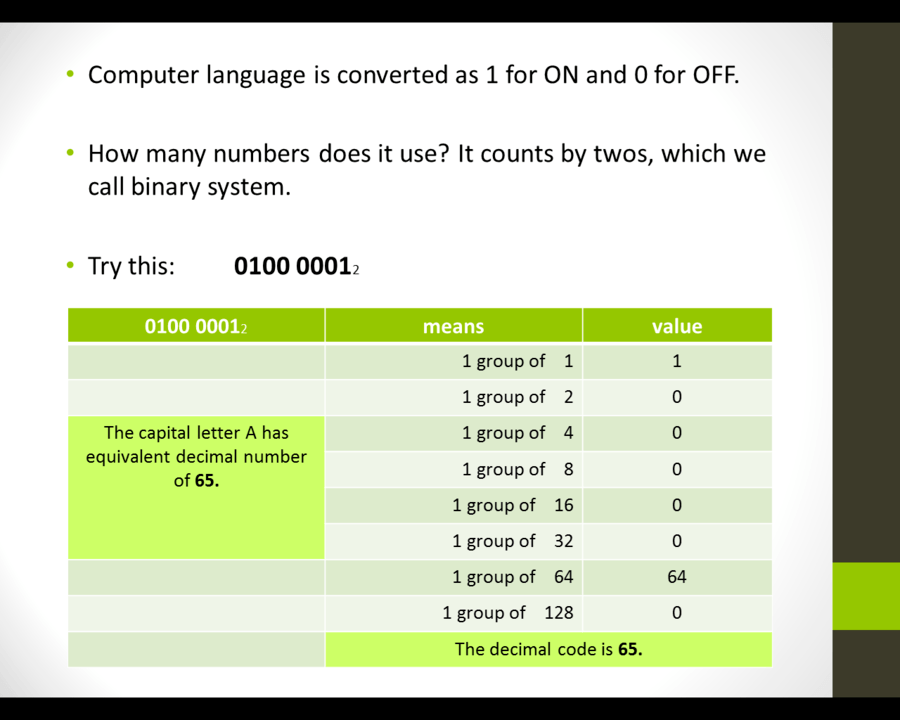
Try Yourself!
0011 01112.
It has decimal number of 55.
Show the correct means and value and give the decimal code.
6
The ASCII Code
[Introduction to Binary]
7
The ASCII Code
ASCII stands for American Standard Code of information Interchange.
The ASCII codes are codes used to represent the letters, numbers, symbols, and some of the commands used by the computer.
The ASCII code gives a binary code of eight numbers to each character or command. An uppercase A sends the binary code 0100 0001.
There are 26 different codes for the 26 letters of the alphabet.
8

[Example of Binary Conversion]
9
The Binary Digit
[Introduction to Binary]
10
The Binary Digit
Binary digits are 0 and 1. We call them bits.
A group of eight bits is known as byte.
0100 0001 is a byte and it stands for letter A
Every character or symbol entered into the computer takes up one byte of memory
11
Binary Language
[Introduction to Binary]
12
Binary Language
The character used in human language are meaningless to a computer.
Like a lightbulb, the computer must interpret every signal as enter “ON” or “OFF”.
A computer represents data as distinct or separate numbers.
These numbers are known as bits.
Where: 0 = "off" and 1 = "on"
13

[Units of Measure Used to Measure Storage Capacity]
14
How can 2 digits represent an infinite number of values?
8 4 2 1
(1x8) + (1x4) + (1x2) + (1x1)
●If its on (1) the total value represented by the light bulb is 15.
8 4 2 1
(0x8) + (0x4) + (0x2) + (0x1)
●If its off (0) the total value represented by the light bulb is 0.
15
In personal computers, they commonly use the ASCII system to represent character data.
ASCII is pronounced as “Ask-kee” which stands for: American Standard Code for Information Interchange
Each ASCII number represents an English character
Computers translate ASCII to binary data so they can process it
16

Examples: (Letters & Symbols)
17

18
Key Terms
Binary Digit – registration of data as 1 or 0
bps (bits per second) – the unit of measurement for the speed of data transmissions
Byte – a series of (8) eight bits
8 bits = 1 byte
19

Introduction to Binary
Lesson 1
Show answer
Auto Play
Slide 1 / 19
SLIDE
Similar Resources on Wayground

13 questions
Midpoint & Distance
Presentation
•
8th - 9th Grade
15 questions
Write Linear Equations for Word Problems
Presentation
•
8th - 9th Grade
12 questions
Living Things
Presentation
•
KG
14 questions
Transformations
Presentation
•
8th Grade
14 questions
Imperialism
Presentation
•
9th Grade
11 questions
Teenager 5 Session 24: Pronunciation & Speaking
Presentation
•
KG
14 questions
Atoms and Molecules
Presentation
•
8th Grade
15 questions
Standard Form Linear Equations
Presentation
•
8th - 9th Grade
Popular Resources on Wayground
10 questions
Safety Day 2026 – Student Review

Quiz
•
9th Grade
21 questions
Continents and Oceans
Quiz
•
6th Grade
20 questions
Parts of Speech
Quiz
•
5th Grade
16 questions
Subject & Predicate
Quiz
•
5th Grade
25 questions
Multiplication Facts
Quiz
•
5th Grade
12 questions
Map Skills
Quiz
•
3rd Grade
22 questions
Continents and Oceans
Quiz
•
5th Grade
15 questions
Rounding Decimals
Quiz
•
5th Grade
Discover more resources for Computers
32 questions
Unit 3: Intro to App Design (APCSP 22-23, Code.org)
Quiz
•
9th - 12th Grade
30 questions
[AP CSP] Spreadsheets Review
Quiz
•
9th Grade
10 questions
Digital Citizenship: Part 1
Quiz
•
6th - 8th Grade
15 questions
AP CSP - Code.org Unit 3 Review
Quiz
•
9th - 12th Grade
40 questions
Introduction to Microsoft Word
Quiz
•
8th - 12th Grade