Web technologies
Presentation
•
Computers
•
11th - 12th Grade
•
Practice Problem
•
Medium
Michelle Parton
Used 33+ times
FREE Resource
27 Slides • 31 Questions
1
Web Technologies
A Level H446 Computer Science
2
There are 3 main technologies you need to know about
HTML
CSS
JavaScript
3
HTML
It stands for Hypertext Markup Language.
Hypertext, because it can allows sections of text to be connected by links.
Markup, because it specifies the layout and style of a page, and
Language because it has a grammar and syntax that must be followed.
HTML is the standard markup language used to create web pages and its elements form the building blocks of all websites.
It is a text-based language and its commands are stored in a text file usually with the extension .html or .htm
4
HTML
If the file is opened in a browser, the commands are interpreted by the browser resulting in a rendered web page.
HTML markup commands allow an author to include the following in a web page
Text, images, headings, tables, lists, Online forms for sending data to the server, Media objects such as video and sound, Hyperlinks to jump to other web pages or even parts of its own page
Development of HTML is ongoing and the organising body is the W3C consortium.
It is now in its 5th major revision. This revision is called HTML 5
5
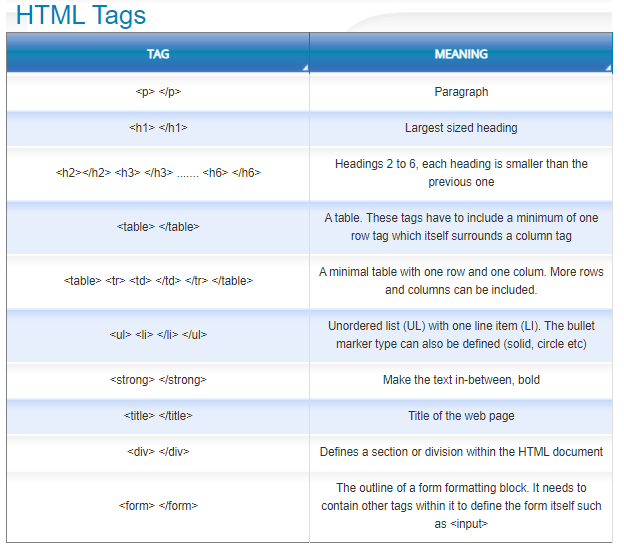
HTML Tags
HTML is fairly simple to learn as it is just made up of a number of 'tags'.
A tag is a formatting command for the browser to interpret.
A tag is formatted like this
<tag>
Most tags come in pairs - one to mark the start of the formatted block and the other to mark the end of the formatted block.
The end marker includes a forward slash. The pair of tags look like this
<tag> </tag>
For example a paragraph is marked with
<p> </p>
Any text in-between the tags is treated by the browser as its own paragraph of text.
6
7
HTML Browser Support
The major issue with HTML is that there are many different browsers. For example, Chrome, Internet Explorer, Firefox and Android.
In addition, each of these browsers have multiple versions, as the code is updated to add features or remove bugs.
These different browsers and browser versions all interpret HTML formatting commands slightly differently.
This means the same HTML code ends up creating a different looking page depending on which browser and which version number is being used.
8
Syllabus Content
<html>
<link> to link to a CSS file
<head>
<title>
<body>
<h1> <h2> <h3>
<img> including the src, alt, height and width attributes.
<a> including the href attribute.
<div>
9
10
HTML Syllabus Content
<html>
<link> to link to a CSS file
<head>
<title>
<body>
<h1> <h2> <h3>
<img> including the src, alt, height and width attributes.
<a> including the href attribute.
<div>
<form>
<input> where the input is a textbox (has the attribute type=”text” and another attribute name to identify it) or a submit button (i.e. has the attribute type=”submit”)
<p>
<li>
<ol> or <ul>
<script>
11
Multiple Choice
What is the internet?
A worldwide network of networks
The World Wide Web
An internal network
A net
12
Multiple Choice
13
Multiple Choice
14
Multiple Choice
15
Multiple Choice
16
Multiple Choice
17
Multiple Choice
18
Multiple Choice
19
Multiple Choice
20
21
CSS
CSS is short for Cascading Style Sheets. It is a "page styling language". This means that is where HTML describes what is on a web page, CSS describes how it looks.
Styling includes defining colours, layouts and fonts of various parts of the page.
CSS is now in its 3rd major revision, which is called CSS3.
The way it works is to describe, with one or more css properties, how a HTML tag should look in terms of size, colour, font and so on. It uses "style" tags to do this
22
CSS Benefits
Benefits
CSS allows styling to be separate from content. An entire site can be controlled from a single external css file The same html code can be displayed on many different screen sizes and devices without alteration
Easier to allow visually impaired people to personally adjust the way the page looks
23
CSS Issues
Issues
The biggest issue is browser support for specific CSS properties. All browsers support the original CSS1 properties. But later versions such as CSS3 have less support, especially for browsers on non-desktop computers such as smart phones and tablets.
24
CSS Placement - Inline
This is where the css is placed inside the tag being styled.
Inline css placements are handy for making changes to small parts of a page, such as centering an image or highlighting a single piece of text.
25
CSS Placement - External
You can also keep CSS commands in a separate text file. The file will have the extension .css . This allows you to use the stylesheet file on multiple web pages by linking to it in the headers. Pages can link to multiple style sheets if you want. For example you might keep CSS styling for tables in one stylesheet, and styling for hypertext links in another. External css file allow you to change the styling of an entire web site from a single location
26
CSS Placement - Header
CSS style commands can also be placed in the <head> section of the page. From here, it affects every instance of the selector on the page (all <p> tags, for example). If you wanted to style every paragraph to look the same on the page, you do it like this
27
CSS Syntax
The declaration block begins and ends with curly brackets { } or style =" " for inline css
Each declaration is a property (eg: color) followed by a colon and a value (eg: red).
Declarations are separated by semicolons.
You can have any number of declarations within the block.
CSS3 supports dozens of different properties including animation and video support.
28
CSS - Syllabus Content
h1{
color:blue;
}
classes
.infoBox{
background-color: green;
}
and Identifiers
#menu{
background-color: #A2441B;
}
background-color
border-color
border-style
border-width
color with named and hex colours
font-family
font-size
height
width
29
Multiple Choice
30
Multiple Choice
31
Multiple Choice
p {color: red;}
32
Multiple Choice
33
Multiple Choice
/* This is a multi-line comment */
34
Multiple Choice
35
Multiple Choice
border.36
Multiple Choice
37
Multiple Choice
38
Multiple Choice
p {color: red;}
39
Multiple Choice
40
Multiple Choice
41
Javascript
Javascript is a programming language for making web pages interactive. It has all the attributes you would expect of a language such as variables, operators, arrays and so on.
Javascript is an interpreted programming language. Browsers need to have a Javascript interpreter installed in order to run it.
You can write Javascript code directly into a web page. Or you can keep it as a separate .js text file, that you include on a web page using <script> .... </script> HTML tags.
42
DOM
When a browser open a web page, it parses (interprets) the html to find all of the tags. From the tags, it creates a Document Object Model (DOM), which it stores in memory. The DOM tells the browser how all of the tags are arranged and which tags are nested inside of others, so that the browser can display the page correctly. Javascript manipulates DOM elements. It might make them visible or hidden, or change the element's styling, or even insert text.
43
Javascript - Syllabus Content
Learners will be expected to be familiar with the JavaScript equivalents of the structures listed in the pseudocode section (with the exception of input and output (see below).
Questions will not be asked in JavaScript where something is passed to a subroutine by value or reference is relevant.
Input Input will be taken in by reading values from a form.
NB learners will not be expected to memorise the method for doing this as focus will be on what they do with that input once it is received.
Output By changing the contents of an HTML element chosenElement = document.getElementById(“example”); chosenElement.innerHTML = “Hello World”; By writing directly to the document document.write(“Hello World”);
By using an alert box alert(“Hello World”);
44
Summary
There are three key technologies for the web - html, css and javascript
HTML stands for Hypertext Markup Language
HTML is made up of tags such as <html> </html> A web page has a structure within where the tags are placed.
The first part of a web page is <head> where page information and external file references are made
The second part is <body> </body> which contains the visible part of the page in the browser
Browser support for web technologies varies across brands and version numbers
CSS stands for Cascading Style Sheet CSS is used to format the style of the page and its contents
45
Summary cont
The latest version is CSS3
Browser support of CSS3 commands varies across brand and version number
Javascript is a programming language for providing interactivity within web pages
Javascript in an interpreted language that runs within the browser
The official name of the language is ECMAScript
A web page is render in browser memory as a Document Object Model or DOM
Javascript can manipulate the DOM of a page
46
Multiple Choice
JavaScript is designed for following purpose -
To Style HTML Pages
To Perform Server Side Scripting Opertion
To add interactivity to HTML Pages.
To Execute Query Related to DB on Server
47
Multiple Choice
JavaScript is an ________ language.
compiled
interpreted
48
Multiple Choice
Javascript is _________ language.
Programming
Scripting
Application
applet
49
Multiple Choice
We cannot Place JS Code in the body tag . True/false.
True
False.
50
Multiple Choice
JavaScript Code is written inside file having extension __________.
.jsc
.jvs
.js
.javascript
51
Multiple Choice
Is this correct syntax to include JS Code inside HTML Page ?
<script type="text/javascript">
...
</script>
Yes
No
52
Multiple Choice
Why JavaScript is called as Lightweight Programming Language ?
because JS can provide programming functionality inside but up to certain extent
because JS is client side scripting
because JS is available free of cost.
because we can add programming functionality inside JS
53
Multiple Select
JavaScript can be written -
( may select multiple answers)
directly into JS file and included into HTML
directly into HTML pages
directly on the Server Script
None of these
54
Multiple Choice
JavaScript is ______ Side Scripting Language.
JSP
Servlet
Server
Browser
55
Challenge
Make a web site by the end of the lesson
You must now decide the topic of your website......
56
Open Ended
The topic of my website will be....
57
Challenge Task - Rules
You MAY use other people's code
You MAY use an online development site or software
You MUST edit some HTML code
You MUST show 3 steps of the progress of your website
You should try to include CSS
You should try to include Javascript
58
Challenge Task - Evidence
You MUST print screen the initial setup
You MUST print screen evidence of editing code
You MUST provide evidence of the final page at the end of the lesson.
You should provide evidence of any Javascript
You should provide evidence of any CSS
Web Technologies
A Level H446 Computer Science

Show answer
Auto Play
Slide 1 / 58
SLIDE

Similar Resources on Wayground
49 questions
Market Structures of Competition
Presentation
•
11th - 12th Grade
53 questions
Cell Cycle
Presentation
•
11th Grade
54 questions
Manufacturing Presentation
Presentation
•
12th Grade
52 questions
Copywriting
Presentation
•
12th Grade
52 questions
Lección INFORMATICA
Presentation
•
12th Grade
52 questions
Tema 10. El equilibrio macroeconómico
Presentation
•
11th Grade
51 questions
Chemistry 1-4: Electrons in Atoms
Presentation
•
10th - 12th Grade
57 questions
Plant Cell Types
Presentation
•
11th Grade
Popular Resources on Wayground
20 questions
STAAR Review Quiz #3
Quiz
•
8th Grade
20 questions
Equivalent Fractions
Quiz
•
3rd Grade
6 questions
Marshmallow Farm Quiz
Quiz
•
2nd - 5th Grade
20 questions
Main Idea and Details
Quiz
•
5th Grade
20 questions
Context Clues
Quiz
•
6th Grade
20 questions
Inferences
Quiz
•
4th Grade
19 questions
Classifying Quadrilaterals
Quiz
•
3rd Grade
12 questions
What makes Nebraska's government unique?
Quiz
•
4th - 5th Grade
Discover more resources for Computers
20 questions
Grammar
Quiz
•
9th - 12th Grade
31 questions
Easter Trivia
Quiz
•
KG - 12th Grade
16 questions
Circles - Equations, Central & Inscribed Angles
Quiz
•
9th - 12th Grade
46 questions
Unit 4 Geosphere Test Review
Quiz
•
9th - 12th Grade
30 questions
TSI Writing/Revising and Editing Practice Test
Quiz
•
12th Grade
25 questions
Early Cold War Quizziz
Quiz
•
11th Grade
10 questions
Climate Change and Its Impact
Interactive video
•
9th - 12th Grade
35 questions
Venn Diagrams, Theoretical, & Experimental Review
Quiz
•
9th - 12th Grade