

Quizziz Quest

Presentation
•
Professional Development, Instructional Technology
•
Professional Development
•
Practice Problem
•
Hard

Nena Gorospe
Used 9+ times
FREE Resource
26 Slides • 5 Questions
1
Quizziz Quest

2
Quizziz
- a free game-based learning
platform for teachers, students, and even parents
- allows us to conduct student-
paced formative assessments
- a fantastic, flexible, easy to use
- is fun and engaging way for
students of all ages

3
Quizziz Salient Features:
- Student-paced:
1. Questions appear on each student's screen
2. Students can answer questions at their own pace
3. Students can review their answers at the end
4
Is Quizizz good for students?
Privacy-centered design means that students can use Quizizz without creating accounts or sharing PII unless required to use a specific feature such as saving progress to a profile.
5
Why should teachers use Quizizz?
We, teachers incorporate Quizizz into instruction, review, and evaluation to support students
It's super simple to learn and completely free to use!
After providing students with a unique access code, a quiz can be recorded live as a timed competition or used as homework with a specific deadline.
6
How does Quizizz work?
- works on any device:
> web browser
> iOS
> Android
> Chrome apps
- hundreds of ready-made learning quizzes can be accessed
- or create your own
- join as a teacher
- pick a quiz
- use the code for a virtual room to give to our students.
7
Why should teachers use Quizizz?
There is a level of anonymity (always leave the leaderboard out) so it's easier for students to share how they're really feeling.
8
Why should teachers use Quizizz?
Once the students are done, refresh your page, and you will be able to view the results of the quiz.
9
What are the pros and cons of Quizizz?
Pros: Comprehensive reports and integration with learning platforms make assessing easy.
- the ability to go at the student's speed means a more accurate assessment of knowledge
Students don't have to rush to be the first or to beat the timer
Questions can have images attached to provide more flexibility in what can be assessed.
Integration with Google Classroom is a big plus!
10
What are the pros and cons of Quizizz?
Cons:
There is a limit in the types of questions you can ask.
It is perfect for facts and recall, but not conducive for more elaborate questioning.
11
Do you need an account to use Quizizz?
Accounts are not a prerequisite to using Quizizz, but are required to access some features and to save progress over time. If you create an account, Quizizz saves the account information you provide.
12
Can I delete my Quizizz account?
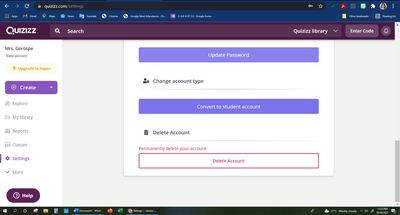
Yes, of course. First, log in to your Quizizz account from a browser.
Once you are logged in, navigate to the settings tab and click on the 'Delete account' button as shown in the screenshot on the right
13
Does Quizizz know if you switch tabs?
The teacher will be notified via email if a student exits the quiz, or opens any other tab.
Unmanaged devices can't access the quiz.
Some extensions and keyboard shortcuts are disabled.
14
How do I use Quizizz live?

You can host two types of quizzes on Quizizz — Live or Assigned.
Select the game type you'd like to host on the quiz detail page.
Live games are ideal while conducting real-time quizzes with students.
15
How do I use Quizizz live?
Once you click on the 'Play Live' button you will be prompted to select a game mode.

16
Can Quizizz read aloud?
Quizizz read-aloud is live on Chromebooks, laptops, desktops, and our mobile apps!
No matter who your students are, where they are, and what devices they're on, Quizizz is there for them.
Toggle read-aloud on/off in student game settings.
17
Can Quizziz be shuffled?
Yes. If this is turned ON, the answers will be shuffled for each question (different students will get a different order.)
Worry-free about shuffling the answers while creating the quiz

18
How do you get answers for Quizziz?
Do you want to view the answers to a quiz before or after a test?
You can do so on the Quiz Details page.
On scrolling down the quiz details page, you can find the entire quiz with the options.
19
How do I start Quizziz?
Follow these steps to host a quiz on Quizziz:
Search for a quiz in your library or you can find millions of quizzes on a variety of topics on Quizziz.
Once you're on the quiz page, click the Start a live quiz button.
Select the type of live game mode, classic or instructor paced.

20
How do you get a Quizizz code?
Each game code is unique and expires as soon as the game ends.
You can generate a game code by hosting a quiz from your account. — Live or Homework.
Note: No game code is required for the students to join a quiz shared via a class or on Google Classroom.
21
How does Team Quizizz work?
Quizizz Team mode lets students work as a team while attempting a quiz.
All students in the class are automatically split into teams with an equal number of players.
In case a team has fewer players, their scores are adjusted with equalizer points to keep the game fair.

22
Multiple Choice
When there are multiple options available but students need to select only one correct answer.
Short Answer
Checkbox
Multiple Choice Grid
Multiple choice
23
Multiple Select
When more than one option (from the given options) need to be selected in order to get the answer right.
Paragraph
Checkbox
Multiple Choice Grid
Multiple Choice
24
Fill in the Blanks
Students need to manually enter the answer in the space provided.
Type answer...
25
Poll
Which apps do you prefer?
Quizziz
GForms
CANVA
26
Open Ended
Longer answers that are not graded.
27
Learners may not remember the lesson per se, but the feelings of enjoyment may last forever in their hearts_Nena G.
28
Acknowledgement
http://bitly.ws/dhT8
29
Acknowledgement
http://bitly.ws/dhT8
Having fun while learning is an experience that learners find enjoyable and memorable
30
Activity:
Create your Quizziz Acct.
Login to:
www.quizizz.com from a browser, and click on Sign-up on the top right corner. Sign up using your Google account or by entering your official email address.
Enter these details:
Title.
First Name.
Last Name.
Password.
For Google/Gmail Account:
1. In case you have multiple Google accounts, click
the relevant one. Share permissions by clicking
the Allow option.
2. Select the type of Account best suitable to you.
Types of accounts include: 1. Teacher 2. Student 3. Parent/Guardian
3. If you are associated with an educational institution, you will need to provide information regarding your institution (your country of residence, ZIP or pincode, and institution name). Once you enter a zip/pincode, you will see a number of institutions popping up in the box. Either select your institution or type it in, if it is not available.
4.You are now a member of the Quizizz community.
31
Activity:
Create your Quizziz Acct.
Login to:
www.quizizz.com from a browser, and click on Sign-up on the top right corner. Sign up using your Google account or by entering your official email address.
For Non-Google users:
1. Type your email address and select the type of Account best
suitable to you.
Types of accounts include:
1. Teacher 2. Student 3. Parent/Guardian
2. Enter these details:
Title 2. First Name 3. Last Name 4. Password.
3. Click on Complete Sign Up
4. If you are associated with an educational institution, you will
need to provide information regarding your institution (your
country of residence, ZIP or pincode, and institution name).
Once you enter a zip/pincode, you will see a number of
institutions popping up in the box. Either select your
institution or type it in, if it is not available.
5.You are now a member of the Quizizz community.
Quizziz Quest
Show answer
Auto Play
Slide 1 / 31
SLIDE
Similar Resources on Wayground

25 questions
Instructional Strategies
Presentation
•
Professional Development
22 questions
MAC2 | Vocabulary | L05
Presentation
•
Professional Development
24 questions
Wiingy Tutors: Lesson 1| Wiingy Tutor Portal
Presentation
•
Professional Development
25 questions
UTAR Sharing
Presentation
•
Professional Development
24 questions
Relationships/SEL PD Activity
Presentation
•
Professional Development
24 questions
Teacher Appreciation Breakout 2024
Presentation
•
Professional Development
24 questions
Using Quizizz for TLA
Presentation
•
Professional Development
24 questions
Education Technology Presentation.pdf
Presentation
•
Professional Development
Popular Resources on Wayground
6 questions
PRIDE Always and Everywhere
Presentation
•
12th Grade
20 questions
Lab Safety Quiz

Quiz
•
6th Grade
26 questions
KOR Review Kahoot Questions
Quiz
•
8th Grade
21 questions
Continents and Oceans
Quiz
•
6th Grade
12 questions
Unit Zero lesson 2 cafeteria
Presentation
•
9th - 12th Grade
20 questions
Parts of Speech
Quiz
•
5th Grade
10 questions
Riddles Riddles fun Riddles
Quiz
•
6th - 12th Grade
16 questions
Subject & Predicate
Quiz
•
5th Grade