

How to Use Quizizz Lessons

Presentation
•
Other
•
Professional Development
•
Practice Problem
•
Easy

Jay Cee
Used 2+ times
FREE Resource
25 Slides • 6 Questions
1

March
Momentum
Remaining
engaging,
While lightening
your load
2
Poll
What do you do as a teacher that you would want to eliminate or reduce from your teaching duties?
Teaching
Marking
Creating Lessons and Lesson Plans
Dealing with Misbehaved Students
3
CREATING QUIZIZZ
LESSONS
4

Create a Quizizz
account, if you
haven’t done so
already.
5


First thing needed:
Multiple devices that have access to Quizizz.
6

Open a
PowerPoint File
you currently
teach.
7

Save the
PowerPoint
file as a
PDF.
8


Return to Quizizz and select
“create”.
9

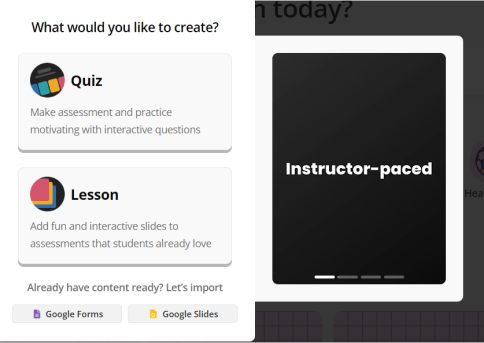
Tap or
click
“Lesson”.
10


Select
“Import
Slides from
Google Drive”
11


Select
“Upload a
PDF file”.
12


Select your
PDF file,
then press
“open”.
13


You now have the
option of selecting
which slides you
want to keep or
delete.
Press “Import”
once you have
made your
decision.
14
Poll
How easy has the steps been for you so far?
Extremely easy
Easy enough
Somewhat challenging
Difficult
15

I would advise that you
always select “Editable
Slides" in the event you
need to make an
adjustment to a slide.
16


17


Everything is uploaded
18

Time to add
some
questions!
19


Select “Add new slide”
20


You can “teleport” a question
related to your topic.
Or create your own question
related to the topic.
21


Creating your own Multiple-Choice question
22


Or teleporting a question. Simply select “Add
question”.
23

Here is how your
added question
should look.
24


Don’t forget to name your
lesson.
25


Select “Save” then “Continue”
26


27


Now let’s:
28
Multiple Choice
Which learning application are you using?
Kahoot
Educaplay
Quizizz
Live Worksheets
29
Fill in the Blanks
Which button should you select when beginning a new lesson or quiz?
Type answer...
30
Multiple Choice
Which type of file do you need to convert to PDF?
Microsoft Word
Microsoft PowerPoint
Microsoft Publisher
Microsoft Excel
31
Poll
Would you incorporate this into your lessons?
Yes
No
March
Momentum
Remaining
engaging,
While lightening
your load
Show answer
Auto Play
Slide 1 / 31
SLIDE
Similar Resources on Wayground

26 questions
Circuits and Symbols
Presentation
•
9th - 12th Grade
24 questions
Gotovo u 70-oj, a tako moćan!
Presentation
•
KG
24 questions
What's the Lie?
Presentation
•
Professional Development
25 questions
G07_5.4_Factor Linear Expressions
Presentation
•
KG
23 questions
MEMBUAT PRESENTASI INTEARKTIF
Presentation
•
Professional Development
24 questions
Ser LESSON
Presentation
•
KG - University
26 questions
Copy of Lesson 1.1 - Modeling Matter
Presentation
•
KG - Professional Dev...
Popular Resources on Wayground
10 questions
Safety Day 2026 – Student Review

Quiz
•
9th Grade
21 questions
Continents and Oceans
Quiz
•
6th Grade
20 questions
Parts of Speech
Quiz
•
5th Grade
16 questions
Subject & Predicate
Quiz
•
5th Grade
25 questions
Multiplication Facts
Quiz
•
5th Grade
12 questions
Map Skills
Quiz
•
3rd Grade
22 questions
Continents and Oceans
Quiz
•
5th Grade
15 questions
Rounding Decimals
Quiz
•
5th Grade