

Windows Installation_1

Presentation
•
Computers
•
Professional Development
•
Hard

Christopher Burnside
Used 1+ times
FREE Resource
40 Slides • 25 Questions
1

Chapter 10: Windows
Installation
Instructor Materials
IT Essentials v7.0
2

14
© 2016 Cisco and/or its affiliates. All rights reserved. Cisco Confidential
Chapter 10 - Sections & Objectives
▪ 10.1 Modern Operating Systems
• Explain operating system requirements.
•Describe the functions of operating systems.
•Describe operating system software and hardware requirements.
•Explain the process of upgrading an operating system.
▪ 10.2 Disk Management
• Create a partition in Windows using the Disk Management utility.
•Explain disk management.
3

15
© 2016 Cisco and/or its affiliates. All rights reserved. Cisco Confidential
Chapter 10 - Sections & Objectives (Cont.)
▪ 10.3 Install Windows
• Install a Windows operating system.
•Install a Windows operating system.
•Describe custom installation options.
•Describe the boot sequence and registry files.
4

16
© 2016 Cisco and/or its affiliates. All rights reserved. Cisco Confidential
10.1 Modern Operating
Systems
5

17
© 2016 Cisco and/or its affiliates. All rights reserved. Cisco Confidential
Operating System Features
Terms
The following terms are often used when describing an operating system (OS):
•Multi-user - Two or more users have individual accounts that allow them to work with programs
and peripheral devices at the same time.
•Multitasking - The computer is capable of operating multiple applications at the same time.
•Multiprocessing - The operating system can support two or more CPUs.
•Multithreading - A program can be broken into smaller parts that are loaded as needed by the
operating system. Multithreading allows different parts of a program to be run at the same time.
The OS boots the computer and manages the file system. Operating systems can support more than
one user, task, or CPU.
6
Multiple Choice

Controls a computers basic operation
Operating System
software
hardware
Application
7
Multiple Choice
Which of the following is an Operating System?
Word
Apple
Windows
Memory
8
Multiple Choice
Multi-user
multiprocessing
multitasking
multithreading
9
Multiple Choice
Windows XP , Windows 10 and Windows XP are examples of:
Operating system
Device driver
Application software
Computer hardware
10
Multiple Choice
--------------------in an operating system, is allowing a user to perform more than one computer task.
Multiprocessing
Multitasking
Multipurpose
Multi-user
11


18
© 2016 Cisco and/or its affiliates. All rights reserved. Cisco Confidential
Operating System Features
Basic Functions of an Operating System
•The OS manages the interaction between the applications and the hardware.
•The OS creates a file structure on the hard disk drive to store data.
•The OS enables the user to interact with the software and hardware.
•The OS locates and application and loads it into the RAM of the computer.
12

19
© 2016 Cisco and/or its affiliates. All rights reserved. Cisco Confidential
Operating System Features
Windows Operating Systems
•Windows 7 – This is an upgrade from Windows XP or Vista.
•Windows 8 – This introduced the Metro user interface that unifies the Windows look and feel on
desktops, laptops, mobile phones, and tablets.
•Windows 8.1 – This is an update to Windows 8 with improvement to make Windows familiar for
users with devices that use touch of mouse and keyboard interfaces.
•Windows 10 – This is an update from previous versions of Windows. It was designed for PCs,
tablets, embedded devices and Internet of Things devices.
13


20
© 2016 Cisco and/or its affiliates. All rights reserved. Cisco Confidential
Customer Requirements for an Operating System
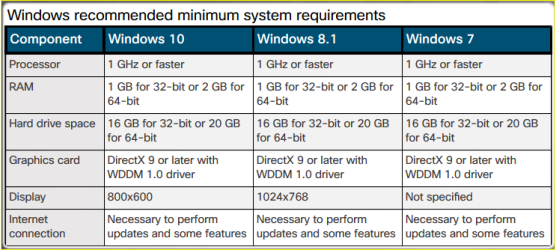
Compatible System Software and Hardware Requirements
To make an OS recommendation, a technician must review budget constraints, learn how the computer
will be used, determine which types of applications will be installed, and whether a new computer may be
purchased. These are some guidelines to help determine the best OS for a customer:
•Does the customer use off-the-shelf applications for this computer? Off-the-shelf applications
specify a list of compatible operating systems on the application package.
•Does the customer use customized applications that were programmed specifically for the
customer? If the customer is using a customized application, the programmer of that application
specifies which OS to use.
14

21
© 2016 Cisco and/or its affiliates. All rights reserved. Cisco Confidential
Customer Requirements for an Operating System
Minimum Hardware Requirements and Compatibility with OS
15


22
© 2016 Cisco and/or its affiliates. All rights reserved. Cisco Confidential
Customer Requirements for an Operating System
32-bit vs. 64-bit Processor Architecture
16


23
© 2016 Cisco and/or its affiliates. All rights reserved. Cisco Confidential
Operating System Upgrades
Checking OS Compatibility
• An OS must be upgraded periodically to remain
compatible with the latest hardware and
software.
• Before upgrading the operating system, check
the minimum hardware requirements of the new
OS to ensure that it can be installed
successfully on the computer.
• Microsoft provides the Get Windows 10
application that is automatically downloaded
and installed via the Windows Update service
on computers running Windows 7 Service Pack
1 and Windows 8.1.
17


24
© 2016 Cisco and/or its affiliates. All rights reserved. Cisco Confidential
Operating System Upgrades
Windows OS Upgrades
•The version of an OS determines available
upgrade options. For example, a 32-bit OS
cannot be upgraded to a 64-bit OS. Windows
7 and Windows 8 can be upgraded to
Windows 10 but Windows Vista and Windows
XP cannot.
•To upgrade Windows 7 or Windows 8 to
Windows 10, use the Windows 10 Update
Assistant available on the Download Windows
10 website. It walks you through all the steps
in the Windows 10 setup process.
•Computers running Windows XP or Windows
Vista do not have an upgrade path to Windows
10 and require a clean installation. Windows
10 installation media can be created using the
Create Windows 10 installation media tool.
18


25
© 2016 Cisco and/or its affiliates. All rights reserved. Cisco Confidential
Operating System Upgrades
Data Migration
• When a new OS installation is needed, user data must be migrated from the old OS to the new one.
• The User State Migration Tool (USMT) is a command line utility to simplify user state migration.
• Use Windows Easy Transfer when switching from an old computer to a new one.
• PCmover Express is a tool for transferring selected files, folders, profiles and applications from an old
Windows PC to a Windows 10 PC.
19
Multiple Choice
What is data migration?
movement from one region to another and often back again
Transferring data between different formats, storage types, and computer systems
to move something from one place to another
the activity of collecting information, especially using computers
20
Multiple Select
Choose all data migration risks
Data loss / corruption
Takes lots of time
Incompatibility of type and format
Types of access
21
Multiple Choice
Choose True or False
Files could also be incompatible if the data is from different hardware systems
True
False
22

26
© 2016 Cisco and/or its affiliates. All rights reserved. Cisco Confidential
10.2 Install Windows
23


27
© 2016 Cisco and/or its affiliates. All rights reserved. Cisco Confidential
Disk Management
Storage Device Types
The two most common types of data storage
devices used today are hard disk drives and
flash memory-based drives such as solid-state
hard drives and USB drives.
When the storage device type has been chosen,
it must be prepared to receive the new operating
system. Modern operating systems ship with an
installer program. Installers usually prepare the
disk to receive the operating system, but it is
crucial for a technician to understand the terms
and methods involved in this preparation.
24


28
© 2016 Cisco and/or its affiliates. All rights reserved. Cisco Confidential
Disk Management
Hard Drive Partitioning
Finding and launching the operating system is one of the responsibilities of computer firmware, which needs
to know the partition scheme. Two partition scheme standards are master boot record (MBR) and globally
unique identifier (GUID) partition table (GPT).
•Master Boot Record - The MBR contains information on how the hard drive partitions are organized. The
MBR is 512 bytes long and contains the boot loader, an executable program that allows a user to choose
from multiple operating systems. MBR is commonly used in computers with BIOS-based firmware.
•GUID Partition Table - Also designed as a partition table scheme standard for hard drives, the GPT
makes use of a number of modern techniques to expand on the older MBR partitioning scheme. GPT is
commonly used in computers with UEFI firmware.
25


29
© 2016 Cisco and/or its affiliates. All rights reserved. Cisco Confidential
Disk Management
Partitions and Logical Drives
•The primary partition contains the OS files and is usually the first partition.
•On MBR disks, the active partition is used to store and boot an OS.
•If more than 4 partitions are needed on an MBR disk, one partition can be designated an extended
partition.
•A logical drive is a section of an extended partition, used to separate information for administrative
purposes.
•A basic disk (the default) contains partitions such as primary and extended, as well as logical drives which
are formatted for data storage.
•A dynamic disk can create volumes that span across more than one disk.
•Formatting creates a file system on a partition for file storage.
26

30
© 2016 Cisco and/or its affiliates. All rights reserved. Cisco Confidential
Disk Management
File Systems
File systems differ in properties of speed, flexibility, security, size and more. Here are five common file
systems:
•File Allocation Table, 32 bit (FAT32) - Supports partition sizes up to 2 TB or 2,048 GB. Used by
Windows XP and earlier OS versions.
•New Technology File System (NTFS) - Supports partition sizes up to 16 exabytes, in theory. NTFS
incorporates file system security features and extended attributes.
•exFAT (FAT 64) - Created to address some of the limitations of FAT, FAT32, and NTFS when
formatting USB flash drives, such as file size and directory size. One of the primary advantages of
exFAT is that it can support files larger than 4GB.
•Compact Disc File System (CDFS) - Created specifically for optical disk media.
•NFS (Network File System) - NFS is a network-based file system, that allows file access over the
network. NFS is an open standard which allows anyone to implement it.
27


31
© 2016 Cisco and/or its affiliates. All rights reserved. Cisco Confidential
Disk Management
Video Demonstration – Disk Management Utility and Disk
Partitioning
28


32
© 2016 Cisco and/or its affiliates. All rights reserved. Cisco Confidential
Disk Management
Video Demonstration – Multiboot Procedures
29

33
© 2016 Cisco and/or its affiliates. All rights reserved. Cisco Confidential
Disk Management
Lab – Create a Partition in Windows
In this lab, you will create a FAT32 formatted partition on a disk. You will
convert the partition to NTFS. You will then identify the differences
between the FAT32 format and the NTFS format.
30

34
© 2016 Cisco and/or its affiliates. All rights reserved. Cisco Confidential
10.3 Installation and Boot
Sequence
31


36
© 2016 Cisco and/or its affiliates. All rights reserved. Cisco Confidential
Basic Windows Installation
Account Creation
Authentication is when users enter a username
and password to access a user account. Windows
uses Single-Sign On (SSO) authentication, which
allows users to log in once to access all system
resources. User accounts allow multiple users to
share a single computer using their own files and
settings.
Windows 10 offers two account types:
Administrator and Standard User.
Administrator accounts have complete control
over a computer. Users with this type of account
can change settings globally and install programs.
Standard user accounts have limited control over
a computer. Users with this type of account can
run applications, but they cannot install programs.
32


37
© 2016 Cisco and/or its affiliates. All rights reserved. Cisco Confidential
Basic Windows Installation
Finalize the Installation
Windows Update
To update the OS after the initial
installation, Microsoft Windows Update is
used to scan for new software and install
service packs and patches.
Device Manager
After installation, verify that all hardware is
installed correctly. The Device Manager is
used to locate device problems and install
the correct or updated drivers in Windows.
The figure shows the Windows Update
and Device Manager utilities on Windows
10.
33


39
© 2016 Cisco and/or its affiliates. All rights reserved. Cisco Confidential
Custom Installation Options
Disk Cloning
Installing an OS on multiple computers takes time. To
simplify, administrators usually elect a computer to act as a
base system and go through the regular operating system
installation process. After the OS is installed in the base
computer, a specific program is used to duplicate all the
information on its disk, sector by sector, to another disk.
This new disk, usually an external device, now contains a
fully deployed operating system and can be used to quickly
deploy a fresh copy of the base operating system and any
installed applications and data.
If an undesirable setting is accidentally included during the
base installation, an administrator can use Microsoft’s
System Preparation (Sysprep) tool to remove it before
creating the final image.
34


40
© 2016 Cisco and/or its affiliates. All rights reserved. Cisco Confidential
Custom Installation Options
Other Installation Methods
Windows has several different types of custom
installations:
•Network Installation – This includes Preboot
Execution Environment (PXE) Installation,
Unattended Installation, and Remote
Installation.
•Image-based Internal partition Installation -
This is a Windows image stored on an internal
(often hidden) partition that can be used to
restore Windows to its original state when it
was shipped from the factory.
•Other Types of Custom Installations – This
includes Windows Advanced Startup Options,
Refresh your PC (Windows 8.x only), System
Restore, Upgrade, Repair installation, Remote
network installation, Recovery partition, and
Refresh/restore.
35


41
© 2016 Cisco and/or its affiliates. All rights reserved. Cisco Confidential
Custom Installation Options
Remote Network Installation
With remote network installation, the OS
installation files are stored on a server. The
client computer can access the files
remotely. A software package such as
Remote Installation Services (RIS)
communicates with the client, stores the
setup files, and provides the necessary
instructions for the client to access the
setup files, download them, and begin the
OS installation.
Because the client computer does not have
an OS installed, a special environment must
be used to boot the computer, connect to
the network, and communicate with the
server to begin the installation process. This
special environment is known as the
Preboot eXecution Environment (PXE).
36


42
© 2016 Cisco and/or its affiliates. All rights reserved. Cisco Confidential
Custom Installation Options
Unattended Network Installation
To perform a Windows Unattended installation,
setup.exe must be run with the user options found in
the answer file. Instead of prompting the user, Setup
uses the answers listed in the file.
To customize a standard Windows 10 installation, use
the System Image Manager (SIM), to create the setup
answer file. The answer file is copied to the
distribution shared folder on a server. At this point,
you can do one of two things:
•Run the unattended.bat file on the client machine
to prepare the hard drive and install the OS from
the server over the network.
•Create a boot disk that boots the computer and
connects to the distribution shared folder on the
server. You then run a batch file containing a set of
instructions to install the OS over the network.
37


43
© 2016 Cisco and/or its affiliates. All rights reserved. Cisco Confidential
Custom Installation Options
Video Demonstration – Windows Restore and Recovery
38


44
© 2016 Cisco and/or its affiliates. All rights reserved. Cisco Confidential
Custom Installation Options
Recovery Partition
Some Windows computers contain a
section of the disk that is inaccessible to
the user. This partition, called a recovery
partition, contains an image that can be
used to restore the computer to its
original configuration.
The recovery partition is often hidden to
prevent it from being used for anything
other than restoration. To restore the
computer using the recovery partition,
you often must use a special key or key
combination when the computer is
starting. Sometimes, the option to restore
from the factory recovery partition is
located in the BIOS or found in Windows.
39


45
© 2016 Cisco and/or its affiliates. All rights reserved. Cisco Confidential
Custom Installation Options
Upgrade Methods
•In-place upgrade - This will update the OS and
migrate apps and settings to the new OS. The
System Center Configuration Manager
(Configuration Manager) task sequence can be
used to completely automate the process.
When upgrading Windows 7 or Windows 8 to
Windows 10, the Windows installation program
(Setup.exe) will perform an in-place upgrade,
which automatically preserves all data, settings,
applications, and drivers from the existing OS
version.
•Clean install - Another way to upgrade to a
newer version of Windows is to perform a clean
upgrade. Because a clean install will wipe the
drive completely, all files and data should be
saved to some form of backup drive.
40


46
© 2016 Cisco and/or its affiliates. All rights reserved. Cisco Confidential
Windows Boot Sequence
Windows Boot Sequence
After POST, the BIOS locates and reads the
configuration settings stored in the CMOS
memory. The boot device priority is the order in
which devices are checked to locate the bootable
partition. The BIOS boots the computer using the
first drive that contains a valid boot sector. This
sector contains the Master Boot Record (MBR).
The MBR identifies the Volume Boot Record
(VBR) which loads the boot manager, which for
Windows is bootmgr.exe.
Hard drives, network drives, USB drives, and
even removable media can be used in the boot
order, depending on the capabilities of the
motherboard.
41


47
© 2016 Cisco and/or its affiliates. All rights reserved. Cisco Confidential
Windows Boot Sequence
Windows 7 Startup Modes
Pressing the F8 key during the boot process
opens the Windows Advanced Boot Options
menu. Users can select how to boot Windows. 4
startup options:
•Safe Mode – A diagnostic mode used to
troubleshoot Windows and Windows startup.
Functionality is limited as many device
drivers are not loaded.
•Safe Mode with Networking - Starts
Windows in Safe Mode with networking
support.
•Safe Mode with Command Prompt - Starts
Windows and loads the command prompt
instead of the GUI.
•Last Known Good Configuration - Loads
the configuration settings that were used the
last time that Windows started successfully.
42


48
© 2016 Cisco and/or its affiliates. All rights reserved. Cisco Confidential
Windows Boot Sequence
Windows 8 and 10 Startup Modes
Both Windows 8 and Windows 10 boot too
quickly to use F8 to access startup settings.
Instead, hold the Shift key and select the
Restart option in the Power menu. This will
display the Choose an Option screen. To
get the startup settings, select
Troubleshoot, then from the next screen
select Advanced options. Inside Advanced
options select Startup settings, then on the
next screen select Restart. The computer
will then restart and display the Startup
Settings menu shown in the figure. To
choose a startup option use number or
function keys F1-F9 that corresponds to the
desired option.
43

50
© 2016 Cisco and/or its affiliates. All rights reserved. Cisco Confidential
Conclusion
Chapter 10: Windows Installation
• Explain operating system requirements.
• Create a partition in Windows using the Disk Management utility.
• Install a Windows operating system.
44
Multiple Choice
managing applications
text processing
flow chart editing
program compilation
45
Multiple Choice
Which methods should a technician use to update a device driver?
Insert the operating system installation media and load the driver from there
Buy another operating system license
Download the driver from the website of the manufacturer
Perform a firmware update
46
Multiple Choice
multiuser
multitasking
multimedia
multiprocessing
47
Multiple Choice
device driver
BIOS
CMOS
Application Program Interface
48
Multiple Choice
Microsoft Compatibility Center
Microsoft Knowledge Base
Windows 7 manual
Windows Easy Transfer
49
Multiple Choice
recommended changes to hardware
recommended changes to file systems
recommended changes to user permissions
recommended changes to directory structures
50
Multiple Choice
The active partition must be a primary partition.
ONLY 1 primary partitions can be marked as active.
An active partition must be assigned C: as the drive letter.
The active partition may include the manufacturer recovery partition.
51
Multiple Choice
to provide a copy of the C: partition and data from the last backup in case of failure
to provide a backup copy of the BIOS
to restore the computer to the factory state without deleting user files
to restore the computer to its factory state
52
Multiple Choice
in the recovery partition
in BIOS
in flash memory
in the Registry
53
Multiple Choice
Disk Management
Device Manager
Microsoft System Preparation
Bootmgr
54
Multiple Choice
real mode
protected mode
multiuser mode
compatibility mode
55
Multiple Choice
Control Panel
Administrative Tools
My Computer
System Registry
56
Multiple Select

What are two advantages of the NTFS file system compared with FAT32? (Choose two.)
NTFS allows faster access to external peripherals such as a USB drive.
NTFS supports larger partitions.
NTFS allows the automatic detection of bad sectors.
NTFS allows faster formatting of drives.
NTFS provides more security features.
57
Multiple Choice

What type of file system allows the use of files larger than 5 GB and is mostly used on internal hard drives?
CDFS
NTFS
FAT32
exFAT
FAT64
58
Multiple Choice

A technician is attempting to create multiple partitions on a hard disk that is using the boot sector standard that supports a maximum partition size of 2TB. What is the maximum number of primary partitions allowed per hard drive?
4
1
2
32
16
59
Multiple Choice

What contains information on how hard drive partitions are organized?
BOOTMGR
Windows Registry
MBR
CPU
60
Multiple Choice

Which version of the OS can be upgraded to 64 bit Windows 10 Pro?
64-bit version of Windows XP Pro
32-bit version of Windows 8 Pro
32-bit version of Windows 10 Pro
64-bit version of Windows 7 Home
61
A 32-bit OS cannot be upgraded to a 64-bit OS. Windows XP and Windows Vista cannot be upgraded to Windows 10.

62
MBR

63
Master boot record (MBR) is the boot sector standard that supports a maximum primary partition size of 2TB. MBR allows four primary partitions per drive. The globally unique identifier (GUID) partition table standard (GPT) can support enormous partitions with a theoretical maximum size of 9.4ZB (9.4 x 10 to the 24th bytes). GPT supports a maximum of 128 primary partitions per drive.

64
The file system exFAT, also known as FAT64, is used to address some of the shortcoming of FAT32 and is mainly used for USB flash drives. CDFS is used for optical drives. FAT32 allows the storage of files up to 4 GB in size. NTFS allows the storage of files up to 16 TB in size.

65
The file system has no control over the speed of access or formatting of drives, and the ease of configuration is not file system-dependent.The correct answers are: NTFS supports larger partitions., NTFS provides more security features.

Chapter 10: Windows
Installation
Instructor Materials
IT Essentials v7.0
Show answer
Auto Play
Slide 1 / 65
SLIDE
Similar Resources on Wayground

60 questions
RPMS-PPST Coaching and Monitoring
Presentation
•
Professional Development
58 questions
HCI DESIGN PRINCIPLES PART 2
Presentation
•
University
59 questions
USA Facts & Information
Presentation
•
Professional Development
59 questions
Baseball Vocabulary
Presentation
•
Professional Development
59 questions
10 - Human Animal Bond S25
Presentation
•
Professional Development
59 questions
Superlatives
Presentation
•
Professional Development
62 questions
Topic 4 & 5 Networking Media
Presentation
•
University
Popular Resources on Wayground
10 questions
Safety Day 2026 – Student Review

Quiz
•
9th Grade
21 questions
Continents and Oceans
Quiz
•
6th Grade
20 questions
Parts of Speech
Quiz
•
5th Grade
16 questions
Subject & Predicate
Quiz
•
5th Grade
25 questions
Multiplication Facts
Quiz
•
5th Grade
12 questions
Map Skills
Quiz
•
3rd Grade
22 questions
Continents and Oceans
Quiz
•
5th Grade
15 questions
Rounding Decimals
Quiz
•
5th Grade