PS Layer Masks Lesson
Presentation
•
Design
•
9th - 12th Grade
•
Easy
Ambrie Butler
Used 3+ times
FREE Resource
19 Slides • 30 Questions
1
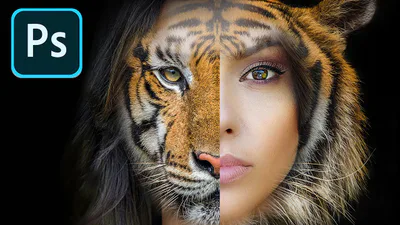
A Self-Guided Study on Layer Masks
2
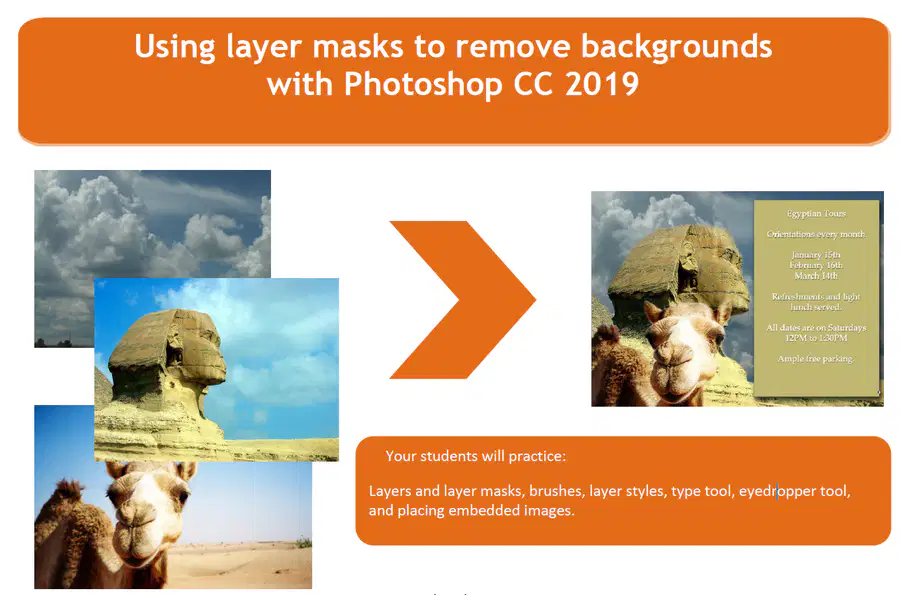
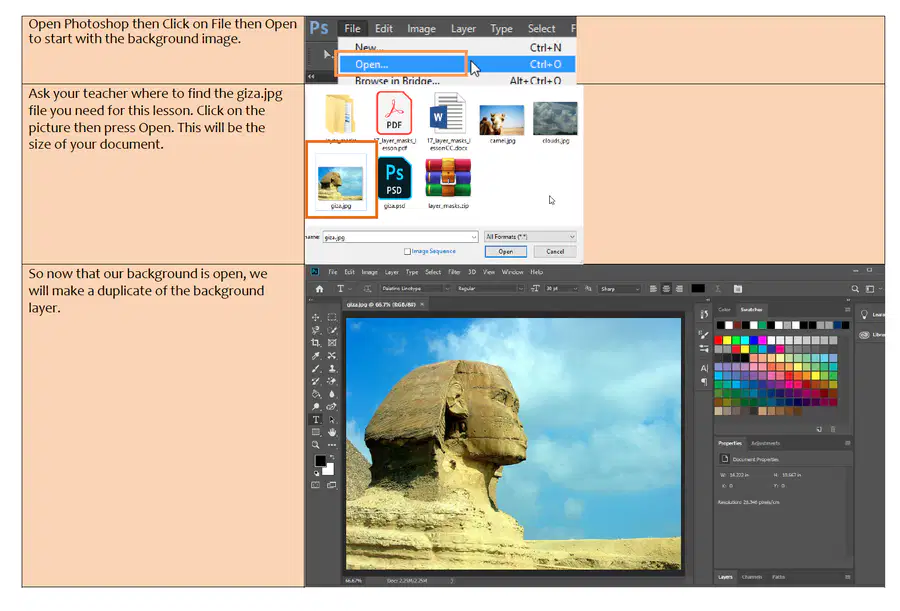
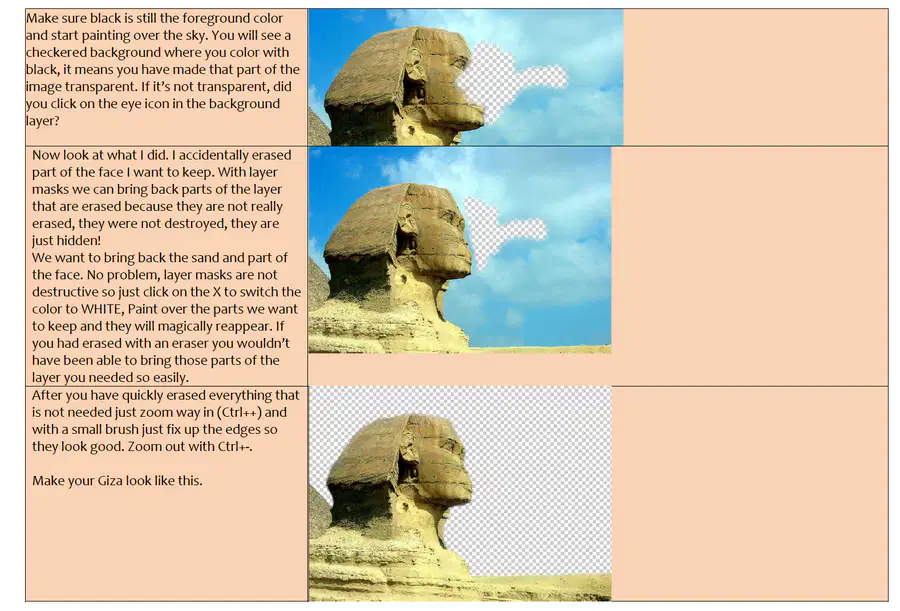
Create a mask to remove a subject from the background.
Refine a mask to remove a subject from the background.
Create a quick mask to make changes to a selected area.
Edit a mask using the properties panel.
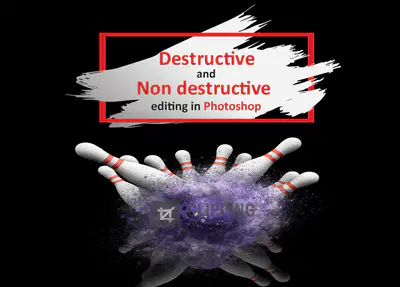
Explain the difference between destructive and non-destructive editing.
Criteria for Mastery
SWBAT USE and APPLY layer masks to create non-destructive editing techniques in Photoshop.
Learning Target
Photoshop Layer Masks
3
We all get used to using the erasers to remove parts of an image we don’t want; the magic eraser is especially fun to use. In many situations the eraser cannot be used.
Using the eraser is a destructive process with Photoshop which means we are getting rid of the pixels in our image we are erasing.
4
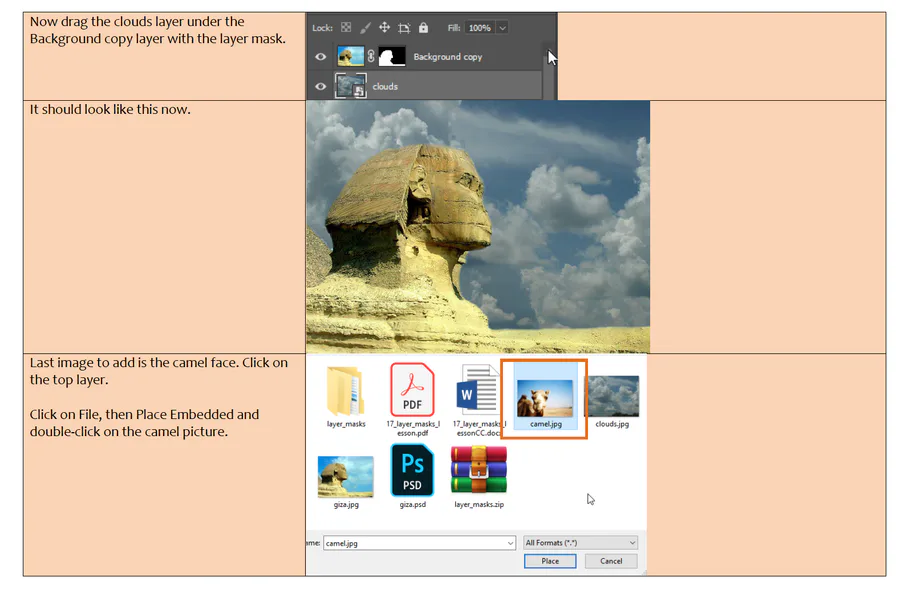
Using layer masks is a non- destructive process because the pixels we are trying to remove are not being destroyed, as you will see the pixels are still there even if we can’t see them and we can bring them back if we want to! You
5
This video will cover the following basic key points:
What is a layer mask
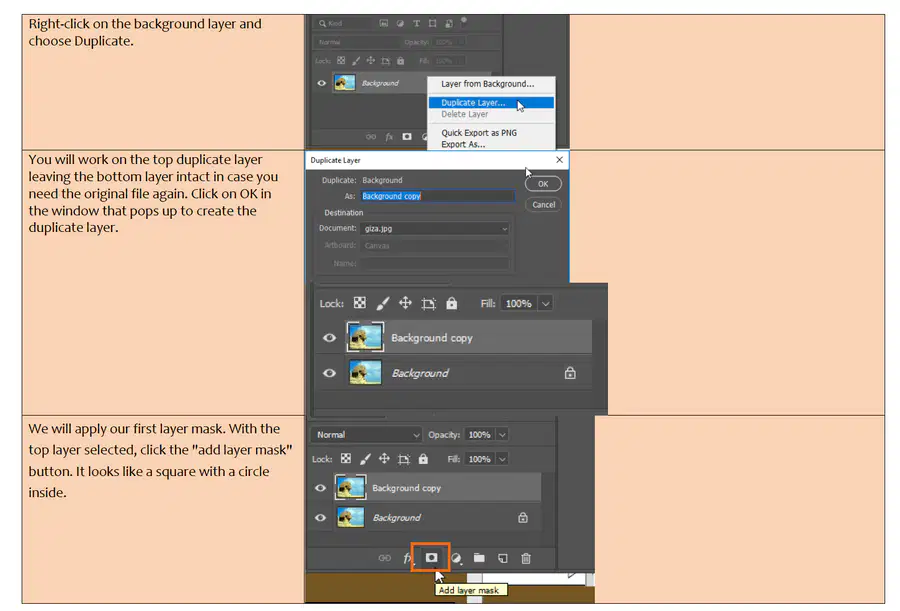
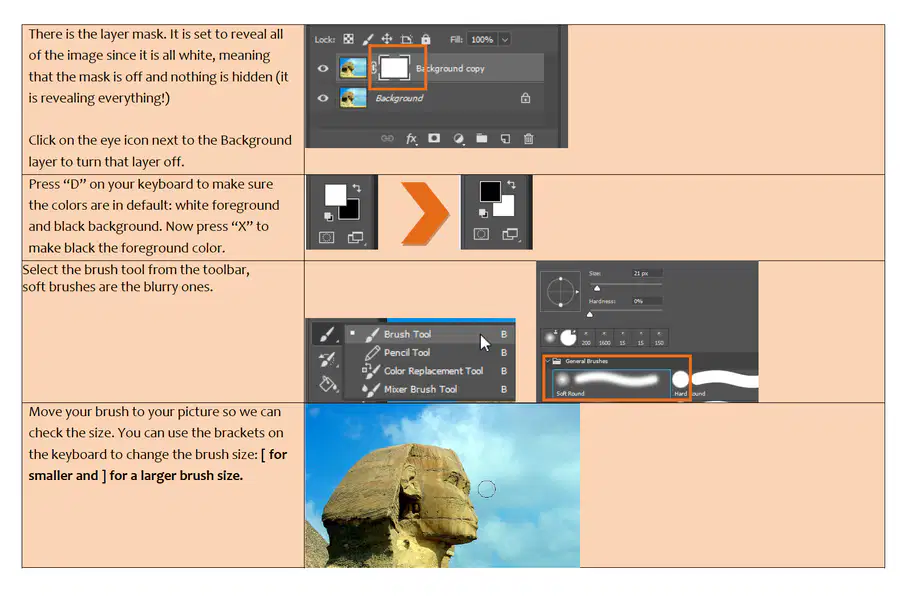
How to add a layer mask
How to set the color of a layer mask.
How to hide the mask
How to bring back content.
Benefits of layer masks
Viewing and deleting layer masks
What are Layer Masks in Photoshop
6
Multiple Choice
When using a mask, things painted white will be ___________
Hidden
Visable
Erased
White
7
Multiple Choice
When using a mask, things painted black will be _________
Hidden
Visible
Erased
Black
8
Open Ended
When you have a selection created by a quick mask, what happens when you deselect?
9
Multiple Choice
What do "Layer Masks" do?
refine the edge of a selection
allow for adjustment layers
erase portions of a layer
hide/show portions of a layer
10
Open Ended
What is the benefit of using a quick mask?
11
12
13
14
15
16
17
18
19
20
21
22
23
24

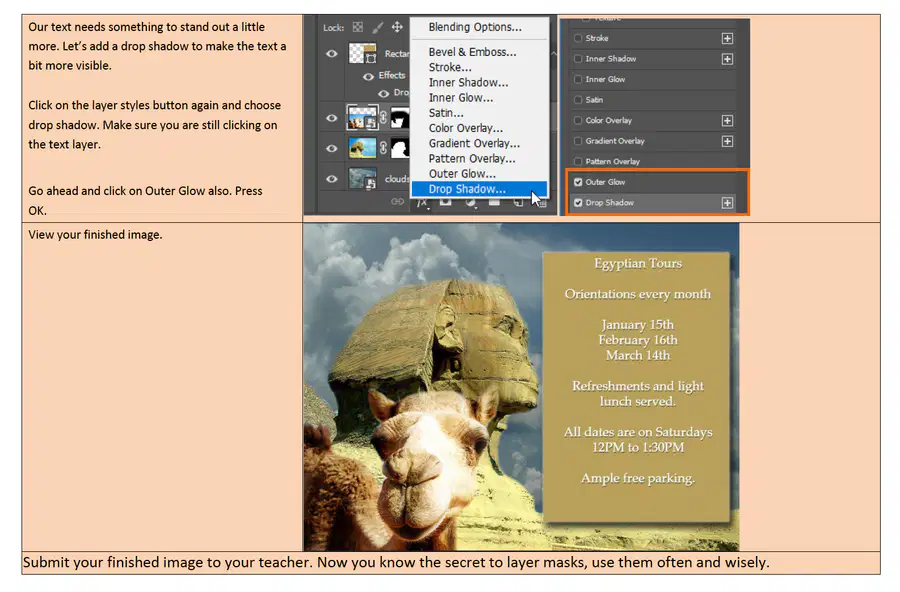
Upload you completed activity in Google Classroom under the Layer Mask Practice Activity for feedback.
25
Multiple Choice
The 2 headed arrow in the top right of this image will ___________
Undo your last command
Switch the foreground and background colours
Turn your image 90 degrees
Create a new mask
26
Multiple Choice
If you do not see a specific panel, where do you go to find it?
Select Menu
Edit Menu
Window Menu
Workspace
27
Fill in the Blanks
Type answer...
28
Multiple Choice
______________ panel in Photoshop displays all the layers in an image.( This preserves the original state of an image while manipulating another version of it through another layer.)
Photoshop stuff
Drawings
Layers
Pictures
29
Multiple Choice
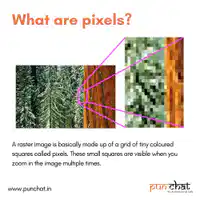
A raster image is made of pixels.
true
false
30
Multiple Choice
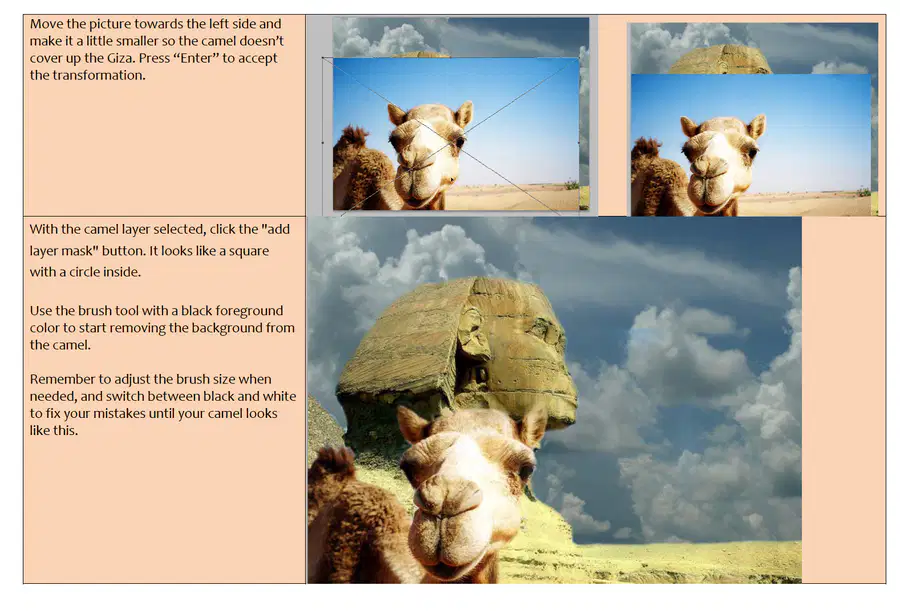
Which of the buttons at the bottom of your layers panel creates a new mask?
31
Multiple Choice
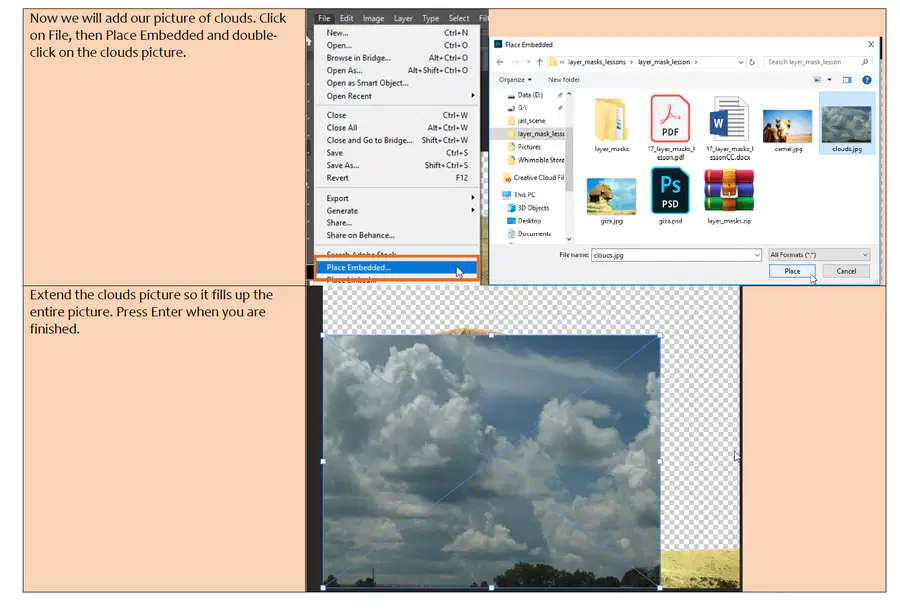
What does "place embedded" do?
puts a file into your current file as it's own layer
pulls a file out of your current file
autosaves your file
32
Multiple Choice
Hidden areas
Transparent areas
Protected areas
Selected areas
33
Multiple Choice
When using a mask, things painted white will be ___________
Hidden
Visable
Erased
White
34
Multiple Choice
When using a mask, things painted black will be _________
Hidden
Visible
Erased
Black
35
Multiple Choice
The 2 headed arrow in the top right of this image will ___________
Undo your last command
Switch the foreground and background colours
Turn your image 90 degrees
Create a new mask
36
Multiple Choice
Painting a shade of grey on your mask will affect the masks ___________
Brightness
Clarity
Opacity
Hugh
37
Multiple Choice
What do "Layer Masks" do?
refine the edge of a selection
allow for adjustment layers
erase portions of a layer
hide/show portions of a layer
38
Multiple Choice
If you do not see a specific panel, where do you go to find it?
Select Menu
Edit Menu
Window Menu
Workspace
39
Multiple Choice
Select the BEST option to hide all other layers.
Click on the Layer Visibility Toggle Icon one by one.
Alt+Layer Visibility Toggle Icon
CTRL + ,
Layer Menu>Hide Layers
40
Multiple Choice
______________ panel in Photoshop displays all the layers in an image.( This preserves the original state of an image while manipulating another version of it through another layer.)
Photoshop stuff
Drawings
Layers
Pictures
41
Multiple Choice
Which Image has the highest resolution?
42
Multiple Choice
A raster image is made of pixels.
true
false
43
Multiple Choice
What do you edit a layer mask with?
paint or selection tools
pen or shape tools
44
Multiple Choice
What does "place embedded" do?
puts a file into your current file as it's own layer
pulls a file out of your current file
autosaves your file
45
Multiple Choice
Above one of the following: A selected layer, a selected collapsed group, or a selected layer in an expanded group
Always above the topmost layer
Always just above the Background
46
Multiple Choice
True
False
47
Multiple Choice
Move tool
Ruler tool
Path Selection tool
Hand tool
48
Multiple Choice
Hidden areas
Transparent areas
Protected areas
Selected areas
49
Poll
Rate your level of understanding of layer masks.
I can teach the class.
I can do this.
I know how but I may need alittle help.
I'm struggling.
A Self-Guided Study on Layer Masks
Show answer
Auto Play
Slide 1 / 49
SLIDE

Similar Resources on Wayground
42 questions
Biomolecule terms 2 - Enzymes
Presentation
•
9th - 12th Grade
45 questions
Skeletal System
Presentation
•
9th - 12th Grade
44 questions
Intro to the Periodic Table
Presentation
•
10th - 12th Grade
45 questions
Algoritma & Pemrograman
Presentation
•
9th - 12th Grade
46 questions
End Behavior of a Polynomial Function
Presentation
•
9th - 12th Grade
44 questions
Phase Diagrams and Heating/Cooling Curves
Presentation
•
9th - 12th Grade
42 questions
4-3 Logarithmic Functions
Presentation
•
9th - 12th Grade
Popular Resources on Wayground
15 questions
Grade 3 Simulation Assessment 1
Quiz
•
3rd Grade
22 questions
HCS Grade 4 Simulation Assessment_1 2526sy
Quiz
•
4th Grade
16 questions
Grade 3 Simulation Assessment 2
Quiz
•
3rd Grade
19 questions
HCS Grade 5 Simulation Assessment_1 2526sy
Quiz
•
5th Grade
17 questions
HCS Grade 4 Simulation Assessment_2 2526sy
Quiz
•
4th Grade
20 questions
Equivalent Fractions
Quiz
•
3rd Grade
24 questions
HCS Grade 5 Simulation Assessment_2 2526sy
Quiz
•
5th Grade
20 questions
Math Review
Quiz
•
3rd Grade
Discover more resources for Design
20 questions
Algebra 1 EOC Review 1
Quiz
•
9th Grade
20 questions
Graphing Inequalities on a Number Line
Quiz
•
6th - 9th Grade
20 questions
Figurative Language Review
Quiz
•
10th Grade
20 questions
Earth Day Trivia
Quiz
•
9th - 12th Grade
10 questions
Earth Day Awareness and Impact
Interactive video
•
6th - 12th Grade
10 questions
Earth Day and Plastic Alternatives
Interactive video
•
5th - 10th Grade
5 questions
A.F/ST Quizizz Day 1
Quiz
•
9th - 12th Grade
100 questions
Biology EOC Review
Quiz
•
9th - 12th Grade