

ICT 10 CSS Creating Crossover Cable Module 8

Presentation
•
Other
•
10th Grade
•
Practice Problem
•
Easy

Jerome Suelto
Used 1+ times
FREE Resource
15 Slides • 19 Questions
1
Creating Crossover Cable
2
1. identify the steps in creating crossover cable.
2. perform the steps in creating crossover cable.
3. appreciate the importance of creating crossover cable.
After completing this lesson, you should be able to:
3
Labelling
Direction: Identify the correct color coding for RJ45 pin-out T-568A. Write the letter of the correct answer from the box.
e. White/Blue
f. White /Brown
a. Blue
b. White/Green
h. Orange
c. Brown
g. White/Orange
d. Green
4
Fill in the Blanks
Type answer...
5
Fill in the Blanks
Type answer...
6
Fill in the Blanks
7
Fill in the Blanks
8
Fill in the Blanks
9
Fill in the Blanks
10
Fill in the Blanks
11
Fill in the Blanks
12
Fill in the Blanks
13
Fill in the Blanks
14
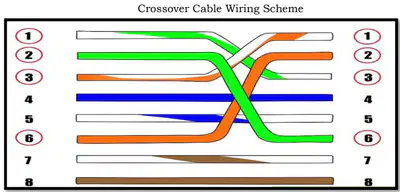
Crossover Cable a type of cable used for the interconnection of two similar devices.
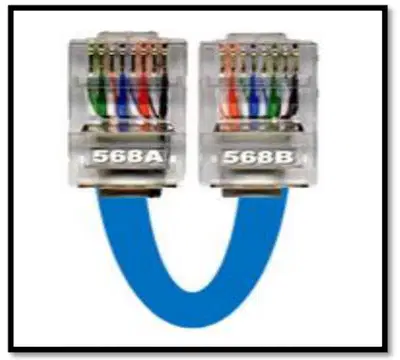
15
Crossover Cable a type of cable used for the interconnection of two similar devices.
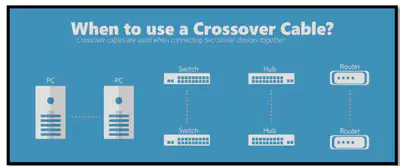
16
Steps in Creating Crossover Cable
1. Prepare the tools and materials.
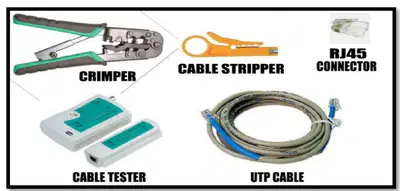
17
Steps in Creating Crossover Cable
2. Cut the twisted-pair cable based on the needed length.
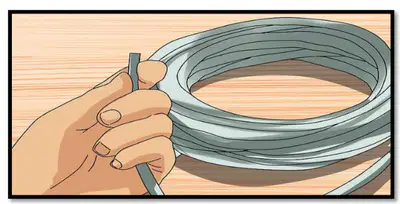
18
Steps in Creating Crossover Cable
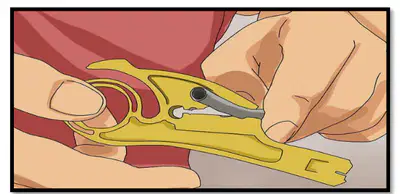
3. Remove the outer jacket of the cable to expose the four pairs of wires inside.
19
Steps in Creating Crossover Cable
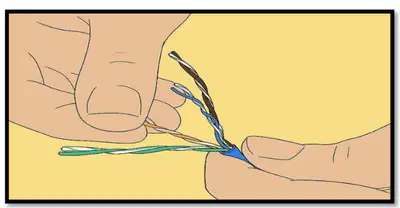
4. Untwist the wires, make sure that they are free from any damage.
20
Steps in Creating Crossover Cable
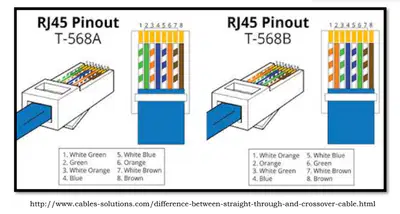
5. Arrange the wires based on the type of cable.
21
Steps in Creating Crossover Cable
6. Cut the wires so that they will be of exact length, make sure that the ends of the wires are aligned.
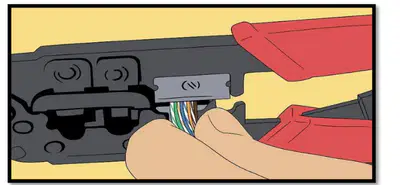
22
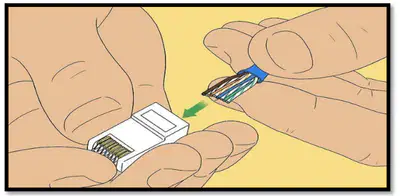
Steps in Creating Crossover Cable
7. Firmly hold the cable and insert the wires into the RJ45 jack.
23
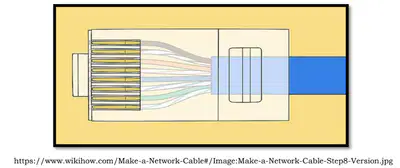
Steps in Creating Crossover Cable
8. Check if the end of the wires touches the end of the RJ45 jack.
24
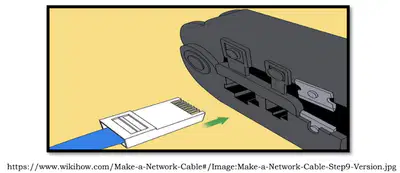
Steps in Creating Crossover Cable
9. Plug the cable into the crimping tool, firmly squeeze it while securely holding the cable.
25
Steps in Creating Crossover Cable
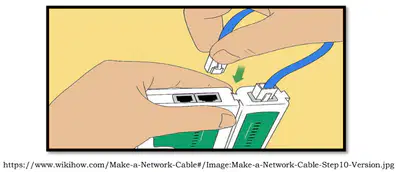
10.Use a LAN tester to ensure that the connection of all the wires in both ends of the cable.
26
Labelling
Direction: Identify the correct color coding for RJ45 pin-out T-568A. Write the letter of the correct answer from the box.
d. Green
c. Brown
g. White/Orange
f. White /Brown
b. White/Green
e. White/Blue
a. Blue
h. Orange
27
Crossover cables are needed only when connecting two ethernet client devices, neither of which is configured for gigabit ethernet. Modern ethernet devices automatically detect the use of crossover cables and work with them effortlessly.
28
Open Ended
1. What are the importance of creating crossover cable?
29
Open Ended
2. Cite a situation in which you can apply the knowledge of creating crossover cable.
30
Open Ended
1. What are the tools and materials used in creating crossover cable?
31
Fill in the Blanks
Type answer...
32
Open Ended
3. What are the color of wires inside the UTP cable?
33
Fill in the Blanks
34
Fill in the Blanks
Creating Crossover Cable
Show answer
Auto Play
Slide 1 / 34
SLIDE
Similar Resources on Wayground

24 questions
Taxonomy
Presentation
•
10th Grade
26 questions
Network Topologies-Sta Cruz
Presentation
•
10th Grade
25 questions
Human Impact
Presentation
•
10th Grade
26 questions
2.3 Thermal Energy
Presentation
•
10th Grade
27 questions
ABCs of Applique
Presentation
•
10th Grade
30 questions
Essay Writing
Presentation
•
10th Grade
26 questions
Alyssa's Birthday- Grey's "Anatomy"
Presentation
•
KG
31 questions
Cell division terms 2 - mitosis prep
Presentation
•
10th Grade
Popular Resources on Wayground
20 questions
Math Review

Quiz
•
3rd Grade
15 questions
Fast food
Quiz
•
7th Grade
20 questions
Context Clues
Quiz
•
6th Grade
20 questions
Inferences
Quiz
•
4th Grade
19 questions
Classifying Quadrilaterals
Quiz
•
3rd Grade
20 questions
Figurative Language Review
Quiz
•
6th Grade
20 questions
Equivalent Fractions
Quiz
•
3rd Grade
10 questions
Identify Fractions, Mixed Numbers & Improper Fractions
Quiz
•
3rd - 4th Grade
Discover more resources for Other
10 questions
Fact Check Ice Breaker: Two truths and a lie
Quiz
•
5th - 12th Grade
10 questions
Video Games
Quiz
•
6th - 12th Grade
10 questions
Test Your Knowledge with 15 Fun Trivia Questions

Interactive video
•
6th - 10th Grade
15 questions
Memorial Day Trivia
Quiz
•
KG - 12th Grade
12 questions
Name that Candy
Quiz
•
KG - 12th Grade
20 questions
Guess The App
Quiz
•
KG - Professional Dev...
30 questions
K/H Final Review Part 1
Quiz
•
9th - 12th Grade
40 questions
NCFE Earth and Environmental Science Released Test
Quiz
•
9th - 12th Grade