

Dash Robots Training

Presentation
•
English
•
Professional Development
•
Practice Problem
•
Easy
Standards-aligned

Candice Delgado
Used 2+ times
FREE Resource
21 Slides • 6 Questions
1


Dash Robot Teacher PD
2

Heavenly Father,
As we gather here today to embark on this workshop about Dash robots, we invite your presence among us. Bless our time of learning and collaboration, guiding our minds and hearts as we explore new ways to enrich our teaching. May the knowledge we gain today be a testament to your wisdom and inspire us to serve our students with diligence and compassion. In your name, we pray.
Amen.
Opening Prayer
3

Why should we bother?
When learners use these robots and their
accompanying programs they are engaging:
●computational thinking, which means they are solving problems, looking for patterns, identifying essential information, creating algorithms, persevering, engaging in design
thinking.
●ELA, Math, Next Generation Science,
& ISTE Standards
●It’s part of our CIPA plan of technology use for
21st Century skills.
4

5
Hotspot
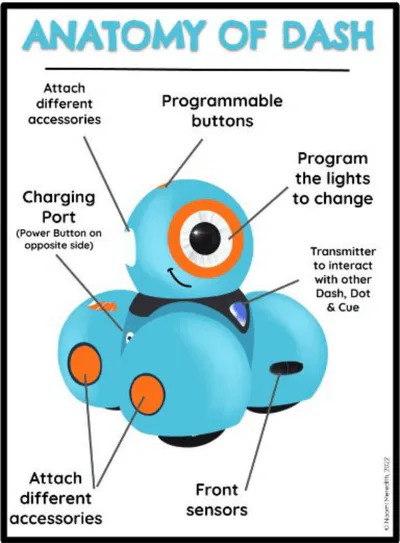
Where is Dash's charging port?
6
Hotspot
Where is Dash's "ON" button?
7
Multiple Choice
Where is the best place to put Dash before turning on?
the floor
the student desk
a long table
8

This page is in your binder. You can make copies of this worksheet for students to keep in their folders to refer to.
Introduce Dash Robot Vocabulary
9
Match
Match the following
gives Dash if this happens, do that actions
Sets up how many times the robot performs an action
options to light Dash up in different ways
add-on items Dash can use to perform a
moves Dash forward, backward, turn left, turn right
Variables
Control
Lights
Accessories
Drive
Variables
Control
Lights
Accessories
Drive
10


Let’s Connect & Play to Learn
It’s time to tinker and try using these little robots!
Choose Your Own Adventure! Pick up a Dash & iPad
A.
For Beginners: Work on Puzzles
using the Blockly app on the iPad (This is a
good way to acclimate your learners when
beginning to use the robots.)
B.
For Those Up For A Challenge: A maze is set
up. Robots are charged. Program the robots
to conquer the maze! Choose My Projects to begin this challenge.
Enter my teacher code VSWPR
Find your grade in my class

11
20 Minutes - Be back by 10:50 am
12

Lets make your own teacher class!
Go to https://portal.makewonder.com/#/teacher-landing to create your own free teacher account. Free version only allows up to 30 students in a class.
13

When you have created your class, you can manage it in the dashboard. You can even turn on Read Aloud Support for specific students that require it.
14

Like us as beginners, your students should begin their first steps using Blockly Puzzles. You can track your class progress here
15
Multiple Select
Click on all the options below that are true.
You can give students read aloud support
The teacher controls the pace the students work through puzzles.
Students work at their pace.
Advanced students can work on other problems you assign them.
16
17
18
19


When your students have finished all puzzles, they are ready for the next step. You can assign and track progress here.
20

When your students are ready, you can assign them challenges. Level A is for K, B is for 1st grade, so on and so forth until Level F for 5th Grade.
21


There are also math activities you can use to reinforce what they are learning in class.
22

You can search by grade level and concept.
23
24

25

This teacher has a wonderful playlist of 6 videos she uses with her students. https://www.youtube.com/playlist?list=PLHbOIkpCXgpI3yofFD3AsogoW1W-y4QDp
Link to my Google Resources Folder https://drive.google.com/drive/folders/13OaUoowgm-Dfblw12f4OmNAj3RpRoGud?usp=sharing
26
Poll
On a scale of 1 to 5 (5 being very confident and 1 being not confident at all), how confident do you feel in integrating Dash robots into your teaching curriculum after attending this workshop?
1
2
3
4
5
27

Heavenly Father,
As we conclude this workshop on Dash robots, we thank you for guiding us in our learning. Bless the skills we've gained to enhance our teaching and inspire our students. Help us use technology wisely in line with our Catholic values. May our work reflect your love and lead our students toward greater good.
Amen.
Closing Prayer
Dash Robot Teacher PD
Show answer
Auto Play
Slide 1 / 27
SLIDE
Similar Resources on Wayground

21 questions
2nd Conditional
Presentation
•
Professional Development
19 questions
Writing a Summary
Presentation
•
University
19 questions
B2 U4 Grammar
Presentation
•
University
20 questions
Relative clauses
Presentation
•
Professional Development
20 questions
Vocabulary Things Fall Apart
Presentation
•
KG
18 questions
Perfect Verb Tenses
Presentation
•
KG
21 questions
Was Were
Presentation
•
University
18 questions
Theme Christmas Movie Clips
Presentation
•
KG
Popular Resources on Wayground
10 questions
Safety Day 2026 – Student Review

Quiz
•
9th Grade
21 questions
Continents and Oceans
Quiz
•
6th Grade
20 questions
Parts of Speech
Quiz
•
5th Grade
16 questions
Subject & Predicate
Quiz
•
5th Grade
25 questions
Multiplication Facts
Quiz
•
5th Grade
12 questions
Map Skills
Quiz
•
3rd Grade
22 questions
Continents and Oceans
Quiz
•
5th Grade
15 questions
Rounding Decimals
Quiz
•
5th Grade