Search Header Logo
1.3 Notes - String Methods

1.3 Notes - String Methods

Assessment

Presentation

•

Computers

•

9th - 12th Grade

•

Practice Problem

•

Hard

Created by

Robert Giordano

FREE Resource

10 Slides • 11 Questions

1

media

2

media

3

media

4

media

5

Fill in the Blanks

Fill in the blank to print the variable's value

num = 17

print("Shohei Ohtani #{ }".format(

Type answer...

))

6

Multiple Choice

Question image

Which of the following should fill in the blanks to create the output shown?

class1 = "Python"

class2 = "AP CS P"

print("I teach { } and { }".format(_____________))

1

class1, class2

2

class1/class2

3

class2, class1

4

class2/class1

7

media

8

Math Response

What will print as a result of the code shown?

e = _______________

Type answer here
Deg°
Rad

9

Math Response

What will print as a result of the code shown?

tau = _________________

Type answer here
Deg°
Rad

10

media

11

Fill in the Blanks

media image

What will print as a result of the code?


Type answer...

12

Drag and Drop

Complete the code to make the computer print "HEY"


text = "hEy"

print(​
.​
)
Drag these tiles and drop them in the correct blank above
text
upper( )
caps( )
string
lower( )
shift( )

13

media

14

Math Response

What will print as a result of the code?

text = "Stay in school"

print(len(text))

Type answer here
Deg°
Rad

15

media

16

Math Response

What is the index of the last character in the string below?

text = "Computer Science!"

Type answer here
Deg°
Rad

17

media

18

Fill in the Blanks

media image

What will print as a result of the code below?


Type answer...

19

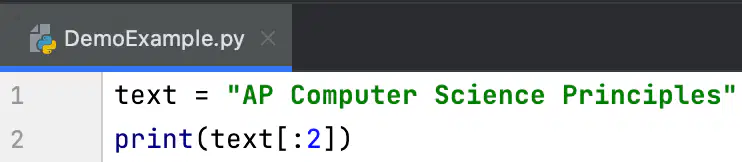
Fill in the Blanks
media image

What will print as a result of the code shown?

Type answer...

20

Fill in the Blanks
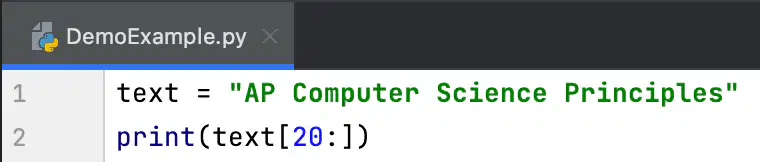
media image

What will print as a result of the code shown?

Type answer...

21
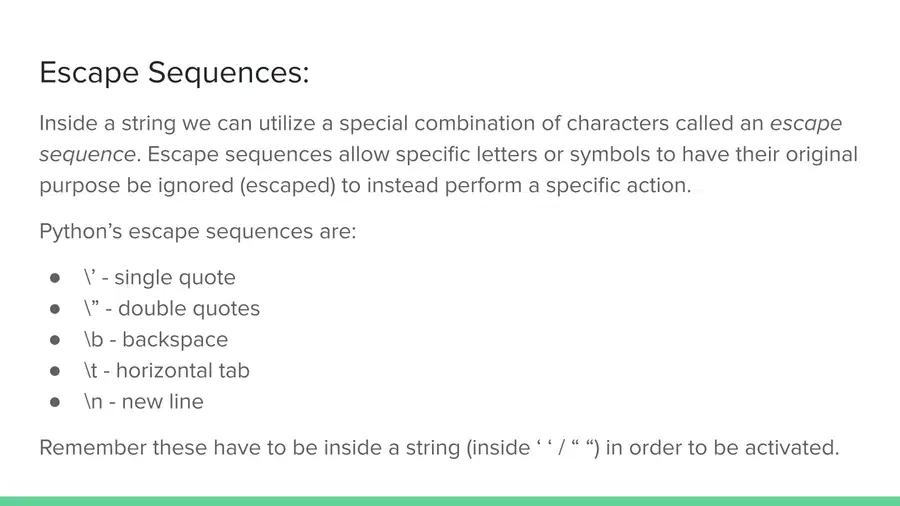
media
pattern-tertiary
media

Show answer

Auto Play

Slide 1 / 21

SLIDE