

Yr8_HT4_L4 Characters in Binary

Presentation
•
Computers
•
12th Grade
•
Practice Problem
•
Easy

Talib Ali
Used 11+ times
FREE Resource
16 Slides • 11 Questions
1
Open Ended
Imagine you have a word document open...What do you think happens when you press the 'A' key on your keyboard?
Use these words: (input, keyboard, CPU, output, monitor, binary):
[3 mins]
2
Characters in Binary
KS3
3
Understanding binary
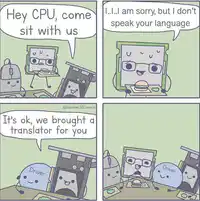
CPUs in computers can only process binary.
In our daily lives, we use the English alphabet and regular numbers.
So we need a way to store these English letters and numbers in binary.

4
Fill in the Blanks
5
The need for character sets
So, computer scientists have designed character sets -> the possible characters that can be represented by a number system.
There are three in use...Today you will learn about ASCII

6
Multiple Choice
What is a character set?
[20 sec]
What language can be used in a computer system
The possible characters that can be represented by a number system
The characters that make up a movie scene.
7
Introduction to ASCII
In ASCII (American Standard Code for Information Interchange):
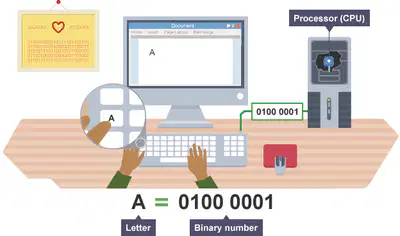
- each letter and number is given an ASCII code
- this can then be translated into binary.
8
Multiple Choice
What does ASCII stand for?
[20 sec]
Australian Standard Code for Information Interchange
Any Set of Characters In the Internet
All Set Characters In Information
American Standard Code for Information Interchange
9
ASCII table
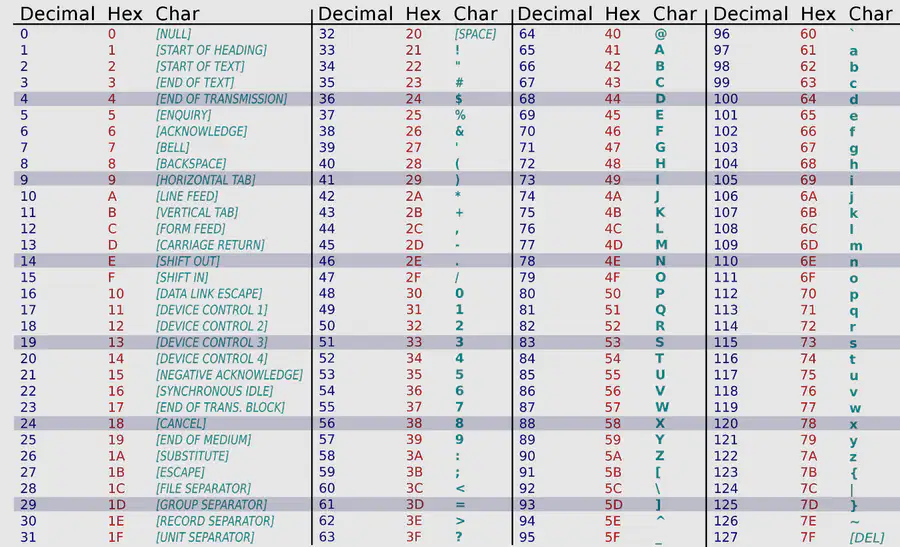
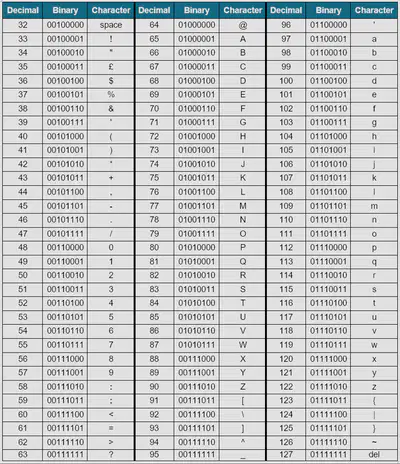
Originally, ASCII used 7 bits, giving us a maximum of 128 possible characters that can be represented
For example, in the right, you can see that the 'space' key is represented by ASCII code 32.
10
Extended ASCII
Because we need more characters to represent, we can use Extended ASCII using 8 bits, which has 256 possibilities.
For example, the Spanish accented a is represented by ASCII code 225.

11
An example of ASCII
Here, we can see that A is stored as an 8-bit binary number.
A = 0100 0001
12
Fill in the Blanks

13
ASCII codes
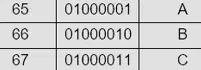
The ASCII Code for A is 65.
The ASCII code for B is 66
The ASCII code for C is 67
What do you think the ASCII code is for...
- D?
- F?
14
Multiple Choice
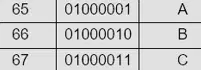
What is the ASCII code for A?
65
66
67
68
15
Multiple Choice
What is the ASCII code for B?
65
66
67
68
16
Multiple Choice
What is the ASCII code for C?
65
66
67
68
17
Multiple Choice
What is the ASCII code for D?
65
66
67
68
18
The ASCII Table
Here is the ASCII table.
It goes from 0 -> 127 (128 possibilities)
Note:
0-31 have been hidden as they are non-printable characters.
19
Match
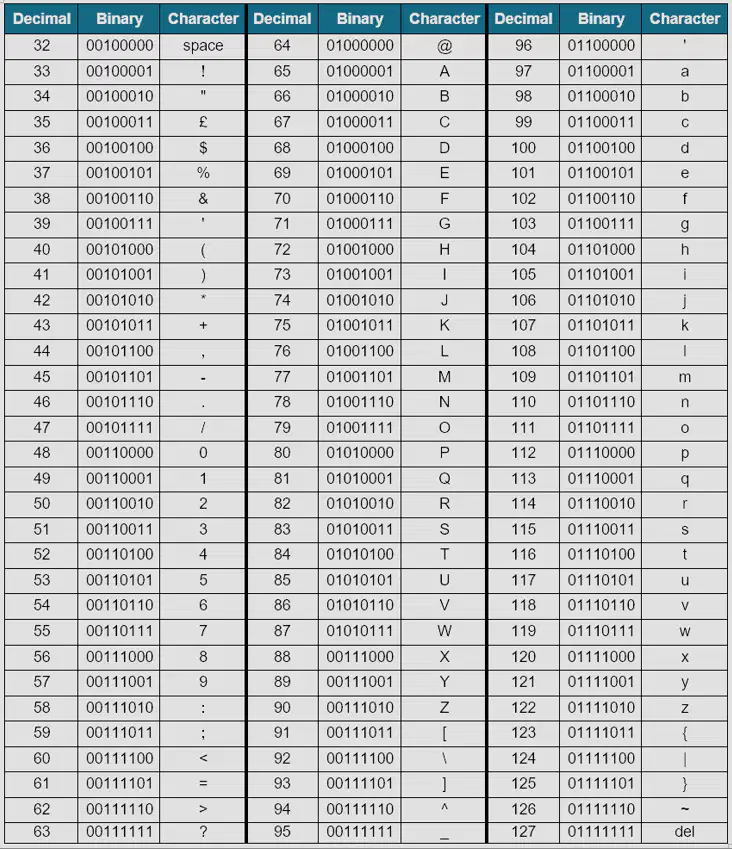
Click on the ASCII table in the picture to match the following:
32
65
97
64
127
the space key
A
a
the @ symbol
the DEL key
the space key
A
a
the @ symbol
the DEL key
20
Converting between ASCII codes and English
KS3
21
The ASCII Table
Here is the ASCII table.
Let's find out what this says:
0100 1000 => H
0110 1001 => i
0010 0001 = !
This binary number says Hi!
22
The ASCII Table
This time, let's use the ASCII codes...
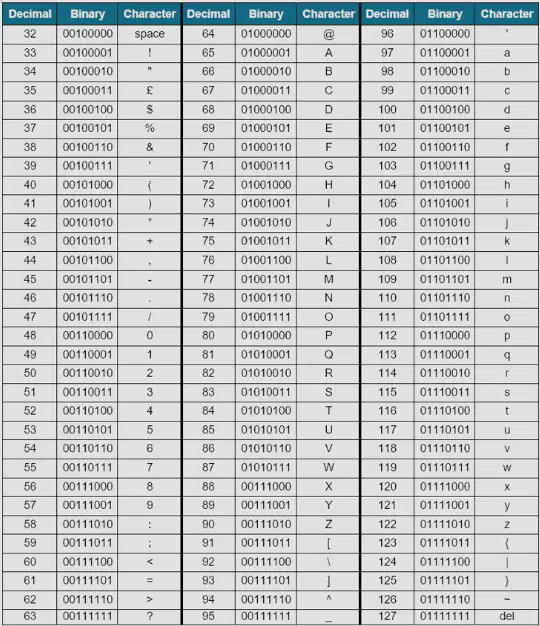
What does this say?
ASCII code: 65, 83, 67, 73, 73
Work it out!
23
Fill in the Blanks
24
The ASCII Table: Harder
In real-life, ASCII will be stored like this...
Can you find out what this says using 8-bit ASCII:
01010000011010000110010101110111
Hint: Try splitting the binary number into bytes (8-bits)
See the next slide for the answer!
25
The ASCII Table: Harder
It is actually four bytes that represent four characters!
01010000/01101000/01100101/01110111
Phew
26
Independent Tasks
KS3
27
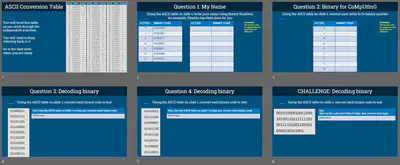
Your tasks
In PowerPoint, can you:
1. write your name in ASCII using the binary code?
2. write the binary for CoMpUtInG
3. convert binary to text
4. convert more binary to text
5. convert lines of binary to text
Imagine you have a word document open...What do you think happens when you press the 'A' key on your keyboard?
Use these words: (input, keyboard, CPU, output, monitor, binary):
[3 mins]
Show answer
Auto Play
Slide 1 / 27
OPEN ENDED
Similar Resources on Wayground

21 questions
1.1(a) System Concept
Presentation
•
12th Grade
19 questions
Module 1 Lesson 3A: Storage Devices
Presentation
•
12th Grade
21 questions
sistem Bilangan
Presentation
•
12th Grade
20 questions
REMOTE DESKTOP CONFIGURATION
Presentation
•
12th Grade
21 questions
EXAM CS 1
Presentation
•
12th Grade
20 questions
4.2 Basic Probability Rules
Presentation
•
12th Grade
20 questions
CAUSATIVE FORM
Presentation
•
12th Grade
21 questions
COMPOUND WORDS
Presentation
•
12th Grade
Popular Resources on Wayground
10 questions
HCS SCI 03 Summer School Assessment 1

Quiz
•
3rd Grade
15 questions
HCS SCI 05 Summer School Assessment 1 Review
Quiz
•
5th Grade
22 questions
Day 9 Equations and Inequalities Review
Quiz
•
9th Grade
10 questions
Writing and Identifying Ratios Practice
Quiz
•
5th - 6th Grade
7 questions
PYRAMID PERSPECTIVES part 1
Presentation
•
9th - 12th Grade
12 questions
Understanding the Fourth of July
Quiz
•
9th Grade
15 questions
Soccer World Cup Quiz Questions
Quiz
•
7th Grade