

Maze Game Scratch Lesson

Presentation
•
Computers
•
9th - 12th Grade
•
Practice Problem
•
Easy

ERICK SWALLOWS
Used 8+ times
FREE Resource
17 Slides • 3 Questions
1
Maze Game
2

Stand-up, Hand-up, Pair-up
3
Vocabulary
Programming- the process of preparing an instructional program for a device (such as a computer)
Iteration- a procedure in which repetition of a sequence of operations yields results successively closer to a desired result
Debugging- to eliminate errors in or malfunctions of ex.debug a computer program
Visual Programming Language- In computing, a visual programming language, also known as diagrammatic programming, graphical programming or block coding, is a programming language that lets users create programs by manipulating program elements graphically rather than by specifying them textually.
4
What is an iterative design process?
Use the internet to research the answer to the question and find a process that you want to use in today’s lesson. Write your iterative design process on a sticky note.
Share out our answers
5
Part 1: Programming the Original Maze Game (15 min.)
6

You can open this webpage in a new tab.
7
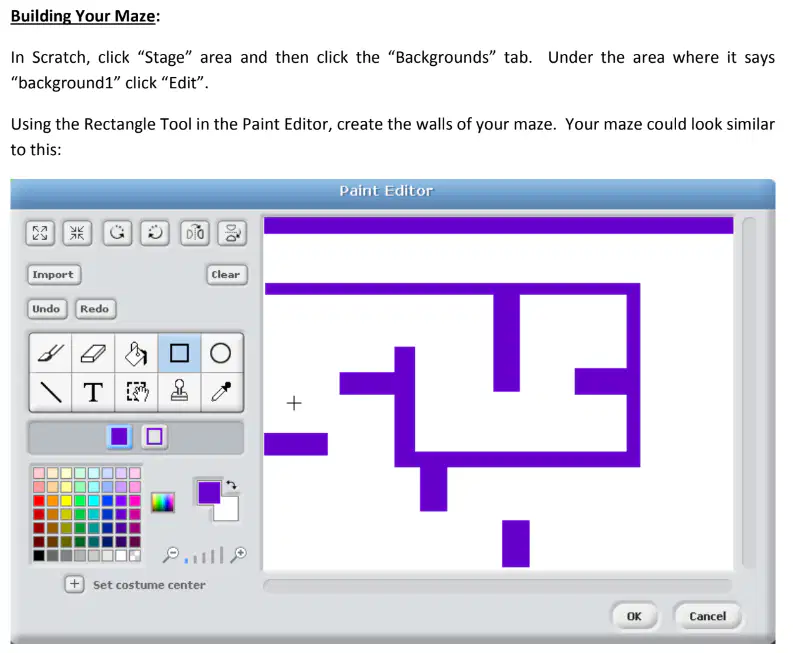
Step 1
8
Step 2

9
Step 3
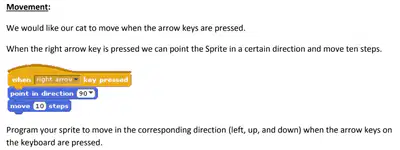
10
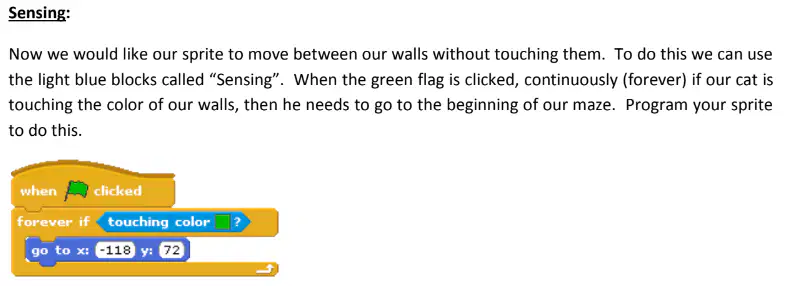
Step 4
11

Step 5
12
Time to submit your 1st version.
In Scratch go to File-> Save to your computer.
Then save that file to you Google Drive (rename it with you, your partners name a 1) and share it with Mr. Swallows.
13
“What parts of the design process have we completed?” What part of the process do we need to do next?
14
Step 6
Your group will partner with another group and you will let the other group play your game. After the other group plays the game, have them answer these peer review questions.
1. What was your favorite thing?
2.What was your least favorite thing?
3. Was there anything you wanted to do that the game wouldn't let you do?
4. What would you do to make the game better?
Step 7
Now take what you learned from the peer review and make your game better.
Repeat Steps 6 & 7 at least three times.
15

Consider the following upgrades
16
Time to submit your Final version.
In Scratch go to File-> Save to your computer.
Then save that file to you Google Drive (rename it with you, your partners name a F) and share it with Mr. Swallows.
17
Exit Ticket
18
Open Ended
How do you think your answers to the peer review questions affected other groups' maze game?
19
Open Ended
How did using the iterative design process affect your final program?
20
Open Ended
What steps do you think a good iterative design process includes?
Maze Game
Show answer
Auto Play
Slide 1 / 20
SLIDE
Similar Resources on Wayground

13 questions
Mindfulness Essentials
Presentation
•
9th - 12th Grade
15 questions
BÀI 6: XEM TIN VÀ GIẢI TRÍ TRÊN INTERNET
Presentation
•
KG
14 questions
Dystopian Literature Introduction
Presentation
•
9th - 12th Grade
15 questions
Push Back Manual Part 1
Presentation
•
9th - 12th Grade
15 questions
Getting started with Javascript #Educreator12
Presentation
•
9th - 12th Grade
16 questions
Data Representation - Sound
Presentation
•
9th - 11th Grade
15 questions
Dictionary Skills
Presentation
•
9th - 12th Grade
17 questions
Preterite Tense
Presentation
•
9th - 12th Grade
Popular Resources on Wayground
10 questions
GPA Lesson
Presentation
•
9th - 12th Grade
7 questions
Albert Einstein

Quiz
•
3rd Grade
31 questions
Bridge A Review
Quiz
•
3rd Grade
6 questions
Blue Sue and Red Ruth
Quiz
•
3rd Grade
8 questions
(Day12 HW) Inverse Trig Ratios
Quiz
•
9th Grade
20 questions
Summer Geometry QUIZ (Week3)
Quiz
•
9th Grade
16 questions
Theme Practice
Quiz
•
7th Grade
20 questions
Taxes
Quiz
•
9th - 12th Grade
Discover more resources for Computers
10 questions
GPA Lesson
Presentation
•
9th - 12th Grade
8 questions
(Day12 HW) Inverse Trig Ratios
Quiz
•
9th Grade
20 questions
Summer Geometry QUIZ (Week3)
Quiz
•
9th Grade
20 questions
Taxes
Quiz
•
9th - 12th Grade
16 questions
Warm Up: Basics of Geometry
Quiz
•
9th Grade
16 questions
Translations and Reflections
Quiz
•
9th - 10th Grade
17 questions
High School Survival Guide
Presentation
•
9th - 12th Grade
20 questions
Banking
Quiz
•
9th - 12th Grade