

Styling Text with CSS

Presentation
•
Computers
•
12th Grade
•
Practice Problem
•
Easy

Katherine Valenti
Used 5+ times
FREE Resource
17 Slides • 3 Questions
1

Web Development - Lesson 6
Styling Text with CSS
2

3
Open Ended
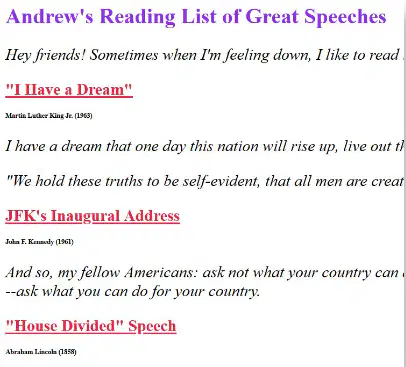
If you wanted to create a page like this, what do you already know how to do? What do you still need to learn how to do?
4
Get the structure and size of text using headings and paragraphs (<h1> and <p>)
Don't know how to change the color of the text, italics, underline
Citations are very small
5

Question of the Day
How can we change the style of text on a web page?
(e.g. color, font size, italics)
Web Development Lesson 6 - Warm Up
6

7

Code Studio, Level 2
Do This
● Explore the index.html and style.css files
Web Development Lesson 6 - Activity
8

Web Development Lesson 6 - Activity
9
Open Ended
How is the style of a web page different from the structure? Why might you want your web page to have a certain style?
10

Web Development Lesson 6 - Activity
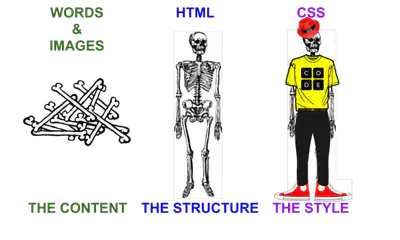
Intro to CSS
The structure of the page organizes the information in a logical way, but doesn't tell the computer how to display it
The style of the page is the specifics of its appearance
Having them seperate makes changing the style of a website easier
Can have an individual look on each page but still be unified across the entire site
11

Web Development Lesson 6 - Activity
Key Vocabulary
CSS - Cascading Style Sheets; a language used to describe how HTML elements should be styled
CSS Selector - the part of a CSS rule-set that defines which HTML elements the style should be applied to
12





Web Development Lesson 6 - Activity
Code Studio Level 3-7
Do This
● Follow the instructions on each level
● If you get stuck, try…
○ Drop down tips
○ Help and Tips Tab
○ Code documentation
● If you make a big mistake…
○ Use version history to go back
13

Web Development Lesson 6 - Activity
14

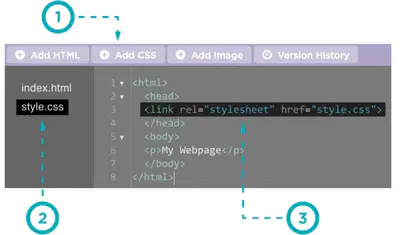
Code Studio, Level 8
Do This
● Add code that will link the stylesheet to the HTML file
Web Development Lesson 6 - Activity
15

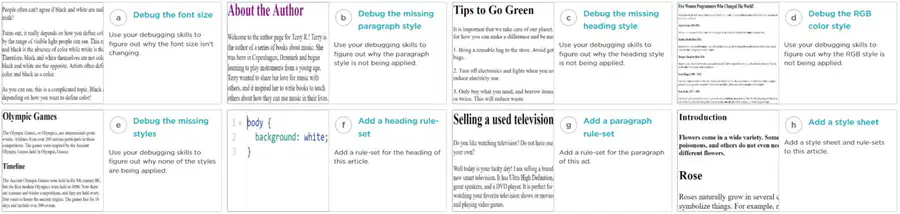
Code Studio, Level 9
Practice styling text using CSS. Complete FOUR of the choice modules here.
Web Development Lesson 6 - Activity
16


Code Studio, Level 10 & 11
Assessment & Reflection Levels
Level 10: Do This
●
Follow the instructions to complete the task in Level 10.
●
The "Rubric" tab describes how to demonstrate your understanding.
●
Check out the Help & Tips tab if you need help.
Level 11: Do This
●
Reflect on how you did on the assessment task
●
How did you know how to complete it? What was easy? What was
challenging?
Web Development Lesson 6 - Activity
17


Code Studio, Level 12
Complete FOUR of the challenges
Web Development Lesson 6 - Activity
18

19
Open Ended
Describe one CSS property you learned today and give an example.
20

Web Development Lesson 6 - Wrap Up
CSS Properties
Property
What it Changes
Example
color
The color of your text
color: maroon;
font-family
Which font to use
font-family:fantasy;
font-size
The size of your text
font-size: 20px;
text-align
The alignment of your text
text-align: center;
text-decoration
Additional style
text-decoration: underline;
letter-spacing
Adds extra space between letters
letter-spacing: 5px;
text-shadow
Adds a shadow to text
text-shadow: 3px -3px;
Web Development - Lesson 6
Styling Text with CSS
Show answer
Auto Play
Slide 1 / 20
SLIDE
Similar Resources on Wayground

18 questions
Fractions Intro
Presentation
•
KG - 12th Grade
13 questions
Exploring Client-Side Processing in Web Development
Presentation
•
12th Grade
15 questions
Integumentary System
Presentation
•
12th Grade
14 questions
Phrasal Verbs
Presentation
•
12th Grade
13 questions
Present and Past Tenses
Presentation
•
12th Grade
15 questions
[igCS] Open and Proprietary Software
Presentation
•
12th Grade
14 questions
Ch6.4 ICT IGCSE 0417 Applications Computer Controlled Systems
Presentation
•
12th Grade
16 questions
El Poder de PowerPoint-Javier
Presentation
•
KG
Popular Resources on Wayground
10 questions
Safety Day 2026 – Student Review

Quiz
•
9th Grade
21 questions
Continents and Oceans
Quiz
•
6th Grade
20 questions
Parts of Speech
Quiz
•
5th Grade
16 questions
Subject & Predicate
Quiz
•
5th Grade
25 questions
Multiplication Facts
Quiz
•
5th Grade
12 questions
Map Skills
Quiz
•
3rd Grade
22 questions
Continents and Oceans
Quiz
•
5th Grade
15 questions
Rounding Decimals
Quiz
•
5th Grade