

Quizziz -- More than just a game

Presentation
•
Education
•
Professional Development
•
Easy

Rebecca McClain
Used 4+ times
FREE Resource
33 Slides • 16 Questions
1

2
Poll
On a scale of one (least) to five (most), how comfortable are you with Quizziz?
1 - I know nothing!
2 - I know what a Quizziz is, and I know how to find one on the site.
3 - I can find and make my own quizzizes.
4 - I can find and make a quizziz, and I have used different quizziz modes!
5 - I can use Quizziz AI, and I know all the features! I'm just here to hang out.
3
Open Ended
What are you most looking forward to learning about in today's session?
4
5
Instant feedback & data
Quality materials and practice with standards
High engagement and student input
Library of resources
Multi-purpose program
Platform updates to maintain quality
6
Multiple Choice
Quizziz can....
increase engagement & promote collaboration
be a self paced activity
be used in real time
all of the above
7
Build student engagement in lessons.
Jumpstart learning at the beginning of lessons.
Give students a brain break.
Quickly gauge student's understanding of content.
Monitor student engagement
8
Build flashcards and pre-assessment data.
Collect data in real time.
Provide practice and review before an assessment.
Send data to parents for accountability.
Track long-term understanding of the standards.
9


Bellwork, Practice Problems, Vocabulary Review, Extension Activities, Homework
Daily Practice
Direct Instruction, Independent Practice, Checks for Understanding
Lessons
Real-Time Feedback, Accountability, Long-Term Measurements, Direct Correlation to Standards
Data
Review, Real-Time Assessment, Personalized Practice, Flashcards
Assessments
10
Set Expectations
Introduced Concepts
Practiced Vocabulary
Reviewed for Exams
Quick Writes
Brain Breaks
Replaced Slides and Peardeck
Met Accommodation Needs
11
Open Ended
Are there any questions about why you should use Quizziz or how you can use Quizziz?
12
13


You can access others' lessons, assessments, etc. from the main page! You can narrow your search by grade, subject, topic, etc.
Using someone elses'
You can input information from your resources, the internet, or into a prompt. The AI will generate a Quizziz Assessment or Lesson for you.
Using AI
You can get the web extension for Google to link Quizziz (similar to Peardeck). You can also upload your Slides to Quizziz.
Creating from Google Slides
14
Multiple Choice
What is the purpose of the Quizizz Lessons Extension for Google Slides?
To play music during presentations
To convert Google Slides into interactive lessons
To enhance image quality in slides
To increase the speed of slide transitions
15
16
17
Multiple Select
When going to create a Lesson, which of the following are two ways to begin the process?
Using someone else's Lesson
Make Chat GPT think about it for me
Just forget it! It's TOO MUCH!
By uploading my Google Slide Deck
I will steal an idea from YouTube
18
Lessons/Assessment Creation
Both the Lessons and Assessment Creation are very similar in how they begin.
Running the Lesson or Assessment is where they begin to differ.
19
Open Ended
Are there any questions about how to build a lesson?
20
Multiple Choice Questions
Class wide Polls
Open Ended Questions
Fill-in-the-blank
Check boxes
21


It matters how you ask
Quizizz Question Types
22

All Question Types
A S S E S S M E N T
Give students up to five possible answers, with an option for
multiple correct answers just like they’ll find on state tests
Students engage with concepts physically as they arrange words to
form a sentence, order WWII battles chronologically, and more
Students engage with concepts physically as they match capital
cities with states, fractions with their percentages, and more
Flexibly assign points for exact words/numbers (e.g. for math
skills) or answers that contain them (e.g. for defining vocabulary)
But wait, there’s more…
Available on Super, School, and District plans only

23

All Question Types (cont.)
H I G H E R - O R D E R T H I N K I N G
Nurture memory and recall as students label elements of a plant
cell, circle Greenland on a world map, and more
Get opinions on current events or provide an essay prompt as
students enter up to 1,000 characters
Let students really show what they know by acting out a scene
from their reading or presenting on a topic
Give students a voice with a prompt to recite a poem, demonstrate
reading skills, and/or work on pronunciation
+ O T H E R E L E M E N T S
Available on Super, School, and District plans only


24
Multiple Choice
What features does Quizizz offer to make quizzes more engaging?
Adding images and videos to questions, timer for each question, and points for correct answers.
Adding a background music to the quiz
Providing a physical trophy for the winner
Allowing students to cheat
25
26
Discover new features in Lessons!
Finish all phases of “I-do ; We-do ; You-do” with Quizizz
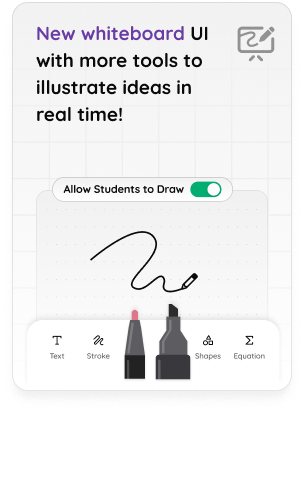
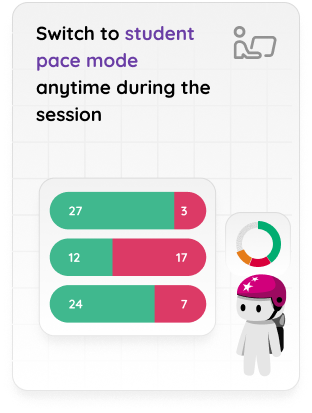
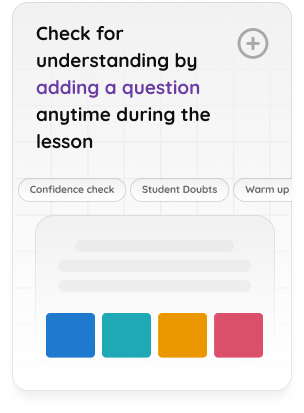
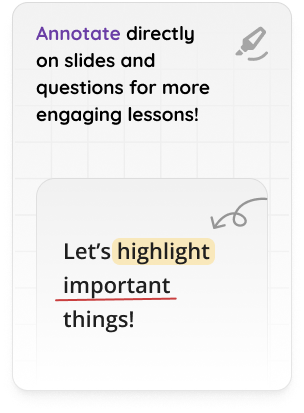
You can also create lessons directly on Google Slides using “Quizizz Extension”.
Read more about it here
27
Multiple Choice
Can student-paced mode be used for homework?
I'm not sure
Yes!
Absolutely not
Can I get ice cream for this?
28
29
30
Open Ended
Are there any questions about Question Types and Lessons Features?
31
32
Begin the Lesson!
Before the lesson, set all of your accommodations ahead of time. It's easier! You can also adjust accommodations through the Classroom Pulse.
When you hit play, you have the option to change settings. Make sure your pre-set accommodations are selected. I also make sure factory names are on.
33
34
Notes about assessments:
You have more setting and gameplay options for assessments than lessons.
You won't have a classroom pulse in assessments, just the end data.
You can create flashcards from the assessments.
You can create an independent practice assessment that can be completed for homework or independent work in class.
35
Multiple Choice
What is the difference between a live quiz and a homework quiz on Quizizz?
A live quiz is played in real-time with all participants answering the questions simultaneously, while a homework quiz can be assigned for students to complete at their own pace.
A live quiz has more difficult questions than a homework quiz.
A live quiz can only be accessed during school hours, while a homework quiz can be accessed anytime.
A live quiz is only for students who are present in the classroom, while a homework quiz is for students who are absent.
36
Open Ended
Are there any questions about running a lesson or assessment in class?
37
38


Engage every learner
●Blend engaging, low-stakes
assessment into any activity
●Let students show what they know
with Live Whiteboard drawings,
Audio & Video Responses, and
more
●Meet every student’s needs, on any
device, with Instructor-Ledand
Student-Paced options, plus Read
Aloud and Redemption Questions

39
40


QUIZIZZ.COM
Motivate every
student with Quizizz
41

When you go to accommodations, you can set them by student or class.
There are many more options than pictured; Quizziz has updated many accommodations!
Options
42
Multiple Choice
As the teacher, what features can you adjust on the quiz before students take it?
Shuffle order
Timer for questions
Displaying leaderboard
All of the above
43
44


Differentiate learning
with data
●Get immediate insights at
the student and class level
to inform instruction
●Automatically differentiate
learning with Adaptive
Question Banks
●See students’ progress over
time with Longitudinal
Growth Graphs
45
46
Multiple Choice
How can teachers track student progress on Quizizz?
Sending an email to the Quizizz support team
Checking the weather forecast for the day
Accessing the 'Reports' tab on their dashboard
Asking students to submit their progress reports
47
48
Open Ended
What questions do you still have?
49
Poll
On a scale of 1-5, how confident are you about taking these tools and applying them to your classroom?
1 - I still got nothin', teach.
2 - I'm a step above where I started, but I'd love some direct instruction or help from someone.
3 - I'm mildly confident, but I'd still love a check-in from someone soon!
4 - I'm getting confident; this really solidified my thoughts on Quizziz!
5 - I'm on top of the world! This is magical! I got this!
Show answer
Auto Play
Slide 1 / 49
SLIDE
Similar Resources on Wayground

43 questions
Roadmap B1+ EOY Test
Presentation
•
Professional Development
43 questions
Scuola Arbitrale Regionale DR2 - Novembre 2023
Presentation
•
Professional Development
42 questions
Useful Applications and Strategies in Teaching Earth Science
Presentation
•
University - Professi...
44 questions
Social media and Emojis
Presentation
•
Professional Development
44 questions
Complete Sentences, Fragments, and Objects
Presentation
•
Professional Development
44 questions
Indicaciones y contraindicaciones de la VMNI
Presentation
•
Professional Development
44 questions
Writing: Story
Presentation
•
Professional Development
Popular Resources on Wayground
10 questions
Safety Day 2026 – Student Review

Quiz
•
9th Grade
21 questions
Continents and Oceans
Quiz
•
6th Grade
20 questions
Parts of Speech
Quiz
•
5th Grade
16 questions
Subject & Predicate
Quiz
•
5th Grade
25 questions
Multiplication Facts
Quiz
•
5th Grade
12 questions
Map Skills
Quiz
•
3rd Grade
22 questions
Continents and Oceans
Quiz
•
5th Grade
15 questions
Rounding Decimals
Quiz
•
5th Grade