

Year 5 U2 the structure of a computing system

Presentation
•
Computers
•
5th Grade
•
Medium

Enes Nas
Used 4+ times
FREE Resource
28 Slides • 24 Questions
1
Structure of a computing system
Components of a Computer System:
Hardware: Physical parts we can see and touch, like the monitor, keyboard, mouse, and central unit.
Software: Programs that connect user actions to hardware, enabling tasks like drawing, gaming, or listening to music.
Operation of a Computer System:
Controlled by software (programs), loaded into internal memory for the CPU (Central Processing Unit) to execute.
Data Flow: Input data is gathered from input devices or external memory, processed, and output as information, saved or sent via output devices.
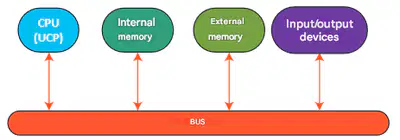
Information Pathway: Uses a common communication line called a "bus."
2
3
Multiple Select
Which of the following statements are true:
Software means the totality of programs included in a computing system
The term hardware refers to the Central Processing Unit.
Input data represents commands or information received by the computer from the user.
Output data represents data produced by the processor and then transmitted to the user.
4
If we compared a person to a computing system, then the hardware would be the body, while the software would be the mind.
How could we "improve" such a "computing system"?
5
Open Ended
Why do you think the CPU, internal memory, and external memory are connected by a bus?
6
Draw
Imagine that the four components are rooms and you should be able to move between any two of them without passing through one of the other rooms. How should you connect the rooms? Create a drawing.
7
Replace this with a header
One of the main components of a computing system is the hardware component, meaning the physical equipment that makes up a computing system.
Within the hardware component, a very important part is the motherboard. It is the place where the other parts of the hardware component, including the processor, are interconnected.
The interconnection is made using connectors (often called electrical connectors).
8
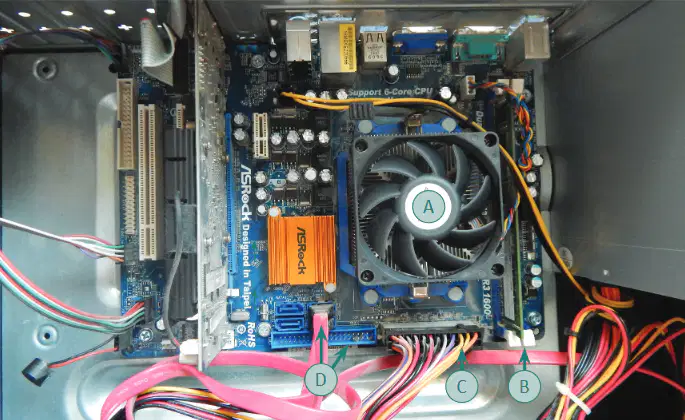
The processor, with a cooling fan on top.
Internal memory (RAM stick).
Connector for powering the motherboard.
Connectors.
9
Role of the CPU:
The CPU performs command and control operations by executing program instructions.
It also carries out arithmetic and logical operations.
Digital Processors:
Most modern processors are digital, processing information as sequences of 0s and 1s.
Binary System:
A bit (b) is a 0 or 1.
8 bits make a byte (B), also called an octet (o).
10
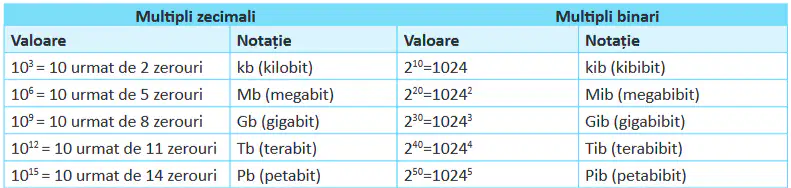
Multiples of a bit
Because the amount of information flowing through a computing system is very large, to express this quantity, multiples of bits (the plural of the word bit) are used.
11
Multiple Choice
Which is larger?
1 kb (kilobit) vs 1 kib (kibibit):
1 kib
1 kb
12
Multiple Choice
Which one is larger?
1000 kib (kibibits) vs 1 Mib (mebibit):
1000 kib
1 Mib
13
Multiple Choice
Which one is larger?
200 Mb (megabits) vs 1 Gb (gigabit):
1 Gb
200 Mb
14
Multiple Choice
Which one is larger?
7 Pb (petabits) vs 1 Pib (pebibit):
1 Pib
1 Pb
15
Multiple Choice
Which one is larger?
200 GiB (gibibytes) vs 1 Tb (terabyte):
1 Tb
200 GiB
16
Multiple Choice
Which one is larger?
500 Mb (megabits) vs 1 Gb (gigabit):
500 Mb
1 Gb
17
Look up in the dictionary what the word interconnection means.
18
Multiple Choice
Choose from the list below how the interconnection of various hardware components on the motherboard can be achieved:
correctors;
connectors
travelers
by soldering with special glue for plastic materials.
19
Multiple Select
What is the role of the Central Processing Unit? What operations are performed by the Central Processing Unit:
command and control
writes sequences of 0s and 1s
arithmetic and logical operations
shuts down the computer?
20
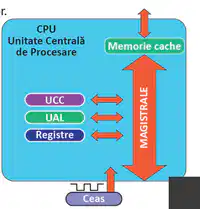
The Internal structure of a processor
a) Control and Command Unit – manages fetching instructions from memory and executing them.
b) Arithmetic and Logic Unit – performs arithmetic and logical operations.
c) Registers – very fast memory areas where processed information and instructions are stored.
d) Internal Clock – the processor executes instructions at a speed dependent on the clock signal speed.
e) Internal Buses – connect the Control and Command Unit with the Arithmetic and Logic Unit and registers.
f) Cache Memory – high-speed memory designed to speed up data access.
21
Important
We have 2 types of internal memory:
a) RAM – Random Access Memory – volatile memory (meaning that when the power is interrupted, the information in it is lost). Programs that are running are loaded into RAM.
b) ROM – Read Only Memory – memory that can only be read. It is permanent memory.
• ROM is used to store information/programs that do not change over the lifetime of the computer.
• External memory is archival memory, meaning it ensures data storage for an indefinite period and in significant volumes.

22
Open Ended
What do you do when you need to store a large amount of data for a longer period of time?
23
EXternal Storage devices
HDD (Hard Disk Drive): A big storage box where you can save lots of files like games, photos, and videos.
SSD (Solid State Drive): A faster and smaller storage box, like an upgraded HDD, used to save information quickly.
Memory Stick (USB): A tiny stick you can carry in your pocket to save and move files between computers.
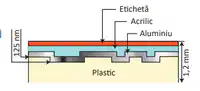
CD (Compact Disc): A round, shiny disc used to store music, pictures, or small amounts of data. It has a capacity of 700MB. The optical drive that reads CDs is called a CD-ROM.
Blu-ray Disc: A special disc that looks like a CD but can store a lot more, perfect for high-quality videos. It has a capacity of 50GB. Some drivers exist to read/write BlueRay discs, DVD's and CD's.
DVD (Digital Versatile Disc): A disc that stores more data than a CD but less than a Blu-ray, often used for movies or software. The capacity is from 4.7 to 17 GB


24
Open Ended
You need to move the information from 2 DVDs to CD. How many CDs would you need to make
the move?
25
Group Work
Form groups of three. Search the Internet or check local stores for the price of a DVD-R, a CD-R, and a 16 GB memory stick. Then, each team member will answer one of the following questions:
26
Multiple Choice
You've purchased a new 2TB HDD and want to transfer 200GB of data from your old HDD to the new one using a 16GB memory stick. How many times will you need to copy data from the old HDD to the stick to complete the operation?
27
Match
Find the most suitable pairing between the bolded words and the computer components:
Processor
ROM
RAM
Creier (Brain)
Carte (Book)
Caiet (Notebook)
Creier (Brain)
Carte (Book)
Caiet (Notebook)
28
Input
The keyboard (called an input peripheral device) allows the user to input information into the computer. The input is made by pressing the keys. When a key is pressed, a numeric code is generated and transmitted to the computer.
Classification of keys:
Numeric keys: the digits 0 – 9;
Alphanumeric keys: letters a – z, A – Z, digits 0 – 9, and special characters: ‘”~`!@#$%^&* (){}[]:;,./<>?;
Function keys: F1, ...., F12;
Editing keys: Delete, Enter, TAB, Caps Lock, Insert, Num Lock, Shift;
Command keys: Esc, Enter;
Navigation keys: TAB, Page Up, Page Down, Home, End, arrow keys;
29
Replace this with a header
The main keys are F and J. Position your index fingers on these keys. They have a plastic marker that you can feel when you touch the key. Position your left hand fingers on the keys A, S, D, and F, and your right hand fingers on the keys J, K, L, and ;. This positioning is called the "home position."
After each key press, return to the home position. This will help you stop looking at the keyboard.
Try typing the following letter strings without lifting your fingers from the keyboard:
a) add add add add
b) kka kdsf
c) ksja sjff
30
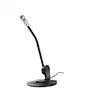
Some other Input devices
GamePad
Microphone
Digital Camera
Graphics Tablet
Scanner
Mouse
Trackball & Touchpad


31
Match
Match the name of each component with a characteristic:
Scanner
Digital Camera/Video Camera
Graphics Tablet
Microphone
colors can be black-white or color
The resolution is measured in Mp
enables precise drawing with a stylus
A device used to capture sound from the
colors can be black-white or color
The resolution is measured in Mp
enables precise drawing with a stylus
A device used to capture sound from the
32
Output
Here’s a summary of current display technologies:
CRT (Cathode Ray Tube): An outdated technology offering good image quality and fast response times, but with high energy consumption and harmful radiation emissions.
TFT-LCD (Thin-Film-Transistor Liquid Crystal Display): Provides good image quality with low energy consumption, while the improved TFT-LED version offers even lower energy usage.
OLED and AMOLED: Offer superior image quality compared to TFT-LED, but consume more energy.
33
Monitor
The monitor is an output peripheral device used for displaying images and text.
Characteristics:
Resolution: Represents the number of pixels that can be displayed on the screen. A pixel is the smallest element of an electronic image. A resolution of 1920 x 1080 (also known as Full HD) displays a rectangle with 1920 pixels horizontally and 1080 pixels vertically.
Diagonal: The size measured in inches between opposite corners of the screen.
Aspect ratio: The ratio between the length and height of a screen. It can be 4:3, 16:9, or 16:10.
Response time: The time required for a pixel to change from white to black and back to white. The smaller it is, the better moving images will look.
Contrast: The ratio between the maximum and minimum brightness of the image on the screen.
34
Graphics Card
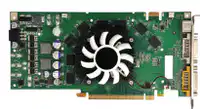
The graphics card (also called a graphic adapter or graphic card) generates and transmits the video image to the monitor. It can either be integrated into the motherboard or separate.
Characteristics:
Graphics processor: Performs the calculations for generating the video image.
Memory: Stores images needed for display.
Connector types: Specifies how to connect to the monitor. Common types include VGA, DVI, HDMI (can also transmit sound), and Display Port.
35
Projector
The projector is an auxiliary device that takes an image from a source (computer, smartphone, laptop, camera) and projects it onto a screen.
Characteristics:
Native resolution: The resolution of the image that the projector will project.
Brightness: Measured in lumens, it represents the intensity of light emitted by the projector.
Projection technology: The method used to generate the image, which can be LCD, DLP (uses a lamp as a light source), LED, or Laser (uses a laser as a light source).
Speakers are an output peripheral device used to transmit sound from the computer to the user.

36
Multiple Choice
Which statements about pixels are true?
37
Open Ended
What do you think is more suitable to use in the living room for watching movies: a television or a video projector? What about in a large room with 100 seats? Why?
38
Open Ended
You have a computer with the latest processor on the market, a lot of RAM, and the most high-performance SSD for storage, yet some games are running slowly. What would you change to improve gaming performance?
39
INPUT AND OUTPUT DEVICES
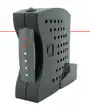
A modem enables communication between computers over non-dedicated lines like telephone or TV cables.
A network card connects a computer to a wired (fiber optic or UTP) or wireless network.
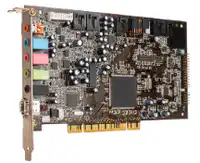
A sound card manages audio input and output, supports speakers, and connects microphones.
A touchscreen detects touch using resistive (layer contact) or capacitive (electric discharge) technology.
40
Open Ended
Some computer systems have the central unit built into the monitor and are known as All-in-One PCs. What advantage do you think an All-in-One system has over a traditional monitor + desktop setup?
41
Work in pairs (2min)
Each of you will analyze your own computer and determine:
a) What kind of input devices are connected to it? What type of ports are they connected through?
b) What output peripherals are connected to your central unit?
c) What input/output devices can you identify?
d) Discuss your analysis with a partner. What similarities and differences did you find in your analyses?
42
Software
43
Open Ended
What do you understand by software? What do you think this term refers to?
44
Software
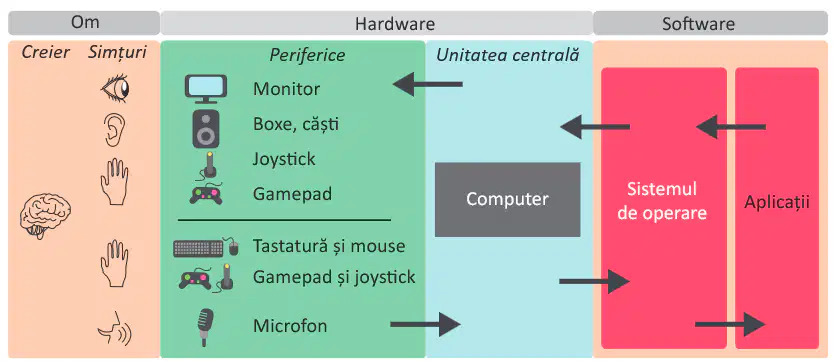
Software refers to applications and programs that control and manage computer systems. It includes operating systems, drivers (which connect the operating system to hardware), and application programs.
Operating System
An operating system manages hardware (processor, memory, etc.) and software (running programs, files) and provides a user-friendly interface.
Examples of Operating Systems
Desktop/Laptop: Windows (Microsoft), MacOS (Apple), Linux (free systems like Ubuntu, Debian).
Mobile Devices: Android (Google), iOS (Apple), HarmonyOS (Huawei).
45
46
Important
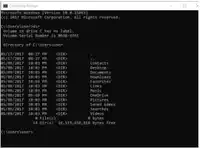
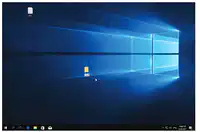
The operating system interface can be graphical, where the user communicates with the computer using graphical elements (icons, menus, and windows), or command-line, where the user types commands and the computer displays responses in text form.
Command-line interface
Graphical user interface (GUI)
47
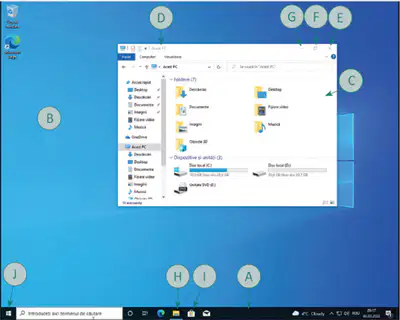
Windows 10
A. Taskbar – Displays an icon for each running app (H). You can pin shortcuts (I) for frequently used apps. The Start button (J) opens a menu for accessing apps and system settings.
B. Desktop – An invisible workspace displaying icons for files, folders, and shortcuts.
C. Window – A rectangular area for an app, with elements for operations and manipulation:
Title bar (D): Changes color when active. Only one window can receive keyboard input at a time.
Buttons: Close (E), Maximize/Restore (F), and Minimize (G).
48
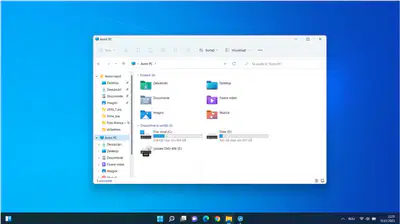
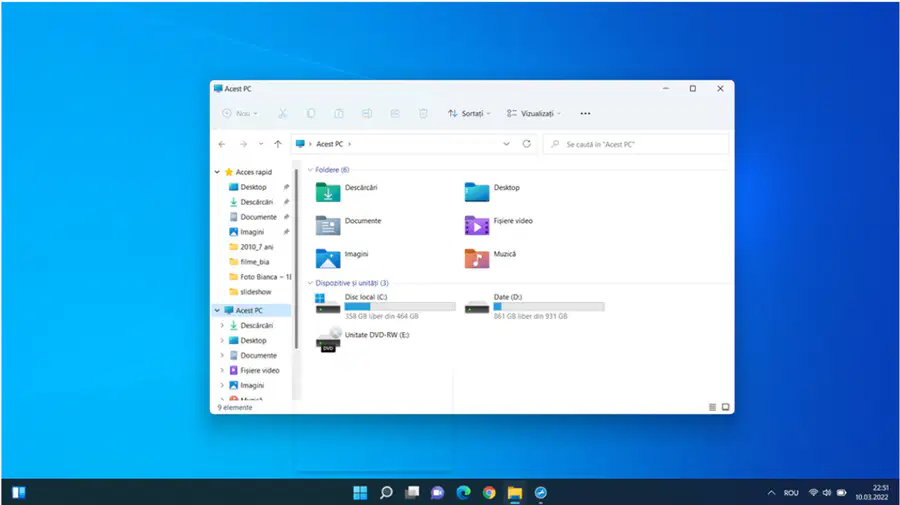
Windows 11
49
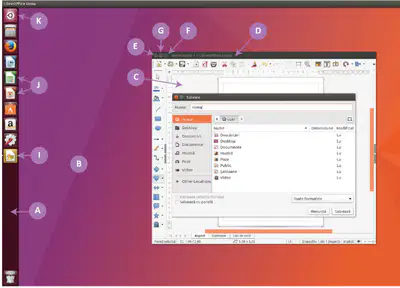
Ubuntu
A. Taskbar – Displays an icon for each running app (H). You can pin shortcuts (I) for frequently used apps. The Start button (J) opens a menu for accessing apps and system settings.
B. Desktop – An invisible workspace displaying icons for files, folders, and shortcuts.
C. Window – A rectangular area for an app, with elements for operations and manipulation:
Title bar (D): Changes color when active. Only one window can receive keyboard input at a time.
Buttons: Close (E), Maximize/Restore (F), and Minimize (G).
50
Open Ended
Open the Paint application from the Start menu.
a) Use the Paint window buttons to minimize, maximize, and restore the window to its original size.
b) Move the mouse cursor to one of the window edges. The cursor should change to a double-headed arrow.
c) With the cursor in this shape, press the left mouse button and drag the cursor to the left. What do you notice?
d) Open two applications. Press the Alt+Tab key combination (hold down the Alt key and then press Tab). What happens? What if more than two applications are open on the Desktop?
51
Open Ended

Press the key combination Win + S (hold down the Windows key, and while holding it, press the S key on the keyboard) in Windows. What happens? What if you press only the Windows key?
52
Open Ended

Open two or more applications, then press the Win + M key combination in Windows. What happens? Right after pressing Win + M, press Win + Shift + M
Structure of a computing system
Components of a Computer System:
Hardware: Physical parts we can see and touch, like the monitor, keyboard, mouse, and central unit.
Software: Programs that connect user actions to hardware, enabling tasks like drawing, gaming, or listening to music.
Operation of a Computer System:
Controlled by software (programs), loaded into internal memory for the CPU (Central Processing Unit) to execute.
Data Flow: Input data is gathered from input devices or external memory, processed, and output as information, saved or sent via output devices.
Information Pathway: Uses a common communication line called a "bus."
Show answer
Auto Play
Slide 1 / 52
SLIDE
Similar Resources on Wayground

47 questions
“Mag-usap Tayo!”
Presentation
•
5th Grade
45 questions
Renewable Energy Resources Guided Lesson
Presentation
•
6th Grade
46 questions
3 Hari Pertama dengan Chromebook
Presentation
•
4th Grade
45 questions
Decimal to Binary
Presentation
•
5th - 6th Grade
44 questions
Ecosystems/Biomes
Presentation
•
5th Grade
51 questions
Life Cycles
Presentation
•
5th Grade
45 questions
5.9A and 5.9B - Interdependency and Food Webs
Presentation
•
5th Grade
46 questions
Heat Transfer Lesson
Presentation
•
6th Grade
Popular Resources on Wayground
19 questions
Naming Polygons

Quiz
•
3rd Grade
10 questions
Prime Factorization
Quiz
•
6th Grade
20 questions
Math Review
Quiz
•
3rd Grade
15 questions
Fast food
Quiz
•
7th Grade
20 questions
Main Idea and Details
Quiz
•
5th Grade
20 questions
Context Clues
Quiz
•
6th Grade
20 questions
Inferences
Quiz
•
4th Grade
19 questions
Classifying Quadrilaterals
Quiz
•
3rd Grade