

5.1 Linux Security

Presentation
•
Computers
•
8th Grade - Professional Development
•
Practice Problem
•
Easy

Sarah Hess
Used 4+ times
FREE Resource
13 Slides • 8 Questions
1
5 - Security and File Permissions
By Sarah Hess
2

Security - Control who can access what
Concept: Principle of Least Privilege
Linux OS's based off of Unix (50+ Years Old!)
Why Accounts
3
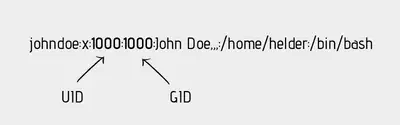
UID: User ID
GID: Group ID
Every user has a UID and PRIMARY GID
Groups can have 1 or many users
Users can be in 1 or many groups
Identifiers
4
Multiple Choice
What is the main philosophy of Linux security?
5

Root UID is 0 - SUPERUSER!
Standard User ID's > 1000
- Have defined home directory (usually subdirectory of /home)
- Defined login shell (default Bash in /bin/bash)
Types of Linux User Accounts
6

Typically pre-created at system/services installation
Used by facilities/programs/services that don't require SU
-No dedicated home directory
-No valid login shell
System & Service Accounts
7

Command: id
Shows UID and name, primary GID and name and additional groups
Get Information About Users
8
Multiple Choice
Which group ID is shown first in the id command?
9
Multiple Choice
What does UID stand for in Ubunu?
10

Command: chsh
-Some users need to boot into shell
-Default is BASH (bourne again shell, what you've been learning)
-Can define different default shell using chsh
-Try change your shell to /usr/bin/zsh (zshell)
Change default shell.
11
Multiple Choice
Why would you use chsh?
To change a user’s password
To change a user’s default login shell
To create a new user account
To modify file permissions
12

Command: last
Shows when users last logged into the system
Command: lastb
Shows last BAD attempts to login
When did users log in?
13
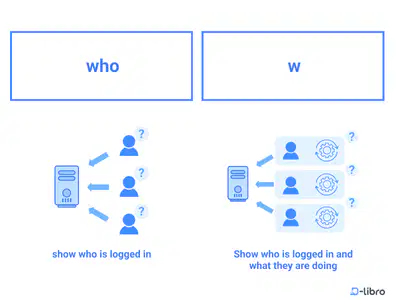
Commands who and w differ slightly
Think of effectiveness as a server admin
Currently Active?
14
Multiple Choice
What differentiates the who and w command?
15

su - switches to root (needs root password) or su user switches user
sudo runs individual commands as root
Switching Users and Privilege Escalation
16
Multiple Choice
Why is sudo preferred over su in modern Linux?
It's faster
It enables accidental elevated actions
It doesn’t share the root password
It opens a GUI
17

/etc/passwd: User info
/etc/shadow: Password hashes
/etc/group: Group info
/etc/sudoers: Sudo permissions
Access Control Files
18
Match
Match the following
/etc/passwd
/etc/shadow
/etc/group
/etc/sudoers
User info
Password hashes
Group id
Sudo permissions
User info
Password hashes
Group id
Sudo permissions
19

/etc/shadow stores one-way password hashes
Hashes are salted and not reversible
Password Hashing
20
Multiple Choice
In the /etc/shadow file passwords are stored in what format?
open
hash
salt
mesh
21
Review
-Accounts are used for security
-UID and GID numbers define users and groups (user IDs > 1000)
-Root is account 0
-Typically standard users have a home directory, system and service accounts do not
-Command id shows user information
-last shows the last time users logged in
-who and w show active users
-su switch user to root/another user
-sudo inline privilege escalation
-etc passwd, shadow, group, sudoers directories have user information
-shadow has user passwords hashed
5 - Security and File Permissions
By Sarah Hess
Show answer
Auto Play
Slide 1 / 21
SLIDE
Similar Resources on Wayground

18 questions
El ahorro
Presentation
•
KG
15 questions
ICT : Media Pembelajaran
Presentation
•
KG
12 questions
Key Details and related vocabulary
Presentation
•
6th - 7th Grade
12 questions
untitled
Presentation
•
KG - University
14 questions
Modulo 1 week 1 day 5
Presentation
•
KG
13 questions
For Loop
Presentation
•
8th - 12th Grade
15 questions
Artistic Effects
Presentation
•
9th Grade - University
15 questions
Graphic Design: Software
Presentation
•
9th - 12th Grade
Popular Resources on Wayground
16 questions
Grade 3 Simulation Assessment 2

Quiz
•
3rd Grade
19 questions
HCS Grade 5 Simulation Assessment_1 2526sy
Quiz
•
5th Grade
10 questions
Cinco de Mayo Trivia Questions

Interactive video
•
3rd - 5th Grade
17 questions
HCS Grade 4 Simulation Assessment_2 2526sy
Quiz
•
4th Grade
24 questions
HCS Grade 5 Simulation Assessment_2 2526sy
Quiz
•
5th Grade
13 questions
Cinco de mayo
Interactive video
•
6th - 8th Grade
20 questions
Math Review
Quiz
•
3rd Grade
30 questions
GVMS House Trivia 2026
Quiz
•
6th - 8th Grade