

A4 - Designing An Efficient User Interface

Presentation
•
Computers
•
9th - 10th Grade
•
Hard

Ayomikun J Sodipe
FREE Resource
32 Slides • 36 Questions
1

2

3

4

5
6

7

8

9

10

11

12

13

14

15

16

17

18

19

20

21
Multiple Choice
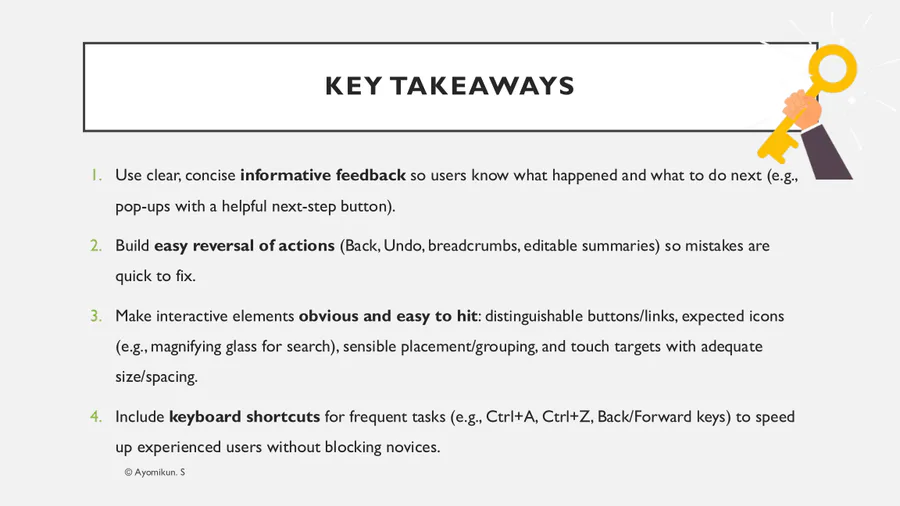
What is the primary purpose of keyboard shortcuts?
Improve screen resolution
Speed up input of instructions
Replace the mouse entirely
Increase security
22
Multiple Choice
Which shortcut selects all items in a document (as per the slide example)?
Ctrl+C
Ctrl+V
Ctrl+A
Ctrl+S
23
Multiple Choice
Which shortcut is used to undo an action?
Ctrl+Y
Ctrl+Z
Ctrl+U
Ctrl+R
24
Multiple Choice
The Left Arrow shortcut mentioned in the slide is associated with:
Refresh
Back
Forward
Close tab
25
Multiple Choice
The Right Arrow shortcut mentioned in the slide is associated with:
Forward
Back
New tab
Search
26
Multiple Choice
Why should excessive text be avoided in shortcut help overlays?
It reduces icon size
It slows page loading
It overwhelms users and slows task flow
It hides tooltips
27
Multiple Choice
What is the main goal of informative feedback?
Entertain the user
Confirm success/failure and guide the next action
Replace error messages entirely
Track user data
28
Multiple Choice
Which is the best example of informative feedback?
A silent change on the screen
A pop-up stating “Saved successfully” with a “View file” button
A long paragraph about storage policy
A pop-up with no close button
29
Multiple Choice
Why should feedback be clear and concise?
To meet legal requirements
To make text smaller
To ensure users can quickly decide what to do next
To improve colour contrast
30
Multiple Choice
Which format is explicitly mentioned for delivering feedback?
Background image
Pop-up
Footer note
Hidden tooltip
31
Multiple Choice
Adding links/buttons in feedback is useful because it:
Hides the error details
Moves users to unrelated pages
Helps users take the next step immediately
Forces page reload
32
Multiple Choice
Excessive feedback text can harm usability because it:
Causes animations to fail
Increases cognitive load and delays action
Lowers device brightness
Breaks hyperlinks
33
34

35

36

37

38

39

40

41

42

43
Multiple Choice
“Easy reversal of actions” primarily supports which usability principle?
Aesthetic integrity
Error tolerance/recovery
Personalisation
Hardware scalability
44
Multiple Choice
In the checkout example, why must users return to “Review Order”?
To change the theme
To edit an incorrect house number before confirming
To update the device driver
To change the currency symbol
45
Multiple Choice
Which control best supports easy reversal?
Disabled “Back” button
Clear breadcrumb trail
Auto-playing video
Hidden navigation
46
Multiple Choice
Allowing users to reverse actions improves:
Marketing reach
Network speed
Confidence and error recovery
Colour depth
47
Multiple Choice
A confirmation step before a destructive action (like “Delete”) helps by:
Slowing the UI
Forcing sign-out
Reducing accidental irreversible actions
Disabling shortcuts
48
Multiple Choice
Which is the worst practice for reversal of actions?
“Undo” option
Edit previous steps
Breadcrumbs to earlier pages
One-way wizard with no back option
49
Multiple Choice
Why must buttons/links stand out?
To increase ad clicks
So users recognise actionable elements quickly
To allow bigger logos
To reduce server load
50
Multiple Choice
A common convention for hyperlinks is that they:
Use random colours
Are underlined and change colour once visited
Have no visual difference from text
Use background videos
51
Multiple Choice
Which example best shows a distinguishable link?
Grey text identical to body copy
Underlined, high-contrast text that changes after visiting
Small, low-contrast text
Invisible hotspot area
52
Multiple Choice
What is a likely effect if links aren’t visually distinct?
Faster navigation
Users miss navigation paths
Improved accessibility
Better battery life
53
Multiple Choice
A “Help” button that looks like plain text most likely causes:
Higher task success
Lower discoverability
Improved scanning
Faster form completion
54
Multiple Choice
Which pairing follows convention for “Search”?
Paintbrush icon
Spanner icon
Magnifying glass icon
Heart icon
55
Multiple Choice
Why does object size matter on an interface?
It sets the font license
It affects how easily users can select items
It controls cookie banners
It determines file size
56
Multiple Choice
What happens if touch targets are too small?
Users complete tasks faster
Users waste time and have a poor experience
Images load faster
Shortcuts stop working
57
Multiple Choice
When designing for phones, you should especially consider:
Mouse hover states
Finger selection and screen size
Keyboard macros
Printer DPI
58
Multiple Choice
Which choice best improves selection accuracy?
Smaller buttons with tight spacing
Larger targets with adequate spacing
Hidden buttons
All caps labels
59
Multiple Choice
A likely consequence of difficult-to-tap controls is:
Fewer errors
Reduced bounce rate
Increased mis-taps and abandonment
Faster page loads
60
Multiple Choice
Which design review question comes directly from the slides?
“What is the server OS?”
“What will users need to select and how?”
“What is the ISP bandwidth?”
“What’s the paper size?”
61
Multiple Choice
Placing objects where users expect to find them improves:
Aesthetics only
Learnability and speed
Server performance
CSS validation
62
Multiple Choice
Why should common objects use expected icons?
To reduce licensing fees
To match user mental models and reduce search time
To reduce pixel density
To remove labels
63
Multiple Choice
Adjusting font, size, and colour of an object primarily helps with:
Legal compliance
Visual hierarchy and scannability
Database performance
Browser caching
64
Multiple Choice
Grouping related items together helps by:
Increasing scroll length
Reducing selection time
Forcing longer reading
Hiding advanced options
65
Multiple Choice
Which layout choice best follows the grouping principle?
Scattering related controls around the page
Grouping shipping, billing, and delivery options in one panel
Splitting a form across random modals
Hiding help beneath unrelated sections
66
Multiple Choice
The search icon should usually be:
Magnifying glass
A lock
A heart
A paintbrush
67
68

Show answer
Auto Play
Slide 1 / 68
SLIDE
Similar Resources on Wayground

62 questions
Introduction to Physics
Presentation
•
10th Grade
65 questions
1.4 - Forms Of Attack
Presentation
•
9th - 10th Grade
61 questions
Beyond the Mississippi
Presentation
•
10th Grade
62 questions
Classification of Matter
Presentation
•
9th Grade
62 questions
Social Changes of the 1920s
Presentation
•
10th Grade
59 questions
Layers and protocols 2025 RDU
Presentation
•
10th Grade
61 questions
Complex Patterns of Inheritance
Presentation
•
9th Grade
Popular Resources on Wayground
11 questions
Hallway & Bathroom Expectations

Quiz
•
6th - 8th Grade
10 questions
HCS SCI 03 Summer School Assessment 2
Quiz
•
3rd Grade
11 questions
Home Scope
Quiz
•
7th - 8th Grade
12 questions
2026 TAP Technology in the Classroom
Presentation
•
Professional Development
15 questions
HCS SCI 05 Summer School Assessment 2 Review
Quiz
•
5th Grade
15 questions
HCS SCI 04 Summer School Review 2
Quiz
•
4th Grade
59 questions
Geometry Unit 3 Review
Quiz
•
9th - 12th Grade
14 questions
FAST ELA READING SMAPLE TEST MATERIALS

Passage
•
3rd Grade