

B1 – Project Planning Techniques

Presentation
•
Computers
•
9th - 10th Grade
•
Easy

Ayomikun J Sodipe
Used 1+ times
FREE Resource
36 Slides • 37 Questions
1

2

3

4

5

6

7

8

9

10

11

12

13

14

15

16

17

18

19
Multiple Choice
What is a task list used for in a project?
To create visual layouts
To list all tasks with their dates and durations
To test the interface
To collect images
20
Multiple Choice
Which of the following can a task list show?
Dependencies between tasks
Tasks that run at the same time
Sub-tasks under a main task
Milestones as symbols
21
Multiple Choice
Which of these is a limitation of a task list?
It is hard to read
It does not show concurrent tasks
It cannot have dates
It can only be handwritten
22
Multiple Choice
A student says, “My task list shows what I have to do and when.” This is...
Correct
Incorrect, task lists don’t show time
Incorrect, task lists are only for design
Incorrect, task lists are Gantt charts
23
Multiple Choice
Which field is MOST likely to appear in a task list?
Button styles
Start date
File size
User feedback
24
Multiple Choice
Why might a task list not be suitable for a large project?
It is too visual
It does not show task dependencies or overlapping tasks
It can’t be typed
It always needs specialist software
25
Multiple Choice
What is a graphical description?
A diagram showing task timings
A sketch or drawing of what the product might look like
A test plan
A list of software tools
26
Multiple Choice
What does a written description do?
Explains in words what the design or interface will be like
Shows dependencies
Creates contingency time
Shows milestones
27
Multiple Choice
Which of the following is TRUE about diagrams/graphical descriptions from the slide?
They contain start and end times
They can be used to show how a product will be laid out
They must be made in Excel
They replace Gantt charts
28
Multiple Choice
Which would be MOST suitable to show the layout of a new website?
Gantt chart
Graphical description/wireframe
Task list
Mood board only
29
Multiple Choice
What is one limitation of a graphical description?
It can’t show layout
It does not contain task times or dates
It cannot be understood
It must be printed
30
Multiple Choice
Written and graphical descriptions are mainly about...
Scheduling the project
Showing or explaining what the design will look like
Recording user tests
Backing up files
31

32
33

34

35

36

37
38

39

40
Multiple Choice
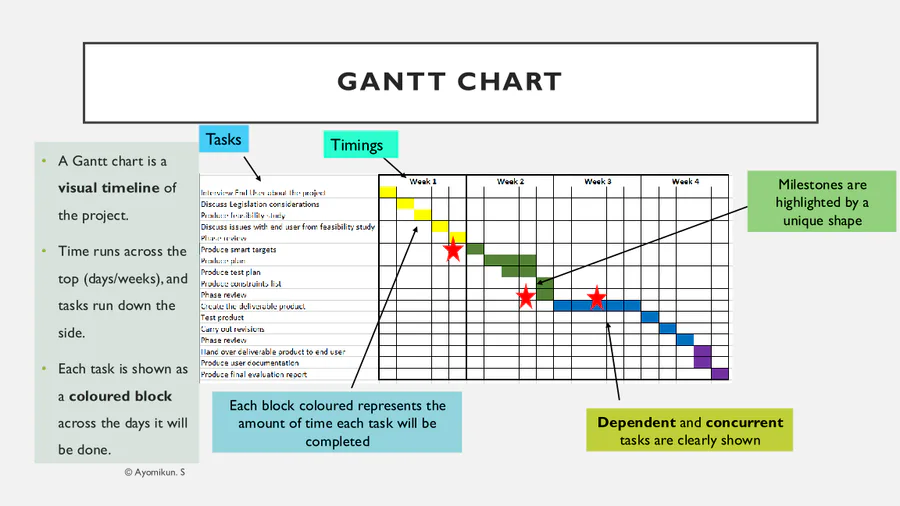
What does a Gantt chart mainly show?
Hardware requirements
A plan of tasks over time using blocks
Only milestones
Only written descriptions
41
Multiple Choice
Which of the following can a Gantt chart show that a task list usually cannot?
Names of students
Concurrent (overlapping) tasks
42
Multiple Choice
What is a dependent task?
A task that can be done at any time
A task that must wait until another task is completed
A task that is cancelled
A task that is always a milestone
43
Multiple Choice
What is a milestone in a Gantt chart?
A long task
A key point in the project, shown with a special shape
A cancelled task
A task without a date
44
Multiple Choice
What is contingency time?
Extra time added in case something overruns
Time to create a mood board
Time for teacher feedback only
Time to install software
45
Multiple Choice
Why are Gantt charts useful for UI projects?
They show the look and feel
They show timings, order of tasks, milestones and overlaps
They test the UI automatically
They replace design sketches
46
Multiple Choice
Which statement is TRUE?
Gantt charts cannot show the order of tasks
Gantt charts are only for designers
Gantt charts can show dependent and concurrent tasks
Gantt charts cannot be edited
47
Multiple Choice
A project needs to show “Design complete” and “Testing complete” as key check-points. Which planning tool is BEST?
Mood board
Gantt chart
Mind map
Written description
48
Multiple Choice
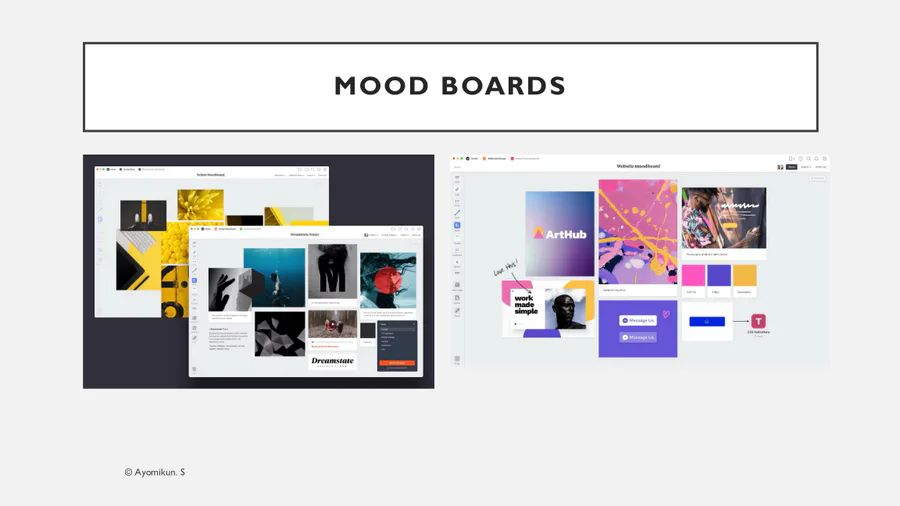
What is the main purpose of a mood board?
To show exact task durations
To collect visual ideas to show the feel of the interface
To mark attendance
To test user feedback
49
Multiple Choice
Which of the following might appear on a mood board?
Colour palettes and font styles
Start dates
Dependencies
Milestones
50
Multiple Choice
Why is a mood board a “useful discussion tool” (as the slide said)?
It lets the designer and user talk about visual style before full design
It calculates time
It tests navigation
It stores passwords
51
Multiple Choice
Which is a limitation of a mood board?
It cannot include images
It does not show project timings
It cannot be shown to a client
It must be handwritten
52
Multiple Choice
At what stage would a mood board MOST LIKELY be used?
After final testing
Early design stage, before building the interface
After publishing the website
During hardware installation
53
Multiple Choice
A student wants to agree on colours, icon styles and button shapes with the client. Which tool should they create?
Gantt chart
Mood board
Task list
Mind map
54

55

56

57

58

59

60

61
Multiple Choice
What is placed in the centre of a mind map for a project?
The Gantt chart
The project target or main idea
The milestones
The software list
62
Multiple Choice
What did the slide say about mind maps as planning tools?
They are very detailed
They are not a detailed planning tool but are easy to understand
63
Multiple Choice
What do the branches/nodes of a mind map usually show?
Different tasks or sub-tasks in the project
Only the mood board
Only the final product
Only the start date
64
Multiple Choice
Why might you use a mind map before a Gantt chart?
To brainstorm and organise ideas first
To add contingency time
To show milestones
To calculate duration
65
Multiple Choice
Which of the following is a limitation of a mind map?
It shows layout
It doesn’t show exact timings or durations
It can’t show sub-tasks
It can’t be drawn
66
Multiple Choice
Which tool is BEST for quickly listing everything you need to research, design, build and test?
Mind map
Mood board
Gantt chart
Written description
67
Multiple Choice
Why does the slide say “decide on the most suitable software application for the planning tool”?
Because different tools work better in different software
Because only one software is allowed
Because software decides the project goal
Because software replaces planning
68
Multiple Choice
Which software would be MOST suitable for creating a mood board?
A spreadsheet
PowerPoint or Canva
Command prompt
Antivirus software
69
Multiple Choice
Which tool would most likely need specialist or project-planning software?
Gantt chart
Mood board
Written description
Mind map
70
Multiple Choice
When choosing software for planning, which is the BEST consideration?
Whether it looks pretty
Whether it supports the planning tool you want to use (e.g. Gantt, mind map)
Whether it has games
Whether it is only online
71
Multiple Choice
A student needs to show milestones and dependent tasks clearly. Which is the BEST combination?
Word + mood board
PowerPoint + sketch
Project/planning software + Gantt chart
Spreadsheet + mood board
72

73

Show answer
Auto Play
Slide 1 / 73
SLIDE
Similar Resources on Wayground

70 questions
Lesson #14: Labor's Response to Industrialism (1970-1920)
Presentation
•
10th Grade
67 questions
Electricity and Magnetism
Presentation
•
9th Grade
70 questions
Repàs pneumàtica
Presentation
•
9th - 10th Grade
68 questions
Triangle Congruence (SSS, SAS, ASA, AAS, HL)
Presentation
•
8th - 10th Grade
65 questions
Download pg 87 passive voice
Presentation
•
9th - 11th Grade
67 questions
M4 Gateway B1+ Ch.3-4 Review
Presentation
•
10th Grade
69 questions
Math 2- Finals review
Presentation
•
10th Grade
Popular Resources on Wayground
20 questions
STAAR Review Quiz #3

Quiz
•
8th Grade
20 questions
Equivalent Fractions
Quiz
•
3rd Grade
6 questions
Marshmallow Farm Quiz
Quiz
•
2nd - 5th Grade
20 questions
Main Idea and Details
Quiz
•
5th Grade
20 questions
Context Clues
Quiz
•
6th Grade
20 questions
Inferences
Quiz
•
4th Grade
19 questions
Classifying Quadrilaterals
Quiz
•
3rd Grade
12 questions
What makes Nebraska's government unique?
Quiz
•
4th - 5th Grade
Discover more resources for Computers
7 questions
Warm Up 04.01.2026
Quiz
•
9th Grade
50 questions
STAAR English 2 Review
Quiz
•
10th Grade
20 questions
Graphing Inequalities on a Number Line
Quiz
•
6th - 9th Grade
20 questions
Figurative Language Review
Quiz
•
10th Grade
20 questions
Linear Functions Review
Quiz
•
9th Grade
30 questions
English 1 STAAR Review
Quiz
•
9th Grade
10 questions
Pythagorean Theorem and its Converse
Quiz
•
7th - 9th Grade
14 questions
Ecological Succession: Primary and Secondary
Quiz
•
9th Grade