

03 Operating Systems Lesson

Presentation
•
Computers
•
9th - 10th Grade
•
Practice Problem
•
Easy

R Walker
Used 9+ times
FREE Resource
12 Slides • 30 Questions
1
Operating Systems
By R Walker
2
Operating Systems
Explain the purpose and functionality of an operating system:
File management
Process management, including memory management and multitasking
Peripheral management and drivers
User management
3
Reorder
Reorder these blocks to form a sentence that describes what a computer system is:
A computer system is the combination of...
...hardware and software...
...that can take inputs, process them...
...and produce outputs.
4
Categorize
Keyboard
Operating System
Organize these options into the right categories
5
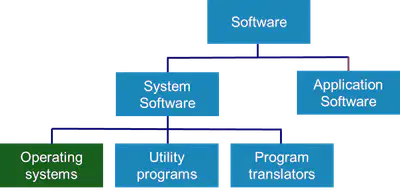
Operating systems manage computer hardware, users and the resources used by software.
They are responsible for managing:
Process management
Peripheral management
File management
User management
Operating Systems
6
Multiple Select
What areas of a computer system is an operating system responsible for managing:
File Management
Process Management
Peripheral Management
User Management
7
Processes can be thought of as programs that need to be run on the CPU
A CPU can only run one program at a time, so each program must be given a small amount of time to use the processor
The operating system is responsible for managing processes
This also include managing the memory, multi-tasking and interrupts
Process Management
8
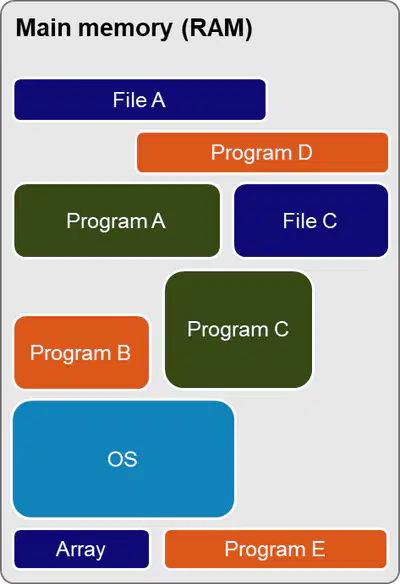
To run a program, the computer must copy the program from storage into main memory
Data used by the program is copied into main memory
The operating system keeps a record of where each program and its data are located
The operating system will make sure not to overwrite existing programs and data
Memory Management
9
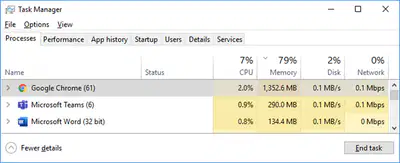
Multi-tasking is where an operating system manages many tasks happening at the same time.
This may be having a web browser open whilst playing music and messaging friends, along
with many other background processes also are running
The operating system decides which process will next run on the CPU and for how long.
Multi-Tasking
10
Interrupts are signals sent to the CPU by external devices to indicate an event that needs immediate attention.
They tell the CPU to suspend its current activities and execute appropriate instructions.
Hardware interrupts are generated by hardware devices – for example, printer out of paper.
Software interrupts are generated by programs – for example, a divide-by-zero error will cause an error message to be displayed
Interrupts
11
Multiple Choice
Memory, Multi-tasking and Interrupts are all part of what core responsibility of an operating system?
Process Management
File Management
User Management
Peripheral Management
12
Drag and Drop
13
Drag and Drop
14
Drag and Drop
15
Drag and Drop
16
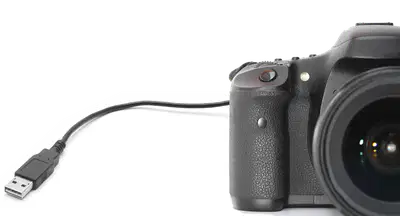
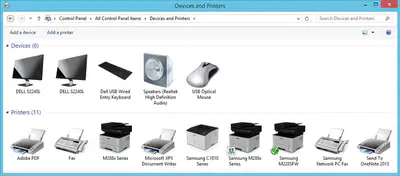
The operating system must manage:
Getting inputs from and sending outputs to peripheral devices
Peripherals include mice, keyboard, printers, displays, digital cameras and graphics tablets
Peripheral Management
17
A device driver is a program that controls peripheral devices
Each device communicates with the OS via its own driver
Many device drivers come with an operating system but some devices will be supplied with a driver, which you will need to install
Device Drivers
18
Categorize
Keyboard
Organize these options into the right categories
19
Reorder
A keyboard and a monitor both use separate drivers. Order the steps taken when a key is pressed.
The user presses a key on the keyboard.
The signal from the keyboard is sent to operating system.
The operating system sends the signal to the keyboard driver which work outs what key was pressed.
The keyboard driver sends the signal back to the operating system.
The operating system sends the signal to the monitor driver which can then display the key that has been pressed.
20
Multiple Choice
All hardware must have drivers to work effectively?
True
False
21
Multiple Choice
All drivers must be separately installed on a computer for the operating system to use them?
True
False
22
Multiple Choice
Modern operating systems come with a lot of device drivers built in.
True
False
23
Multiple Choice
Modern operating systems come with a lot of device drivers built in.
True
False
24
Multiple Select
What areas responsibilities of an operating system have we not looked at yet:
File Management
Process Management
Peripheral Management
User Management
25
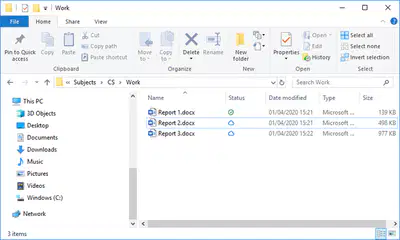
File management is carried out by the operating system
The following features are available:
Naming files
Allocating files to folders
Moving files
Saving files
Copying files
Deleting files
File Management
26
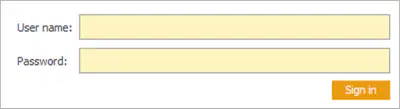
The operating system is responsible for user logins and passwords
It will store all users and their passwords in a file or database
Passwords are usually stored in an encrypted form
Certain programs, drives, files and activities can be restricted based on which user is logged in
User Management
27
Multiple Choice
What is it called when Users have access to different files, folders and features when they are logged into an operating system?
Access Rights
FFF (Files, Folders, Features)
Read/Write
Read Only
28
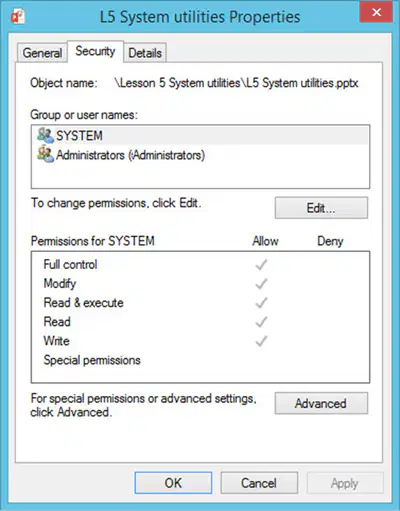
If a computer is used by more than one person, each user should be able to see only their own files
Users and system administrators have different levels of access rights
For example, some users may be allowed to read files but not edit them
Access Rights
29
Multiple Choice
Read permission allows a user to:
Only view a file
Delete a file
Modify a folder
Change system settings
30
Multiple Choice
Write permission allows a user to:
Make changes and save them
Delete folders only
Execute programs
Change IP addresses
31
Multiple Choice
Edit/Modify permission allows:
Reading only
Editing and deleting
Viewing hidden files only
Installing apps
32
Multiple Choice
Privileges refer to:
Special actions users can perform
Storage capacity
Password complexity rules
Network ports
33
Multiple Choice
Which user normally has the highest privileges?
Guest
Standard user
Administrator
Temporary user
34
Multiple Choice
Access rights define:
What a user can access & do
Internet speed
Firewall settings
Screen brightness
35
Multiple Choice
Rules in access control are created by:
System administrator
Guest users
Anyone in the system
Antivirus software
36
Multiple Choice
To install hardware devices
37
Multiple Choice
38
Multiple Choice
One program to run at a time until it is complete
39
Multiple Choice
40
Multiple Choice
41
Multiple Choice
What do device drivers do?
Allows the OS to communicate with hardware
Drives around the motherboard
Increases the amount of storage
42
Multiple Choice
What does the OS manage to allow multi-tasking?
Hard disk
Memory and CPU
Motherboard
Operating Systems
By R Walker
Show answer
Auto Play
Slide 1 / 42
SLIDE
Similar Resources on Wayground
![[igCS] Database - Intro, Structure and Data types](https://cf.quizizz.com/image/image-loader.svg)
35 questions
[igCS] Database - Intro, Structure and Data types
Presentation
•
9th - 10th Grade
40 questions
Cell terms part 1
Presentation
•
9th - 10th Grade
37 questions
6.1 Intro to polygons
Presentation
•
10th Grade
38 questions
Taxonomy and Three Domains
Presentation
•
9th Grade
38 questions
Structure and Properties of Matter
Presentation
•
9th Grade
36 questions
Accuracy and Precision REVIEW
Presentation
•
9th - 10th Grade
39 questions
Genetics terms part 1
Presentation
•
9th - 10th Grade
38 questions
2023 EOC Review - Day 1 - Plant / Animal Body Systems
Presentation
•
9th - 10th Grade
Popular Resources on Wayground
10 questions
How much do you know about our Portrait of an Eagle?

Quiz
•
10th Grade
10 questions
Fast Food Slogans
Quiz
•
6th - 8th Grade
21 questions
Continents and Oceans
Quiz
•
6th Grade
20 questions
Parts of Speech
Quiz
•
5th Grade
16 questions
Subject & Predicate
Quiz
•
5th Grade
25 questions
Multiplication Facts
Quiz
•
5th Grade
12 questions
Map Skills
Quiz
•
3rd Grade
22 questions
Continents and Oceans
Quiz
•
5th Grade
Discover more resources for Computers
10 questions
Exploring Digital Citizenship Essentials

Interactive video
•
6th - 10th Grade
20 questions
[AP CSP] Python Coding: Functions, Parameters, Return
Presentation
•
9th - 12th Grade
40 questions
Introduction to Microsoft Word
Quiz
•
8th - 12th Grade
20 questions
APCS Unit 1A
Quiz
•
9th - 12th Grade
24 questions
Binary
Quiz
•
9th - 12th Grade