
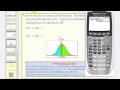
TI-84 Graphing Calculator and Normal Distribution

Interactive Video
•
Mathematics, Computers, Instructional Technology
•
9th - 12th Grade
•
Practice Problem
•
Medium

Jackson Turner
Used 1+ times
FREE Resource
Read more
10 questions
Show all answers
1.
MULTIPLE CHOICE QUESTION
30 sec • 1 pt
What is the primary function of the TI-84 graphing calculator as discussed in this lesson?
To perform matrix operations
To find probabilities in a normal distribution
To graph linear functions
To solve algebraic equations
2.
MULTIPLE CHOICE QUESTION
30 sec • 1 pt
What is the mean of the data set used in the first example?
110
100
20
85
3.
MULTIPLE CHOICE QUESTION
30 sec • 1 pt
Which feature of the TI-84 is used to find the cumulative normal density function?
Normal PDF
Standard Deviation
Normal CDF
Inverse Normal
4.
MULTIPLE CHOICE QUESTION
30 sec • 1 pt
What is the probability of a data value being less than 85 in the first example?
0.7734
0.5858
0.2266
0.5000
5.
MULTIPLE CHOICE QUESTION
30 sec • 1 pt
In the second example, what is the upper bound data value?
110
75
85
100
6.
MULTIPLE CHOICE QUESTION
30 sec • 1 pt
What is the probability of a data value being between 75 and 110?
0.2266
0.5000
0.7734
0.5858
7.
MULTIPLE CHOICE QUESTION
30 sec • 1 pt
What is the standard deviation of the data set used in both examples?
40
30
20
10
Access all questions and much more by creating a free account
Create resources
Host any resource
Get auto-graded reports

Continue with Google

Continue with Email

Continue with Classlink

Continue with Clever
or continue with

Microsoft
%20(1).png)
Apple

Others
Already have an account?

