
Font size
S
M
L
XL
 Worksheets
ICT
Total questions: 113
Worksheet time: 1hrs 9mins
Name
Class
Date
1.
What does a computer allow you to do?
a)
Type documents and send email
b)
Browse the Internet
c)
Store and retrieve data
d)
All of the above
2.
The most popular operating system for personal computers is ________.
a)
Mac OS X
b)
Facebook
c)
Microsoft Windows
d)
Ubuntu Linux
3.
Applications can be downloaded from the Internet.
a)
True
b)
False
4.
The cloud allows you to ________.
a)
access your email from any computer with an Internet connection
b)
automatically back up your data
c)
easily bring your files with you
d)
do all of the above
5.
What part of the computer do you use to type?
a)
Desktop
b)
Keyboard
c)
Mouse
d)
Cursor
6.

What is this called?
a)
CPU
b)
Screen
c)
Mouse
d)
Box
7.

What are these called?
a)
Headphones
b)
Keyboard
c)
Microphone
d)
Keyboard
8.
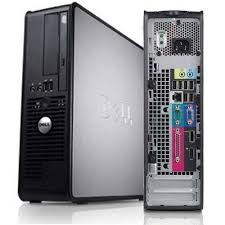
What part of the computer is this?
a)
Central Processing Unit
b)
Computer
c)
Tower
d)
Box
9.

What is this called?
a)
Address Bar
b)
Key
c)
Scroll Bar
d)
Tool Bar
10.

What is this used for?
a)
Close a tab
b)
Open a window
c)
Close all windows
d)
Use the mouse
11.

What is this called?
a)
Tool
b)
Cursor
c)
Mouse
d)
Window
12.
What is this called?
a)
Tool
b)
Cursor
c)
Mouse
d)
Window
13.
What key do you press to erase a letter?
a)
Space Bar
b)
Backspace
c)
Enter
d)
Tab
14.

What part of the computer is this?
a)
Screen
b)
TV
c)
Desktop
d)
Monitor
15.

What does this do?
a)
Maximize
b)
Minimize
c)
Hide
d)
Open a window
16.
What happens if you right click?
a)
Changes a color
b)
It chooses a link
c)
The window closes
d)
A menu comes up
17.
The internet is?
a)
A place to eat
b)
Millions of computers connected together
c)
A computer link
d)
A webpage
18.

What kind of computer is this?
a)
Chromebook
b)
Laptop
c)
CPU
d)
Desktop Computer
19.

What is highlighted in red?
a)
Address Bar
b)
Tool Bar
c)
Scroll Bar
d)
Google Bar
20.
Instead of a mouse, many laptops use a(n) ________.
a)
optical drive
b)
touchpad
c)
scanner
d)
laser pointer
21.
The main circuit board in a computer is called the ________.
a)
RAM
b)
dongle
c)
motherboard
d)
power supply unit
22.
It is possible to connect peripherals to a laptop.
a)
True
b)
False
23.
To guard against malware, you will need to have ________.
a)
antivirus software
b)
a can of compressed air
c)
a word processor
d)
spyware
24.
If a Windows program has become unresponsive, which keys do you press to open the Task Manager?
a)
Shift, Tab, Enter
b)
Home, Control, Shift
c)
Space bar, F1, Tab
d)
Control, Alt, Delete
25.
What is software?
a)
Anything connected to the computer that is soft
b)
Anything connected to the computer that you can touch
c)
Any set of instructions that you can work with
d)
Any set of instructions that tells the hardware what to do
26.
What operating system is on a pc?
a)
OS X
b)
Vista
c)
Safari
d)
Windows
27.
Name two things you can do with a computer
a)
Write letters
b)
Surf the web
c)
Process data
d)
All of the above
28.
A speaker and a printer are input devices.
a)
True
b)
False
29.
The CPU is called the Central Processing Unit and is the brains of the computer.
a)
True
b)
False
30.
__________ is basically anything you can touch with your fingers.
a)
Hardware
b)
CPU
c)
Network
d)
Software
31.
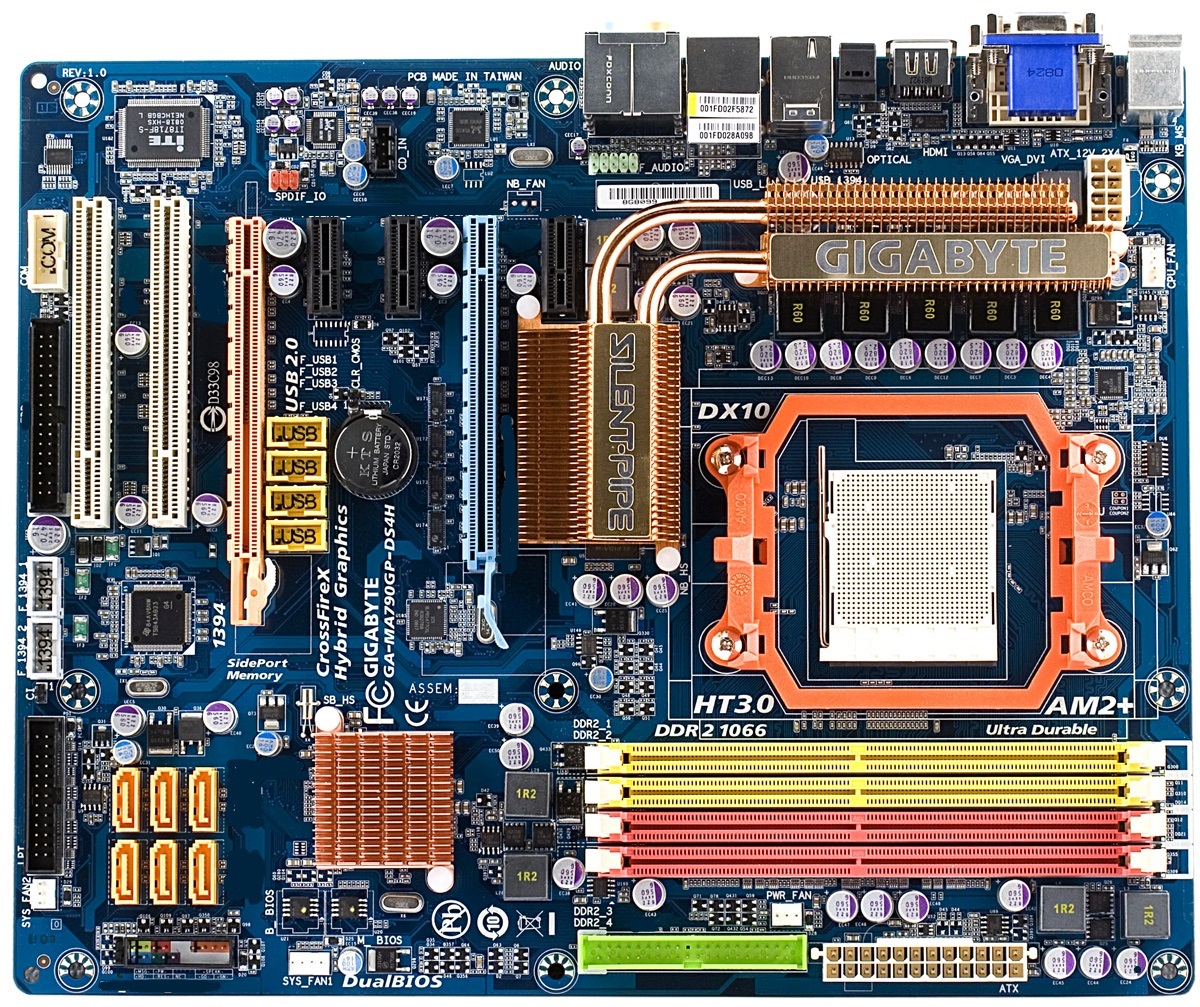
What computer component is displayed?
a)
Expansion Card
b)
CPU
c)
Motherboard
d)
Memory
32.

What is PSU?
a)
Personal Supplying Unit
b)
None of these
c)
Personal upplication Unify
d)
Power supply unit
33.
Which is not a computer part?
a)
Remote
b)
CPU
c)
Keyboard
d)
Mouse
34.
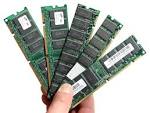
What are these?
a)
Tower
b)
Motherboard
c)
Harddrive
d)
RAM memory
35.
In terms of computing, what does CPU stand for?
a)
central pc unit
b)
clean processing unit
c)
computer processing unit
d)
Central processing unit
36.
Who developed Facebook?
a)
Steve Jobs
b)
Bill Gates
c)
Mark Zucherberg
d)
Michael Dell
37.
What ROM stand for in IT?
a)
Read Only memory
b)
Record on Movement
c)
Repeat Only Memory
d)
Receive On Main server
38.
A computer which is attached to a network is called a
a)
Personal computer
b)
Stand alone
c)
Work alone
d)
Work station
39.
What is an example of an input device?
a)
Keyboard
b)
Speakers
c)
Monitor
d)
DVD
40.

Why is a mouse called a mouse?
a)
It stands for: Moveable Optical Universal Selection Encoder
b)
It has a tail
c)
It squeaks when you move it
d)
It is small and dark coloured
41.
What is an example of an output device?
a)
Mouse
b)
Microphone
c)
Speakers
d)
DVD
42.

Name the computer hardware shown.
a)
CPU and Internal Hard Drive
b)
Mouse
c)
Monitor
d)
Speakers
43.

Name the computer hardware shown.
a)
Keyboard
b)
Cables
c)
Printer
d)
USB Flash Drive
44.

Name the computer hardware shown.
a)
Printer
b)
Mouse
c)
Monitor
d)
Speakers
45.

Name the computer hardware shown.
a)
Keyboard
b)
Cables
c)
USB Flash Drive Port
d)
Printer
46.
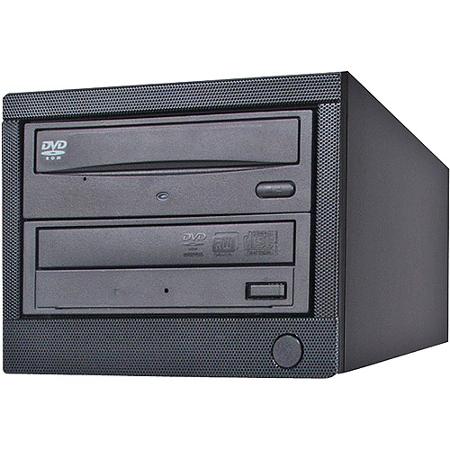
Name the computer hardware shown.
a)
USB Flash Drive
b)
DVD or CD-ROM drive
c)
Monitor
d)
Cables
47.

Name the computer hardware shown.
a)
Printer
b)
Speakers
c)
CPU and Internal Hard Drive
d)
Keyboard
48.

Name the computer hardware shown.
a)
Printer
b)
Mouse
c)
Monitor
d)
Speakers
49.

Name the computer hardware shown.
a)
Monitor
b)
Cables
c)
Mouse
d)
Speakers
50.
The instructions and data computer uses
a)
hardware
b)
software
51.
Behavior in the classroom should
a)
Include running and horseplay
b)
Not include running and horseplay
c)
Be according to students' preference
52.
Coats, bags and other items should be placed
a)
On the floor next to your computer.
b)
Under your chair.
c)
In front of the classroom out of the walkway
53.
When working at the computer for long periods of time you should glance away from the screen periodically to avoid eye strain.
a)
True
b)
False
54.
Sitting up straight at the computer is bad for your back
a)
True
b)
False
55.
Long sessions of typing may cause
a)
Repetitive stress injuries to your hands.
b)
Blisters on your fingers.
c)
Deafness
56.
It is important to know the location of fire extinguishers and fire exits in the computer lab.
a)
True
b)
False
57.
If the computer will not start, the student should open the computer and check the power supply.
a)
True
b)
False
58.
It is OK to drink near the computer
a)
True
b)
False
59.
Always shut your computer down by pressing the power button on the computer case.
a)
True
b)
False
60.
Use a surge protector to keep excess electric power from damaging your computer.
a)
True
b)
False
61.
It is ok to place your feet on top of the table and walls.
a)
True
b)
False
62.
Excessive heat and magnets can damage the computers
a)
True
b)
False
63.
When a computer is on, it is fine to move it around as much as you like
a)
True
b)
False
64.
You should always have at least two copies of all your important files
a)
True
b)
False
65.
You should never turn your computer off.
a)
True
b)
False
66.
If your computer does not work, you do not need to report it to the teacher--just begin working on it.
a)
True
b)
False
67.
Why do computers use binary to read data from memory?
a)
It's all they understand
b)
It's quicker
c)
Computers are made up of electronic switches
d)
Computers only read 1's and 0's because it's all they can do
68.
DVD stands for
a)
Digital Versatile Disc
b)
Digital Video Disc
c)
Digitised Video Disc
d)
Digital Virtual Drive
69.
Which of these is a not a computer manufacturer?
a)
Microsoft
b)
Sun
c)
IBM
d)
Apple
70.

The computer and all of the parts connected to it are called...
a)
input devices
b)
output devices
c)
hardware
d)
software
71.
Holds many components of the system and provides connectors for other peripherals.
a)
USB
b)
Touch screen
c)
Motherboard
d)
CPU
72.
Basic components of a motherboard are :
a)
Video adapter card, sound adapter card, TV Tuner card
b)
Processor slot, Expansion slot, CPU slot
c)
CU, ALU and RAM
d)
Input devices, process and output device
73.
Function of memory are :
a)
Store instructions
b)
Store devices
c)
Store binary numbers
d)
Store processor
74.
Examples of utility program is
a)
Windows file manager
b)
Avira
c)
Mozilla
d)
Defragmenter
75.
Functions of operating system is
a)
Organizing files in folders
b)
Detect and remove virus
c)
Configure new devices
d)
Organize data in rows and columns
76.
Plug and Play means
a)
automatically configures new devices after install them
b)
automatically removes the driver after install them
c)
automatically detect and removes viruses
d)
automatically restart
77.
Two types of user interfaces are
a)
Graphics and Video interface
b)
Graphical user interface and command line interface
c)
Command line interface and Video interface
d)
Command line interface and hypertext
78.
Which of the following is a storage device?
a)
Hard Disk
b)
USB Disk
c)
Floppy Disk
d)
All of the above
79.
This computer is small enough to fit on your lap and is very portable.
a)
Laptop
b)
Tower
c)
Computer
d)
Motherboard
80.
How many generations of computers we have?
a)
6
b)
7
c)
4
d)
5
81.
WWW stands for?
a)
Wibble Wobble Wibble
b)
World Wide Web
c)
World Wide Wise
d)
Wonderful Willie Wonka
82.

Name this Icon?
a)
MS Excel
b)
MS Word
c)
MS PowerPoint
d)
None of the above
83.
You cannot insert pictures in PowerPoint?
a)
True
b)
False
84.
When you sit in front of the screen, you must?
a)
Slouch over the keyboard
b)
Sit upright
c)
Sleep
85.
Choose an example of an Input Device?
a)
Speakers
b)
The Screen
c)
The Keyboard
86.
Choose an example of an Output Device?
a)
The Keyboard
b)
Speakers
c)
The mouse
87.
Choose an example of an Output Device?
a)
The Keyboard
b)
Speakers
c)
The mouse
88.

Name the Web browser?
a)
Safari
b)
Google Chrome
c)
Internet Explorer
d)
Mozilla Firefox
89.

Name the Web browser?
a)
Google Chrome
b)
Internet Explorer
c)
Mozilla Firefox
d)
Safari
90.
Which of the following is a presentation program?
a)
MS Word
b)
MS Excel
c)
MS PowerPoint
d)
None of the above
91.
Microsoft word is used for?
a)
Painting
b)
Drawing
c)
Typing
d)
Hunting
92.
Monitor is ........ device?
a)
An Input
b)
An Output
c)
CPU
d)
Both 1 & 2
93.
Keyboard is ......... device?
a)
An Output
b)
An Input
c)
Software
d)
Memory
94.
A computer processes instructions using two binary digits, ____ and ____.
a)
1 and 10
b)
1 and 5
c)
1 and 0
95.
Computer _____________ is any physical device used in or with your machine.
a)
Hardware
b)
Software
c)
Malware
96.
An example of computer hardware is...
a)
Web Browser
b)
Keyboard
c)
App
d)
Operating System
97.
Computer _____________ is a set of instructions that tells a computer what to do or how to perform a task.
a)
Hardware
b)
Software
c)
Malware
98.
One drawback of a desktop is...
a)
More expensive
b)
Less portable
c)
Less storage than laptops
99.
One benefit of a desktop computer is...
a)
Most components are easily upgraded
b)
Portable
c)
Designed to be used in a single location
100.

Name the computer hardware shown.
a)
Keyboard
b)
Cables
c)
USB Flash Drive Port
d)
Printer
101.
Keyboard, mouse, scanner and webcam are examples of which devices?
a)
Input
b)
output
c)
Software
d)
USB
102.

What am I?
a)
iPad
b)
Cellphone
c)
Digital camera
d)
35mm camera
103.

What is my job?
a)
Input
b)
Output
c)
Input and output
d)
Input, output, and storage
104.

What are the programs that run on a computer system called?
a)
Algorithms
b)
Code
c)
Software
d)
Languages
105.

What is this image the icon for?
a)
Microsoft PowerPoint
b)
Microsoft Word
c)
Microsoft Publisher
d)
Microsoft Excel
106.

What is this ?
a)
RAM
b)
ROM
c)
CPU
d)
GUI
107.

What does this mean?
a)
Clip
b)
Email
c)
Attachment
d)
Send
108.

What is this image the icon for?
a)
Microsoft PowerPoint
b)
Microsoft Word
c)
Microsoft Publisher
d)
Microsoft Excel
109.

What is this?
a)
Email
b)
Inbox
c)
Post
d)
Sent
110.

What does this mean?
a)
Search
b)
Paste
c)
Delete
d)
Copy
111.

What's this?
a)
MOUSE
b)
BARCODE READER
c)
TRACKERBALL
d)
DIGITAL CAMERA
112.

This device is used for reading barcodes
a)
TRUE
b)
FALSE
113.
Which of these is NOT an input device?
a)
Screen
b)
Microphone
c)
Scanner
d)
Keyboard
Reset

