
 Worksheets
computer
Total questions: 80
Worksheet time: 39mins
Name
Class
Date
1.
Computer literacy is the knowledge and understanding of computers and their uses.
a)
True
b)
False
2.
Wireless and mobile devices are not as common as wired desktop machines.
a)
True
b)
False
3.
It is okay to remove media from a drive when the drive indicator light is on.
a)
True
b)
False
4.
You should hold DVDs at the edges.
a)
True
b)
False
5.
A network drive is located on a computer other than the user's local system.
a)
True
b)
False
6.
Most hard disks are used to store data inside the computer.
a)
True
b)
False
7.
Tiny chips embedded in dishwashers, bathroom scales, or airport radar systems are classified as ________ computers.
a)
general-purpose
b)
special-purpose
8.
The computer does not understand human language.
a)
True
b)
False
9.
_____ is a nonvolatile, removable medium that uses integrated circuits.
a)
Optical Storage
b)
Magnetic storage
c)
Solid-state storage
d)
None of the above
10.
Random access memory, or RAM, is considered short term memory.
a)
True
b)
False
11.
The arithmetic/logic unit (ALU) is the boss of the CPU.
a)
True
b)
False
12.
Just about all computers, regardless of size, take raw data and change it into information.
a)
True
b)
False
13.
Which type of computer is designed for one person to use at a time?
a)
personal computer
b)
server
14.
What part of the computer do you use to type?
a)
Desktop
b)
Keyboard
c)
Mouse
d)
Cursor
15.

What is this called?
a)
CPU
b)
Screen
c)
Mouse
d)
Box
16.

What are these called?
a)
Headphones
b)
Keyboard
c)
Microphone
d)
Keyboard
17.
What are these called?
a)
Headphones
b)
Keyboard
c)
Microphone
d)
Keyboard
18.
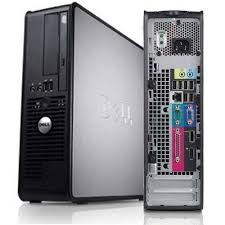
What part of the computer is this?
a)
Central Processing Unit
b)
Computer
c)
Tower
d)
Box
19.

What is this called?
a)
Address Bar
b)
Key
c)
Scroll Bar
d)
Tool Bar
20.

What is this used for?
a)
Close a tab
b)
Open a window
c)
Close all windows
d)
Use the mouse
21.

What is this called?
a)
Tool
b)
Cursor
c)
Mouse
d)
Window
22.
What key do you press to erase a letter?
a)
Space Bar
b)
Backspace
c)
Enter
d)
Tab
23.

What part of the computer is this?
a)
Screen
b)
TV
c)
Desktop
d)
Monitor
24.

What does this do?
a)
Maximize
b)
Minimize
c)
Hide
d)
Open a window
25.
What happens if you right click?
a)
Changes a color
b)
It chooses a link
c)
The window closes
d)
A menu comes up
26.
The internet is?
a)
A place to eat
b)
Millions of computers connected together
c)
A computer link
d)
A webpage
27.
Which one of these is a search engine?
a)
Facebook
b)
Snapchat
c)
Google
d)
You Tube
28.

What kind of computer is this?
a)
Chromebook
b)
Laptop
c)
CPU
d)
Desktop Computer
29.

What is highlighted in red?
a)
Address Bar
b)
Tool Bar
c)
Scroll Bar
d)
Google Bar
30.
The most popular operating system for personal computers is ________.
a)
Mac OS X
b)
Facebook
c)
Microsoft Windows
d)
Ubuntu Linux
31.
Applications can be downloaded from the Internet.
a)
True
b)
False
32.
The cloud allows you to ________.
a)
access your email from any computer with an Internet connection
b)
automatically back up your data
c)
easily bring your files with you
d)
do all of the above
33.
Instead of a mouse, many laptops use a(n) ________.
a)
optical drive
b)
touchpad
c)
scanner
d)
laser pointer
34.
The main circuit board in a computer is called the ________.
a)
RAM
b)
dongle
c)
motherboard
d)
power supply unit
35.
It is possible to connect peripherals to a laptop.
a)
True
b)
False
36.
A mouse can connect to the computer with a ________ connection.
a)
USB
b)
PS/2
c)
Bluetooth
d)
All of the above
37.
To guard against malware, you will need to have ________.
a)
antivirus software
b)
a can of compressed air
c)
a word processor
d)
spyware
38.
If a Windows program has become unresponsive, which keys do you press to open the Task Manager?
a)
Shift, Tab, Enter
b)
Home, Control, Shift
c)
Space bar, F1, Tab
d)
Control, Alt, Delete
39.
What is software?
a)
Anything connected to the computer that is soft
b)
Anything connected to the computer that you can touch
c)
Any set of instructions that you can work with
d)
Any set of instructions that tells the hardware what to do
40.
What operating system is on a pc?
a)
OS X
b)
Vista
c)
Safari
d)
Windows
41.
What operating system do we use in the lab?
a)
OS X
b)
Internet Explorer
c)
Windows 7
d)
Win Zip
42.
What is the operating system for a Mac?
a)
OS X
b)
Windows
c)
Safari
d)
Opera
43.
Name an operating system for a phone
a)
Nintendo
b)
Kit Kat
c)
Safari
d)
Windows
44.
Name two things you can do with a computer
a)
Write letters
b)
Surf the web
c)
Process data
d)
All of the above
45.
The CPU is called the Central Processing Unit and is the brains of the computer.
a)
True
b)
False
46.
A speaker and a printer are input devices.
a)
True
b)
False
47.
__________ is basically anything you can touch with your fingers.
a)
Hardware
b)
CPU
c)
Network
d)
Software
48.
Computer programs or applications that tell a computer what to do is called ________.
a)
Play Store
b)
Software
c)
Hardware
d)
Application Manager
49.
The physical parts of the computer are called _______.
a)
software
b)
hardware
c)
computer parts
d)
computer case
50.
This internal computer component is erased every time the computer is turned off.
a)
hard drive
b)
processor
c)
random access memory (RAM)
d)
keyboard
51.
I am known as the "brain" of the computer because I receive information and carry out commands. I tell other parts of the computer what to do and when to do it.
a)
processor (CPU)
b)
motherboard
c)
power supply
d)
hard drive
52.
What does a computer allow you to do?
a)
Type documents and send email
b)
Browse the Internet
c)
Store and retrieve data
d)
All of the above
53.
1. RAM and ROM are _________________ of a computer. [1]
a)
backup storage
b)
temporary storage
c)
peripherals
d)
main memory
54.
A Graphical User Interface (GUI) uses ___ to help the user navigate within the computer system.
a)
Windows
b)
Videos
c)
Graphics
d)
Operating Systems
55.
External hardware used to store and retrieve data, such as a disk drive, CD/DVD drive, or flash drive
a)
Storage Device
b)
Operating System
c)
Computer System
d)
Peipherals
56.
The _________ that acts as a "go-between", allowing computer hardware and other software to communicate with each other (e.g., Windows 10, Mac OS 11, Linux, Unix, etc.)
a)
Operating System
b)
Storage Device
c)
Peripherals
d)
Computer System
57.
An example of computer hardware is...
a)
Web Browser
b)
Keyboard
c)
App
d)
Operating System
58.
A server is a type of computer that does the following...
a)
Serves up information to other computers on a network
b)
Stores and shares data
c)
Plays an important role in making the internet work
d)
All of the above
59.
A computer is an electronic device for storing and processing data.
a)
True
b)
False
60.
What is a computer?
a)
A piece of technology
b)
A device that manipulates information or data
c)
A machine that is intelligent
d)
A device that sees information and collects data for you
61.
What is an example of hardware?
a)
mouse & computer case
b)
Word & Ultra Key
c)
Word & monitor
d)
keyboard & Chrome
62.
What is an example of software?
a)
mouse & computer case
b)
Word & Minecraft
c)
Word & monitor
d)
keyboard & Chrome
63.
A printer is an _____ device
a)
Output
b)
Input
c)
Processing
d)
Storage
64.
Which one is an input device?
a)
printer
b)
mouse
c)
monitor
d)
speakers
65.
Which one of the following is NOT a piece of hardware?
a)
Mouse
b)
Keyboard
c)
MS Word
d)
Printer
66.
What does the term Peripheral mean?
a)
Being able to see all around
b)
A device that connects to a computer
c)
Printing a document from a colour printer
d)
Being close to a computer
67.
Which is an example of an Operating System?
a)
Linux
b)
Microsoft
c)
MacAfee
d)
macUX
68.
What does RAM stand for?
a)
Random Access Memory
b)
Random Acute Memory
c)
Read And Memory
d)
Read Angled Motor
69.
Which of these is NOT an Output device
a)
Scanner
b)
Projector
c)
Printer
d)
Monitor
70.
When connecting a MOBILE DEVICE to a network what would you use?
a)
PAN
b)
LAN
c)
WLAN
d)
DAN
71.
BIOS stands for Basic Input/Output System
a)
True
b)
Fale
72.

What is this?
a)
Graphics Card
b)
Fan
c)
Central Processing Unit
d)
Motherboard
73.
Which of these is NOT an Input device
a)
Optical Mark Reader
b)
Speakers
c)
Mouse
d)
Scanner
74.
Processing speed of the CPU
a)
Hertz
b)
MPH
c)
Rounds
d)
Cycles
75.

What am I?
a)
disc
b)
CD-ROM
c)
CPU chip
d)
SD card
76.

What are the programs that run on a computer system called?
a)
Algorithms
b)
Code
c)
Software
d)
Languages
77.
This part can be updated through the BIOS
a)
Memory
b)
Motherboard
c)
Hard Drive
d)
CPU Fan
78.
This part keeps the inside of the computer from overheating.
a)
Hard Drive
b)
Memory
c)
Motherboard
d)
CPU Fan
79.
RAM is like a computer’s ______________, while a hard drive is like a computer’s ______________.
a)
brain/nervous system
b)
short-term memory/long-term memory
c)
long-term memory/short-term memory
d)
nervous system/brain
80.
Expansion slots are used to add software to the computer. True or False.
a)
True
b)
False
100 %

