wayground logo

Free Printable Worksheets

Font size

S
M
L
XL
Worksheets

180s Week13

Total questions: 63

Worksheet time: 33mins

Name
Class
Date
1.

Software are written in the following steps …

a)

Design, programming, testing and , Analysis, programming, testing

b)

Analysis, design, programming, testing

c)

Design, Analysis, programming, testing

2.

It is used as an Input and Output Device at the same time :

a)

Printer

b)

Touch Screen

c)

Scanner

3.

GUI stands for …

a)

Geographical User Internet

b)

Graphical User Interface

4.

<!--content-->

a)

Comment

b)

Paragraph

c)

Heading

5.

<ol><li></li></ol>

a)

Unorder list

b)

Order list

c)

Text

6.

background-repeat:repeat-x

a)

Repeats a background image horizontally

b)

Repeats a background image vertically

c)

Repeats a background image in both

7.

Inline CSS Style

a)

CSS styles whose code is located within the head section of the HTML code of a web page.

b)

CSS coded in the body of the webpage as an attribute of an html tag

c)

Collection of styles stored in a separate file that controls the formatting of elements on any web page that links to the .css file.

8.

Which tool can do the most things in Illustrator?

a)

Pen

b)

Text

c)

Shape

9.

What is a "point"?

a)

A pixel

b)

A segment of a drawing

c)

A piece of text

10.

What can the pencil tool be used for?

a)

Drawing lines

b)

Drawing shapes

c)

All of the above

11.
What is an advantage to applying corrections via adjustment layers rather than via the Image > Adjustments submenu?
a)
Adjustment layers are removable and their settings are editable.
b)
Adjustment layers keep the file size lower.
c)
Adjustment layers can be merged into one another.
d)
Adjustment layers can have a layer mask, whereas normal image layers cannot.
12.
Normally, an adjustment layer affects which pixels in the document?
a)
Only pixels in the layer directly below the adjustment layer
b)
Pixels in all the layers below the adjustment layer
c)
Pixels in all the layers in the document, both above and below the adjustment layer
13.
Which slider in the Levels dialog affects the lightness of the midtones?
a)
The topmost black slider
b)
The gray slider
c)
The topmost white slider
14.
Which one of the following is NOT an adjustment layer that could change the saturation values of colors in an image?
a)
Vibrance
b)
Hue / Saturation
c)
Color Balance
15.
Which of the following adjustments can be applied via an adjustment layer?
a)
Shadows / Highlights
b)
Replace Color
c)
Channel Mixer
16.

You are creating an image for a client who will be using the image by placing it in several

layout applications. You want to maximize the compatibility of the image with the different

layout applications.

Which file format should you use?

a)

PDF

b)

PSD

c)

Tiff

d)

JPEG

17.

Which filter should you use to remove tiny spots from an image while leaving the rest of the

image intact?

a)

Median

b)

High Pass

c)

Smart Blur

d)

Dust & Scratches

18.

A user is attempting to make a new digital photograph have an aged appearance. Which filter should be used to simulate this?

a)

Noise > Despeckle

b)

Other > High-Pass

c)

Pixelate > Pointillize

d)

Filter Gallery > Film Grain

19.
Before painting on the image with a brush to edit the mask on an adjustment layer, what do you need to do?
a)
Click the adjustment layer mask thumbnail.
b)
Click the Link icon between the layer and layer mask thumbnails.
c)
Click the visibility icon for the underlying image layer to hide it.
d)
Click the Edit in Quick Mask Mode button on the Tools panel.
20.
Adjustment Layers apply color and tone adjustments to your image __________.
a)
non-destructively
b)
destructively
21.
Which of the following Ps retouching tools is the best choice to touch up small spots and blemishes on a photo?
a)
Patch tool
b)
Red eye tool
c)
Content aware move tool
d)
Spot healing tool
22.
Which of these is NOT a color correction technique in Ps?
a)
Hue/Saturation
b)
Levels
c)
Curves
d)
Free Transform
23.
Which of these in Ps should a user apply to create various artistic and special effects on an image?
a)
Selections
b)
Filters
c)
Vectors
d)
Pixels
24.
You need to bend a photo around the edges of the carton for your ice cream packaging project so that it looks realistic. A good method to use is....
a)
Scale
b)
Warp
c)
Guides
d)
Filter
25.
You want to darken just a corner of your photo. What do you adjust on your selection so that it has a faded edge, not a hard edge so that the newly darkened part blends with the rest of the photo?
a)
Constrain
b)
Feather
c)
Group
d)
Quick select
26.
to change the width of any path at any point use?
a)
width tool
b)
thickness tool
c)
stroke thickness
d)
stroke color
27.
To join two non-connected anchor points
a)
Join - Command J
b)
Use the Join Anchors tool in menu bar
c)
use the join anchors tool
d)
convert anchor tool
28.
An image that supports an idea or event is called a(n) ________.
a)
Illustration
b)
Collage
c)
Outline
d)
Line drawing
29.
What is a vector based image?
a)
An image that is made from pixels
b)
Graphics that are made up of paths, which are defined by a start and end point, along with other points, curves, and angles along the way.
c)
A clipart image 
d)
None of the above
30.
What can the pencil tool be used for?
a)
Drawing shapes
b)
Drawing lines
c)
Editing existing lines
d)
All of the above
31.
How do you join two shapes together to make one shape?
a)
File > join
b)
Object > Join
c)
Pathfinder > Unite
d)
Object > Group
32.
Which arrow is  the direct selection tool?
a)
The Black arrow
b)
The White Arrow
c)
The white plus arrow
d)
None of the above
33.
Selects points or path segments within objects. (Q)
a)
Artboard tool
b)
Line Segment tool
c)
Direct Selection tool
d)
 Lasso tool
34.
Which key do you hold down to select multiple objects?
a)
Ctrl
b)
Alt
c)
Shift
35.

What is the name of this tool?

a)

Direct Selection Tool

b)

Free Transform Tool

c)

Selection Tool

d)

Shape Builder Tool

36.
Illustrator has multiple workspaces. What is the main workspace we will be working in?
a)
Layout 
b)
Essentials
c)
Tracing
d)
Typography
37.
What is located at the left hand side of the screen?
a)
Application Bar
b)
Document Windows
c)
Panels/Panel Groups
d)
Tools Panel
38.
Selects objects with similar attributes. (Y)
a)
Magic Wand tool
b)
Direct Selection tool
c)
Lasso tool
d)
Artboard tool
39.
Smooths Bezier paths.
a)
Smooth tool
b)
Pencil tool
c)
Shape tool
d)
Line tool
40.
Creates and edits meshes and mesh envelopes. (U)
a)
Gradient tool
b)
Eyedropper tool
c)
Mesh tool
d)
Live Paint Selection tool
41.
Cuts paths at SPECIFIED points. (C)
a)
Eraser tool
b)
Slice tool
c)
Scissors tool
d)
Knife tool
42.
Erases ANY area of the object over which you drag. (Shift-E)
a)
Eraser tool
b)
Scissors tool
c)
Slice tool
d)
Knife tool
43.
Cuts objects along a freehand path you draw with the tool, dividing objects into their component-filled faces. (A face is an area undivided by a line segment.)
a)
Eraser tool
b)
Scissors tool
c)
Knife tool
d)
Slice tool
44.
What is a symbol?
a)
An image template
b)
A piece of text
c)
A logo
d)
A tool for editing images
45.

What's the shortcut for Create outlines

a)

Ctrl+shift

b)

Ctrl+O

c)

Ctrl+Shift+O

d)

Shift+O

46.
What does HTML stand for?
a)
Hyper Text Modelling Language
b)
Heuristic Text Markup Language
c)
Hyper Text Markup Language
d)
Heuristic Text Modelling Language
47.
Which heading tag is the largest in size?
a)
<h1>
b)
<h2>
c)
<h3>
d)
<h4>
48.
What is the function of the <p> tag?
a)
Defines a paragraph.
b)
Makes the text purple.
c)
It pushes the text to the right.
d)
Prints the webpage.
49.
Which tag is used to make text bold?
a)
<a>
b)
<u>
c)
<b>
d)
<I>
50.
You should save HTML files with which file extension?
a)
.htm
b)
.index
c)
.webpage
d)
.html
51.

Which language is used to enhance a webpage, e.g. change background colour?

a)

HTML

b)

CSS

c)

JavaScript

d)

SQL

52.
Within which tags on the HTML page is the main content placed?
a)
<head>
b)
<style>
c)
<html>
d)
<body>
53.
Which tag is used to create a hyperlink?
a)
<a>
b)
<u>
c)
<b>
d)
<i>
54.
What does WYSIWYG stand for?
a)
when you sing is what you get
b)
why your sight is wearing your glasses
c)
what you sign is where you go
d)
what you see is what you get
55.
Chrome, Safari, Firefox and Internet Explorer are all examples of?
a)
Browsers
b)
Interpreters
c)
Compilers
d)
Web Authoring Software
56.
What program is needed to view web pages?
a)
Browser
b)
Interpreter
c)
Compiler
d)
Web Authoring Software
57.
Which of these is the purpose of the Operating System?
a)
Allows the user to communicate with the system
b)
Allows the hardware and software of the system to communicate
c)
All of the above
58.
Which Interface uses spoken instructions?
a)
Command Line
b)
Graphical
c)
Voice Command
59.
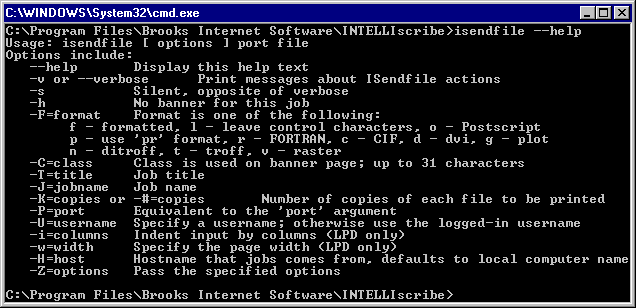
Which Interface is this an example of?
a)
Command Line
b)
Graphical
c)
Voice Command
60.
Which Interface is this an example of?
a)
Command Line
b)
Graphical
c)
Voice Command
61.

Which type of user interface is shown in the following image?

a)

Command Line Interface

b)

Graphical User Interface

c)

Menu Interface

d)

Speech and Sound Interface

62.

What are TWO advantages of a Graphical User Interface?

a)

It uses less processing power, so is quicker

b)

It is easy for a beginner to use

c)

It does not take up a lot of memory on a device harddrive

d)

There are a lot of accessibility functions

63.

What is an example of a GUI

a)

Microsoft Windows OS

b)

Apple Mac OS

c)

Android OS

d)

All the above