
 Worksheets
Computing BTEC Unit 2 Topic A
Total questions: 114
Worksheet time: 1hrs 2mins

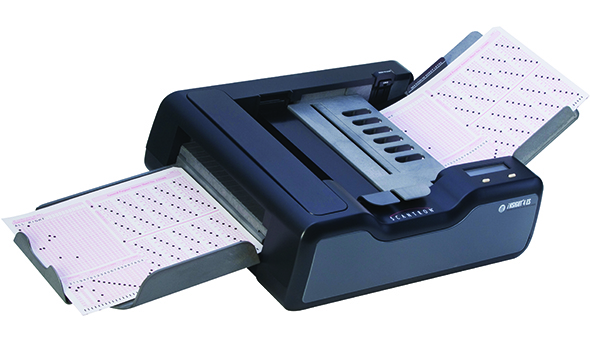


RAM
Input
Output
Processes
Storage

Stylus
Input
Output
Processes
Storage
The instructions and programs which are run by the CPU.
Processor
Software
Multitasking
Motherboard
A system with more than one processor, to increase its performance.
Processor
Software
Multiprocessing
Motherboard
Processor with more than one processor core, to increase its performance.
Multi-core
Software
Multiprocessing
Motherboard
Physical parts of a computer system.
Multi-core
Software
Multiprocessing
Hardware
A multi-core system with two processor cores.
Multi-core
Dual Core
Gigahertz
Hardware

A type of OS which can run on a standalone PC (or other device) and supports the use of running more than one job simultaneously
Distributed
Multi-tasking
Embedded
Real-time
A type of OS which is used inside in range of hardware, including "Internet of Things" devices
Distributed
Multi-tasking
Embedded
Real-time
BIOS stands for...
Basic Instruction Operating System
Basic Information Output System
Basic Input Output System
Binary Information Output System

Choose the disadvantage
Choose the disadvantage
Choose the disadvantage

Downloads new software for your device from the Internet without your input
Auto-Update
Compression
Encryption
Defragmenter
Encryption _______ the data to make it unreadable
Scrambles
Changes
Updates
Which of the following is not a piece of Utility Software?
Encryption
Compression
Defragmenter
Translator
What is the purpose of Utility Software? Click all that apply
To keep the computer organised
To ensure it has up to date software
To ensure the system runs efficiently
To translate machine code into high level code
Software built by companies and sold to users is called ________ .
proprietary software
beta software
freeware
open source software
Software that helps run the computer's hardware devices and coordinates instructions between application is called ________ .
a web server
application software
system software
beta software
When should you schedule a system’s backup?
When the system is least busy.
At 2AM local time.
On boot up.
Any time before 6AM local time.
What is the greatest advantage of local backups?
Speed
Cost
Safety
Geographic diversity
What is a significant advantage of cloud-based backups?
The backups are geographically dispersed.
The cost is lower for cloud-based backups than for local backups.
Restore time is lower than for local backup and restore scenarios.
Cloud-based backups are far more secure than local backups.
Which type of backup medium protects you from a catastrophic natural event in your area?
An offsite backup
An external drive
Digital media
A local NAS device
What important danger must be considered when using cloud storage?
Data security
Data transfer speed
Data integrity
Data recovery
What is the primary purpose of performing an offsite backup or storing backups in an offsite location?
Valuable data is protected in case of a disaster.
There will be no disruption of service in case of a disaster.
Backups should be stored away from computers because of the magnetic fields generated by computers.
It prevents mixing up of backed up data.
•You don’t need a powerful computer with a huge hard drive – everything is stored and run on a remote computer is an advantage of what?
the Internet
Local area networks
optical devices
cloud storage

RAID implementation methods are
hardware
software
system
both hardware and software
Which one is not a RAID technique?
Stripping
Mirroring
Segmentation
Parity
Data is distributed across multiple disk and used in parallel called
Mirroring
Stripping
Parity
None of the above
______________provide data redundancy by error checking and data recovery
Mirroring
Parity
Scanning
Stripping
What can happen when a server goes down, or internet connection is lost
Hardware is upgraded
Access to data is lost
Data can be downloaded quickly
Data upload is possible
You are working on a file in college. Which of the online options gives you access to your file from any location?
SSD backup
RAM Storage
Cloud Storage
USB storage
Why will storing data across multiple systems lead to increased cost for businesses?
Purchase of cloud storage services
Purchase of monitors
Purchase of RAM storage services
IT staff salary
How can storing data across multiple systems have negative impact on productivity
System needs upgrade
Faster access to data
Locating files may waste time
Additional people may be required
What can happen if multiple versions of the same file are stored across multiple systems?
Wasted repeated work
Faster access to file
Slower access to file
System upgrade
Storing data across multiple systems can lead to serious _____ issues.
Internet
Personnel
System
Security
Businesses can often suffer data loss, either accidentally or maliciously if they do not have what in place?
IT Staff
Backup & Recovery procedures
Word processing software
System software
What factors should be considered when deciding on a backup procedure
When to backup
Why backup
What to backup
Where to backup
Who to backup
When is the recommended time to carry out backup for businesses.
In the morning
In the afternoons
After working hours
During working hours
Which of the following is a type of backup
Partial backup
Incremental Backup
Digital Backup
Cloud Backup
Select 2 other types of backups
System backup
Cyber backup
Full backup
Differential backup
First level backup
A backup of the data that has changed is known as ...
Incremental backup
Full backup
Differential backup
Data backup
A mixture of full and incremental backup is known as ...
Different backup
Top up backup
Combined backup
Differential backup
Which of the following terms describes the type of analysis where large amounts of data is processed into one or more summaries?
Analysis
Conversion
Aggregation
Sorting
If you want to identify trends e.g. poor selling items within a supermarket, which of the following data processing functions would you use?
Analysis
Validation
Conversion
Aggregation
Validation is best described as which of the following?
Data processing to generate a sequence of data
Rejection of data that does not meet a pre-set standard
Rejection of data that does meets a pre-set standard
Data used within batch processing
What is Data processing ?
When data is stored on a computer
When data is processed into a meaningful and useful forms
When data is sent in useful forms
When data is copied from different devices
What are the 3 key stages of data processing?
Upload
Input
Posting
Processing
Output
When a computer collects and stores data what does it mean?
Data input
Data output
Data process
Data upload
What industry will collect and process data for loan and savings?
Banking
Healthcare
Manufacturing
Farming
Racheal works in the retail sector. What kind of data will she likely be processing?
Payment Card details
Medical history
Mortgage
Weather conditions
Select one example of an automatic data collection device
Mouse
Monitor
Barcode readers
Printer
What can a sensor help to accomplish with data
Data collection
Data uploading
Data deletion
Data memory
Specifically, what can make data easier to store, retrieve and process?
Input
Word processors
Database applications
Productivity software
What are databases used for?
displaying data
storing data
organizing data
all of the above
Why are databases better than spreadsheets?
Select all that apply.
They handle big data sets better.
They store the data more securely.
They do not use columns and rows.
You can run custom reports.

