Wayground logo

Free Printable Worksheets

Font size

S
M
L
XL
Worksheets

EXCEL END OF UNIT

Total questions: 50

Worksheet time: 45mins

Name
Class
Date
1.
A chart that shows only one data series and is used to compare sizes of each part to the whole.
a)
line chart
b)
column chart
c)
pie chart
d)
xy axi
2.

When creating an IF function, a ____ separates the logical test from the value if true/false.

a)

colon

b)

semicolon

c)

comma

d)

dash

3.

Suppose cell B2 in a spreadsheet contains the formula:

=if(A1>100,"bazinga","zippo") If cell A1 contains the value 425, what value appears in cell B2?

a)

zippo

b)

425

c)

bazinga

d)

B2 is blank

4.

The absolute cell reference uses which symbol:

a)

$

b)

%

c)

*

d)

&

5.
When using the SUBTOTAL command, you must sort by the column you are wanting to subtotal.
a)
True
b)
False
6.

To add a special sort order to a “Sort By” list, you would use:

a)

SORT A to Z

b)

SUBTOTAL

c)

FILTERS

d)

CUSTOM SORT

7.
it is used to display series of numeric data in a graphical format to make it easier to understand large quantities of data and the relationship between different series of data.
a)
pivot
b)
chart
c)
view
d)
model
8.
To allow you to evenly distribute a title over a table of numbers, use the
a)
Center button
b)
Merge and Center button
c)
Merge cells only button
9.
If you see a series of "######" in a cell, that means the following:
a)
You keyed in an incorrect number
b)
The row height is too high
c)
The text is incorrectly spelled
d)
The column width is not wide enough
10.
Adding two cells
a)
=SUM(A1+A13)
b)
=SUM(__)
c)
A1+A13= SUM
d)
Total
11.
A type of chart which displays information as a series of data points called 'markers' connected by straight line segments. 
a)
Pie chart
b)
Line Chart
c)
Bar Graphs
d)
Graphs
12.
A(n) _________ is a prewritten formula that is built into EXCEL. 
a)
function
b)
problem
c)
equation
d)
equal sign
13.
What would be a correct formula for sum in excel?
a)
=SUM(B3:B9)
b)
=SUMB3+B9
c)
SUM(B3:B9)
d)
=ADD(B3:B9)
14.
Which tab in Excel has charts and tables?
a)
review
b)
home
c)
file
d)
insert
15.
Sum, average, count, and maximum value are examples of what?
a)
Formulas
b)
Calculations
c)
Functions
d)
Spreadsheet Data
16.
What symbol is used to begin a formula?
a)
+
b)
=
c)
-
d)
>
17.
What does the term “relative” mean for a formula?
a)
The formula remains unchanged when it is moved.
b)
The formula is related to another spreadsheet.
c)
The formula is related to the cells before it.
d)
The formula changes based on its location.
18.
What does the term “absolute” mean for a formula?
a)
The formula remains unchanged when it is moved.
b)
The formula is related to another spreadsheet.
c)
The formula is related to the cells before it.
d)
The formula changes based on its location.
19.
Why do you use conditional formatting?
a)
To make your cells more colorful
b)
The format your cells automatically
c)
To format your cells according to specific rules of tests
d)
To only format your cells when you open a file
20.
In the cell reference B$5, what part of the cell reference would remain unchanged?
a)
Column B
b)
Row 5
c)
All cells in Column B
d)
All cells in Row 5
21.
What kind of software is Excel?
a)
Spreadsheet software
b)
Word Processing
c)
Drawing
22.
A combination of numbers and symbols used to express a calculation. Always begins with an = sign.
a)
Cell Address
b)
Worksheet
c)
Formula
23.
What is the Formula sign for multiply? 
a)
\
b)
*
24.

In Excel rows are labeled by

a)

Letters

b)

Numbers

25.

In Excel, columns are labeled by?

a)

Numbers

b)

Letters

26.

What button will add up a group of numbers?

a)

Equals button

b)

Auto sum button

c)

Plus symbol button

27.

You can use the auto-sum key to subtract numbers.

a)

True

b)

False

28.
What is the name of this cell?
a)
B10
b)
5B
c)
B5
d)
A5
29.
You can only work in one cell at a time. The actual cell that you are working in is called what?
a)
Column
b)
Name Box
c)
Active Cell
d)
Row
30.
2 or more cells that are selected to create a source to be used in a formula
a)
Range
b)
Max
c)
Filter
d)
Colums 
31.
How do you select an entire column?
a)
Select Edit > Select > Column from the menu
b)
Click the column heading letter
c)
Hold down the shift key as you click anywhere in the column.
d)
Hold down the Ctrl key as you click anywhere in the column
32.
Each Excel file is called a workbook because
a)
It can contain text and data
b)
It can be modified
c)
It can contain many sheets including worksheets and chart sheets
d)
You have to work hard to create it
33.
Which formula gets the biggest value of a range of cells?
a)
MAX
b)
MIN
c)
LARGE
d)
SUM
34.
Which formula gets the smallest value of a range of cells?
a)
MAX
b)
MIN
c)
SMALL
d)
SUM
35.
When making a chart, you always highlight the entire spreadsheet.
a)
True
b)
False
36.
The area within the red box is called
a)
Active Cell
b)
Fill Handle
c)
Cell
d)
Row
37.
This is a
a)
Column
b)
Row
c)
Cell
d)
Range
38.
This is a
a)
Column
b)
Row
c)
Cell
d)
Range
39.

In Excel, the name of the bar where information appears as you input data is called?

a)

File Bar

b)

Formula Bar

c)

Help Bar

d)

Window Bar

40.

Text in Excel is automatically aligned _____________.

a)

Right

b)

Left

c)

Center

d)

Justify

41.

Numbers in Excel are automatically aligned ____________?

a)

Left

b)

Right

c)

Center

d)

Justified

42.

The ability to quickly add a formula, set of number, months or day of the week down a column or across a row.

a)

Autofill

b)

Copy and Paste

c)

Drag and Drop

d)

Typing

43.
Lauren currently has each month’s sales entered into a spreadsheet. She wants to know what she will need to sell in the month of June in order to meet her quarterly average sales goal of $40,000.Which of the following features will allow her to easily calculate what she would need to make in June?
a)
Average
b)
GoalSeek
c)
Sparklines
d)
PivotTables
44.
Petra placed all of her grades from her science class into a worksheet. She wants to highlight all of the failing grades with red. Which of the following is quick way for her to do this? 
a)
Conditional Formatting
b)
Page Layout
c)
Quick Format
d)
Cell Alignment
45.
Jun is the director of a summer camp. This spreadsheet contains campers’ names, information, and their counselors.


Which two features will help him sort the list by counselor, and then print out a list containing only the campers’ and counselors’ names?
a)
Sort and Track Changes
b)
Format and Hide Columns
c)
Custom Sorting and Formatting
d)
Custom Sorting and Hide Columns
46.
Alex needs to add three cells and then divide the sum by 4. Which of the following is an example of the correct formula to do this? 
a)
=(A1+A2+A3)/4
b)
A1+A2+A3/4
c)
=A1+A2+A3^4
d)
(A1+A2) + A3/4
47.
Minh wanted to find the average of all of her grades, but can not get her function work. Her spreadsheet is below. What error is Min making?
a)
She has the incorrect arguments
b)
She has the wrong function name
c)
She is missing an equal sign at the beginning of her formula
d)
The colon should be replaced with a dash (-)
48.
When creating a table in Excel, what will clicking the drop down arrows in the headings allow you to do?
a)
Fill the column with color
b)
Filter the data
c)
Format the cells
d)
Hide the column
49.
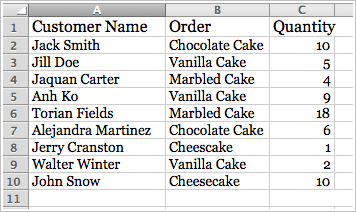
Gerilynn wanted to find the total amount of vanilla cakes ordered. Which of the following formulas should she use?
a)
=(C3+C5+C9)/3
b)
=SUM(C2:C10)
c)
=AVERAGE(C2:C10)
d)
=(C3+C5+C9)
50.
Once a type of graph is chosen, it can not be changed.
a)
True
b)
False