wayground logo

Free Printable Worksheets

Font size

S
M
L
XL
Worksheets

Input and output devices

Total questions: 84

Worksheet time: 41mins
Name
Class
Date
1.

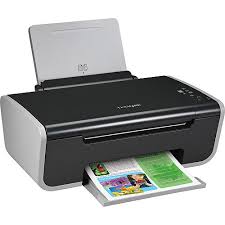
Is this device Input or Output?

Printer

a)

Input

b)

Output

2.
Is this device Input or Output?
Keyboard
a)
Input
b)
Output
3.
Is this device Input or Output?
Monitor
a)
Input
b)
Output
4.
Is this device Input or Output?
Mouse
a)
Input
b)
Output
5.
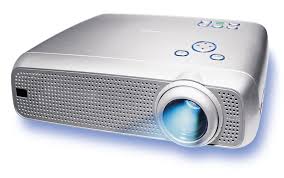
Is this device Input or Output?
Projector
a)
Input
b)
Output
6.
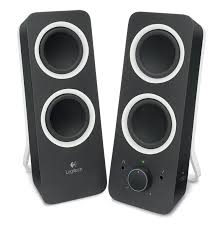
Is this device Input or Output?
Speaker
a)
Input
b)
Output
7.
What is the the definition for?
Allows the user to put data into the computer
a)
Input Device
b)
Output Device
8.
What is the the definition for?
Allows the user to see/hear data coming out of the computer
a)
Input Device
b)
Output Device
9.
a)
input
b)
output
10.
a)
input
b)
output
11.
a)
input
b)
output
12.

Headphones are a ____________ device.

a)

input

b)

output

13.

A game controller is a ________ device.

a)

input

b)

output

14.

A microphone is a _____________ device.

a)

input

b)

output

15.
Which of these is not an input device?
a)
Scanner
b)
Screen
c)
Microphone
d)
Keyboard
16.

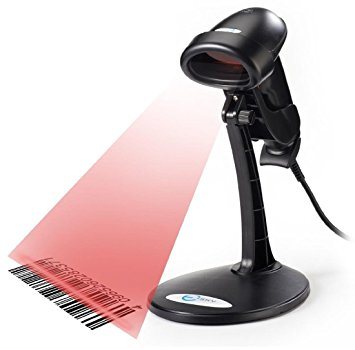
What is the device shown in the picture?

a)

Headphones

b)

A game controller

c)

A microphone

d)

A barcode reader

17.
What type of device is this?
a)
Input
b)
Output
c)
Storage
18.

Three types of input devices are:

a)

Projector, Monitor and Printer

b)

Remote Control, Touch Screen and joystick

c)

Microphone, Video Cameras, Projector

d)

Graphic Tablet, LCD monitor, scanner

19.
An input device that is used to input pictures, documents, pages of magazines, and other images into the computer.
a)
mouse
b)
PDA
c)
scanner
20.
A software program that lets you speak words or phrases into a computer, but it will not format.
a)
light pen
b)
voice recognition
c)
scanner
21.
Most commonly used input device.
a)
graphic tablet
b)
keyboard
c)
SD card
22.
An input device you take out of your digital camera and put directly into your computer to download pictures.
a)
graphic tablet
b)
keyboard
c)
SD Card
23.
An input device that uses a USB port to transfer information into a computer
a)
mouse
b)
flash drive
c)
Wii remote
24.
If you are shopping at Walmart and you need to know the price of an item, you could use a _____________.
a)
Barcode Scanner
b)
Scanner
c)
Web Cam
25.
A Camera attached to a computer that put short videos on your computer
a)
Digital Camera
b)
Security Camera
c)
Webcam
26.
Objects you can use to put information into a computer
a)
Printer
b)
Speakers
c)
Input Devices
27.
If you want to draw house plans, you could use this device
a)
Light pen
b)
graphic Tablet
c)
PDA
28.
If you want to draw cartoon character and have it save into your computer, you would use this device.
a)
Light Pen
b)
Graphic Tablet
c)
PDA
29.
If you want to put documents, pictures, music, etc. into your computer you could use a
a)
Flash Drive
b)
CD
c)
Flash Drive or CD
30.
If you want to put some old paper pictures into your computer, you could use a
a)
SD Card
b)
flash drive
c)
scanner
31.

What is the device shown in the picture?

a)

A game controller

b)

A microphone

c)

A joystick

d)

A webcam

32.

What is the device shown in the picture?

a)

A joystick

b)

A webcam

c)

A digital camera

d)

A game controller

33.

What is the device shown in the picture?

a)

A digital camera

b)

A barcode reader

c)

Earphones

d)

A joystick

34.
Barcode Reader
a)
Input 
b)
Output
35.

What type of device is this? (Interactive whiteboard)

a)

Input

b)

Output

c)

Input and Output

36.

What type of device is this? (Smartphone screen)

a)

Input

b)

Output

c)

Input and Output

37.
Wires are output devices because they come OUT of a computer
a)
True
b)
False
38.
What type of device is this? CD / DVD / Blu-Ray
a)
Input
b)
Output
c)
Storage
39.
Which of these would you use to digitise a paper photograph?
a)
Scanner
b)
 Joystick
c)
Touch screen
d)
None of the above
40.
What is the most suitable input device for highlighting or selecting an object on the screen?
a)
Mouse
b)
Joystick
c)
Keyboard
d)
None of the above
41.

What are the 2 main types of software?

a)

System and Application

b)

Informational and Entertainment

c)

Dynamic and Static

d)

Professional and Home-based

42.

Software that controls all of the computers hardware is...

a)

Program Software

b)

Application Software

c)

Instructional Software

d)

System Software

43.

An Operating System is...

a)

Used for creating graphs and docutments

b)

The most common type of system software

c)

Only found in desktop computers

d)

All of these

44.

The type of software that the users run to do various tasks on a computer is...

a)

System Software

b)

Application Software

c)

Utility Software

d)

Operative Software

45.

Microsoft Windows

a)

System Software

b)

Application Software

46.

Mobile Device Apps

a)

System Software

b)

Application Software

47.
Software is a series of ____________ that tells a computer what tasks to perform and how to perform them.
a)
data
b)
information
c)
instruction
d)
utility
48.
________________programs that control or maintain the operations of the computer and its devices.
a)
Software
b)
System Software
c)
Application software
d)
Utility program
49.
_________________are programs that designed to help users to be more productive with their personal tasks.
a)
Software
b)
System Software
c)
Application software
d)
Utility program
50.
_________________are programs that designed to help users to be more productive with their personal tasks.
a)
Software
b)
System Software
c)
Application software
d)
Utility program
51.
Function of system software is to serve as the _________ between the user, the application software, and the computer’s hardware
a)
interface
b)
program
c)
application
d)
server
52.
There are three(3) types of system software
a)
True
b)
False
53.
There are three(3) types of system software
a)
True
b)
False
54.
There are four(4) types of operating system
a)
True
b)
False
55.
_____________is a type of system software allows that allow a user to perform  maintenance-type tasks
a)
Operating system
b)
System Software
c)
Application software
d)
Utility program
56.

Where do you go to access your apps?

a)

Start Menu

b)

File Explorer

c)

App Launcher

d)

Home screen

57.

What is the bar called where the search bar and other frequently used apps are located?

a)

Start Menu

b)

App Bar

c)

App Shelf

d)

Taskbar

58.

In which app can you change the sensitivity of the mouse cursor?

a)

Control Panel

b)

Settings

c)

Mouse Adjustment

d)

Computer Options

59.

This symbols represents

a)

Microsoft Windows

b)

IOS

c)

Android

60.

Which of the following is not an example of an OS for Smart phone?

a)

UNIX

b)

IOS

c)

Windows Phone 7

d)

Android

61.

An Operating System is a program that helps the user to communicate between the software and ___________

a)

Memory

b)

Hardware

62.

1. Without the Operating System the computer is useless

a)

True

b)

False

63.

Which of these symbols represent UNIX?

a)
b)
c)
64.

Most people have this Operating System on their Computer System.

a)

UNIX

b)

LINUX

c)

IOS

d)

Microsoft Windows

65.

Hardware and software cannot communicate without the Operating System

a)

True

b)

False

66.
Software is a series of ____________ that tells a computer what tasks to perform and how to perform them.
a)
data
b)
information
c)
instruction
d)
utility
67.

Smart phones don't need operating systems, only computers do.

a)

True

b)

False

68.

Does a mobile device need an Operating System?

a)

Yes

b)

No

c)

Sometimes

69.

Which of the following is an Operating System?

a)

Word

b)

Apple

c)

Windows

d)

Memory

70.

Which of the following is NOT an Operating System

a)

Android

b)

Word

c)

iOS

d)

Windows

71.

What does OS stand for

a)

Organisation Startup

b)

Operating Startup

c)

Operating System

d)

Organisation System

72.

a set of instructions which control the computer is....

a)

Hardware

b)

Software

c)

Firmware

d)

Loungewear

73.

Hardware is different from software because....

a)

you can see hardware

b)

it costs more

c)

hardware needs a person to make it work

d)

a computer doesn't need software to work

74.

A computer needs both hardware and software to work

a)

true

b)

false

75.
Carries out the instructions of a computer program, performs basic input/output operations of the system
a)
Software
b)
Central Processing Unit
c)
Operating System
d)
Motherboard
76.
This component visually displays information generated by the computer...
a)
Monitor
b)
Motherboard
c)
CPU
d)
Operating System
77.
This component allows users to enter text, numbers, and other information
a)
Mouse
b)
Keyboard
c)
Monitor
d)
CPU
78.
Input device which communicates commands to the CPU; allows users to select, highlight, and control options on the monitor
a)
Mouse
b)
Keyboard
c)
Monitor
d)
Software
79.
A computer can function without an operating system
a)
True
b)
False
80.
What operating system is this a symbol of?
a)
Mac OS X
b)
Linux
c)
Windows
81.
The screen that you see when your computer has finished starting up is called the ____________.
a)
Task Bar
b)
Start up screen
c)
Home
d)
Home Screen/Desktop
82.
The screen that you see when your computer has finished starting up is called the ____________.
a)
Task Bar
b)
Start up screen
c)
Home
d)
Home Screen/Desktop
83.
Which of the following is the most recent version of Windows?
a)
Windows 8
b)
Windows 7
c)
Windows 10
84.
Which of the following is the most recent version of Windows?
a)
Windows 8
b)
Windows 7
c)
Windows 10