

wayground logo

Free Printable Worksheets

Font size

S
M
L
XL
Worksheets

Semester Exam Review Day 1 & 2

Total questions: 34

Worksheet time: 20mins

Name
Class
Date
1.
What does the "E" stand for in E-mail
a)
Energetic
b)
Electrical
c)
Enormous
d)
Electronic
2.

What does digital citizenship mean?

a)

Any information about you on the Internet.

b)

An online membership.

c)

Using digital media safely, responsibly, and ethically.

d)

Not giving credit to someone else's work.

3.
Computer programs or applications that tell a computer what to do is called ________.
a)
Play Store
b)
Software
c)
Hardware
d)
Application Manager
4.
The physical parts of the computer are called _______.
a)
software
b)
hardware
c)
computer parts
d)
computer case
5.
What is software?
a)
any set of instructions that tells the hardware what to do
b)
the video card on the monitor
c)
the operating system
d)
the monitor and computer case
6.
This type of computer is placed on a desk and is made to stay in one place such as your home, work or school. 
a)
laptop
b)
desktop
c)
monitor
d)
power supply
7.
What is an electronic device that manipulates information, or data?
a)
computer
b)
typewriter
c)
mouse
d)
printer
8.
Hardware is any part of your computer that has a physical structure, such as the keyboard or mouse.
a)
True
b)
False
9.
Software is any set of instructions that tells the hardware what to do and how to do it.
a)
True
b)
False
10.
What is hardware?
a)
all the ports and buttons of a computer
b)
is any part of your computer that has a physical structure.
c)
is any part of your desktop
d)
software
11.
Examples of hardware include web browsers, games, and word processors.
a)
True
b)
False
12.
An example of computer hardware is...
a)
Web Browser
b)
Keyboard
c)
App
d)
Operating System
13.
A desktop computer is more portable than a laptop.
a)
True
b)
False
14.
A ______ is a personal computer that can be easily moved and used in a variety of locations. 
a)
Desktop Computer
b)
Laptop Computer 
15.
One drawback of a desktop is...
a)
More expensive
b)
Less portable
c)
Less storage than laptops
16.

Which of these are NOT an example of software?

a)

Search Engine

b)

Games

c)

Word Processor

d)

Keyboard

17.
What home row key do you use the left pinky for?
a)
F
b)
A
c)
S
d)
D
18.
True or False?
G and H are home row keys
a)
False
b)
True
19.
Which are the following ARE home row keys?
a)
a s d f g h j k l ;
b)
a s d f j k l ;
c)
a s d f g j k l ; :
d)
a s d f j k l :
20.

How does ergonomic seating help with typing?

a)

Allows you to type SLOWER and MORE motion

b)

Allows you to type ineffectively

c)

Allows you to type FASTER and MORE motion

d)

Allows you to type FASTER and LESS motion
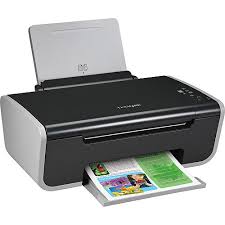
21.

Is this device Input or Output?

Printer

a)

Input

b)

Output

22.
Is this device Input or Output?
Keyboard
a)
Input
b)
Output
23.
Is this device Input or Output?
Monitor
a)
Input
b)
Output
24.

Choose all the Input Devices from below.

a)

Game Controller

b)

Monitor

c)

Mouse

d)

Projector

e)

Touch Screen

25.

Choose all the Output Devices from below:

a)

Scanner

b)

Smartboard

c)

Projector

d)

3D Printer

e)

Headphones

26.
CPU stands for
a)
Computer Processing Unit
b)
Central Processing Unit
c)
Core Processing Unit
d)
Central Power Unit
27.

I am the most important part of the computer "the BRAIN." What am I?

a)

UPS

b)

CPU

c)

PUC

d)

CUP

28.

What is hardware?

a)

The parts of the computer you can smell.

b)

The parts of the computer you can hear.

c)

The parts of the computer you can touch.

d)

The parts of the computer you can taste.

29.
_______________ is known as the brain of a computer.
a)
Monitor
b)
Keyboard
c)
CPU
d)
System
30.

An Operating System is a program that helps the user to communicate between the software and ___________

a)

Memory

b)

Hardware

31.

A computer needs both hardware and software to work

a)

true

b)

false

32.

What manages the hardware and runs the software?

a)

Computer Systems

b)

Dedicated Systems

c)

Embedding Systems

d)

Operating Systems

33.

Which of these is not a function of an OS:

a)

Provide a user interface

b)

Communicate with hardware

c)

Allow the computer to multi-task

d)

Improves CPU performance

34.

What can an operating system do?

a)

Allow the hardware and software to communicate?

b)

Make a computer run faster

c)

Make tea

d)

carry out hospital operations
